
A live stream does not become memorable because the camera is expensive or the lighting looks like a studio. Those things help, especially when a creator wants the broadcast to feel professional. But no camera has ever answered a viewer by name, and no lighting rig has ever given anyone instant replies. People stay in a live session for different reasons. They want to feel that something is happening with them, not simply in front of them.
That is why instant replies carry so much weight. A comment has a short life. Thirty seconds later, the moment has moved on, and a good question answered late is just a question that went unanswered. A host who catches it while it is still live, reacts, thanks someone by name, or adjusts an explanation because the chat looks confused can turn a normal broadcast into something viewers remember.
A good reply beats a good camera. Viewers stay for a host who talks back, not for perfect lighting.
Answer fast or do not bother. A comment from thirty seconds ago is already old, and the person who wrote it has moved on.
The first few minutes set the tone. If nobody gets a reply early, the chat stays quiet for the rest of the stream.
Plan when you will look at the chat. A host who is not watching cannot reply quickly, so build reply moments into the broadcast.
Three platforms mean three chat tabs. Pull them into one window, or you will miss questions simply because you were looking at the wrong screen.

Live Viewers Want to Be Part of the Room
People behave differently when they know the host can see them. They ask questions they would not send by email. They react faster. They share small details about where they are watching from, what they are working on, or what confused them in the last few minutes.
Those comments may look casual, but they are often the most useful part of the stream. A cooking creator can tell from the chat when viewers are stuck on one step. A fitness coach can see which routine looks too difficult. A software educator can notice that three people are confused by the same setting.
A musician can let the audience choose the next song and change the mood of the broadcast on the spot. That kind of interaction is hard to replace with a recorded video. A replay may be useful, but it cannot give the viewer the same feeling of being heard in real time.
Why Instant Replies Matter Most in the First Few Minutes
The beginning of a live stream is more important than many hosts think. Two decisions are being made at once. Viewers are deciding whether to stay, and the chat is deciding whether it is worth speaking up at all. A room that gets no reply in the first few minutes tends to stay quiet for the rest of the hour.
This is the moment where speed does real work. A viewer who says hello and hears their name ten seconds later understands that the chat is part of the show. The same reply twenty minutes on lands very differently, because by then they have already decided the host is not looking.
It does not mean reading every message out loud. That makes the stream messy and slow. A good host learns to pull in the comments that move the broadcast forward, such as a question that helps others, a quick correction, a useful reaction, or a viewer’s example that fits the topic.
A simple “I see what you mean” before answering a question can do more for trust than another graphic on the screen. It tells the audience that the host is not just presenting. They are listening.
How to Keep Instant Replies from Derailing Your Stream
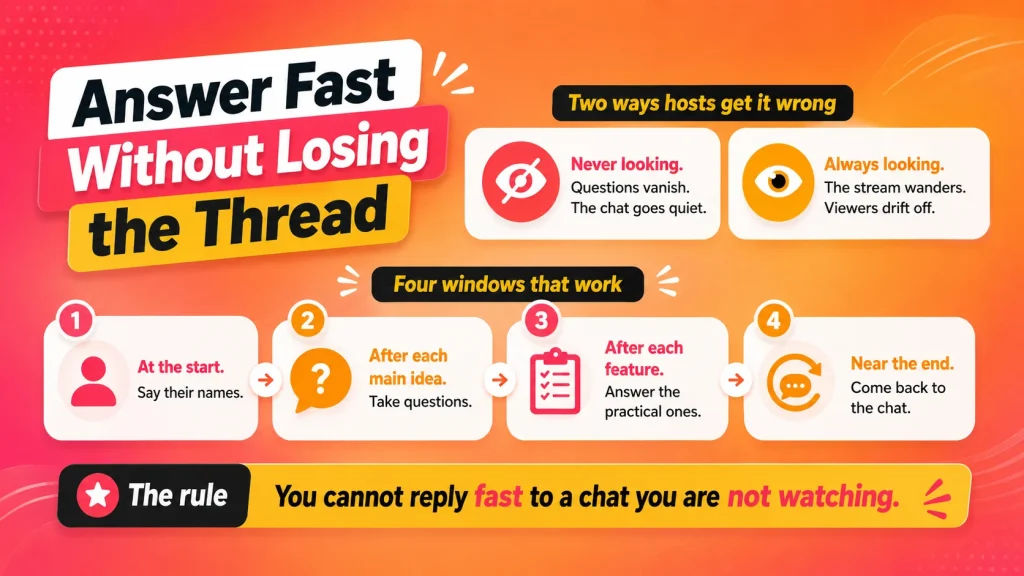
A live stream feels more natural when the host leaves room for the audience, but that room still needs some shape. If comments are handled only when the host happens to remember them, good questions get lost. If the host stops for every message, the stream loses its direction and the people who came for the topic quietly leave.
Speed and structure are not opposites here. A plan is what makes a fast reply possible in the first place, because a host who is not looking at the chat cannot answer anything quickly. The point is to know when you will be looking, so that the moment a viewer speaks up, someone is actually there.
There is a mechanical version of this problem, too. A host broadcasting to YouTube, Instagram, Facebook, and Twitch at the same time is not watching one conversation. They are watching three, each in its own tab, and questions get missed because nobody was looking at the right window in time. OneStream Live pulls comments from Facebook, Instagram, YouTube, and Twitch into a single unified chat, so the host replies to the audience rather than to whichever tab happens to be open.
A better rhythm is to build reply moments into the broadcast. A teacher can pause after each main idea. A product host can answer practical questions after showing one feature. A church, nonprofit, or community group can welcome people at the start, then return to questions near the end.
This kind of planning does not make the stream stiff. It gives the host permission to stay present with the audience without losing the thread.
Comments Should Not Disappear after the Stream Ends
A busy live chat can be useful during the broadcast and almost impossible to manage afterward. Someone asks for a replay link. Another person wants a reminder before the next event. A viewer asks a serious question right as the host is wrapping up. A few people want the resource mentioned on screen, but their comments are buried under greetings, emojis, and side conversations.
Creators often lose good follow-up moments there. The stream ends, the chat scrolls away, and only the loudest or most recent comments get attention. For small creators, that may mean missed community building. For brands, schools, churches, or event teams, it may mean losing people who were ready to take the next step.
For teams that already keep registrations, contacts, or viewer details inside HubSpot, a HubSpot SMS integration can make that follow-up easier to manage after the stream. The live chat still matters, but the conversation no longer depends only on whatever happened to stay visible during the broadcast.
Texting Works Best When It Feels Useful, Not Pushy
A creator should be careful with follow-up messages. Viewers may enjoy a live stream, but that does not mean they want random texts afterward. The reason for texting should be clear from the start: a reminder, a link, a replay, a resource, a registration update, or another message the viewer actually asked for.
This is especially important for communities that stream often. If people trust the host, they are more willing to opt in. A short text can be helpful, but only when it respects the reason the person signed up in the first place.
For larger live events, a short code texting service can also make participation easier. A short number and keyword are much easier to mention on screen than a long URL, especially during a fast-moving broadcast. Viewers can text for a replay, a checklist, an event reminder, a donation link, or a sign-up page without searching through the description or waiting for a moderator to paste a link again.
The Best Production Choice is Often Attention
A stream with average production but strong audience attention can feel more alive than a beautiful broadcast where the host never looks at the chat. Viewers forgive a slightly imperfect setup when the host is useful, present, and responsive. They are far less forgiving when they feel ignored.
This is why creators should plan replies the same way they plan titles, thumbnails, overlays, and camera angles. The comment section is not decoration. It is part of the live format, and it tells you what viewers care about, where they are confused, what they want next, and whether the topic is connecting at all.
A host who pays attention can act on that information while it still matters. The stream stops being something you deliver to an audience and becomes something the audience is quietly helping you shape.
A Live Stream Should Not End with the Stop Button
The strongest live streams usually continue in small ways after the broadcast ends. Someone watches the replay. Someone replies to a reminder. Someone signs up for the next session because the first one felt useful. Someone asks a question that becomes the topic of a future stream.
None of that comes from the camera. It comes from the instant replies that made people feel heard while the stream was happening, and from the small work of keeping the conversation reachable once the chat has gone quiet.
So buy a better microphone if you want one. Just remember that the thing viewers actually remember is the moment you said their name.
The easiest way to say it in time is to stop hunting for the comment in the first place. OneStream Live brings your YouTube, Facebook, Instagram, and Twitch chats into one window, so you can see every question as it arrives and answer it while it still matters to the person who asked.

Frequently Asked Questions
Within about thirty seconds, while the moment is still alive. After that, the person has moved on, and your answer arrives at a conversation that already ended.
Every three to five minutes works for most hosts. Answer two or three comments, then return to your content. The rhythm matters more than the exact number, because viewers learn when to expect you.
No, and trying to will make your stream slow and messy. Pull in the comments that move the broadcast forward, such as a question that helps other people or a correction you needed. Greetings can pass without a response.
Reply to the first few people who do speak up, and do it early. A chat that gets no answer in the opening minutes usually stays quiet for the rest of the hour, because viewers decide fast whether the host is actually looking.
Bring the comments into one window. Four platforms mean four separate chats, and questions get missed because you were looking at the wrong tab. OneStream Live pulls chat from Facebook, Instagram, YouTube, and Twitch into a single view.
OneStream Live is a cloud-based live streaming solution to create, schedule, and multistream professional-looking live streams across 45+ social media platforms and the web simultaneously. For content-related queries and feedback, write to us at [email protected]. You’re also welcome to Write for Us!