
“Audio is more important than video.” You’ve probably heard this many times, and in most cases, it’s true. People are more likely to tolerate lower video quality than poor sound. That is why understanding formats like the M4A file becomes important in modern streaming workflows.
When you record, edit, and upload stream content, your audio passes through several formats along the way. One of the most common formats you’ll come across is the M4A.
In this guide, you’ll learn what an M4A file is, how it compares to MP3, and when streamers should use it in real workflows.
- An M4A file is an MPEG-4–based audio format that stores sound efficiently, usually using AAC for good quality at smaller file sizes.
- M4A is a file format, not a codec. The audio inside is typically AAC (compressed) or ALAC (lossless).
- AAC-based M4A files are widely used across modern streaming platforms like YouTube, Twitch, and OBS workflows.
- In the M4A vs MP3 comparison, M4A usually offers better efficiency and similar or improved sound quality at lower bitrates.
- M4A is best used as a final export format for sharing, uploading, and repurposing audio content.
- For editing and long-term storage, use lossless formats like WAV or ALAC, then export to M4A when needed.

What Is an M4A File
An M4A file is an audio file that uses the MPEG-4 container format to store sound. It is commonly used for high-quality, compressed audio.
M4A belongs to the MPEG-4 family, a format designed for web, mobile, and broadcasting use. This is why M4A files are widely used across modern media and streaming workflows. Apple’s developer documentation describes M4A as the Apple M4A audio file format, and Apple also offers an export preset for an audio only MPEG 4 Audio file.
In simple terms, an M4A file is a compact audio file that stores sound efficiently without taking up too much space. In most cases, the audio inside an M4A file is encoded using AAC, a compression method known for maintaining good sound quality at smaller file sizes.
It is important to understand that M4A is the file format, not the audio compression itself. The audio inside is usually AAC, but it can also be ALAC, which is a lossless format used in Apple’s ecosystem. This means the file structure and the audio quality are related but not the same thing.
Because of this, M4A is best thought of as a modern, efficient audio format that balances sound quality and file size, which makes it a common choice for music, recordings, and online media.
What Is an M4A Audio File and M4A File Type?
A common point of confusion starts here. The M4A file type tells you what kind of file you have, but it does not fully define the audio quality or how the sound is compressed.
In simple terms, an M4A file is an MPEG-4–based audio file that stores encoded sound inside a structured format. Most of the time, that audio is compressed using AAC, though formats like Apple Lossless (ALAC) can also be used.
This is why it’s more accurate to think of M4A as a file format rather than a codec. The format acts as a container, while the actual audio inside is created using a specific encoding method.
Apple’s documentation makes this distinction clear by separating file formats from encoding formats, such as AAC and Apple Lossless. The M4A format is then used to package and deliver that audio efficiently, including support for features like gapless playback.
AAC Inside the M4A File Format
AAC is the audio format most streamers will come across most often. It is widely used across modern streaming tools and platforms, including OBS, YouTube, and Twitch, because it delivers good sound quality while keeping file sizes small.
In practice, most M4A files use AAC to store audio. This means if you are working with an M4A file, you are likely using the same audio standard that powers everyday streaming workflows.
While Apple helped popularize AAC through its ecosystem, it is now a widely adopted format across the entire streaming and media industry. That is why AAC-based M4A files are commonly used for recording, exporting, and sharing audio content.
ALAC Inside the M4A File Format
ALAC represents the lossless side of the M4A format. Unlike AAC, which compresses audio, ALAC preserves all original sound data, resulting in higher audio quality.
This makes ALAC useful in situations where quality matters more than file size, such as archiving recordings or working with high-quality audio sources. However, these files are larger and require more storage and bandwidth.
The key takeaway is simple. M4A is a flexible format that can store both compressed and lossless audio. AAC-based M4A files are ideal for streaming and delivery, while ALAC-based M4A files are better suited for high-quality storage and editing.
Read More: Audio Transcription Using AI
M4A vs MP3 and Is M4A Better Than MP3?
The M4A vs MP3 debate still comes up, but the answer is much clearer today. AAC, the audio format commonly used inside M4A files, was designed as the successor to MP3 and can deliver similar sound quality at a lower bitrate.
This is why modern streaming tools and platforms prefer it. OBS uses AAC as its default audio codec, while Twitch and YouTube Live both support and recommend AAC for streaming. In real-world workflows, this makes M4A files more efficient for delivering good audio without increasing file size.
That does not mean MP3 is outdated. It is still widely supported and works well when compatibility is the main concern. However, converting between compressed formats like MP3 and AAC can reduce audio quality, so it is best to avoid unnecessary conversions.
So, is M4A better than MP3? For most streamers, yes. If the M4A file uses AAC, it offers better efficiency and similar or improved sound quality at smaller sizes. MP3 still has its place, especially for older tools or specific requirements, but M4A is the more modern choice for live streaming and content creation today.
Read More: MKV vs MP4 for Pre-Recorded Streaming
Why the M4A File Format Matters for Stream Audio
The M4A file format matters because a streamer’s audio goes through several stages. You might record a session, edit it, export it, upload it, and then let the platform process it for viewers.
During this process, platforms like YouTube and Twitch automatically convert your stream into different formats and quality levels to match various devices and internet speeds. This means the file you upload is not always the same format your audience receives.
M4A is usually more useful as a stored or exported audio file rather than the format used for live streaming itself. Live streaming tools like OBS rely on formats such as RTMP with containers like FLV, which are designed for real-time delivery and typically use AAC audio.
In simple terms, your audio may start as AAC (the same format used inside many M4A files), but the live stream is not delivered as a standalone .m4a file.
This distinction is important. M4A works best when you are exporting clean, high-quality audio after recording, such as for uploads, podcasts, or archived content. It is not the main format used during the live broadcast itself.
There is one more practical point to consider. Platforms like YouTube recommend uploading high-quality audio sources, ideally lossless, so their system can create better final versions. If you are using compressed audio, AAC at higher bitrates is still a strong choice.
That is why M4A can be a smart format for delivery in many cases, but not always the best option as your original master file.
When Streamers Should Use an M4A File
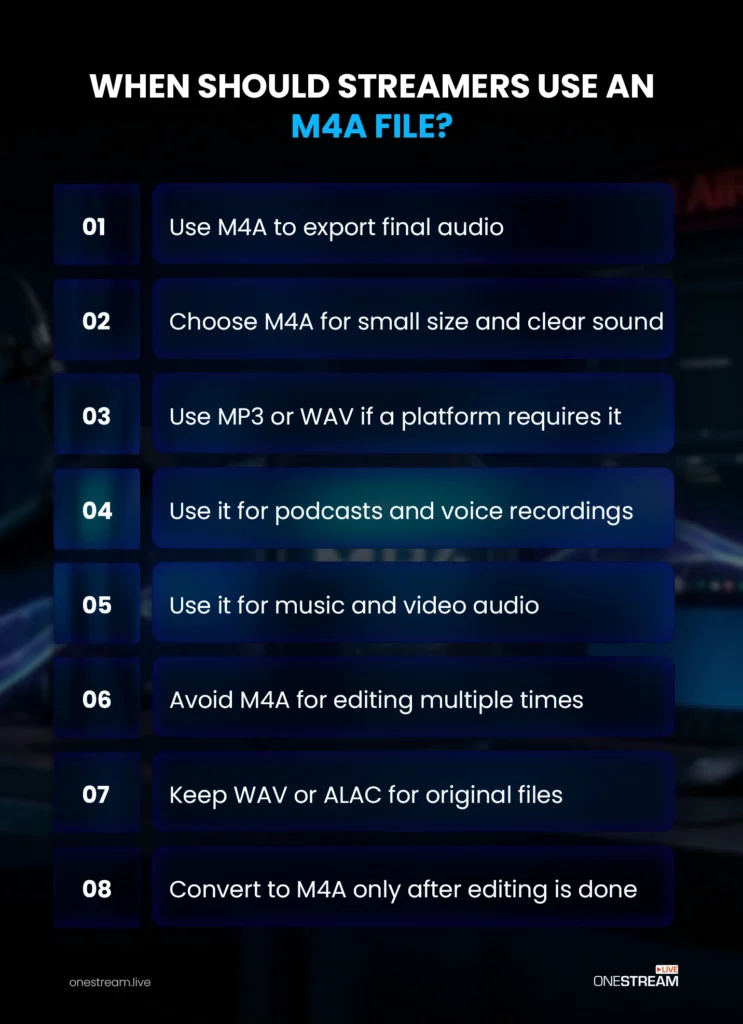
Use an M4A file when you need a final audio export that stays compact and sounds clean. It works well for voice recordings, podcast-style content, music tracks, sponsor reads, and audio used in video projects.
This aligns with how modern tools handle audio. AAC, the format commonly used inside M4A files, is widely supported across streaming platforms and creator tools. That makes M4A a reliable choice for delivering finished audio without large file sizes.
However, M4A should not be your only master file if you plan to edit the audio multiple times or store it long term. Repeated edits and conversions with compressed formats can reduce quality over time.
A better approach is to keep a high-quality master file, such as WAV, PCM, or ALAC, and then export an M4A file when you need a smaller, shareable version. This follows standard audio workflow practices, where lossless formats are used for editing and compressed formats are used for delivery.
It is also important to stay flexible. Some platforms and tools still require formats like MP3 or WAV for compatibility. While MP3 remains widely supported, modern streaming tools and platforms continue to favor AAC-based formats for efficiency and quality.
Read More: 10 Ways to Improve Your Live Stream Audio Quality
Pro Tip: Use OneStream Live to record, multistream, and manage your live content in one place. Once your stream is complete, you can repurpose that content by extracting audio and exporting it into formats like M4A for podcasts, clips, or reuse.

Final Verdict
M4A is a modern, efficient audio format that works well for most streaming and content workflows. It offers a strong balance between sound quality and file size, especially when using AAC, which is widely supported across platforms.
For streamers, M4A is best used as a final export format for sharing, uploading, or repurposing audio. For editing and long-term storage, higher-quality formats like WAV or ALAC are still the better choice.
If you want to simplify your overall workflow, OneStream Live can help you record, multistream, and manage your content in one place.

Frequently Asked Questions
What is M4A audio format?
M4A audio format refers to the overall method used to store and compress audio using the MPEG-4 standard. It defines how audio data is encoded and packaged, usually with AAC for efficient compression or ALAC for lossless quality. In simple terms, it explains how the audio system works behind the scenes.
What is a M4A audio file?
An M4A audio file is the actual file you use or download that follows the M4A format. It contains audio stored inside an MPEG-4 container, usually compressed with AAC. You will commonly see M4A files when downloading music, exporting recordings, or working with audio in streaming and content creation workflows.
Can live streaming software use M4A files?
Many live-streaming and media tools can work with M4A files, but compatibility depends on the platform or software you use.
Why should streamers know about M4A files?
Streamers should know about M4A files because choosing the right audio format can affect sound quality, storage, and playback performance.
How can you convert an M4A file for streaming use?
You can convert an M4A file using audio editing software or online converters if your streaming setup requires a different format.
OneStream Live is a cloud-based live streaming solution to create, schedule, and multistream professional-looking live streams across 45+ social media platforms and the web simultaneously. For content-related queries and feedback, write to us at [email protected]. You’re also welcome to Write for Us!