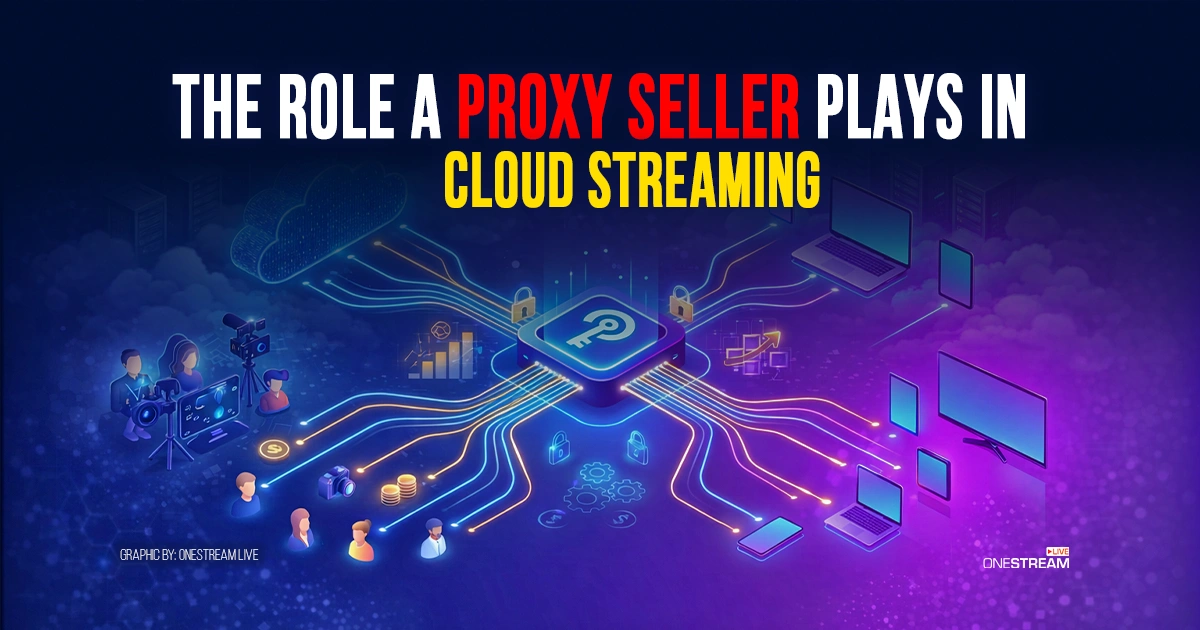
Multiplatform live streams look simple on a planning doc. Then the show goes live and reality shows up: upload limits, flaky routes, account logins from the wrong place, and viewers in one region reporting a black screen while everyone else is fine. A streaming proxy routes your live video traffic through dedicated IP infrastructure to prevent buffering, manage bandwidth spikes, and support stable multistreaming across platforms.
Streaming is also a heavy load. In ’s 2024 Global Internet Phenomena Report, On‑Demand Streaming is listed at 54% of downstream volume, with Video called out as the biggest application category for downstream traffic.
Cloud streaming platforms such as reduce the chaos by moving outbound publishing work to their own servers. If you upload a pre‑recorded video, schedule a playlist, or send one encoder feed into OneStream Live, it can publish that stream to multiple destinations without you keeping separate uplinks alive from your laptop. OneStream Live also positions itself as a multistreaming service for 45+ social platforms.
So where does a proxy seller belong in this picture? Not as a magic cure for buffering. A proxy seller matters when you need controlled exit IPs for testing, monitoring, and team operations around cloud streaming.
1. Streaming Proxy Definition and Why It Matters
A streaming proxy, in this context, is typically a forward proxy: a middle system that makes outbound connections to an internet service on behalf of a user or tool. Security references describe proxy servers as intermediaries between client devices and destination servers, intercepting and forwarding traffic.
SOCKS5 is one of the common proxy protocols. The standard specifies that SOCKS5 supports establishing TCP connections and includes a UDP association method (which matters for some non‑HTTP traffic, depending on client support).
A proxy seller is the provider that rents you access to those proxy endpoints (datacenter IPs, residential IPs, ISP proxies, or mobile IPs), usually with controls for authentication and location. For example, advertises SOCKS5 and HTTP(S) support, multiple proxy categories (residential, ISP, datacenter IPv4/IPv6, and mobile), and authentication by username/password or IP allowlisting. If you need to buy SOCKS5 proxy access, the practical way to frame it is: “I need a controlled exit IP for geo QA, monitoring checks, or consistent admin access.”
2. Where Proxies Fit in Cloud Streaming
Cloud streaming has three main network edges: ingest, control, and playback. Proxies show up in the control layer far more often than in ingest or playback.
Ingest: from your encoder to the first server
If you’re sending RTMP into a cloud platform, your first win condition is a stable outbound connection to the ingest server. YouYube publishes encoder recommendations and bitrate ranges: for H.264 ingest it lists 12 Mbps for 1080p at 60 fps and 35 Mbps for 4K at 60 fps, and it recommends RTMPS (encrypted RTMP) for streaming into YouTube.
Proxies are not a universal answer here, because ingest depends on what your encoder can do. OBS Studio is a good example of a limitation that trips people up: moderators and community guidance from the note that OBS does not support connecting through a proxy directly.
This is where OneStream Live changes the equation. If you are doing pre‑recorded live streaming, your broadcast does not depend on your computer staying connected during the event. OneStream Live also supports RTMP encoder streaming using a unique stream key (per stream) or a universal stream key, so you can send one feed to OneStream Live and let it publish outward.
Control: dashboards, chat, scheduling, and multi‑region checks
This is where live proxies and cloud proxy setups earn their keep.
When you run scheduled livestreams, long playlists, or web embeds, you keep touching web dashboards and APIs: account logins, destination status, stream health checks, and chat moderation.
OneStream Live offers Unified Chat so teams can view and reply to comments from multiple platforms in a single window. It also includes team management features for assigning roles and collaboration.
In these control tasks, a proxy can be useful for:
- keeping admin access tied to a known IP
- monitoring from multiple regions (so you see failures before a viewer complains)
- QA from different countries and network types (to confirm what viewers actually see)
Playback: viewer‑side checks
A forward proxy does not make your audience’s last‑mile internet better. What it can do is let you test the viewer experience from a specific country or network type to confirm availability and playback behavior.
3. SOCKS5 Proxy vs HTTP Proxy for Cloud Streaming
SOCKS5 is designed to relay network connections beyond HTTP. The SOCKS5 standard describes a general connect mechanism for TCP and a UDP method. That means SOCKS5 can be relevant to non‑HTTP tools, assuming the client software supports proxy routing.
HTTP proxies are built around HTTP request/response flows and tunneling (for example via CONNECT). They are a strong fit for browser traffic, APIs, dashboards, and many monitoring checks.
For video ingest over RTMP, client support is decisive. Librtmp documents RTMP variants that are tunneled through HTTP/HTTPS (RTMPT and RTMPTS), which exist specifically to move RTMP inside HTTP requests when traversing restrictive networks. Separately, the librtmp documentation lists a socks=host:port parameter for routing RTMP through a SOCKS proxy (documented there as SOCKS4).
4. OneStream Live Use Cases Where a Proxy Seller Helps
A proxy seller is most valuable when the streaming platform is already doing the heavy lifting, and your team needs guardrails around the surrounding work.
Multi‑region QA for Hosted Live Pages and embed players
OneStream Live provides Hosted Live Pages where you can build a branded viewing page, configure player settings, and set up a custom domain through DNS records. It also supports an Embed Player with an iFrame code so you can embed a permanent player for your events, and it allows embedding live chat via iFrame as well.
A proxy is a practical tool here: you can check whether your hosted page, custom domain, embed player, and chat load the same way for a viewer in a specific country. That is standard QA for event teams.
Long schedules, recurring streams, and the someone has to log in problem
OneStream Live’s advanced scheduling can be set up to 60 days in advance. Its 24/7 YouTube Live feature provides continuous streaming for up to 30 days, and it supports automatic video looping for long runs.
Long runs create a boring but real operational risk: someone on the team will need to log in at an inconvenient hour. If the only way you can reach critical dashboards is from constantly changing IPs, you invite lockouts and extra verification steps. A consistent proxy exit for admin access can reduce surprises, especially for teams using OneStream Live’s team management features.
Formats and production tools that create extra QA work
OneStream Live supports 180°/360° video streaming (when you flag the video as 180°/360° in settings). It provides captions via SRT files for pre‑recorded streams.
It also supports uploading multiple videos at once, which matters when you schedule playlists for a week of shows. And it supports pulling videos from cloud storage providers such as Google Drive and Dropbox.
On the live production side, OneStream Live Studio supports guest participation (it advertises up to 16 participants) and production tools such as overlays, virtual backgrounds, multicamera streaming, portrait streaming, and intervals that can insert a break screen where cameras and mics are turned off. It also offers a built‑in teleprompter.
None of these features get better because of a proxy. Where proxies can help is outside the live feed: testing Studio access from locked‑down networks, verifying the final player output in different regions, and keeping support checks consistent.

Copyright-safe background music checks
If you add background music to a show, you are also managing risk: platform takedowns, muted VODs, and copyright claims. OneStream Live publishes guidance on using copyright-safe music for livestreams. Proxies can help you confirm how a VOD or live replay appears in different regions, but they do not change copyright rules.
5. Choosing a Proxy Seller Without Creating New Problems
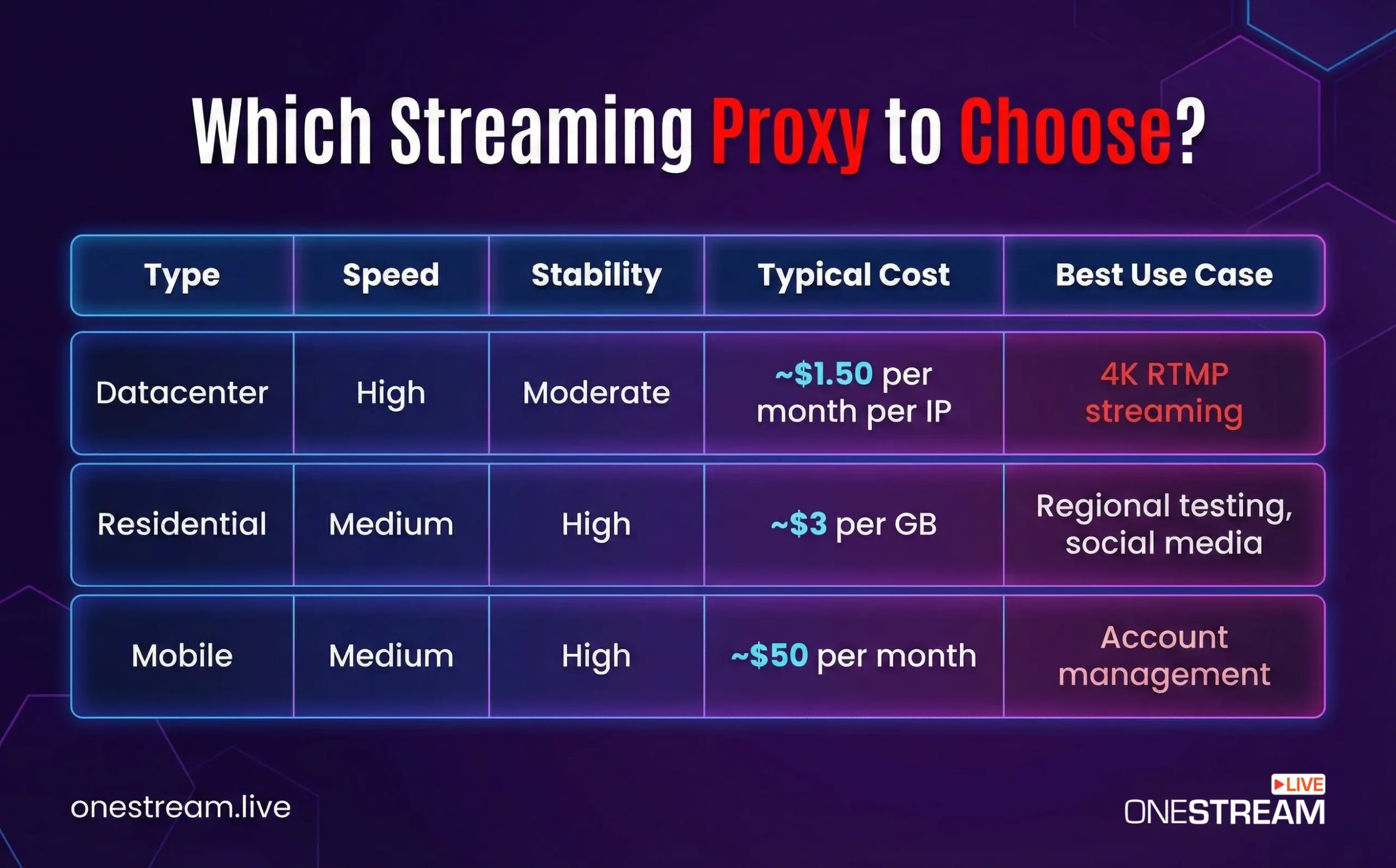
Proxies are a tool. Tools can hurt you when you buy them like trinkets.
What to verify before you buy
- Protocol support and authentication: SOCKS5 includes a standard handshake. Providers commonly offer either credentials or IP allowlisting, and Proxy‑Seller advertises both. The registry lists SOCKS authentication method codes and references the relevant RFCs.
- Documentation: Proxy‑Seller publishes product documentation, including API docs. Whether you use that API or not, good docs are a signal that the provider expects serious use cases.
- Sourcing and compliance: if you buy residential IPs for testing, prefer sellers that describe how IPs are sourced and what privacy frameworks they claim to follow.
Security reality check
SOCKS5 is not encryption. Documentation states plainly that the SOCKS5 protocol does not include encryption by itself; encryption comes from the enclosing tunnel or the application protocol.
Also assume extra latency. Adding a proxy hop can increase latency and reduce throughput. That is fine for monitoring and QA. It is not automatically good for ingest.
What a Proxy Seller actually provides
A proxy seller is not just offering IP addresses. A credible provider supplies:
- Datacenter proxies for high-speed transmission
- Residential proxies for region-specific delivery testing
- SOCKS5 and HTTP support for compatibility with streaming tools
- Dedicated IP allocations
- Uptime guarantees approaching 99.9 percent
- Access to multiple geographic locations
When creators look to buy SOCKS5 proxy, they are typically solving one of three problems:
- Preventing network congestion during live broadcasts
- Testing content accessibility across regions
- Managing multiple streaming accounts or automation systems
Final Thoughts
Choosing a streaming proxy seller is not about buying random IP addresses. It is about preserving viewer trust.
Video dominates internet traffic. Audiences expect immediate playback. Buffering feels outdated. And attention spans are short.
If your streaming operation is small and contained, you may not need dedicated IP routing yet.
But if you manage multi-platform campaigns, agency clients, regional targeting, or continuous live channels, investing in controlled network infrastructure becomes part of responsible broadcast planning.
Infrastructure decisions rarely receive applause. They simply prevent disaster.
And in live streaming, preventing disaster is half the job.
Frequently Asked Questions
Often, no. OneStream Live can handle multistream publishing from its own servers, including pre‑recorded streams, RTMP encoder inputs via stream keys, Hosted Live Pages, and custom RTMP destinations. Your main constraint is usually encoder settings and upstream bandwidth to the first ingest point, not whether you have a proxy.
No. Free public proxies are severely bottlenecked by thousands of concurrent users, making them entirely useless for high-bitrate video broadcasting. Creators utilizing software like OBS Studio or browser-based tools must invest in paid datacenter or residential IPs to guarantee the 99.9% uptime required for professional streaming.
A dedicated datacenter IP typically costs between $1.50 and $2.50 per month, while residential proxies average around $3.00 per gigabyte of data. Content creators running daily, multi-hour broadcasts on YouTube or Twitch must budget accordingly, as high-resolution cloud streaming consumes massive amounts of continuous bandwidth.
Sometimes it can help when your default route is genuinely poor, but a proxy adds an extra network hop. As Cloudflare points out, that hop can add latency. Treat proxies as a testing and control tool first, not a latency cure.
A SOCKS5 proxy handles all types of internet traffic—including heavy UDP video data—making it the mandatory standard for live streaming infrastructure. Conversely, HTTP proxies only interpret basic web traffic. Broadcasters must configure SOCKS5 protocols to ensure platforms like OneStream Live receive uncorrupted video packets without buffering.
OneStream Live is a cloud-based live streaming solution to create, schedule, and multistream professional-looking live streams across 45+ social media platforms and the web simultaneously. For content-related queries and feedback, write to us at [email protected]. You’re also welcome to Write for Us!