Running legitimate crypto webinars used to be about shilling the next moonshot to a room full of bots. Not anymore. Today, it is about survival, reputation, and proving you aren’t just another face in the “fake guru” crowd.
The audience has changed. They are skeptical, they are burned out, and they can smell a scam from a mile away. If you are going live to talk about digital assets, you are battling a trust deficit. The content you broadcast has to be bulletproof, and your technical setup needs to be Fort Knox.
This isn’t a guide on how to get rich streaming. It is a breakdown of how to build a broadcast that respects your audience’s intelligence and wallet. We are going to strip away the hype, look at the mechanics of a secure stream, and discuss what you should actually be teaching—like when to swap versus when to hold—without getting your viewers wrecked.
1. Why Do You Need to Stream Your Crypto Webinars
Most streamers treat crypto broadcasts like a hype reel. That is a mistake. The best crypto YouTube channels and Twitch streams in 2025 are pivoting to “Search Experience Optimization”—Google’s way of saying “be actually helpful.”
When you are live, you are vulnerable. You can’t edit out a bad prediction or a security slip-up. But that vulnerability is exactly why live video converts better than a polished, pre-edited upload. It proves you are human.
However, before you hit that “Go Live” button, you need to understand the mechanics of moving money on-chain, because that is what your audience is there for. They want to see the gears turn.
When you are demonstrating a portfolio rebalance, for example, you can’t just talk theory. You have to show the friction. You have to explain that if they are sitting in stablecoins and see a breakout, they need to know exactly how to exchange USDT to ETH quickly to capture the move before the gas fees spike. Real education is about showing the “how,” not just the “why.”
2. The Technical Setup for Webinars on Crypto
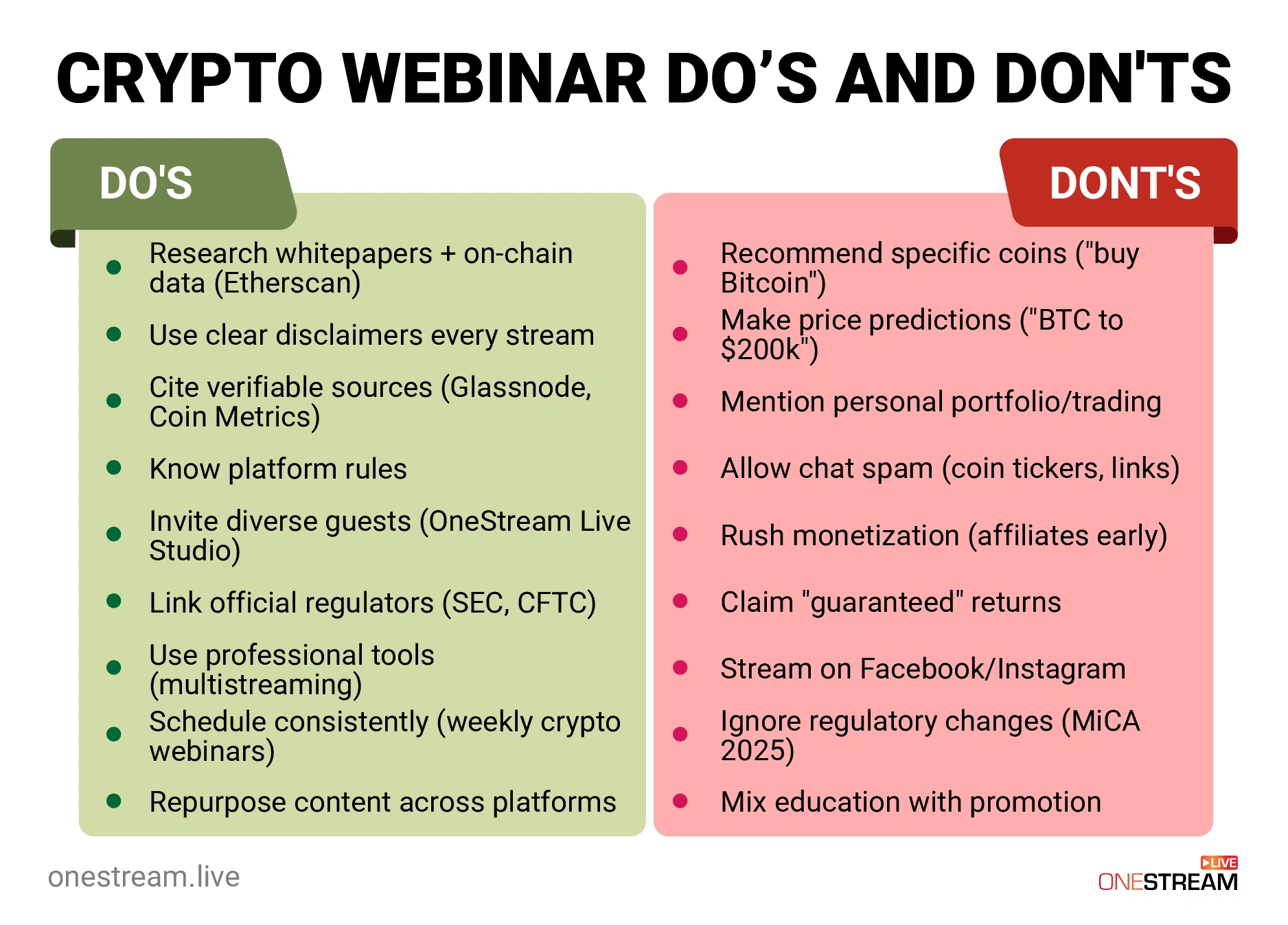
If you leak your private keys or your stream key during a broadcast, you aren’t just embarrassed; you are done. The “Dos” here are critical because the “Don’ts” will cost you money.
i. DO: Sanitize Your Environment
Before you open OneStream Live Studio or any other streaming software, clean your desktop. I don’t mean organize your icons; I mean ensure no wallet extensions are visible in your browser toolbar.
- Create a dedicated browser profile for streaming. This profile should have zero auto-fill data for your credit cards or exchanges.
- Disable Notifications. Nothing kills credibility faster than a “Payment Failed” email or a Telegram message popping up mid-stream.
ii. DON’T: Expose Your RTMP Key
This sounds basic, but it happens to the pros. Your RTMP key is the “password” that lets anyone broadcast to your channel. If a hacker gets it, they can stream a scam using your face and your subscribers.
What is a Stream Key? Your Ultimate Guide
OneStream Live handles this well by allowing you to generate unique keys or use a secure integration, but you must remain vigilant. If you are using External RTMP Streaming to push from OBS, treat that key like a seed phrase.
iii. DO: Use Guest Authentication
If you are hosting a panel—standard in trading webinars, perhaps debating the merits of Bitcoin live stream trends versus Ethereum utility—you need to verify your guests.
- OneStream Live Studio offers guest authentication options. Use them.
- Why? “Zoom-bombing” in crypto isn’t just people shouting profanity; it’s scammers pasting malicious links in the chat that look like they are coming from a speaker. Scammers create accounts that look identical to famous guests (same pfp, slightly altered username). Authentication ensures the person on your cryptocurrency webinar is actually who they claim to be.

3. What Should Be Your Content Strategy for Crypto Webinars
Your content needs to move beyond “number go up.” The best crypto strategies right now focus on risk management. Let’s look at the “Swap vs. Hold” dilemma, a topic that confuses almost everyone.
i. The “Holding is Lazy” Myth
There is a pervasive idea that “HODLing” is the only virtuous strategy. You need to challenge this in your crypto webinars.
- The Data: Discuss the opportunity cost. If a chain’s daily active users drop by 50% while a competitor doubles, holding is not “conviction”—it’s negligence.
- The Lesson: Teach your viewers to rotate. If they are holding a “ghost town” token (a chain with no dev activity), show them how to exit.
ii. The Mechanics of the Swap
Use your screen share to walk through the anatomy of a trade.
- Slippage: Explain that on a DEX (Decentralized Exchange), liquidity matters. If they try to swap a small-cap token with low liquidity, they might lose 5% to slippage. Show them how to check liquidity pools.
- Gas Fees: This is a huge teaching moment. Show them the difference between swapping on Ethereum L1 (potentially $20+ fees) versus an L2 like Arbitrum or Optimism (cents).
- Visual Aid: Use OneStream Live’s media sharing to pull up a chart of gas fees by time of day. Remind them that trading on Sunday mornings often saves money compared to Tuesday afternoons.
iii. DO: Pre-Record the Risky Stuff
Live demos of smart contracts are terrifying. If a transaction hangs or a wallet fails to connect, your pacing dies.
- The Fix: Use Pre-recorded Streaming. Record yourself doing the technical transaction, like checking the contract address, approving the spend, and confirming the swap.
- The Benefit: You can edit out the awkward pauses or the part where you had to find your Ledger. Then, schedule this video to go live as if it were happening now using Advanced Scheduling. You can still be in the chat answering questions live while the “perfect” video plays.
4. Where Should You Stream Your Webinars?
The audience on Twitch cryptocurrency channels is distinct from the audience on LinkedIn or YouTube. You cannot treat them as a monolith.
i. Twitch: The Gamer/DeFi Crowd
- Vibe: Fast, chaotic, meme-heavy.
- Content: Live trading, chart watching, high-frequency scalping.
- Strategy: Twitch viewers want to hang out. They want to see you suffer through a bad trade or celebrate a good one.
- Tech: Use Portrait Streaming if you are targeting mobile users on similar platforms like TikTok, but for Twitch, keep it high-res landscape.
ii. YouTube: The Macro/Education Crowd
- Vibe: Slower, research-focused.
- Content: “State of the Market,” “Project Reviews,” “Tutorials.”
- Strategy: YouTube is a search engine. Your cryptocurrency webinar needs a title that answers a question (e.g., “Is Solana Safer Than Ethereum?”).
- Tech: 24/7 YouTube Live Streaming is a powerful tool here. You can loop a playlist of your best educational content (like “How to Secure Your Wallet”) to run perpetually. This captures traffic from different time zones. Asia and Europe are massive crypto markets that you miss if you only stream US hours.
iii. Multistreaming for Maximum Reach
Why choose one? The most resilient creators are omnipresent.
- The Tactic: Use Multistreaming to hit YouTube, Twitch, and X (formerly Twitter) simultaneously.
- The Nuance: You can stream different content to different destinations if needed. Perhaps your crypto Twitch stream takes the “gaming and NFT” angle, while your LinkedIn stream takes the “Enterprise Blockchain” angle. This segmentation prevents you from boring one audience while trying to please another.
iv. Hosted Live Pages: Your Safety Net
This is a critical “Do.” Do not rely 100% on third-party platforms. YouTube and Twitch have a history of banning crypto content without warning (often flagging it as spam by mistake).
- The Solution: Use OneStream Live’s Hosted Live Pages.
- How it works: You create a webpage hosted by OneStream Live (no coding needed). You embed your player there.
- Why it matters: You own the traffic. If YouTube strikes your channel, your Hosted Live Page is still up. You can direct your email list to your domain, not a tech giant’s walled garden. You can also add a clickable call-to-action button that links directly to your verified resources, bypassing the algorithm entirely.
5. Engagement & The "Trust" Factor
Engagement in crypto live streams is a double-edged sword. You want comments, but you don’t want the “SEND 1 ETH GET 2 BACK” bots.
i. DON’T: Ignore the Chat Bots
If your chat is filled with spam, you look amateur.
- Unified Chat: Use a tool for live chat that aggregates chat from Twitch, YouTube, and Facebook into one window. This lets you spot spam patterns quickly.
- Moderation: Appoint a moderator. If you are a solo streamer, set your chat to “Subscribers Only” or “Followers (10 min+)” to kill the drive-by bots.
ii. DO: Use Overlays for Disclaimer
You are not a financial advisor (probably). You need to say this, but you also need to show it.
- Branding and Overlays: Create a permanent ticker at the bottom of your stream using OneStream Live Studio.
- Text: “Educational purposes only. Not financial advice. Crypto is volatile.”
- Psychology: This actually increases trust. It signals that you aren’t trying to trick them into buying a bag; you are just analyzing the market.
iii. DO: Verify Everything You Show
If you are highlighting a new project, audit it live.
- Check the Contract: Copy the token address and put it into a scanner (like Token Sniffer) on screen.
- Check the Unlocks: Show the “Token Unlocks” schedule. If 10% of the supply is unlocking next week, tell your audience that the price might dump.
- Why: This is the “skeptical” approach. You are teaching them how to fish, not just handing them a fish.
6. The "Don'ts" of Crypto Streaming (The Red Flags)
We touched on some, but these deserve their own section. These are the career-enders.
i. DON’T: Show Your Seed Phrase (Ever)
It sounds insane that I have to say this, but people have typed their seed phrase into a “verification” window while screen sharing.
- Rule: Never type a seed phrase on a computer that is connected to the internet, period. Certainly not while broadcasting.
ii. DON’T: Stream “Alpha” You Haven’t Vetted
“Alpha” is crypto slang for insider info or early tips.
- The Trap: A dev DMs you about a “stealth launch.” You stream it. It’s a rug pull. You just lost your reputation.
- The Fix: If you haven’t verified the liquidity lock and the team’s identity, do not stream it. Stick to the majors (BTC, ETH, SOL) or established protocols until you have done the homework.
iii. DON’T: Leave “Viewer Count” on Screen
This is a psychological tip. If you have 5 viewers, and you are staring at the number 5, your energy drops.
- The Fix: Hide the view count. Stream as if you are talking to 5,000 people. The internet is forever; most of your views will come from the replay, not the live session.
7. How to Scale Your Crypto Webinars
You spent an hour doing a deep dive on cryptocurrency education. Don’t let that content die.
ii. The “Playlist” Strategy
Take your live stream recording (OneStream Live allows you to record while you stream).
- Chop it up: Cut the 60-minute stream into ten 6-minute clips.
- Topics: “How to Bridge to Base,” “Analyzing Bitcoin Support Levels,” “Why I Sold My Solana.”
- Re-stream: Use Playlist Streaming to broadcast these clips as a loop on the weekend. This keeps your channel active and feeds the algorithm without you having to be at your desk.
ii. Embeds for SEO
If you are writing a blog post (like this one), embed your relevant webinar.
- Universal Embed Player: This tool puts your live stream directly on your blog.
- SEO Benefit: Google loves pages that keep users on them for a long time. A video embed increases “Dwell Time,” which is a massive signal for ranking. If you want to rank for trading webinars, you need video content on your landing page.
8. How to Stay Clear of The Regulatory Landscape of Crypto
The August 2025 Google Core Update and the tightening of global crypto regulations mean you have to be smarter about compliance.
Don’t hide from the rules; make content about them.
- Taxes: Do a webinar on “How to Track Your Crypto Taxes.” Show tools like CoinTracker. Remind them that swapping crypto-to-crypto is a taxable event in the US.
- KYC (Know Your Customer): Explain why exchanges like Coinbase ask for ID. It’s not an invasion of privacy; it’s the cost of doing business in a regulated world.
- Why this works: It filters your audience. The people looking for “get rich quick” scams hate this content. The people with actual capital to deploy love it because it helps them stay legal.
Conclusion: The Long Game
The crypto channels that survive the next cycle won’t be the ones with the loudest screams, they will actually be the ones with the best security and the most reliable information.
Hosting safe crypto webinars is about respecting the asset class. It is about acknowledging that while the tech is revolutionary, the risks are real.
By securing your RTMP keys, verifying your guests, and using robust tools like OneStream Live, you are building a moat around your brand. You are telling your audience that you value their safety as much as their views.
Next Step: Security starts before you hit “Go Live.” We can help you set up a custom Guest Authentication workflow in OneStream Live Studio to ensure no impersonators ever make it onto your stage. Sign up now!

Frequently Asked Questions
Security starts with hygiene. Always use a dedicated “clean” browser profile with no wallet extensions for streaming. Never reveal your private keys or seed phrases on screen.
Additionally, use unique stream keys for every broadcast and enable password protection on your streams to prevent unauthorized takeovers.
It depends on your goal. Twitch is ideal for high-frequency trading and gaming communities, while YouTube is better for deep-dive educational content. However, for maximum safety and control, use Hosted Live Pages, which allow you to stream directly to your own website without fear of arbitrary platform bans.
Yes, and you should. Pre-recording technical demonstrations (like smart contract interactions) minimizes the risk of on-air errors or security leaks. Tools like OneStream Live let you schedule these videos up to 60 days in advance, allowing you to interact in the chat while the perfect video plays.
Beyond sponsorships, you can drive traffic to your own ecosystem. Use a Hosted Live Page with a clickable Call-to-Action (CTA) button to direct viewers to your paid newsletter, course, or verified exchange affiliate links. This bypasses the algorithm and sends traffic directly to your revenue sources.
Absolutely. Regulatory scrutiny is high. You should permanently display a “Not Financial Advice” overlay during your stream. This not only protects you legally but also signals to your audience that you are a responsible educator, not a “pump and dump” promoter.
You can use a cloud-based multistreaming tool to broadcast to YouTube, Facebook, Twitch, and custom RTMP destinations simultaneously. This maximizes your reach without requiring extra bandwidth or hardware power from your computer.
OneStream Live is a cloud-based live streaming solution to create, schedule, and multistream professional-looking live streams across 45+ social media platforms and the web simultaneously. For content-related queries and feedback, write to us at [email protected]. You’re also welcome to Write for Us!