
For many hybrid and remote teams, the idea of another “fun” mandatory video call can sound exhausting. “Zoom fatigue” is real. But in 2025, when hybrid models are the standard, these moments of connection are very critical. A virtual Thanksgiving in 2025 shouldn’t try to replicate an in-person dinner. It should create a flexible, interactive experience that fosters genuine gratitude and connection.
Data from 2025 shows that 80% of employees feel workplace holiday events are more important than ever for building team connections. Team-building activities are not just about fun; they are proven to strengthen bonds, improve communication, and boost morale, which is essential for engagement and retention.
This guide will show you how to plan a an online Thanksgiving celebration that goes beyond a single, awkward call. It details a hybrid and asynchronous model that includes everyone, no matter their time zone, and shares the interactive ideas and technical setup to make it seamless. This is a “people-first” plan for hosting an event that your team will actually enjoy.
How to Celebrate a Virtual Thanksgiving
The biggest mistake planners make is scheduling one live event and excluding 70% of their global team. A 2 PM EST event is 2 AM in Mumbai. That is not inclusive. The most inclusive solution is a hybrid model that runs all day, blending live and on-demand elements.
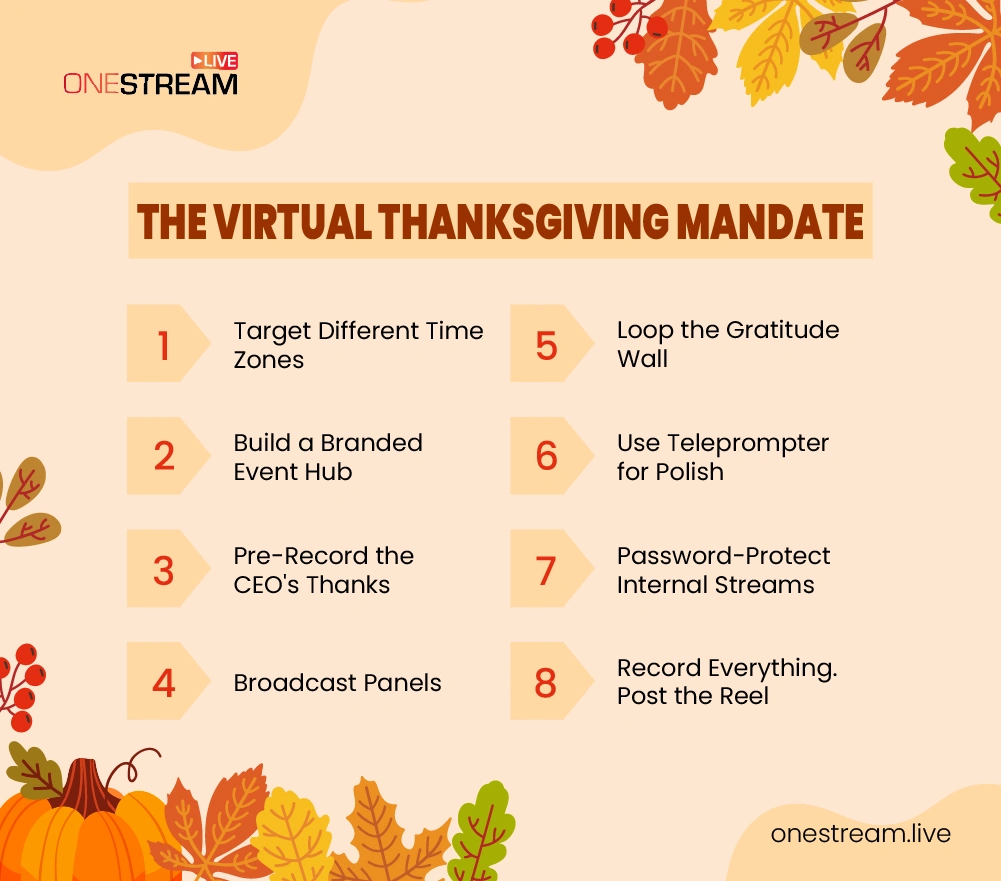
Step 1: Create Your 24/7 "Thanksgiving Activities Hub"
Your team needs one central, easy-to-find “place” to go for all event-related information. An email chain gets messy. A branded-for-your-company event page is the professional solution.
This is where a tool like OneStream Live’s Hosted Live Pages is invaluable. You can create a beautiful, custom web page in minutes, with no coding required. This page becomes your “Event Hub,” and you can brand it with your company logo and even a Custom Domain.
What to include on your Event Hub page:
- An Upcoming Events Schedule (e.g., “11 AM EST: Live Game Show,” “3 PM GMT: CEO Gratitude Message,” “On-Demand: Gratitude Wall”).
- A Clickable Call-to-Action Button (e.g., to link to your Thanksgiving charity drive or a shared virtual recipe book).
- Social Media Links to your internal community channels.
- An Embed Player which will be the “main stage” for all your live and pre-recorded content.

Step 2: Use Pre-Recorded Content for Global Inclusion
Not everyone can make the “live” part. That’s okay. Have your CEO or department leaders record a 5-minute message of thanks and appreciation. This personal touch goes a long way.
Using a Pre-recorded Streaming tool, you can upload this video and schedule it to play at different, time-zone-friendly intervals. You can use Advanced Scheduling to set this up 60 days in advance, so it’s ready to go. This ensures every employee, in every time zone, gets to feel included.

Step 3: Create an "All-Day" Gratitude Wall
An “all-day” activity provides a fantastic, passive way to build connection. Ask your team to submit short (10-second) video clips, photos, or text of what they’re grateful for this year.
Compile these into a simple slideshow or video. Using Playlist Streaming or Video Looping, you can have this “gratitude wall” play on your Event Hub all day. An employee in Sydney can watch it over their morning coffee, and an employee in San Francisco can see it before logging off.
Pro Tip: Make all your pre-recorded content accessible. Be sure to add captions via an SRT file to your videos. It’s a small step that makes a huge difference for inclusivity.
Ideas for Live Interaction During Your Virtual Thanksgiving Activities
This is the “live” part of your event, hosted from your virtual “stage” (the Embed Player on your Event Hub). With a platform like OneStream Live Studio, you can design a professional, interactive broadcast much more like a TV show than a chaotic 200-person video call for fun Thanksgiving activities.
Activity 1: The "Arm's Reach" Show & Tell (Thanksgiving Icebreakers)
A perfect, human-centric icebreaker that gets people talking. The prompt is simple: “Grab an object within arm’s reach that has a story or a special meaning.”
Instead of 200 tiny faces on a grid, use the Invite Guests feature to bring 10-14 employees “on-screen” at once in the main OneStream Live Studio.
They can share their item for one minute each. This creates a focused, engaging “panel” discussion. The host can manage the flow, and you can keep Live Chat running for the rest of the audience to comment. This is a fantastic way to learn about the people behind the job titles.

Activity 2: The "Thanksgiving Game Show" (Trivia, Pictionary, Bingo)
These are classics for a reason. They are simple to understand and spark friendly competition. Create Thanksgiving-themed trivia (e.g., “What year was the first Macy’s Parade?”), use an online Pictionary tool, or create virtual Bingo cards.
This is where the Live Studio shines:
- Branding: Use Branding and Overlays to add a custom background, your company logo, and a “Thanksgiving Game Show” banner or ticker. This makes the event feel special and professional.
- Media Sharing: The host can use the Media Sharing feature to share their screen and show the Pictionary board, the trivia slides, or the Bingo numbers.
- Engagement: Use the Unified Chat feature to pull in answers from the audience. This tool consolidates comments from multiple platforms (like your private Facebook group, YouTube, and Hosted Live Page) into one single interface for the host to manage.
Activity 3: The Team Cook-Along/Mixology Class
This is a crowd-pleaser that engages the senses. Send ingredients (or a stipend) to your team in advance for a simple recipe. A fall-themed cocktail or mocktail class is a great, manageable option.
One team member (or a hired professional) can lead the class.
Pro Tip: Use Multicamera Streaming to connect two cameras to your Studio session. One camera can be on the host’s face, and a second camera (even a smartphone) can be positioned overhead to give a clear view of the ingredients and hands. This is a pro-level touch that makes the stream much more helpful and easier to follow.
Technical Checklist for an Online Thanksgiving
Great ideas can be ruined by bad tech. Demonstrating “how” to run a smooth event for virtual Thanksgiving activities is key to building trust and showing expertise. Here is a first-hand technical checklist for a seamless production.
For the Host: Stay on Script and Look Professional
Don’t try to wing a 90-minute live event. Write a script, at least for your introduction, transitions between activities, and your outro.
- The Teleprompter feature in the Studio is a lifesaver. You can paste your script and read it right on the screen, maintaining perfect eye contact. It’s the secret to a confident, polished delivery.
- Use Virtual Backgrounds. Don’t let a messy home office distract from the event. OneStream Live provides a range of unique virtual backgrounds, or you can upload your own festive, branded one.
For the Audience: A Secure and Easy-to-Watch Experience
If this is an internal-only Thanksgiving event, you must make it secure. You do not want a private company celebration to be publicly accessible.
- Use Guest Authentication Options to ensure only invited employees (the “guests” coming on-screen) can join the Studio.
- Use the Embed Player to stream the event directly onto your company’s private intranet page or the password-protected Hosted Live Page. The Embed Player itself offers enhanced security features, including the option to password-protect the stream, giving you full control over access.

For the Whole Company: Capture the Moment
Someone will inevitably miss the live event. Record it. The Studio has a built-in Recording feature. Capture the entire live event.
After, you can edit it down to a “highlight reel” and post that video on your Event Hub for everyone to watch later. This extends the life of the event and includes those who couldn’t make it.
Make Connection the Goal
A virtual Thanksgiving is a powerful tool to fight employee disengagement. The goal isn’t just to “do an event”; it’s to make your team feel seen, valued, and connected.
By focusing on a “people-first” hybrid model that blends inclusive, asynchronous content with high-energy, live interaction, you can create an experience that works for everyone. The technology is just there to make that connection simple, professional, and secure.
Planning a virtual event? The tools discussed in this guide are all designed to make it simple to bring your team together for fun Thanksgiving activities.
Start a free trial of OneStream Live and see how you can build your event hub today.
Happy Thanksgiving 2025!

Frequently Asked Questions (FAQs)
Keep it simple and heartfelt. Build a short itinerary: opening greetings, a gratitude circle, shared meal moments, and a fun activity like trivia or storytelling.
You don’t need a studio, just a steady internet connection, decent lighting, and clear audio. Platforms like OneStream Live handle the technical side, letting you focus on celebrating, not troubleshooting.
Encourage live reactions and use unified chat features so guests can comment, share memories, or drop family photos during the stream. Interaction keeps the spirit alive.
Schedule multiple short live segments throughout the day, or prerecord parts of your celebration and set them to stream automatically when others are awake.
Record the full live stream or highlight the best moments to share privately later. It’s the modern version of home videos, something everyone can replay and cherish year after year.
OneStream Live is a cloud-based live streaming solution to create, schedule, and multistream professional-looking live streams across 45+ social media platforms and the web simultaneously. For content-related queries and feedback, write to us at [email protected]. You’re also welcome to Write for Us!