
Streaming live Christmas music can light up your holiday live streams, but nothing kills the Christmas spirit faster than a sudden mute or takedown due to copyright violations. Many streamers have learned the hard way that popular carols and holiday hits can trigger DMCA strikes if you don’t have the rights.
The good news? You can absolutely stream Christmas content safely by using copyright-free music sources and smart strategies. In this guide, we’ll share real streamer experiences, OneStream Live tips, and a collection of royalty-free holiday music resources (from lo-fi Christmas jazz to instrumental carols) to keep your stream jolly and strike-free.
Let’s unwrap the details!
- Playing commercial holiday songs on live streams often leads to instant copyright mutes.
- Buying music for personal listening does not allow public live broadcasting.
- Public domain Christmas songs can still cause issues due to copyrighted recordings.
- Using licensed background music for livestreams lowers the risk of DMCA strikes.
- Preparing a royalty-free holiday music playlist before going live avoids mistakes.
- Multistreaming requires following the strictest platform music policy.
- Keeping proof of music licenses helps resolve false copyright claims faster.
Streamer Experiences: Holiday Streams & DMCA Lessons
Real content creators have navigated the copyright minefield during the holidays, offering cautionary tales and clever solutions:
1. Ludwig’s DMCA-Free Christmas Album
Popular streamer Ludwig Ahgren released A Very Mogul Christmas (Dec 2020) specifically so streamers could play Christmas classics without DMCA strikes. He produced cover versions of songs like “The Christmas Song” and “All I Want for Christmas Is You” with proper licensing.
This was an innovative solution born from Twitch’s crackdown on unlicensed music. This case shows how serious the issue became for creators and how one streamer turned it into an opportunity by providing a safe alternative for everyone.
2. Harris Heller’s Holiday Playlists
Streamer and musician Harris Heller (known for StreamBeats) also contributed to the Nice List. He published over two dozen DMCA-safe holiday tracks for streamers to use.
These songs (available via Spotify and other platforms) range from chill “lo-fi Christmas” beats to upbeat instrumentals and are all pre-cleared for streaming. Heller’s proactive approach means you can set a cozy Christmas ambiance with his music without worrying about takedowns.
3. “Public Domain” Doesn’t Mean Problem-Free
Many traditional carols (e.g., “Jingle Bells,” “Silent Night,” “Deck the Halls”) are in the public domain, but specific recordings of them often are copyrighted. Streamer Sam Proof warned that using a random recording of a classic carol can still trigger a claim if that recording isn’t licensed for your use.
His advice: either perform the PD songs yourself, or use known royalty-free recordings of them. Example: He pointed to a list of songs that artists can perform freely and resources like EasySong which confirm public-domain status. The takeaway is don’t assume a Christmas classic is safe just because it’s old. Always ensure the version/recording is explicitly free to use.
4. Community-Driven Solutions
In the streaming community, creators often share safe music tips. Some Reddit users compiled YouTube videos of public-domain Christmas instrumentals for anyone to use (e.g., hours of piano and strings renditions) and even curated Spotify playlists of “Christmas Music – No Copyright”.
These grassroots efforts show that many streamers face the same holiday DMCA woes, and pooling resources (and music) is a way to help everyone celebrate without strikes.
OneStream Live Tips for Safe Music Streaming
If you’re using OneStream Live to broadcast your holiday events, you have some built-in advantages and guidance for avoiding copyright issues:
1. Playlist Scheduling & Pre-Checks
OneStream Live’s Playlist feature lets you queue up a series of pre-recorded videos or songs to stream on schedule. This means you can prepare a playlist of vetted, royalty-free Christmas songs in advance.
Before adding a track, double-check its license or origin. OneStream Live even suggests using tools like the YouTube Audio Library for free music and sound effects – just heed any attribution notes. By curating your playlist ahead of time, you won’t accidentally slip into a copyrighted track during a live DJ set or virtual party.
Read Blog on How to Add Copy-Right Free Music to Your Streams
2. Follow Platform Rules
OneStream Live’s blog reminds us that each platform (YouTube, Facebook, Twitch, etc.) has its own music policies. For example, Facebook Live only allows music if you have a license, or else they will mute or block streams that are basically unlicensed “listening parties.”
Twitch similarly permits background music only if it’s your own, you have rights, or you use their provided Soundtrack tool. OneStream Live advises creators to know and follow these guidelines on every platform you multistream to. In practice, this means sticking to royalty-free or original music universally, since you’re only as safe as the most restrictive platform in your multistream.
Read the Ultimate Guide for Multistreaming
3. Built-In Precautions
OneStream Live Studio allows you to add background music and sound easily to your broadcast. Make use of copyright-free tracks provided or recommended by OneStream Live.
In a recent OneStream Live guide, they explicitly say to “stream with copyright-free music in just a few clicks” as the safest way to avoid a strike on Facebook. The platform is clearly aware of DMCA issues, so they incorporate features (and blog tutorials) to help users add music legally.
4. Have Proof on Hand
Even with precautions, false claims happen. OneStream Live’s advice for Facebook streams is instructive: if a stream is flagged mistakenly, you should be ready to appeal by showing proof of your license or permission.
Keep documentation for any music you license (receipts, license certificates) or note the source (e.g., a link to the Creative Commons license) for free tracks. This way, if a platform wrongly mutes your “Carol of the Bells” remix, you can quickly counter-claim with evidence that it’s royalty-free. OneStream Live can’t prevent every false flag, but being prepared can get your content restored faster.
In short, OneStream Live’s own channels emphasize a “better safe than sorry” approach: stick to original, licensed, or royalty-free music so your holiday stream stays live and doesn’t become the Grinch that got deleted.
Royalty-Free Options for Live Christmas Music (With Links)
Luckily, there’s a sleigh-load of royalty-free and DMCA-safe Christmas music out there. Here are some reputable sources and libraries where you can find real holiday tracks cleared for streaming. We’ve included direct links and notes on what each offers:
1. Epidemic Sound – Christmas Genre
A subscription-based library known for high-quality music. Epidemic has a dedicated Christmas genre section with all styles from classic carols to modern festive pop.
Example: their catalog includes lo-fi hip-hop holiday beats, jazzy renditions, orchestral pieces, etc., all pre-cleared for use on streams as long as you’re subscribed.
2. Artlist – Holiday Collection
Another top music licensing platform. Artlist’s Christmas music collection gives you unlimited access with a single subscription.
They offer everything from “The Christmas Sleigh Ride” (joyous orchestral tunes) to chill acoustic pieces, sorted in a curated playlist. It’s a one-stop shop for creators who want mainstream-quality tracks without copyright worries.
3. Free Music Archive (FMA)
A free repository of music under Creative Commons and the public domain. FMA’s Christmas genre contains hundreds of tracks – from instrumental covers of “We Three Kings” and “Deck the Halls” to original festive tunes by independent artists.
Many are traditional carols recorded by modern musicians and offered as royalty-free. Always check the license on each track’s page (some might be for non-commercial use or require attribution). But FMA is a goldmine for stream-safe classics and eclectic holiday music.
4. YouTube Audio Library
YouTube provides a free audio library for creators, which includes seasonal music. You can search the library for “Christmas” to find tracks that are copyright-free for any content (not just YouTube).
For example, there are jazzy holiday instrumentals and ambient winter themes. OneStream Live’s blog specifically recommends using YouTube’s audio library for safe background music. Just make sure to read if a track requires attribution (some do).
5. StreamBeats by Harris Heller
Mentioned earlier, StreamBeats offers a “Christmas” playlist that’s 100% DMCA-free. This includes albums like “A Very Lo-Fi Christmas” (great for cozy, chill vibes on stream). The music is free to use on Twitch, YouTube, etc.
You can find StreamBeats Christmas on Spotify or download tracks via his website. These are perfect for a modern, mellow holiday stream where you want music that won’t trigger any automated mutes.
6. Pretzel Rocks
A streamer-focused music service. Pretzel has licensed holiday tracks as part of its catalog of DMCA-safe music. You can use their desktop app or web player to filter by genre (they had a Christmas station/playlist during the holidays).
The music tends to be indie artists and instrumental covers. Note: Pretzel requires viewers to see a “Now Playing” if you’re on the free tier, along with a chat attribution, but it ensures all music is stream-safe. (The “visual” Now Playing overlay is optional, but the chat attribution is a mandatory part of the free plan.)
7. NoCopyrightSounds (NCS)
If your holiday stream needs an EDM or pop twist, NCS is a label releasing songs that creators can use freely. While NCS isn’t specifically holiday-focused, they occasionally have winter or festive-themed tracks.
All NCS releases are pre-cleared for Twitch/YouTube (just credit the artist in your description). For instance, a track like “Christmas Party (NCS Release)” – if it exists – could be used with no worries. Check NCS’s YouTube or Spotify for any seasonal songs labeled as NCS releases.
8. Free Music Blogs & Archives
Sites like Free Music Archive (mentioned above) and even Internet Archive can have collections of old recordings of carols (some are truly public domain recordings). For example, the Internet Archive has an album “The 8-Bits of Christmas” with chiptune holiday songs released free. If you want a retro gaming vibe, that could be a fun find. Always verify that these are marked public domain or CC0.
Each of these sources provides royalty-free Christmas music that you can confidently play during streams. We’ve focused on reputable platforms so the tracks are genuinely cleared (be cautious of random “copyright free music” off YouTube unless you trust the uploader). With these in hand, you can build a festive playlist that sounds great and keeps your channel safe.
Thematic Playlist Ideas for Safe Holiday Vibes
Tailoring the music style to your stream content is key. Here are some thematic playlist categories and examples that are streamer-friendly (all composed of copyright-safe tracks):
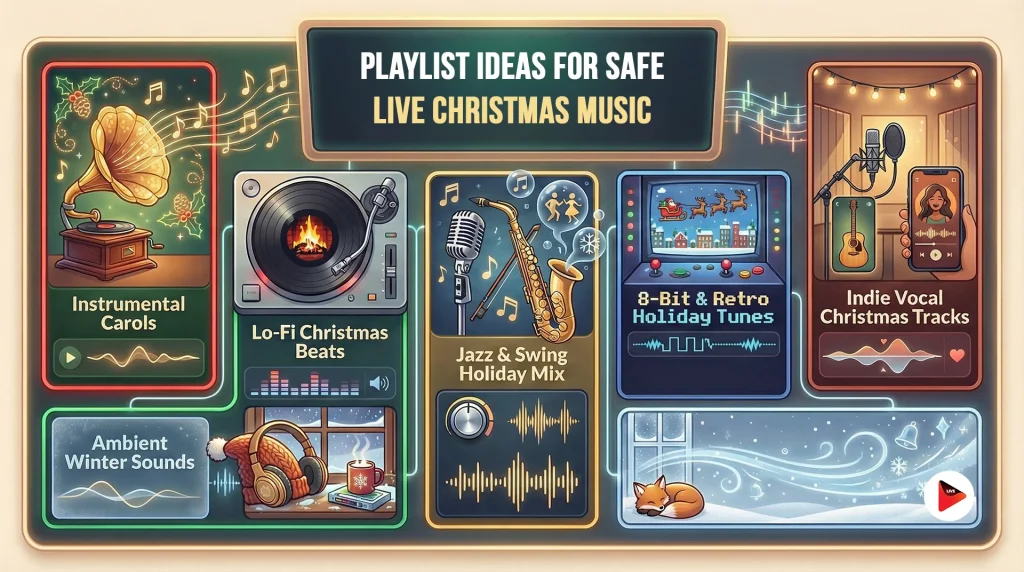
1. Instrumental Carols & Classics
Perfect for a cozy fireside chat or family-friendly stream. These are the familiar holiday songs, but in instrumental versions (no lyrics = fewer distractions).
Look for piano, acoustic guitar, or orchestral renditions of classics. For instance, a gentle piano instrumental of “Silent Night” or a string quartet performing “O Holy Night” – such tracks are often available on Free Music Archive or Artlist’s library.
Many traditional carols in instrumental form are public domain or offered under royalty-free licenses. This playlist sets a warm, nostalgic mood without any copyright baggage.
2. Lo-Fi Christmas Beats
If you run a tech, art, or just chatting stream and want a chill ambiance, go lo-fi. Lo-fi Christmas jazz or lo-fi hip-hop beats with sleigh bells give a modern twist to holiday music.
Harris Heller’s “A Very Lo-Fi Christmas” album is a ready-made example as it blends gentle beats with subtle holiday melodies and is DMCA-safe. You might also find lo-fi remixes of carols on Epidemic Sound (search under Christmas + Hip Hop mood). This category keeps things festive yet mellow and is great as background music that won’t overpower your voice on stream.
3. Jazz & Swing Holiday Mix
For an upbeat, classy atmosphere (think “Santa’s Jazz Lounge” vibe). This could include big band swing versions of “Winter Wonderland,” smooth jazz takes on “Let It Snow,” or bluesy Christmas instrumentals.
Many jazz musicians release royalty-free Christmas tracks. Artlist, for example, has “Christmas is Coming” by Roie Shpigler feat. Budapest Orchestra (a lively jazzy piece) in its holiday collection.
Assemble a playlist of DMCA-safe jazz numbers as it’s perfect for cooking streams, holiday countdowns, or anytime you want viewers snapping their fingers along. Just ensure the versions are licensed for use (platforms like Artlist or Epidemic cover that; some tracks on YouTube Audio Library also fall here).
4. 8-Bit & Retro Holiday Tunes
For gaming streamers, a fun niche category is chiptune or 8-bit style Christmas music. These sound like retro video game holiday themes – nostalgic and nerdy.
The “8 Bits of Christmas” album (from 8bitpeoples) is one example, with chiptune covers of carols available free. Using these tracks can complement retro or indie game streams during December.
They are usually instrumental and upbeat. Because they’re often released by the chiptune artists for free, they’re streamer-friendly but still double-check the license (the mentioned album is free on FMA). Your viewers will love the Mario/Sonic-era holiday vibes.
5. Vocals by Independent Artists
Maybe you do want vocals but can’t use Mariah Carey. Another category could be indie artist Christmas songs or covers. Some independent singers publish covers of public-domain songs (like “Silent Night”) on Free Music Archive or SoundCloud under Creative Commons.
Others write original holiday songs and release them royalty-free as promotion. A playlist of lesser-known but delightful Christmas songs by indie artists can give your stream a unique flavor.
For instance, Scott Holmes Music has an album of “Christmas Background Music” with original songs, free for non-commercial use (some may allow stream use but check license).
This route requires more research per track, but it can yield some gems. Just ensure the license allows streaming (look for CC-BY or CC0 licenses for maximum safety, or get direct permission from the artist).
6. Ambient Winter & Relaxing Sounds
If your holiday stream is more about relaxation or study vibes, consider an ambient winter playlist. This might include soft instrumental pieces titled with winter themes (e.g., “Snowfall,” “Winter Morning”) that evoke the season without being overt carols.
Many royalty-free music sites have these under genres like ambient, acoustic, or classical. They won’t scream “Christmas,” but they fit a subtle holiday atmosphere and are typically DMCA-safe if sourced properly.
Mix in some crackling fireplace sound effects or gentle wind chimes (plenty of free SFX libraries provide those) to enhance the mood. This playlist keeps things calm and cozy – and 100% safe.
When building these playlists, remember to get your music from the trusted sources we listed. For example, you could grab a bunch of lo-fi Christmas tracks from StreamBeats and Epidemic Sound, add some instrumental carols from FMA, and voilà, you have an Instrumental Carols list and a Lo-Fi Xmas list ready to swap in.
Organize your files or make a OneStream Live playlist with clear labels so you can switch the vibe mid-stream if needed (e.g., ramp up from “ambient” during a BRB screen to “jazz swing” when you’re back with cocoa in hand).
Also, always test a snippet of a track offline or in an unlisted stream beforehand. Check that content ID doesn’t flag it pre-stream if possible (YouTube’s “check” tool for uploads or Twitch’s VOD track can help). Even known royalty-free tracks sometimes get claimed by mistake; it’s rare, but a quick test can save you a headache.
Final Thoughts
With thoughtful planning, you can absolutely stream live Christmas music without those dreaded copyright strikes. Take it from veteran streamers who’ve navigated the DMCA maze: stick to copyright-free, royalty-free, or original music, and you’ll be in the clear.
OneStream Live provides the tools to incorporate music smoothly, and if you supply the right tunes, your holiday live stream will be both festive and worry-free. So go ahead and cue up those jingling bells, lo-fi beats, or jazz rhythms that set the perfect mood.
By using the resources and tips above, you’ll spread holiday cheer to your viewers safely, keeping your stream live and your spirits bright. Happy streaming and happy holidays!
Frequently Asked Questions
Absolutely not—unless you want your stream muted instantly. Streaming platforms use Content ID bots that flag commercial tracks in seconds, regardless of whether you “bought” the album. This license is for personal listening, not public broadcasting; stick to safe alternatives or risk a copyright strike.
“Royalty Free” means you pay a subscription (like Epidemic Sound) to legally use the track without paying per play—this is the safest professional option. “Copyright Free” usually refers to Public Domain songs, but be careful: the song “Jingle Bells” is free, but the recording by a specific orchestra is likely copyrighted.
Only songs published before 1928 are truly safe, such as “Silent Night,” “Deck the Halls,” and “Joy to the World.” Modern hits like “Rudolph,” “Frosty,” and “White Christmas” are still under strict copyright. Always verify the specific recording source, even for old songs.
It might not be deleted immediately, but it will likely be muted, blocked in certain countries, or demonetized. Facebook and YouTube algorithms can detect background audio even if you are talking over it. Don’t risk your channel’s health; use a dedicated stream-safe playlist.
Stop using Spotify; those playlists are not licensed for streaming. Instead, use the YouTube Audio Library (filter by “Holiday” and “No attribution required”) or subscribe to services like Pretzel Rocks or Soundstripe. These platforms whitelist your channel to prevent strikes.
OneStream Live is a cloud-based live streaming solution to create, schedule, and multistream professional-looking live streams across 45+ social media platforms and the web simultaneously. For content-related queries and feedback, write to us at [email protected]. You’re also welcome to Write for Us!