You finally booked that trip and decided to take off. No alarm. No schedule. But then the thought creeps in: “What happens to my channel while I’m gone?” The honest answer is that without a plan, your channel goes quiet and your audience moves on. And a few weeks of missed live streams can take months to recover from. However, the right automation tools can keep your channel running as if you never left.
Automation tools let your live streams go out on time, keep the chat moderated, and keep your social posts up to date, without you touching a single button.
This guide covers every tool you need, what it does, and how to set it up before you pack your bags.
What Are Automation Tools?
Automation tools are software solutions that perform tasks on your behalf without your direct involvement. For live streamers, that means going live, managing chat, posting on social media, and capturing content, all running while you are offline.
Why Automation Tools Matter
Consistency is the biggest driver when it comes to growing your audience. Social media platforms reward creators who show up regularly. Their algorithms push consistent content to more people. So, when you disappear, that momentum dies.
According to Influencer Marketing Hub, creators who post with consistency grow their audience up to three to five times faster.
Automation tools make consistency possible even when you physically cannot be there. They are not a shortcut. They are a system. And the streamers who build systems are the ones who keep growing while everyone else burns out.
Types of Automation Tools for Live Streamers
Not all automation tools do the same job. Here is a quick breakdown of the main types and what each one handles for streamers.
- Streaming Automation Tools: Schedule and broadcast your content automatically without you going live manually.
- Chat Automation Tools: Moderate your comments, filter spam, and answer common viewer questions without anyone watching the screen.
- Social Media Automation Tools: Announce your streams and publish content across platforms on a schedule you set in advance.
- Task Automation Tools: Connect multiple apps together so when one thing happens, another fires automatically.
- Content Automation Tools: Capture your best stream moments, edit them, and format them for short-form platforms without manual effort.
- Analytics Automation Tools: Pull your stream performance data together in one place so you can track what is working without logging into five dashboards.
The Best Automation Tools for Live Streamers
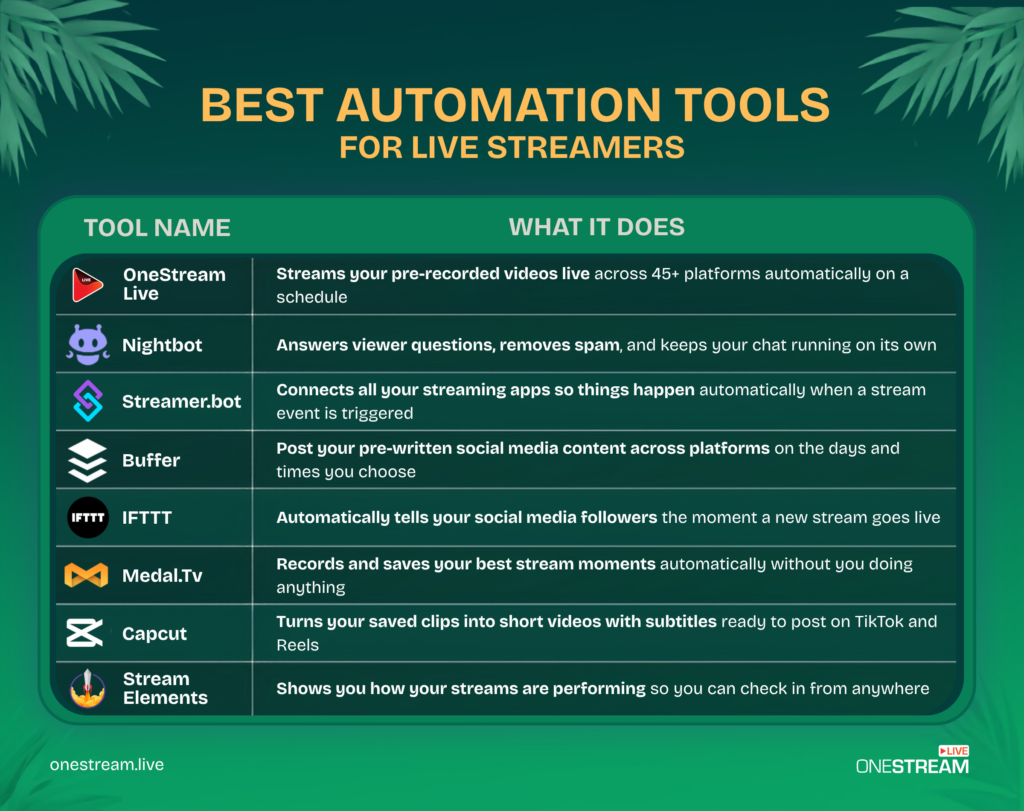
1. OneStream Live — For Going Live
Going live is the core of everything you do. It is also the one thing that completely stops when you travel, unless you set up the right tool.
OneStream Live is a cloud-based multistreaming platform that lets you record content in advance, upload it, and schedule it to broadcast live across 45+ platforms simultaneously.
Here is what makes it the most complete automation software solution for streamers:
Scheduled Pre-Recorded Streaming Upload your videos and schedule them up to 60 days in advance. OneStream Live handles all the transcoding and delivery automatically. You can import content directly from Google Drive, Dropbox, or Amazon S3, so you do not even need to be at your desk to get it ready.
24/7 Live Streaming: Stream 24/7 on YouTube without any breaks or interruptions. Your channel stays live around the clock even when you are sound asleep.
Playlist Streaming: Line up multiple pre-recorded videos in the order you want and stream them back to back across your social media platforms automatically. No manual effort once the playlist is set.
Video Looping: Have one video you want to keep broadcasting? Set it to loop and it will run continuously on your social media channels.
Multistreaming to 45+ Platforms One upload. One schedule. Every platform fires at once. OneStream Live is one of the most powerful process automation tools for streamers seeking maximum reach with minimal effort through multistreaming.
Unified Live Chat Every platform’s chat in one single screen with Live Chat. Even while you are away, a trusted moderator can manage all of it from one dashboard instead of juggling five different tabs.
Read More: How To Get Started with OneStream Live
2. Nightbot — For Chat Moderation
Your stream going live is only half the job. The other half is keeping chat from turning into chaos.
Nightbot is a free, cloud-hosted chatbot that activates the moment your stream goes live. It filters spam automatically, answers common questions through custom commands like !discord, !schedule, and !socials, and sends timed messages to your audience at set intervals. Your chat feels active and managed even with no one watching it.
Here is what makes it the go-to moderation tool for streamers who cannot be in chat every second:
Six Built-In Spam Filters Nightbot ships with six dedicated spam filters covering blacklist words, caps, emotes, links, symbols, and repetitions, each individually adjustable so you decide exactly how aggressive the moderation runs. Links get blocked the moment they appear. Caps floods get shut down before they take over. All of it fires without a moderator lifting a finger.
Custom Commands Unlimited custom commands with userlevel, cooldown, and alias parameters let you build out a full information hub inside your chat. Viewers type !discord, !schedule, or !specs and Nightbot delivers the answer instantly, every single time, with no one manning the keyboard.
Timed Messages The Timers page contains configurable timers where Nightbot displays a message every so often. The time interval and chat lines required can be changed to your liking and can be enabled and disabled as needed. Set it to promote your social links every 20 minutes or remind viewers to subscribe every hour, and it runs on its own for the entire stream.
AutoDJ Song Requests AutoDJ song requests pull from YouTube and SoundCloud with per-user limits, so your audience can queue music during a stream without flooding the list. You set the rules; Nightbot enforces them. A personal playlist is provided as a backup song list if the queue runs out of songs.
Regulars System Regulars are users who are more privileged than normal users. You may want regulars to be ignored when dealing with spam filters or you might want them to have access to certain commands. Trusted members of your community get the access they deserve without you manually overriding filters every time they post.
Read More: Complete Guide To Nighbot
3. Streamer.bot — For Advanced Stream Automation
Streamer.bot handles everything else that needs to happen automatically during a stream.
Streamer.bot is a free task automation tool that connects your streaming setup into one intelligent system. When a viewer subscribes, it can trigger an alert, post to Discord, and switch an OBS scene all at once. When chat types a specific command, it can change your lighting, play a sound, or update an overlay. All of it fires without anyone pressing a single button.
For streamers who want their whole setup to run on autopilot, Streamer.bot is the backbone that holds it all together.
Here is what makes it the most powerful automation engine in a streamer’s toolkit:
350+ Triggers There are currently over 350 triggers available in Streamer.bot covering everything from subscriptions, follows, raids, and chat commands to channel point redemptions and ad breaks. If something happens on your stream, Streamer.bot can react to it automatically.
Multi-Platform Support Twitch integration allows you to capture all the events you expect, such as chat messages, follows, subscriptions, and more. YouTube integration captures chat messages and memberships. Kick integration receives events such as chat messages, follows, subscriptions, and more. One tool runs your entire cross-platform operation from a single setup.
OBS and Streamlabs Integration Streamer.bot ships with first-class support for OBS Studio, allowing you to control your scenes, sources, and more directly from your bot. Integration with Streamlabs Desktop’s Remote Control feature allows Streamer.bot to execute actions on your Streamlabs Desktop instance. Scene switches, source toggles, and filter changes all happen automatically when the right trigger fires.
Sub-Actions and Action Stacking Actions consist of configurable sets of sub-actions that can be executed by Streamer.bot’s event sources. Sub-actions even have the ability to trigger other actions, giving you the ability to organize significant pieces of your setup into consolidated sections and share logic across multiple event sources. One subscriber event can fire an alert, post to Discord, switch a scene, and update an overlay, all in the same breath.
C# Custom Scripting You can utilize the full power of C# to create custom modules and functionality, interacting with the bot and all of its integrated services. If a feature does not exist out of the box, you can build it yourself. The ceiling is as high as your imagination.
Read More: A Guide to Streamer.Bot
4. Buffer — For Social Media Scheduling
Going live on a schedule is pointless if nobody knows about it.
Buffer is one of the most popular automation software solutions for scheduling social media content in advance. Before you leave, you write all your stream announcements, clip posts, and engagement content, pick the dates and times, and Buffer publishes everything automatically while you are away.
It takes one afternoon to schedule two full weeks of social content. After that, your social presence keeps moving without you.
Here is what makes it the cleanest scheduling tool for streamers who want their content working while they are offline:
Multi-Platform Scheduling Buffer supports integrations with more than 10 of the leading social media platforms and is always adding more. Write one post, customize it for each platform, and queue everything from a single dashboard. No logging in and out of five different apps.
Visual Content Calendar A unified schedule view lets you see all your scheduled posts across every channel in one place. Filters and toggles make it easy to find what you need with no more endless clicking. Your entire two weeks of stream announcements sit in front of you, organized and ready to publish automatically.
AI Writing Assistant Buffer’s AI Assistant lets you repurpose your existing posts, rewrite content in any style, and generate fresh ideas. Feed it your stream title and it can generate a week of announcement copy in seconds, ready to drop straight into the scheduler.
Post Customization Per Platform The composer lets you tailor posts for each platform, whether it is a thread, carousel, or video. Your TikTok caption and your LinkedIn post do not have to read identically. Format each one the right way without building separate workflows.
Drag-and-Drop Content Planning A Trello-style planning feature lets you keep track of your social media ideas, visualize your progress, and drag and drop your way from To Do to Done. Map out your entire content calendar visually and shift posts around without starting from scratch.
Analytics and Engagement Tracking The Essentials plan includes unlimited post scheduling, analytics, and engagement tracking. See exactly which stream announcements drove the most clicks and replicate what works.
Read More: A Guide To Buffer
5. IFTTT — For Real-Time Stream Announcements
IFTTT works on a simple trigger-action model. When your stream goes live, IFTTT automatically fires a post to Twitter/X, a message to your Discord server, and an update to your Facebook page at the same time. Your audience gets notified the moment content drops.
Set it up once before you leave and it handles every stream announcement for the entire trip.
Here is what makes it the simplest no-touch broadcast tool for streamers who want zero manual effort:
Go-Live Triggers Across Every Platform A trigger fires every time you start streaming on Twitch, instantly setting off whatever chain of actions you have built. Twitter/X gets the post. Discord gets the ping. Facebook gets the update. All of it happens the moment you go live, not ten minutes later when you finally remember to post.
1000+ Service Connections IFTTT connects to over 1000 apps and services, meaning your go-live announcement can reach platforms that have no native cross-posting support. Your Discord, your Twitter/X, and your Facebook Page all update without you touching them.
Applets — Set Once, Run Forever Each automation is packaged as an Applet, a preconfigured trigger-action pair you turn on once and never touch again. IFTTT is an easy to use automation platform and Applets are simple and quick to set up, and completely customizable to your specifications. Build your full go-live announcement stack in one session before you leave and it handles every stream for the entire trip.
Webhook Support With Webhooks, you can send or receive web requests to trigger actions, while Twitch offers real-time updates on live streams and video posts. If you have a custom website, a community tool, or a third-party service that IFTTT does not natively support, Webhooks bridge the gap so everything still fires on cue.
Multi-Action Chains One trigger can set off multiple actions simultaneously, a tweet, a Discord message, a Facebook post, and a push notification to your phone all firing at the same instant. Your audience gets notified everywhere at once without any duplicate effort on your end.
Read More: Complete Guide To IFTTT
6. Medal.tv — For Clip Capture
Great moments happen during streams whether you are there or not. Someone needs to catch them.
Medal.tv runs quietly in the background and uses AI to detect and save your best gameplay highlights automatically. Kills, wins, big reactions, clutch moments, it catches all of it without you scrubbing through hours of footage. You come back from vacation with a full library of ready-to-post clips waiting for you.
Here is what makes it the most hands-off clip capture tool for streamers who never want to miss a moment:
Automatic Event Detection With Medal’s auto clipping and game event detection, your best moments are captured automatically with no need to press a hotkey or manually record. Simply tell Medal which events to clip from your favorite games like Fortnite, League of Legends, Rocket League, and more. Medal clips them for you the instant they happen, a victory, a goal, an ace, and many more game-specific options.
Hotkey Manual Capture Capture your gameplay by pressing F8 or your preferred hotkey for moments that need a manual save. Auto-clipping and manual capture run side by side so nothing ever slips through.
Clip Editing Trim down clips to get right to the good stuff. Add music and sound effects, filters, memes, text, and GIFs directly inside Medal without jumping to a separate editor. Your clip goes from raw footage to shareable content in the same app.
Cloud Storage and Organization Save clips for later and access them from anywhere. Keep clips organized by game, theme, or people with folders and tags. Every highlight from your entire trip is waiting in the cloud the moment you get back, sorted and ready to post.
Instant Social Sharing Instantly share clips to Discord or social media directly from within Medal. No exporting, no re-uploading, no extra steps. The clip goes from your game to your audience in seconds.
Up to 4K at 144fps Recording Medal supports up to 4K resolution at a buttery-smooth 144fps and is optimized to be lightweight and adjustable, with a minimal impact of 100 to 400MB of RAM, so it runs in the background without dragging down your game performance.
Read More: How To Use Medal.Tv – A Complete Guide
7. CapCut — For Turning Clips Into Content
CapCut uses AI to automatically generate subtitles, cut filler, and format your saved highlights into short-form videos ready for TikTok, Instagram Reels, and YouTube Shorts. What used to take an hour of editing takes minutes. Batch process your Medal.tv clips before you leave and you have weeks of short-form content ready to schedule.
AI AutoCut Powered by advanced AI scene detection, CapCut trims long footage into engaging short clips, highlights key moments, and merges scenes seamlessly. Drop in a raw stream highlight and AutoCut builds the short-form video for you with no timeline scrubbing and no manual trimming.
Auto Subtitles and Filler Word Removal CapCut includes automatic caption creation with filler word removal and bilingual subtitle support. One click generates accurate captions, then another click strips out every “um,” “uh,” and repeated word. The clip tightens itself up without you touching the timeline.
100+ Caption Templates CapCut includes over 100 caption style templates covering categories like music, gaming, and more, allowing creators to match their subtitle aesthetic to their content brand. Your captions do not have to look like plain white text. Match them to your stream branding and keep every Short visually consistent.
AI Background Removal CapCut’s AI video background remover removes the background from video in one click, so you can drop a clean facecam cutout onto any background without a green screen or manual masking.
Text-to-Speech and Voice Enhancement CapCut converts text to natural AI voice for fast, realistic voiceovers and also removes background noise from audio with AI to clean up video sound and reduce static. If your raw clip has bad audio, CapCut cleans it up automatically before anyone ever hears it.
Desktop, Mobile, and Browser Access CapCut runs on desktop, mobile, and directly in the browser, giving creators total flexibility in how and where they work. Batch edit your Medal.tv clips from your laptop before a trip, then polish individual posts from your phone while you are away.
8. StreamElements — For Analytics
You still want to know what is working while you are away.
StreamElements gives you a clean analytics dashboard that tracks viewer engagement, chat activity, stream performance, and loyalty data all in one place. Check it from your phone during your trip and see exactly how your scheduled content is landing. No need to log into five separate platform dashboards to piece together the picture.
Here is what makes it the most complete performance tracking tool for streamers who want data without the chaos:
Stream Analytics Dashboard The StreamElements Dashboard includes stream analytics, bot settings, activity tracking, and navigation tools. You can choose the time period you will be viewing, and the different types of events are shown in boxes with a graph representing these numbers based on the tab chosen to be displayed. Every key metric sits in one clean view so you spot trends at a glance.
Activity Feed Below the graphs is the Activity Feed, where you can filter events, replay alerts, and mark notifications as read. See every follow, sub, and donation from your scheduled streams in one live-updating feed, even while you are away from your setup.
Loyalty and Viewer Engagement Tracking StreamElements centralizes stream overlays, alerts, chatbots, tipping, merchandise stores, and analytics, simplifying the technical aspects of streaming so creators can focus on content. The loyalty system tracks watch time and engagement across every stream, giving you a clear picture of which viewers are showing up consistently.
Cloud-Based Overlay and Alert Editor The cloud-based overlay editor allows streamers to design and manage all their stream visuals directly from a web browser. Overlays are stored online, accessible from any computer, and do not consume local system resources during the stream. Check in on your live visuals and tweak alerts remotely without touching your streaming PC.
Integrated Merch Store StreamElements lets you upload designs to create t-shirts, hoodies, mugs, and other products right in your dashboard. When live, viewers can browse your merch store without leaving your stream. Your monetization keeps running while you are away without any extra steps on your end.
Monetization Tracking StreamElements provides in-depth analytics to track your stream’s performance, viewer engagement, and revenue, helping you make data-driven decisions to grow your channel. Donations, tips, and merch revenue all feed into the same dashboard so you always know exactly what your content is earning.
Read More: Quick-Start Guide To StreamElements
Final Words
Creators who do not take consistency seriously struggle with growth more. Live streaming daily is, without a doubt, a hectic thing, and if you take a vacation on top of it, say bye-bye to growth. But life does not stop, and it should not. That’s where these automation tools come in. They make your life easier by giving you the freedom to live your life while keeping your channel live.
So, take benefit of these tools and live stream smart. Set up OneStream Live for your broadcasts, Nightbot for your chat, Buffer for your social posts, and the rest of the tools to cover everything else. Do it once. Do it properly. Then go enjoy your trip knowing your automation tools are running the show.

Frequently Asked Questions
Automation tools are software solutions that schedule, manage, and broadcast streams without requiring constant manual input.
Yes, pre-recorded and scheduled streams allow you to broadcast content automatically while you’re away.
Platforms like OneStream Live let you multistream and schedule videos across multiple channels.
When used smartly, automation maintains consistent content flow without compromising real-time interaction.
Most modern tools offer intuitive dashboards, making scheduling and automation accessible even for new streamers.
OneStream Live is a cloud-based live streaming solution to create, schedule, and multistream professional-looking live streams across 45+ social media platforms and the web simultaneously. For content-related queries and feedback, write to us at [email protected]. You’re also welcome to Write for Us!