You spent two weeks promoting your webinar. Hundreds of people signed up. Then you went live, and the attendee count stopped at about half.
Sound familiar? The problem usually isn't your topic. It's that your event lives in one room with a locked door. Only people who registered can get in, and Zoom can only push your stream to a few other places.
The good news is you have options. Below, we compare 10 Zoom alternatives for webinars and live events, from enterprise giants like Webex to tools like OneStream Live that put your event in front of people on YouTube, LinkedIn, and Facebook at the same time.
Key Takeaways:
- About half of webinar registrants never show up live, so reaching people outside the webinar room matters more than ever.
- Zoom Webinars costs extra on top of a Zoom Workplace Pro license, and the price goes up as your audience grows.
- Zoom streams to only three platforms at once, while OneStream Live takes the same session to 45+ destinations and your own branded event page.
- Among Zoom alternatives for webinars, Webex Webinars and ON24 fit big enterprise events, BigMarker fits paid summits, and Demio fits marketing teams.
- You don't always have to switch: OneStream Live works alongside Zoom or any webinar tool that can send a stream out.

Why Teams Look for Zoom Webinar Alternatives
Zoom's own roundup of webinar statistics puts the average live attendance rate at just 49%. So for every two people who register, one never sees you live. And Zoom Webinars makes it hard to reach anyone else.
That's why so many teams start looking at Zoom competitors. Here's what usually pushes them away.
- You pay twice. Zoom Webinars is an add on, so you also need a Zoom Workplace Pro license.
- A bigger audience means a bigger bill. Each attendee tier costs more.
- Your audience can only watch. No one can see or hear attendees unless the host makes them a panelist.
- It's live or nothing. Simulive plays a recording at a set time, so people still have to show up on time.
- Social reach is capped. Zoom streams to only three platforms at once.
How Much Does Zoom Webinars Cost in 2026?
Zoom webinar pricing starts at about $129 a month for 500 attendees. On top of that, every host needs a paid Zoom Workplace Pro license, and the price jumps with each bigger audience tier.
| Plan | Starts at | Entry capacity |
|---|---|---|
| Zoom Webinars | About $149 a month | 500 attendees |
| Webinars Plus | About $349 a month | 500 attendees |
| Zoom Events | About $499 a month | 500 attendees |
So which platforms give you more for your money? Let's look at 10 of them.
The 10 Best Zoom Alternatives for Webinars & Live Events
Here's how the best webinar software for live events compares. Each of these alternatives to Zoom Webinar beats it on at least one thing: audience size, engagement, reach, or price.
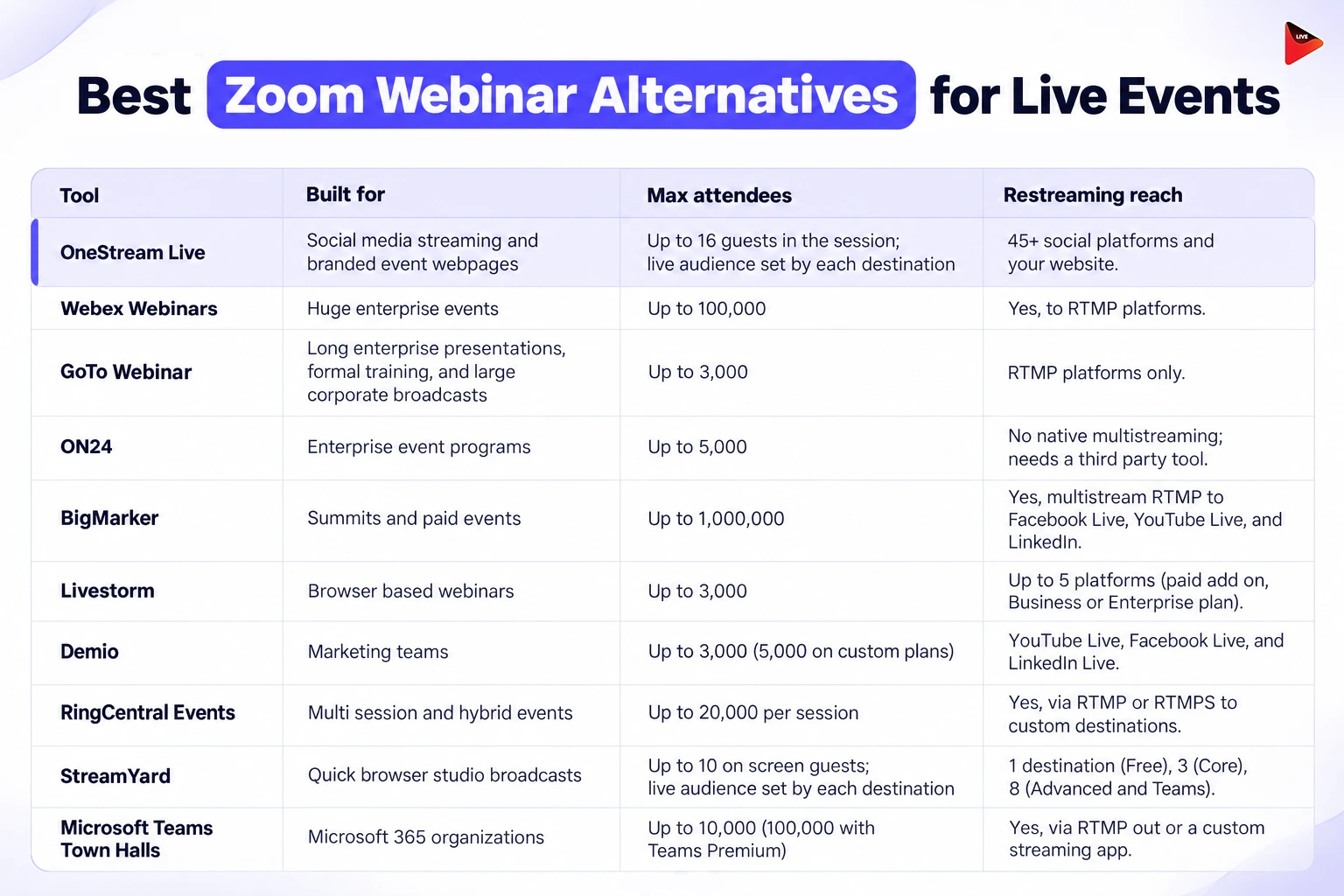
1. OneStream Live
OneStream Live is a cloud based live streaming platform that sends one live event to 45+ social platforms and your own website at the same time. You can run the whole show from its browser Studio, or plug in Zoom, OBS, or vMix and let OneStream Live handle the reach.
What it offers:
- Multistream webinars to up to 45+ destinations simultaneously, depending on your plan
- Broadcast to custom RTMP destinations and custom websites
- Host webinars in a browser based Studio without installing additional software
- Invite up to 16 guests to join your Studio session
- Stream live to social platforms, your website, or a custom website, with audience capacity determined by the streaming destination
- Connect external encoders such as OBS Studio, Zoom, vMix, XSplit, and Wirecast
- Stream using RTMP, RTMPS, SRT, and WHIP compatible workflows
- Broadcast prerecorded webinars as live streams
- Run prerecorded streams for up to 20 hours per stream on eligible plans
- Create playlists to broadcast multiple videos sequentially
- Loop videos for continuous streaming
- Run 24/7 YouTube livestreams with an eligible plan or add on
- Use portrait and landscape streaming formats for different platforms
- Create custom streaming websites with branded layouts, fonts, event schedules, and stream details
- Embed live streams on websites, blogs, portals, and other supported web pages
- Customize streams with logos, overlays, banners, tickers, backgrounds, intros, and outros
- Share your screen, images, videos, audio, and uploaded media during webinars
- Use a built in teleprompter to deliver presentations smoothly
- Connect up to four cameras for multicamera production on eligible plans
- Create custom invitation links for Studio guests
- Record Studio sessions and download recordings on eligible plans
- Upload SRT subtitle files for prerecorded streams
- Monitor and respond to comments from multiple streaming platforms through unified chat management
- Add product images, descriptions, prices, and QR codes to support live selling
- Use backup stream keys for redundant streaming connections on eligible plans
Pro Tips
Already on Webex, GoTo, or Zoom? You don't have to switch. Send your session into OneStream Live with External Encoder Streaming, and live stream it on 45+ social platforms and websites at once.
2. Webex Webinars
Webex Webinars is Cisco's platform for single session webinars and large online broadcasts. It's built for big companies that need to reach huge, global audiences without losing control of the room.
What it offers:
- Accommodate up to 100,000 attendees and 1,000 video panelists
- Engage attendees with chat, reactions, polls, and Q&A
- Customize virtual speaker backgrounds to showcase your brand
- Create branded event landing pages with advanced customization options
- Stream in up to 1080p video resolution
- Facilitate real time networking between attendees
- Coordinate speakers and moderators in a private backstage space
- Use a production studio with professional AV production tools
- Ingest streams via RTMPS
- Pre record content and play it as if it were live
- Host multiple stages with simultaneous live sessions
- Choose from professional layouts and scenes for a polished look
- Generate AI powered event content, including text, images, and video snippets
- Turn recordings into text and video content using Zoom AI features
- Record sessions locally or in the cloud
- Track event performance with analytics and reporting
- Integrate with Eloqua, HubSpot, Marketo, Pardot, and Salesforce
- Support hybrid events with seamless hybrid capabilities
- Manage admin users, roles, and permissions
- Add professional event services for an additional fee
3. GoTo Webinar
GoTo Webinar is GoTo's webinar platform. It's built for long enterprise presentations, formal training sessions, and large corporate broadcasts, and it hosts over 2.8 million events a year.
What it offers:
- Host webinars with up to 500 participants on Reach and 1,000 on Elevate
- Stream live to unlimited attendees with the Complete plan
- Engage attendees with polls, live Q&A, handouts, and breakout rooms
- Track webinar performance with reporting and analytics
- Run prerecorded webinars as live events with simulive streaming
- Record webinars locally or in the cloud, depending on your plan
- Capture webinar content with AI generated summaries and transcripts
- Enable closed captioning for accessible webinar experiences
- Share videos and embed video content into your webinars
- Edit and repurpose webinar recordings with built in video tools
- Create branded event pages with custom URLs
- Integrate webinar workflows with other business tools
- Create dedicated channel pages to promote events, with 10 pages on Reach and 30 on Elevate
- Use GoTo Stage to share and promote events on eligible plans
4. ON24
ON24 is an enterprise webinar and digital engagement platform for B2B sales and marketing teams. It's built to turn every event into data your sales team can act on.
What it offers:
- Host live, prerecorded, simulive, and on demand webinars
- Personalize webinar experiences with tailored content, messaging, and calls to action
- Engage attendees with live Q&A, polls, surveys, chat, and downloadable resources
- Create branded webinar consoles with customizable layouts, colors, and backgrounds
- Build registration pages with a drag and drop registration builder
- Create targeted email campaigns for webinar promotions and follow ups
- Set up dedicated speaker green rooms and production studios
- Track audience engagement with detailed webcast analytics and interaction based insights
- Generate AI powered transcripts, blogs, highlights, and video clips
- Repurpose webinar recordings into social media content
- Host virtual events with breakout sessions, networking lounges, and audience polls
- Run virtual conferences with interactive and gamified sessions
- Access 24/7 customer support for webinar operations
5. BigMarker
BigMarker is a browser based webinar and virtual event platform that also runs hybrid events. It's built for summits, conferences, and paid events, and it handles some of the biggest audiences on this list.
What it offers:
- Host webinars with up to 1,000 live attendees on Basic, 10,000 on Enterprise, and 500,000 on Enterprise+
- Share up to 64 webcams simultaneously, depending on your plan
- Manage webinar production with up to six host licenses
- Broadcast live and on demand webinars
- Stream directly to Facebook and YouTube
- Engage audiences with live chat, polls, Q&A, and downloadable handouts
- Share screens, files, and videos during webinars
- Record sessions for on demand viewing
- Track event performance with analytics and reporting
- Run simulive webinars by broadcasting prerecorded content as live
- Host evergreen webinars and automated 24/7 webinars
- Customize registration pages with landing page templates, custom fields, and UTM tracking
- Embed registration forms directly into your website
- Enable breakout rooms for interactive sessions
- Support attendee collaboration with co browsing
- Customize webinar pages and emails with white labeled domains, custom templates, and fonts
- Enable live closed captioning, real time translation, and multilingual experiences
- Deliver immersive experiences with 360 degree streaming
- Embed webinar rooms into websites and applications
6. Livestorm
Livestorm is a browser based platform for webinars, meetings, and virtual events. Nobody has to download anything to join, which makes it easy for marketing teams to run events often.
What it offers:
- Accommodate up to 3,000 live attendees per event
- Host recorded events lasting 4 to 12 hours, depending on your plan
- Display up to 25 simultaneous speaker video streams in the event room
- Customize event rooms with branded logos, background images, and colors
- Organize multi session events with a single joining link
- Automate event start and end times or play prerecorded videos for live like experiences
- Create on demand events that attendees can watch anytime
- Stream webinars directly on your website or internal portal using an embedded iFrame
- Display upcoming and past events on an embeddable company page
- Engage attendees with live chat, private messaging, emoji reactions, and GIFs
- Share PDFs, prerecorded videos, YouTube videos, and downloadable files
- Enable live captions and real time translated subtitles on eligible plans
- Manage moderators who can remove attendees and unwanted messages or questions
- Offer professional webinar experiences with customizable branding, interactive tools, automated communications, and detailed audience insights
7. Demio
Demio is a browser based webinar platform built for marketing teams. It focuses on simple setup and turning attendees into leads.
What it offers:
- Host live webinars, automated webinars, and on demand events
- Accommodate up to 3,000 attendees, depending on your plan
- Run webinar sessions lasting up to 10 hours on eligible plans
- Host up to 10 people on stage simultaneously with the Premium plan
- Engage attendees with live chat, polls, featured actions, and downloadable handouts
- Track attendee engagement with built in analytics
- Automate webinars using prerecorded content
- Customize webinar rooms and emails with your branding
- Add custom registration form fields to collect attendee information
- Stream webinars in 1080p resolution on eligible plans
- Restream webinars to additional platforms on eligible plans
- Enable live captions for accessible webinar experiences
- Use custom domains for branded webinar experiences on eligible plans
- Generate automatic transcripts for recordings and automated videos
- Get priority support and a dedicated customer success manager with Premium
- Choose attendee room capacities of 50, 150, 500, 1,000, or 3,000, depending on your plan and configuration
8. RingCentral Events
RingCentral Events, formerly Hopin, is an event platform for webinars and virtual, hybrid, and onsite events. Think of it as a full virtual venue for conferences, summits, and trade shows.
What it offers:
- Include up to 10 organizers on eligible plans, with additional organizer based plans available
- Support up to 1,000 registrations on select plans and unlimited registrations on eligible paid plans
- Host unlimited events on eligible plans, subject to plan limits
- Host webinars, virtual, hybrid, and onsite events, with some plans limited to webinars and virtual events
- Engage attendees with polls, surveys, Q&A, and chat
- Enable emoji reactions, confetti, and raise hand functionality
- Provide AI generated closed captions and caption translations
- Livestream events and run simulive sessions using prerecorded content
- Use custom domains for branded event experiences
- Produce webinars using a built in production studio
- Connect external streaming encoders through RTMP
- Facilitate smaller group discussions with breakout rooms
- Record events and make them available on demand
- Enable self service attendee check in through kiosk mode
- Download analytics reports in CSV format
9. StreamYard
StreamYard is a browser based live streaming and recording studio, popular with creators and podcasters. Paid plans also add webinar pages with registration.
What it offers:
- Stream in high quality with essential studio features and a browser based production setup
- Add up to 6 on screen participants on the Free plan, 10 on Core, and 15 backstage participants on Advanced
- Multistream to 3 destinations with Core and 8 destinations with Advanced
- Stream in Full HD 1080p with Core and Advanced
- Record locally for up to 2 hours per month on the Free plan
- Record live streams automatically for later viewing
- Stream prerecorded videos for up to 2 hours with Core and 4 hours with Advanced
- Host On Air webinars with up to 100 viewers on Advanced
- Record locally in 4K resolution with Advanced
- Customize streams with logos, overlays, video clips, backgrounds, and custom layouts
- Connect custom RTMP destinations for broader streaming reach
- Invite guests to stream to their own destinations with guest destinations
- Use extra cameras with Advanced for more flexible production
10. Microsoft Teams Town Halls
Teams Town Halls is the Microsoft Teams format for big one to many broadcasts, like company all hands meetings. It replaced Teams Live Events and is a natural fit if your company already runs on Microsoft 365.
What it offers:
- Host town hall events with up to 100,000 attendees with Teams Premium
- Support ultra low latency events for up to 20,000 attendees
- Present or attend events through Microsoft Teams Rooms on Windows and Android
- Support hybrid events through Microsoft Teams Rooms
- Let attendees join town halls and webinars through phone dial in
- Support NDI and RTMP input for advanced broadcast workflows
- Download event transcripts and access RTMP input content
- Use event templates and scheduling forms to simplify event setup
- Set up private green rooms before and after events
- Moderate Q&A sessions, including questions from anonymous attendees
- Enable private backstage chat for organizers, co organizers, and presenters
- Translate event language experiences with Teams Premium
- Block attendee email addresses when needed
- Provide on demand event recordings
- Enable streaming event chat and attendee reactions with Teams Premium
- Support Q&A for events with up to 20,000 attendees
- Allow attendees to raise their hands during sessions
- Enable live translated captions
- Allow external presenters to join through dedicated links
How to Reach a Bigger Live Audience Than Your Webinar Room
Most webinar alternatives still keep your event inside one room. To reach more people than that room holds, stream your session to the places your audience already hangs out, then give it a branded home page. A live event streaming platform like OneStream Live sits between your webinar tool and every channel your audience uses.
1
Open OneStream Live Encoder Streaming. From your OneStream Live dashboard, select Encoder Streaming.
2
Copy your streaming credentials. Copy the Server URL and Stream Key from OneStream Live.
3
Start your Zoom meeting. Open the Zoom desktop app and start your meeting.
4
Open Zoom's livestream settings. Click More → Livestream → Live on Custom Live Streaming Service.
5
Connect Zoom to OneStream Live. Enter the Server URL and Stream Key in Zoom's custom streaming service settings.
6
Go live. Click Go Live! Zoom will send your meeting to OneStream Live, where you can stream to 45+ social platforms and websites.
Read More: Multistream Your Zoom Meetings and Webinars For Wider Outreach
Webinar Platform Pricing Compared
Not all Zoom alternatives for webinars price their plans the same way. Some charge per host, others by audience size, and some bundle features into fixed plans. Compare the starting prices below, but check what each plan includes before choosing one.
| Tool | Pricinf | Free plan or trial |
|---|---|---|
| OneStream Live | Starts from $15 | Free Plan |
| Zoom Webinars | Starts from $83.33 | No |
| Webex Webinars | Starts from $68.75 | Free Plan |
| GoTo Webinar | Starts from $69 | Free trial |
| ON24 | Custom quote | Demo only |
| BigMarker | Custom quote | Free trial |
| Livestorm | Custom Quote | Free plan |
| Demio | Starts from $63 | Free trial |
| RingCentral Events | Starts from $119 | Free Trial |
| StreamYard | Starts from $44.99 | Free plan |
| Microsoft Teams Town Halls | Included in Microsoft 365; Teams Premium for larger events | Included with Microsoft 365 |
Conclusion: Choosing Your Zoom Webinar Alternative
The best Zoom alternatives for webinars each solve a different problem. Need a huge room? Webex Webinars and Teams Premium reach 100,000 attendees, and BigMarker reaches 1,000,000. Want people talking inside the room? Livestorm and Demio do that well. Want your event seen far beyond it? OneStream Live takes one session to 45+ destinations and your own branded page. Check the pricing model too, so a bigger turnout doesn't mean a bigger bill. Then pick your platform and go live everywhere your audience already is.
Frequently Asked Questions
What are the best Zoom alternatives for webinars?
The best Zoom alternatives for webinars depend on the event. Webex Webinars and ON24 suit large enterprise events, BigMarker suits summits and paid events, Demio suits marketing teams, and GoTo Webinar fits teams already using GoTo tools. For live events that need reach beyond the webinar room, a multistreaming platform like OneStream Live can broadcast the session to 45+ destinations.
Who is Zoom's biggest competitor?
For video meetings, Zoom's biggest competitors are Microsoft Teams, Google Meet, and Cisco Webex, which most comparisons rank at the top. For webinars and virtual events, the main rivals are Webex Webinars, GoTo Webinar, ON24, BigMarker, and Livestorm, each focusing on a different mix of scale, engagement, automation, and price.
Can attendees be seen in a Zoom webinar?
Not by default. Zoom Webinar attendees join in view only mode, so other people cannot see or hear them unless the host promotes them to panelist or allows them to talk. The exception is breakout rooms: attendees can start their video there, and it turns off again when they return to the main session.
Can you stream a Zoom webinar to YouTube or LinkedIn?
Yes. Zoom can live stream meetings, webinars, and events to YouTube Live, Facebook Live, LinkedIn Live, and custom RTMP destinations once live streaming is enabled on a paid account. Zoom's Live Streaming app reaches up to three platforms at once, so for more destinations, send the stream to a multistreaming platform such as OneStream Live, which reaches 45+ destinations.
Does Zoom Webinar have breakout rooms?
Yes. Zoom Webinars supports breakout rooms that split the audience into up to 200 separate sessions, but an account owner or admin must enable the feature first. Attendees can unmute and start video inside a breakout room, although some tools, such as polls, are unavailable there, so plan interactive moments for the main session.
OneStream Live is a cloud-based live streaming solution to create, schedule, and multistream professional-looking live streams across 45+ social media platforms and the web simultaneously. For content-related queries and feedback, write to us at [email protected]. You’re also welcome to Write for Us!