
Ever had a stream look flawless in rehearsal, then fall apart the moment you went live from venue WiFi? Frozen frames, choppy audio, a viewer count dropping by the second. Most of the time, your camera and encoder aren't to blame. The protocol carrying your video to the platform is, and that's where the RTMP vs SRT decision matters.
RTMP is the protocol almost every streaming platform expects. SRT is the newer option built for networks that drop packets. Both work well. They just solve different problems.
This guide compares SRT vs RTMP on latency, security, firewalls and platform support. You'll get honest pros and cons, a clear rule for when to switch, and the exact steps to set up either one in OneStream Live.
Key Takeaways:
- RTMP runs over TCP and works with almost every platform. SRT runs over UDP and recovers lost packets.
- Plain RTMP is unencrypted, so use RTMPS. SRT has AES encryption in the protocol itself.
- SRT's latency buffer is adjustable, with a 120 ms default in OBS.
- YouTube and most social platforms don't accept SRT ingest. They expect RTMP or RTMPS.
- Send SRT to OneStream Live, and it still reaches platforms that only accept RTMP.

What Are RTMP and SRT?
RTMP and SRT are ingest protocols. They carry your live video from your encoder to a server or platform, and that's where their job ends.
Neither one reaches your viewers directly. Platforms repackage your feed into HLS or MPEG-DASH for playback, because CDNs favor those formats for delivery. Want the bigger picture, including RTMPS and WHIP? Our guide to video streaming protocols covers the full lineup.
What is RTMP?
Real-Time Messaging Protocol (RTMP) was created by Macromedia to connect Flash Player with media servers, and Adobe took it over when it bought Macromedia. It runs over TCP, splits audio and video into small chunks and sends them down one persistent connection, usually on port 1935.
Flash is long gone, but RTMP stayed. It became the standard way encoders talk to platforms, and it still powers most custom RTMP streaming destinations today.
What is the SRT Protocol?
Secure Reliable Transport (SRT) is an open source protocol Haivision created to send safe, high quality video over unreliable networks like the public internet. Haivision first demonstrated SRT publicly at IBC 2013. In April 2017, it released SRT as open source and formed the SRT Alliance with Wowza.
SRT runs over UDP and adds its own recovery layer on top. Lost packets get requested again one by one, so a drop costs a quick retransmission instead of a frozen frame. The SRT streaming protocol also handles jitter and timing recovery, and it encrypts video with AES.
Broadcasters have noticed. SRT adoption rose from 47% in 2020 to 78% in 2026, based on a survey of more than 1,300 broadcast professionals, according to Haivision's 2026 Broadcast Transformation Report. So how do the two actually stack up?
SRT vs RTMP: Side by Side Comparison
SRT vs RTMP comes down to one question: how reliable is the network between your encoder and the platform? RTMP wins on compatibility. SRT wins on bad connections.
| Feature | RTMP | SRT |
|---|---|---|
| Transport | TCP | UDP with its own packet recovery |
| Default port | 1935 (443 is common for RTMPS) | Set by the receiving server |
| Latency control | No latency setting; delay depends on the network | Adjustable buffer (120 ms default in OBS) |
| Packet loss | Resends lost packets and holds later data until they arrive, so delay builds | Resends only lost packets inside the buffer |
| Encryption | None (RTMPS adds TLS) | AES, up to 256 bit keys |
| Firewalls | Port 1935 is often blocked on restricted networks | Needs UDP open; caller and listener modes help |
| Platform support | Almost every platform and encoder | OBS, pro encoders and media servers; few social platforms |
| Best for | Stable wired connections | WiFi, cellular and long distance links |
RTMP Latency vs SRT Latency
On a clean connection, RTMP latency at the ingest stage stays low, and most of the delay your audience notices comes from the playback side. Segment based delivery like HLS adds seconds on its own, which our breakdown of RTMP vs HLS vs WebRTC explains in detail.
The trouble starts when packets drop. TCP delivers data strictly in order, so one lost packet holds up everything behind it until it's resent. Delay piles up, and on a weak connection the stream stutters or disconnects.
The SRT protocol handles this differently. You set a latency buffer, and SRT uses that window to recover lost packets before playback. OBS uses 120 ms by default. Haivision's rule of thumb for a fairly good connection is four times your round trip time, so a 50 ms ping means a 200 ms buffer.
Security: Who Can See Your Stream?
Plain RTMP sends your video and stream key unencrypted, so anyone on the same network path can read them. RTMPS wraps the same protocol in TLS and closes that gap.
SRT builds encryption into the protocol itself. Set the same passphrase on both ends, and the stream travels encrypted with AES, with no extra layer to add.
SRT Streaming on Firewalls and Unstable Networks
Locked down networks at offices, schools and hotels often block RTMP's port 1935, which shows up as a "failed to connect" error. RTMPS on port 443 usually gets through.
SRT streaming needs the network to allow UDP traffic. In return, its caller and listener modes let you choose which side opens the connection, which helps behind strict firewalls. SRT can recover from packet loss of up to around 15%, according to OBS's SRT streaming guide, conditions that would leave an RTMP stream stuttering.
Pros and Cons of SRT and RTMP
Neither protocol is "better" across the board. Each one trades something for something else, and knowing the tradeoffs keeps you from switching for the wrong reason.
SRT: Pros and Cons
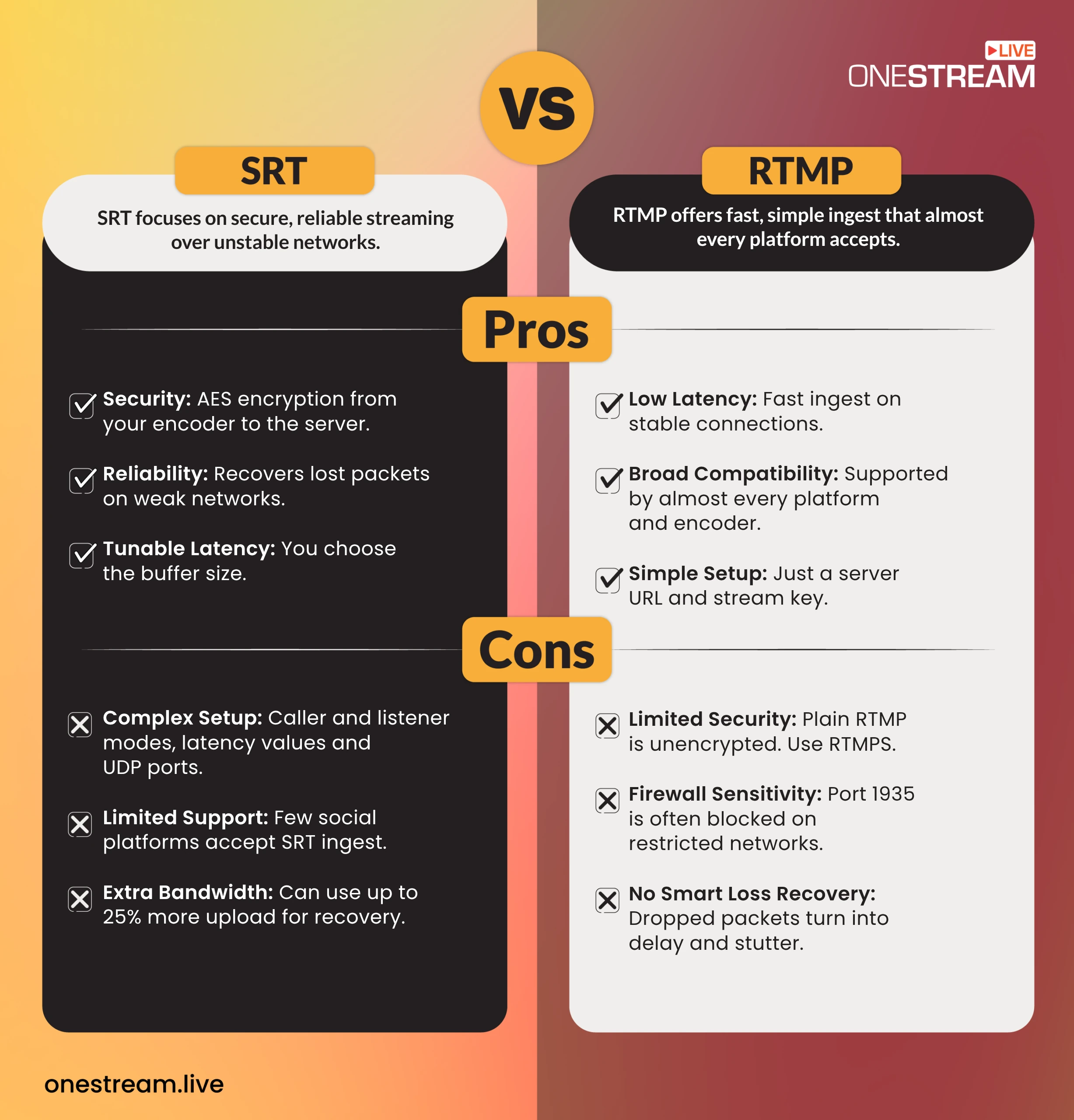
SRT stands out for security and reliability, which makes it a favorite for sensitive content and remote contribution.
Pros:
- Security: AES encryption protects your content on the way from your encoder to the server.
- Reliability: Packet recovery keeps playback clean through packet loss, jitter and bandwidth dips.
- Tunable latency: You choose the buffer, from the 120 ms OBS default up to several seconds for cellular links.
Cons:
- More complex setup: Caller and listener modes, latency values and UDP ports feel technical if you're new to streaming protocols.
- Limited platform support: Most social platforms still expect RTMP or RTMPS. YouTube's supported ingestion protocols are RTMP, RTMPS, HLS and DASH, with no SRT, per its ingestion protocol comparison.
- Bandwidth headroom: Retransmissions need spare upload capacity. By default, SRT can use up to 25% more than your stream’s bitrate to recover lost packets, per Haivision’s bandwidth overhead guide, so a 4,000 Kbps stream can use up to 5,000 Kbps.
RTMP: Pros and Cons
RTMP delivers fast, simple ingest, which still makes it the starting point for most creators.
Pros:
- Low delay on stable connections: Quick enough for live chat, gaming and interactive shows when your upload is clean.
- Broad compatibility: Almost every encoder and streaming platform supports it.
- Simple setup: Paste a server URL and stream key into your encoder, and you're live.
Cons:
- Limited security: Plain RTMP is unencrypted. Switch to RTMPS whenever the platform offers it.
- Firewall sensitivity: Blocked ports lead to connection failures on restricted networks.
- No smart loss recovery: On lossy networks, in order delivery turns dropped packets into delay, stutter or disconnects.
Why is RTMP Still Used?
RTMP is still used because almost every encoder outputs it and almost every major platform accepts it for ingest. Its specification has been open since 2009, so anyone can build on it, and RTMPS fixes its biggest weakness: encryption. On a stable wired connection, RTMP simply works, with nothing extra to configure.
You may have read that RTMP is proprietary and carries licensing costs. That's outdated. Adobe published the RTMP specification in 2009 and gave developers and companies free and open access to it. RTMP isn't going anywhere soon, but SRT is now the smarter choice in a growing number of situations.
When to Use SRT or RTMP
Your network decides the RTMP vs SRT question more than anything else. Use these quick rules to choose.
When to Use SRT
Pick SRT when your connection is the weak link.
- Venue or hotel WiFi: Shared networks drop packets, and SRT recovers them before viewers notice.
- Cellular hotspots: Mobile connections jump around, so a bigger SRT buffer absorbs the swings.
- Long distance contribution: Sending a feed across continents adds round trip time, which SRT is built to handle.
- Sensitive content: Internal town halls or paid events benefit from encryption in the protocol itself.
When to Stick with RTMP (or RTMPS)
Stay with RTMP when your setup is simple and stable.
- Wired home studio: A stable connection rarely needs packet recovery.
- Platform only accepts RTMP: Going straight to a platform means using what it supports.
- Older encoders: Some hardware and software only output RTMP.
- Fast setup: A server URL and stream key get you live in minutes.
Which Encoders Support RTMP and SRT?
Almost every encoder outputs RTMP. SRT support is narrower but growing. Among SRT streaming software, OBS Studio has supported SRT output since version 25.0, open source tools like FFmpeg and VLC support it, and hardware encoders such as Haivision's Makito X support it too.
For OBS SRT streaming, you don't need a plugin. If your encoder's output menu only shows RTMP options, use RTMPS where you can. New to encoders? Start with our beginner's guide to external encoder streaming.
How to Stream with SRT or RTMP on OneStream Live
OneStream Live's Encoder Streaming accepts RTMP, RTMPS, SRT and WHIP. You pick the protocol that suits your connection, and your stream still goes to the destinations you choose from 45+ integrations.
Do You Need Your Own SRT Streaming Server?
Not for multistreaming. An SRT stream needs a receiver on the other end, and OneStream Live plays that role. It takes in your SRT stream and sends it on to every destination you choose, including platforms that only accept RTMP or RTMPS. In other words, it handles the SRT to RTMP step for you.
Here's how to set it up:
1
Open Your Stream Key Settings
Log in to your OneStream Live account and go to your dashboard. Click Encoder Streaming and select a stream key. Then select Stream Keys from the right-hand sidebar.
2
Choose Your Protocol
Click Advanced Settings, open the Protocol dropdown and select SRT, RTMPS, RTMP or WHIP. Click Update & Continue to save your choice.
3
Copy the New Server URL
Your Server URL updates automatically based on the protocol you choose. Copy the new URL before you go live, because your encoder needs the updated one.
4
Set Up Your Encoder
Open your encoder’s stream settings and paste the connection details OneStream Live shows for your chosen protocol into the matching fields. Save your settings.
5
Pick Destinations and Go Live
Select your destinations in OneStream Live, then start streaming from your encoder.
Pro Tips
Want extra insurance? Use OneStream Live's backup stream key alongside your primary feed. If your primary stream disconnects, the backup takes over automatically.
RTMP or SRT? Match the Protocol to Your Network
The RTMP vs SRT choice isn't about which protocol is newer. It's about the network you're streaming over.
If you stream from a stable wired setup, RTMPS gives you encryption, wide compatibility and the simplest setup. If you stream from venue WiFi, a cellular hotspot or across long distances, SRT's packet recovery and adjustable buffer keep your stream clean when RTMP would stall.
The best part? You don't have to pick a protocol based on where your audience watches. Send whichever one fits your connection to OneStream Live, and it delivers your stream to YouTube, Facebook, LinkedIn and the other destinations you choose from 45+ integrations.
Frequently Asked Questions
Is SRT better quality than RTMP?
SRT isn't better quality on its own, because your encoder's codec and bitrate set the picture quality. What SRT does is protect that quality on weak networks by resending lost packets within its latency buffer. On a stable wired connection, RTMP and SRT streams at the same bitrate look the same.
Does YouTube accept SRT?
No. YouTube's ingestion guide lists RTMP, RTMPS, HLS and DASH, but not SRT. To keep SRT's packet recovery for the first leg of your stream, send SRT to OneStream Live. It receives your feed and sends it on to YouTube and the other destinations you choose.
Does OBS support SRT streaming?
Yes. OBS Studio supports SRT from version 25.0 onward. Open Settings, then Stream, choose Custom as the service and paste your SRT server URL. OBS doesn’t use the Stream Key field for SRT, so you can leave it empty.
What latency should I set for SRT?
Haivision's rule of thumb for a fairly good connection is four times your round trip time to the server, so a 50 ms ping means about 200 ms. OBS advises at least 2.5 times your round trip time. On cellular or long distance links, go higher, since a larger buffer gives SRT more time to recover lost packets.
Should beginners use RTMP or SRT?
Most beginners should start with RTMPS. Almost every major platform and encoder supports it, setup takes only a server URL and stream key, and it encrypts your stream. Switch to SRT once you stream over WiFi, cellular or long distances and start seeing drops or stutter.
OneStream Live is a cloud-based live streaming solution to create, schedule, and multistream professional-looking live streams across 45+ social media platforms and the web simultaneously. For content-related queries and feedback, write to us at [email protected]. If you have a story to share about your live streaming experience with OneStream Live, we would be glad to feature it. You're also welcome to Write for Us!