
Trends on TikTok come and go at breakneck speed, and what’s trending on TikTok today might be cringe by the weekend. In this TikTok trend discovery guide, we’ll skip the generic advice and dive into actionable hacks for live streamers.
Because many TikTok micro-trends now peak (and flame out) within 48 hours, fueled by an endless stream of content (TikTok boasts ~1.6 billion users and 16,000 video uploads per minute). If you’re a creator trying to ride the wave, you need strategies to find TikTok trends before they fizzle.
Below, we’ll explore how to spot rising topics early, forecast TikTok’s trending hashtags for 2025, brainstorm engaging TikTok Live ideas, and turn those discoveries into multi-platform gold using OneStream Live. Let’s jump into this discovery guide to keep you ahead of the curve.

- Use TikTok Creative Center to spot rising trends early.
- Track growth rate, not view count, to find real momentum.
- Study trending creators to decode emerging formats.
- Niche identity-driven hashtags will dominate.
- Mix broad, niche, trending, and branded hashtags for discovery.
- Go live with reactive, interactive formats that invite participation.
- Behind-the-scenes and real-time challenges boost watch time.
- Turn trend discoveries into multi-platform streams with OneStream Live.
- Use portrait multistreaming to hit TikTok, Instagram, and YouTube at once.
- Stream once, reach everywhere—don’t trap trends on a single platform.
How to Start a TikTok Trend Discovery
Let’s get tactical. Most streamers fumble around the Discover tab like it’s a slot machine. That’s inefficient. Worse, it’s sad.
The real work happens inside TikTok’s Creative Center, its own intelligence hub for trend-hunting. This isn’t buried in a submenu. This is where the data lives. Here’s how to actually use it:
Step 1: Go to Trend Discovery
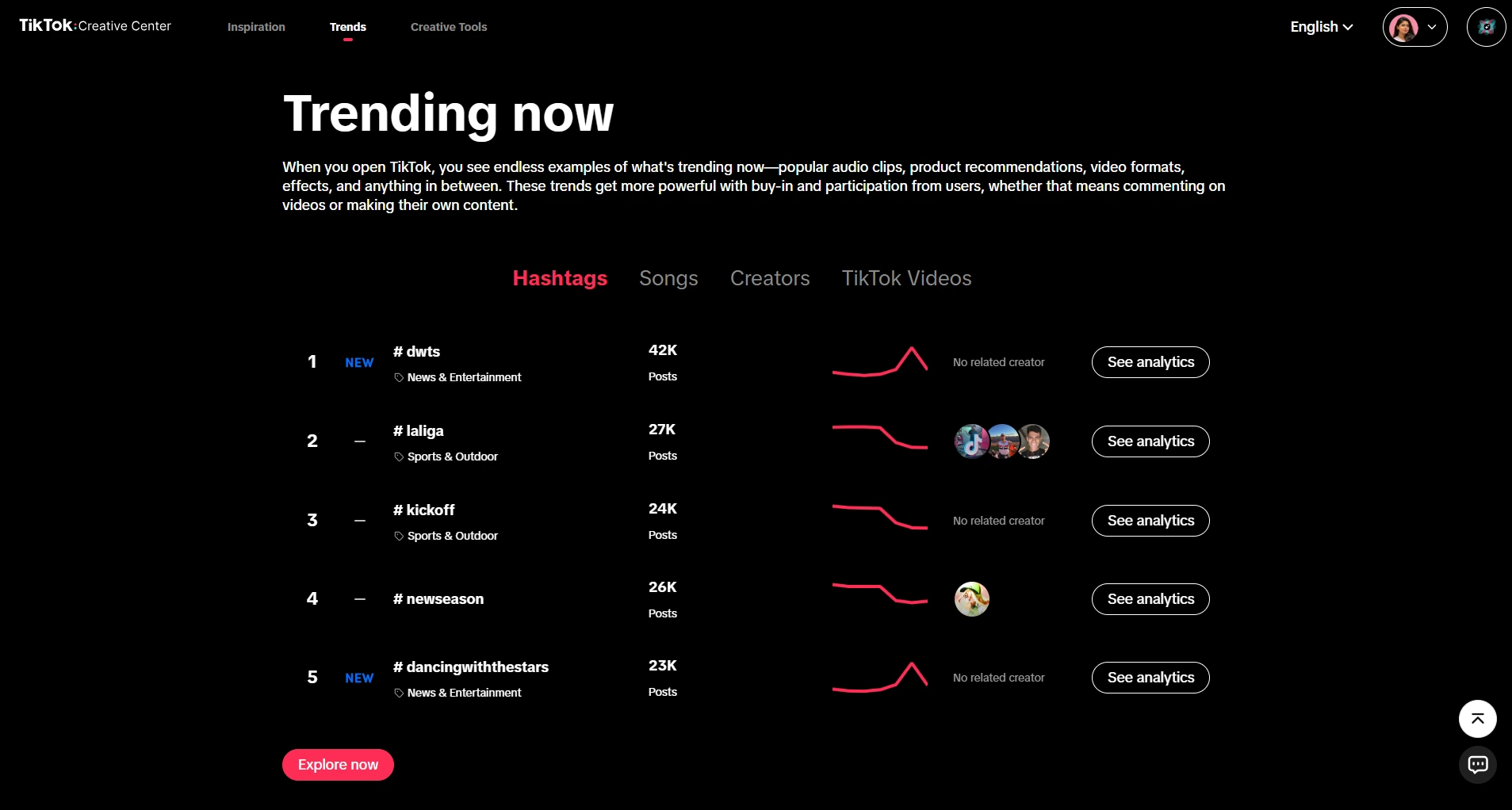
Navigate to the “Trending” or “Inspiration” section. You’re looking for three data sets: TikTok search trends, hashtags, and audio. This is where TikTok shows you what’s actually gaining traction, not what it thinks you want to watch.
Step 2: Filter by Geography and Time Frame
This is the insider move nobody talks about. You can filter TikTok trends by country, region, and the past 7 or 30 days.
If you’re in the UK but obsessing over US trends, you’re chasing noise. Filter for your audience’s geography. Look at both 7-day and 30-day trends to spot emerging patterns versus already-saturated formats.
Step 3: Analyze Growth Rate, Not Just View Count
TikTok Creative Center shows you a growth trajectory. A hashtag with 10M views that plateaued three days ago is dead to you.
But a hashtag with 2M views climbing steeply? That’s gold. This is TikTok search trends in real time, where the algorithm telegraphs which content is accelerating.
Step 4: Cross-Reference Audio and Hashtags
Here’s where sophistication enters. A trending song by itself doesn’t mean much. But when you see that same song tagged across three different hashtag categories (Beauty, Comedy, and Lifestyle), it signals a format-agnostic trend. Those are the ones that travel. Those are the ones worth building around.
Inside the TikTok Creative Center’s Trends Overview, you’ll find which specific sounds, hashtags, and creators are climbing. TikTok actually provides engagement stats and not just views.
You can see average watch time, shares, and saves. Saves matter more than likes now. If people are saving content in a particular format, they find it useful or reusable. Copy that format. Stream it live. Profit.
Pro move: Bookmark the Creative Center. Check it on Monday mornings, Wednesday afternoons, and Friday nights. Trends have rhythms. Workdays have different content appetites than weekends. Know the cadence.
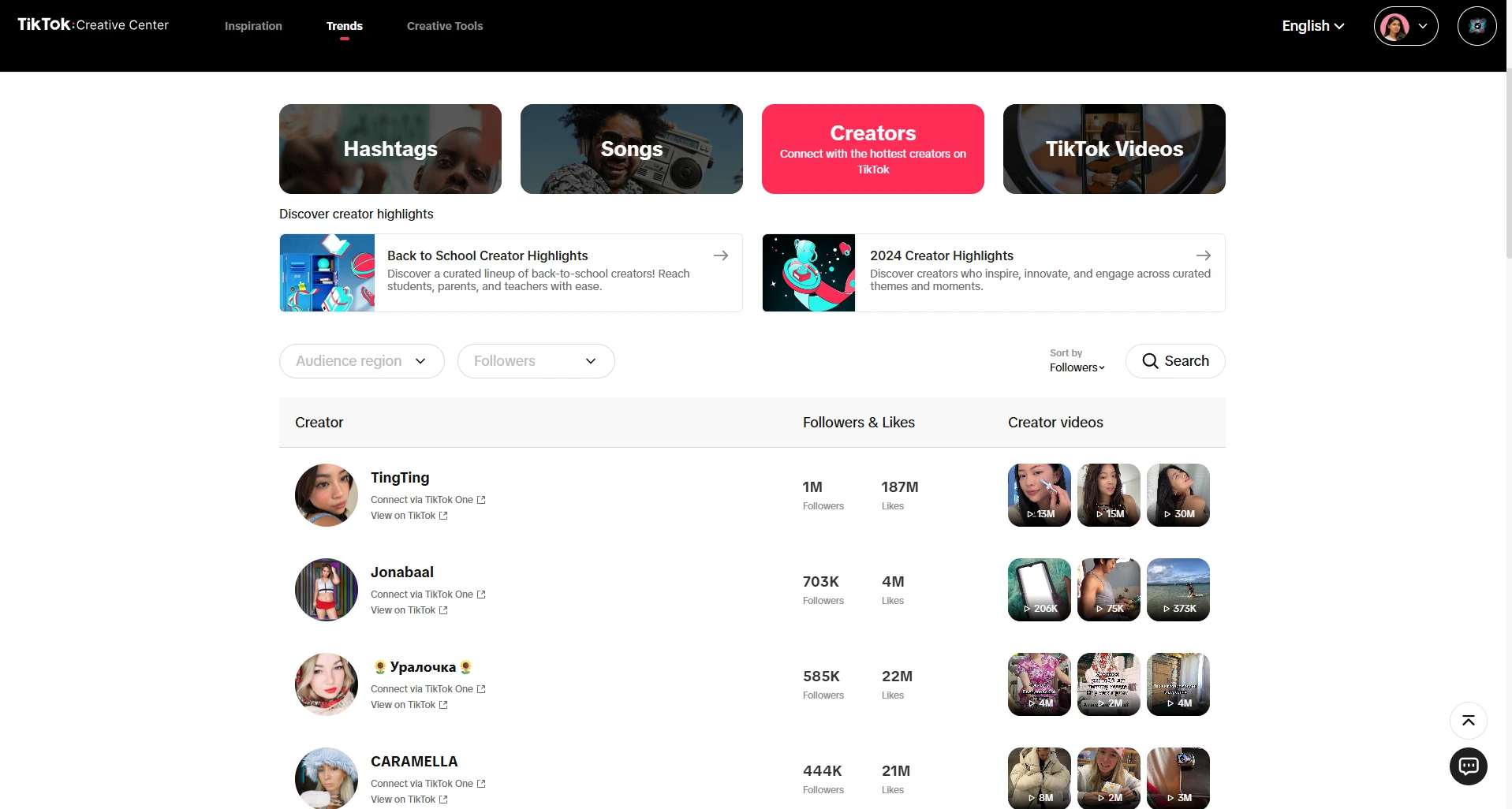
You can also browse the Trending Creators tab in the Creative Center. If certain creators in your niche are blowing up this week, study what format or topic they’re riding – these TikTok creator trends can hint at the next big thing. Often, top creators are early adopters of new sounds or challenges. By following their lead (with your own twist), you can latch onto trends at inception rather than chasing yesterday’s viral hit.
And of course, your own For You Page is a personalized trend detector. Scroll mindfully, and when you start seeing a pattern (the same soundtrack, joke format, or hashtag repeatedly), take note. Checking the FYP daily and the Discover hashtag banners can alert you to rising challenges or themes. Many creators who master TikTok trend discovery treat scrolling as research, not just entertainment.
A Forecast of TikTok's Trending Hashtags in 2025
So, what will be trending on TikTok in 2025? Instead of a static list of hashtags, let’s talk trajectory.
TikTok’s algorithm and culture are always evolving, but we can predict shifts based on data patterns, AI insights, and niche behaviors. The “Unicorn” keywords for 2025/2026 are not generic terms like #fyp (which is functionally useless for segmentation) but specific, high-intent markers of subcultures.
1. The Shift: Brand Fusion and Identity Osmosis
The “What’s Next 2025” report by TikTok identifies three massive cultural shifts: Brand Fusion, Identity Osmosis, and Creative Catalysts. These concepts define the hashtag ecosystem and provide the framework for understanding which tags will rise and which will fall.
i. Brand Fusion: The Death of the Solo Act
Hashtags are increasingly collaborative. Brand Fusion describes the dynamic where brands and creators merge identities to build trust. It is no longer about a brand shouting at a consumer; it is about a brand participating in the community.
- Prediction: We will see a rise in “Fusion Hashtags” like #KnorrXRecipe or #SamsungPartnerLive. These aren’t just ad disclosures because they are community signals that indicate high production value and exclusive content.
- Actionable Hashtags: #CoCreate and #BrandCollab. Streamers should use these when engaging in sponsored content to signal transparency. The audience appreciates the honesty and the implication that the creator is being supported.
ii. Identity Osmosis: The Niche is the Norm
Identity Osmosis refers to the blurring of lines between brand identity and user values. Users don’t just consume content; they absorb it into their persona. The brand becomes a badge of identity.
- The “Core” Suffix Evolution: The “-core” trend (Cottagecore, Goblincore) is evolving into highly specific “lived experience” tags. It’s not just an aesthetic; it’s a lifestyle.
- Forecasted Hashtags:
- #WabiSabiLife: Embracing imperfection. This is a direct counter-culture movement to the “clean girl aesthetic.” It values messiness, raw emotion, and unfiltered live streams. It celebrates the cracked mug, the unmade bed, and the stutter in speech.
- #DeluluIsTheSolulu: A playful embrace of “delusional” optimism. This tag dominates Gen Z conversations about career and romance. A live stream titled “Manifesting Millions: Delulu Hours” utilizes this tag perfectly to frame a mindset discussion.
- #GirlhoodUnfiltered: Moving beyond the pink aesthetic to raw discussions on pay transparency, debt, and corporate survival. This is “Identity Osmosis” in action—integrating real-world struggle into the content identity.
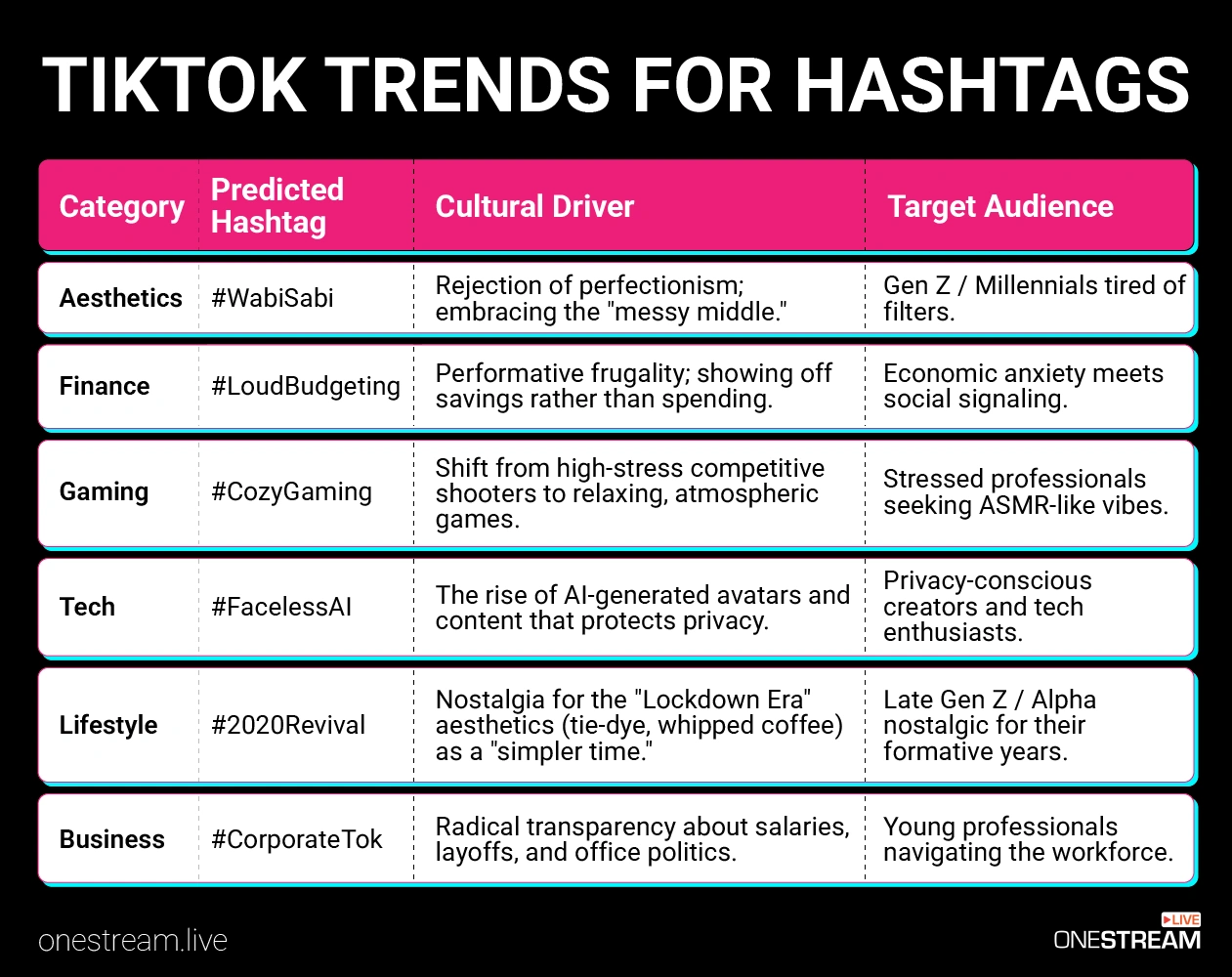
2. The “Unicorn” Strategy: Finding the Zero-Competition Tag
The “Unicorn” keyword is one that has high search volume but low content supply. In 2026, the predicted unicorn is #LiveShoppingHaul.
While “shopping” is saturated, the live component is still growing in Western markets. The algorithm is pushing shopping features hard, and creators who adopt the live format are being subsidized with traffic.
- The “Silent Review” Phenomenon: The #SilentReview trend (ASMR-style product reviews with no talking) is exploding. Translating this to live (e.g., #LiveSilentReview) creates a unique, hypnotic broadcast that stands out in a noisy feed. It forces the viewer to pay attention to the visual details and sound textures.
- The “Study With Me” Evolution: This moves to #BodyDoublingLive. It’s the same concept (working together) but rebranded with neurodivergent-friendly terminology (ADHD support), tapping into a highly engaged community that views the stream as a utility rather than entertainment.
3. Algorithm Signals: Information Gain in Hashtags
The algorithm in 2025/2026 prioritizes information gain. Using generic tags like #fyp penalizes content by grouping it with low-quality spam. Using specific, descriptive tags (e.g., #OBSSetupTutorial2026 instead of #Tech) signals to the AI exactly who the viewer should be.
- Strategic Tagging: The optimal mix is 3-5 tags: 1 Broad (#Gaming), 2 Niche (#MinecraftBuilds, #CozyGaming), 1 Trending (#WabiSabi), and 1 Branded/Specific (#MyStreamName). This triangulation helps the “Discovery Engine” index the content accurately, ensuring it reaches users who will actually engage, rather than just scroll past.
10 TikTok Live Ideas That Actually Engage
When it comes to going live on TikTok, creativity wins. Here are 10 TikTok live ideas (beyond the basic “chat with viewers”) that can genuinely engage your audience and make them stick around:
1. Live Q&A with Polls
Host an interactive Q&A session where viewers ask questions in chat, and use TikTok’s poll or quiz stickers to let them vote on what you answer or do next. This turns a basic Q&A into a fun, participatory event instead of a one-way monologue.
2. Reaction Streams (The Curator’s Play)
You’re not just reacting to random videos. You’re live-reacting to trending content, and your audience is reacting to your reaction.
Meta? Yes. Effective? Absolutely. When you go live to react to the week’s trending TikTok sounds or viral challenges, you’re creating real-time conversation. People will tune in because your take becomes part of their understanding of the trend.
Pro Tip: Use OneStream Live Studio’s Portrait Streaming mode to maintain TikTok’s vertical format and simultaneously broadcast to Instagram and YouTube. Your reaction content becomes native on each platform without reformatting. This is multistreaming viral content and having one stream with three audiences.
3. “Behind-the-Scenes” Stream
Take your audience backstage. If you’re a musician, stream your songwriting or rehearsal; if you’re a chef, go live while prepping a recipe (even if you’ll edit a polished video later).
“Watch me set up my streaming studio.” “Watch me cook this trend into content.” “Watch me recover from a failed live stream.”
These formats work because they’re unglamorous but present. People want to see the scaffolding, not just the finished building. Go live while you’re actually doing something. The format itself is the content.
4. Live Challenge or Trend Attempt
Pick a trending challenge. Go live and nail it. Or hilariously fail. Either way, here’s the magic: your community will invite others into the live stream to compete. Duets and stitches explode. Engagement becomes organic chaos.
Examples: dance challenges, makeup transformations, lip-sync races, and fitness trials. The format is secondary to the liveness. Live adds stakes. It’s not rehearsed. It’s not edited to perfection. That authenticity is intoxicating right now.
5. Real-Time Poll Game or Trivia
Turn your live into a game show. Prepare trivia questions (perhaps themed around your niche or even general TikTok culture) and let viewers answer via comments or TikTok’s Q&A feature. Acknowledge winners with shoutouts.
Alternatively, do a “choose your adventure” story where viewers vote on what you do next. For example, in a makeup live, let them pick the next product or style via poll. This keeps engagement high, as audiences feel in control of the content.
6. Live Tutorials or How-To Sessions
Teach something in real time. It could be as simple as a 10-minute craft made from trending DIY hacks, a quick fitness routine, or a mini cooking demo of a recipe that’s gone viral.
The key is to keep it interactive: take audience questions as you go (“Is almond milk okay instead of dairy here?” – “Sure, let’s try it!”). Viewers get value (they learn something) and feel involved in the process.
7. “Rate or Roast” User Submissions
Before the stream, ask your followers to send in something. It could be their TikTok videos, outfits, room setups, etc., that you’ll review live. Then do a live session where you (kindly) rate or react to each submission.
For example, “TikTok Setup Roast,” where you react to fans’ streaming setups or “Outfit Rate Live” if you’re in fashion. This not only engages those who submitted, but others love seeing the live critiques and reactions. It creates a community vibe, as viewers recognize each other’s submissions.
8. Collab Live (Guest Appearances)
Invite another TikToker or friend to join your live (TikTok allows multi-guest streams). Have a format ready, like maybe a debate, a collaborative jam session, or just a candid conversation about a trending topic.
For instance, two creators could discuss their takes on a viral trend or compete in a dual cooking challenge. Seeing two personalities interact live is often more dynamic than one, and each of you brings your audience along, boosting viewership.
9. Live Challenges with Viewers
Flip the script and let viewers challenge you. Perhaps you’re an artist, so have viewers comment random things to draw within a time limit.
Or if you’re a gamer, let them set weird rules (“play this level blindfolded”) for a round. A popular format is “chat controls my __ for an hour.” It could be your makeup, your music playlist, or even what tasks you do. This spontaneous format keeps everyone glued because they are effectively co-creating the content.
10. Themed “Show” or Series
Treat your TikTok Live like an episodic show. For example, every Friday you run “Feature Friday,” where you showcase 5 cool TikTok videos (or creators) that flew under the radar, giving your commentary.
Or a monthly “Trend Report Live” where you recap what trended that month and what you predict next (great chance to establish yourself as a knowledgeable creator). Having a recurring theme not only gives you content structure but also gives viewers something to look forward to regularly. Consistency can turn casual viewers into loyal fans.
Each of these ideas is practical, as they involve features TikTok already offers (polls, duets, and Q&A) or simple planning on your part. Importantly, they encourage real-time interaction.
Live streams that actually engage go beyond “just talking while people watch”; they make the audience part of the action. As a live streamer, don’t be afraid to mix these up, put your own twist on them, and most of all, respond to your viewers during the stream. That responsiveness is what turns a passive viewer into an active community member.
Broadcasting Viral TikTok Trends Across Every Platform
Here’s the efficiency problem: You find a killer trend. You stream it on TikTok. Beautiful. But your YouTube audience? Missed it. Your Instagram followers? No clue. Your Discord community? Watching someone else’s stream instead.
This is where OneStream Live comes into play as a multiplier.
What is OneStream Live, Exactly?
OneStream Live is a cloud-based platform that lets you stream once and broadcast to 45+ platforms simultaneously. TikTok, Instagram, Facebook, YouTube, LinkedIn, Twitch, Discord—you name it. No reformatting. No re-streaming. One stream, infinite reach.
The Trend Discovery to Multistream Pipeline
- You use TikTok Creative Center to spot a trending format (a sound, a hashtag, a challenge).
- You craft a TikTok live idea around it.
- You open OneStream Live Studio, set up your guests (up to 16), add your overlays, and go live.
- That single stream broadcasts to TikTok, Instagram (portrait mode works natively here too), YouTube, Facebook, and wherever else you’ve connected.

Final Takeaway
Finding TikTok trends before they peak, identifying the best TikTok trending hashtags for 2026, and building TikTok Live ideas that genuinely engage your audience are what you need for 2026. All this requires a system and discipline. It requires you to understand that TikTok’s algorithm isn’t a mystery. It’s a conversation. You’re just learning to listen.
The creators who’ve built a framework for TikTok trend discovery, understanding those trends, and broadcasting them across every platform where their audience lives will rule in 2026. So, start using tools like TikTok’s Creative Center and platforms like OneStream Live to multiply your effort and reach.
You now have that framework.
The rest is execution. Go forth and trend.

Frequently Asked Questions (FAQs)
Use the TikTok Creative Center’s Trend Discovery tool. Go to https://ads.tiktok.com/business/creativecenter/trends/home/pc/en. You’ll see videos ranked by view count, growth rate, and engagement. Filter by country and time frame (7 or 30 days).
Also, check the “Discover” tab in the app itself. Watch videos that are climbing, not plateauing. Save the ones that resonate. Analyze their use of audio, captions, and visuals.
Set a rhythm: Check the Creative Center 2-3 times per week. Follow 3-5 trend-tracking accounts that break down emerging formats weekly.
Join a Discord or Slack community of creators who share trend analysis. Most importantly: create your own check system. Trending content has a shelf life. You need to move faster than the algorithm decays the trend.
Use tools like TrendTok or TikToker to set alerts for emerging hashtags in your niche. Automation doesn’t replace intuition, but it buys you time.
Three methods:
(1) In-app: Tap the search icon, look for “Trending Now” section.
(2) Desktop: Go to TikTok Creative Center’s Trends overview.
(3) Third-party: Use TrendTok, BoardReader, or Google Trends filtered for TikTok.
The Creative Center is most reliable because it’s real-time TikTok data. The others provide broader context. Use all three.
There’s no universal “best time.” But here’s the workaround: Stream live during your audience’s active hours (check your analytics), and make sure to tie your stream to a trend that’s actively climbing in the Creative Center at that moment.
If a hashtag’s still rising, go live. If it’s plateauing, save it for content that’s less time-sensitive. Live streaming has one advantage: urgency. Use it.
The 2025 algorithm update categorizes content by micro-niche and shows it to highly targeted audiences. Using generic hashtags wastes real estate. Use 3-5 specific hashtags that describe your niche precisely.
If you’re in fitness, don’t use #fitness (too broad). Use #homegymsetup or #transformationchallenge (too specific to your audience). The algorithm will distribute your content to people who’ve engaged with similar micro-communities.
OneStream Live is a cloud-based live streaming solution to create, schedule, and multistream professional-looking live streams across 45+ social media platforms and the web simultaneously. For content-related queries and feedback, write to us at [email protected]. You’re also welcome to Write for Us!