Live video streaming has become a significant source of digital content on social media platforms and other channels. Accordingly, more people and brands rely on the best video streaming services to reach wider audiences, share more knowledge, and convert digital footprints into business results. But all this is only possible when you’re using the right streaming platform.
People spend an average of 100 minutes per day watching video content. So, maximizing video content is undoubtedly an intelligent strategy to have for a business or a brand. However, the challenge for some now remains how to live stream effectively. Even for those who have mastered the basics, there is still much more room for improvement.
Content creators now use live videos to conduct educational webinars, online concerts, training and workshops, work meetings and conferences, and a lot more. So if you’re someone looking to stream live, an important decision you have to make is what tool you will use to stream videos on your social media accounts and other digital platforms.
Using a good streaming platform allows for more features, control, and support, making it a wise choice after all. So, here are some considerations when choosing the best live streaming platforms:
1. The Type of Content you Intend to Stream
Before choosing from a streaming service list, it’s better to decide what content you intend to stream on your platform. Different types of streaming services suit specific needs.
Much of live content today has an educational aspect, but there has also been a branching out into other use cases. Amidst pandemic lockdowns, for example, there seemed to be an increase in the use of streaming services for virtual religious gatherings.
Some might use live streams to entertain people with music, poetry, dance, and other forms of entertainment. Then some use it to stream fitness-related content such as workouts and yoga sessions.
Read Blog on How to Make Your Online Fitness Program
Before you look at any platform, define your content. The what dictates the how. A panel discussion is impossible without a multi-guest feature. A product demo fails without clear screen sharing. A live music set is a disaster without pristine audio. Know what your content needs, then find the tool that delivers.
2. Supported Streaming Channels
Not all live streaming tools are created equal. First, they tend to support various streaming channels, and social media streaming is quite common.
Facebook Live streaming, for instance, seems to be the staple for most streaming services. But more content creators and brands are also now capitalizing on the viewership of other social media platforms, such as Instagram, LinkedIn, and TikTok, to name a few.
Before deciding which live streaming software to use, decide where you intend to go live and on how many platforms you need to stream at once. OneStream Live is among the best streaming platforms that allows you to go live on 45+ platforms at once.

3. Reliability
You might have fantastic content ideas for live streaming, but your entire effort will go to waste if your live streaming app has unreliable service. Before deciding, weigh the pros and cons of streaming services to find the one that suits your needs.
You should have a checklist before choosing a platform because the streaming market has changed so much. In 2025, the foundation of a reliable live streaming tool rests on two pillars:
- Ultra-low latency: This is what makes a Q&A feel like a conversation, not a time-delayed press conference.
- Adaptive bitrate streaming: This ensures your viewer on a weak mobile connection gets a clear stream, not a spinning buffer wheel.
This is precisely where you see the difference between a free-for-all tool and a professional service. At OneStream Live, for example, we engineered our infrastructure to tackle these problems head-on.
We automatically transcode streams and manage a global CDN to ensure your content reaches every viewer clearly, whether they’re on a fiber connection or a shaky 4G signal. A professional platform handles this technical load for you.
4. Monetization Models Supported
One of the best jobs without a degree is to become a content creator. Live videos can generate revenue from online content if your streaming platform has a built-in monetization model. Specifically, in 2025, creators have access to more powerful tools that make things easier than ever.
When evaluating a platform, here is the checklist you must use:
- Live Shopping: This isn’t just about showing a product. A true live shopping platform must provide the technical backend. Look for: Direct integrations with e-commerce platforms (like Shopify or WooCommerce), the ability to add clickable product links and overlays, and in-stream inventory management. If the platform can’t do this, it’s not a “live shopping” tool; it’s just a video feed.
- Pay-Per-View (PPV) & Gating: Don’t assume every platform can do this. If you plan to sell tickets to workshops or virtual events, you must check if the service offers a built-in paywall. If not, does it at least integrate smoothly with third-party ticketing and membership tools like Eventbrite, Memberful, or Patreon?
- Token-Gated Access: This is the most cutting-edge model. If this is your strategy, you need a highly specialized tool. You must ask if the platform has native support for wallet verification or, at minimum, a flexible API that lets your developer build a custom-gated integration.
5. User Experience
Almost every platform claims to be “easy to use.” This is a lazy, subjective, and ultimately meaningless marketing phrase.
A great User Experience (UX) is definitely about being easy, but it is more importantly about being clear. It’s about a design that anticipates your workflow and actively reduces stress. This is the difference between a tool that fights you and a tool that acts as your co-pilot.
For example, a common point of failure is the dashboard. Many platforms overwhelm you with settings, menus, and technical jargon, leaving you to hunt for the “Go Live” button.
A truly professional UX does the opposite. It guides you.
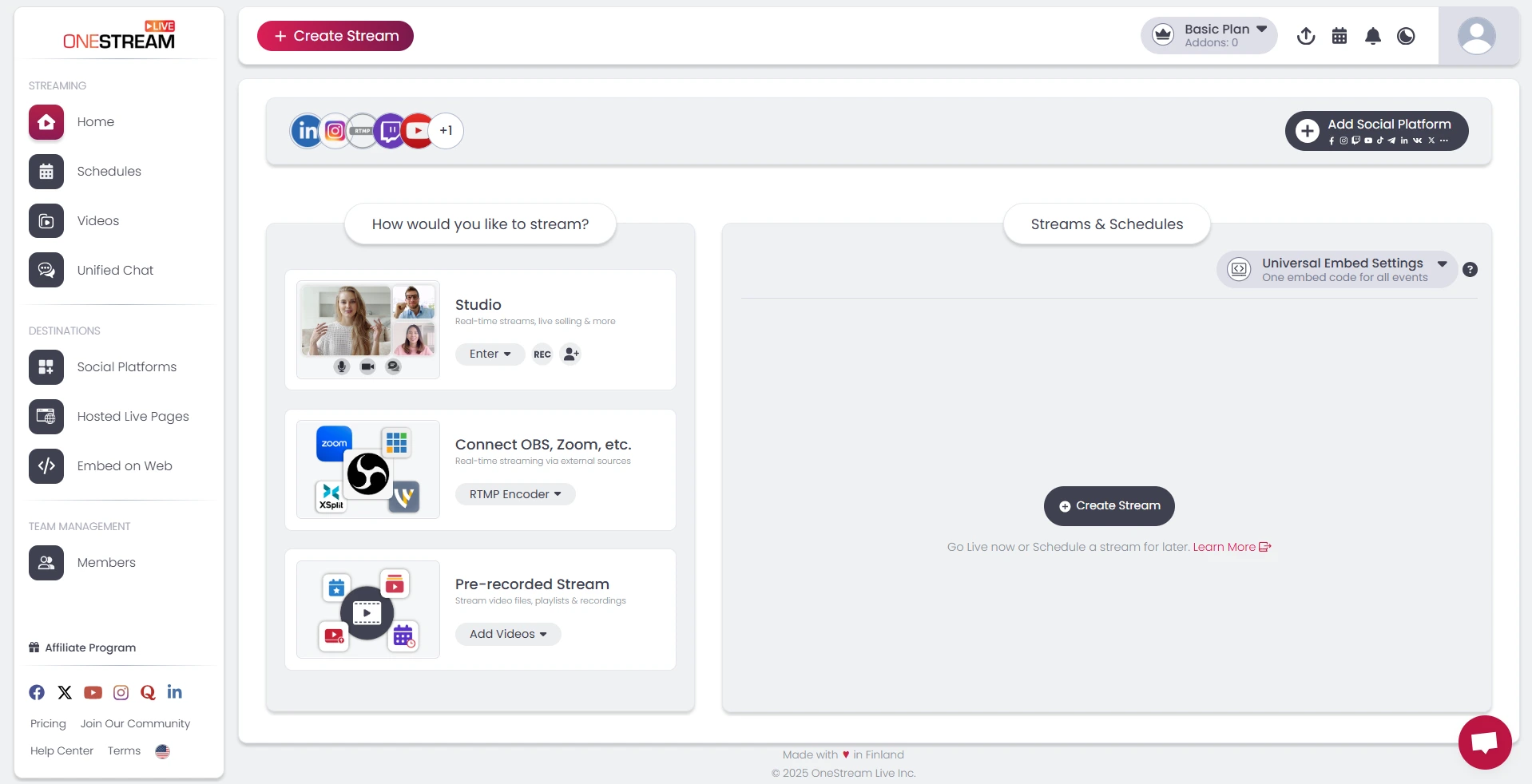
Look at the dashboard pictured above. This is a perfect example of experience-driven design. From our own first-hand experience, we know the biggest moment of anxiety for a creator is the “how do I even start?” question.
So, instead of a complex menu, the dashboard presents three distinct, logical paths:
- Studio: For going live directly from your browser, inviting guests, and selling products.
- Connect OBS, Zoom, etc.: For pro-level users who are bringing in an existing feed via RTMP.
- Pre-recorded Stream: For scheduling and streaming a pre-existing video file.
This is what you must look for when testing a platform. Don’t just “try it out.” Ask yourself: Does this design reduce my anxiety? Does it make my choices clear? Or does it make me hunt for answers?
6. Visual Elements
Visual elements can make or break your stream. But 2025 isn’t just about stream overlays; now you have elements that let viewers interact. From Q&A modules to native polls and real-time data overlays, all of these made streams comparatively more engaging.
Additionally, AI offers powerful features that further help you keep your audience engaged. You have real-time AI captions, smart noise reduction, and automatic highlight reels.
Many tools now support multi-format streaming & multi-camera streaming, allowing you to attract audiences from both mobile and desktop devices.
The Final Decision
There is no single best streaming platform that wins in every category. “Best” is a relative term, and any guide that claims otherwise is trying to sell you something. The best platform for live streaming is the one that perfectly matches your content’s specific technical demands.
For a musician, that’s a platform built for high-fidelity audio. For a global brand, it’s one with flawless, reliable multistreaming. For an educator, it’s a streaming service with a rock-solid, built-in paywall.
Your job isn’t to find the platform with the most features; it’s to find the one with the right features. Use the points in this guide as your checklist. Be skeptical, test the user experience, and ask hard questions about monetization.
Frequently Asked Questions (FAQs)
Free platforms, like streaming directly from a social media site, are basic. They often limit your features, have no multistreaming, and may watermark your content. Paid platforms are professional tools that provide essential features like multistreaming, pre-recorded stream scheduling, monetization tools, and reliable technical support.
The best platform for a beginner is one with a clean, intuitive user interface (UX). Look for a tool that offers pre-recorded stream scheduling, which lets you record and perfect your video first, and a simple browser-based “Studio” option. This allows you to go live without any complex software like OBS.
This depends entirely on your goal. If your goal is maximum reach and to grow your audience on multiple channels (like YouTube, Facebook, and LinkedIn) at the same time, multistreaming is the most powerful and efficient strategy. If you’re building a niche community on one platform (like Twitch), you might stick to a single stream.
A high-quality stream depends on two things: your internet and your platform. First, always use a wired (Ethernet) connection, not Wi-Fi, for a stable upload. Second, choose a platform that uses adaptive bitrate streaming, which automatically adjusts the stream quality to prevent buffering for your viewers on weaker connections.
Yes, absolutely. This is one of the most important factors. A gamer needs a platform built for low latency and Twitch integration. A business hosting a webinar needs reliable screen sharing and pay-per-view (PPV) options. A musician needs a platform that can handle high-fidelity audio. Your content’s specific needs must dictate your choice.
Look beyond the monthly sticker price. Check for hidden fees and limitations. Does the platform charge extra for “add-ons,” for more storage, for extra bandwidth, or for every new destination you add? A slightly more expensive plan that is all-inclusive is often a much better deal than a “cheap” plan that charges you for every single feature.
OneStream Live is a cloud-based live streaming solution to create, schedule, and multistream professional-looking live streams across 45+ social media platforms and the web simultaneously. For content-related queries and feedback, write to us at [email protected]. You’re also welcome to Write for Us!