A brand emails with a sponsorship proposal and asks for audience demographics, stream metrics, and pricing information. One streamer spends the next three hours scrambling to pull together screenshots and stats. Another replies within minutes with a polished streamer media kit that answers every question in a single document. Which creator looks easier to work with?
In sponsorships, perceived readiness matters as much as actual audience size. The lack of a prepared document costs deals, even for streamers with strong numbers. Brands want to move quickly, and creators who can provide clear information in a moment often have an advantage.
The creator economy is only becoming more competitive. The 2026 Influencer Marketing Benchmark Report from Influencer Marketing Hub has found that 87% of surveyed marketers are going to increase their influencer marketing budgets this year, producing more opportunities for creators who are ready to engage with brands.
A sponsorship media kit helps bridge the gap between the first contact and the finalized deal. It explains to potential sponsors what they might expect from a partnership, reducing any sort of delays during negotiations. This guide will walk you through the core of a media kit, with things it must include, tips on building and exporting, and how to use it effectively when reaching out to brands.
What is a Media Kit?
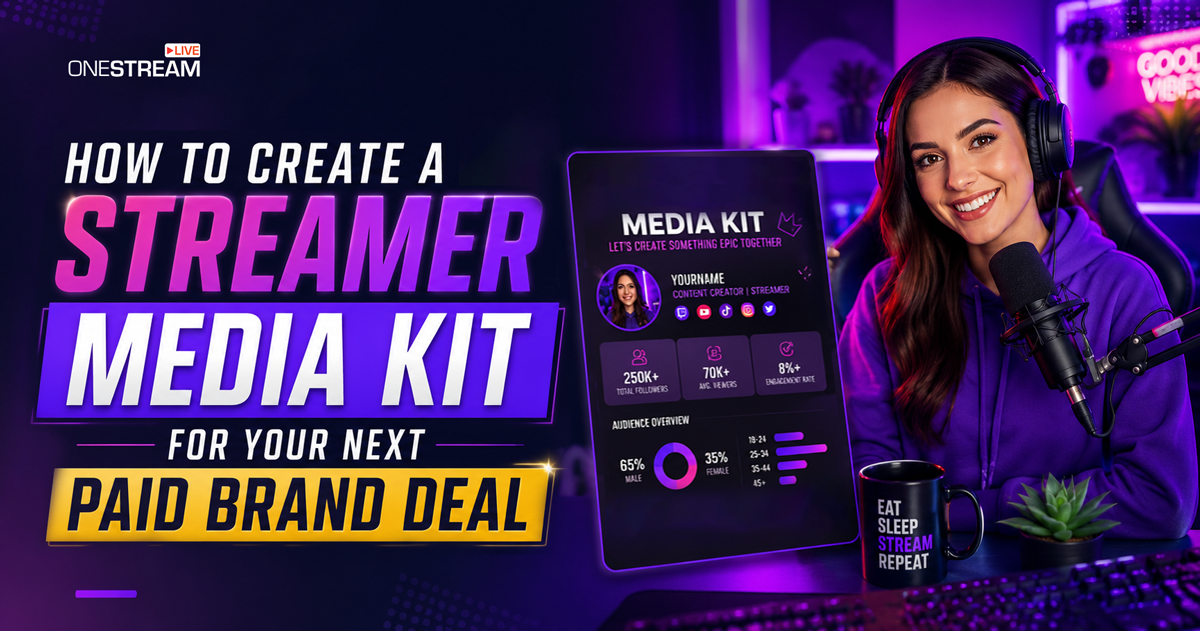
A media kit is a short, portable document that introduces a creator to potential marketing teams. covering who their audience is and which sponsorship formats are available. In the broader creator space, it is often called an influencer media kit or creator kit.
Think of it as a professional portfolio for brand partnerships. A pitch email proposes a specific collaboration; a media kit provides the data that backs it up. It helps brands understand what you offer and whether your audience fits their customer profile. Brands often save creator information for future campaigns. So even if a company isn’t ready to work with you today, your kit may stay on file for months.
Live streaming metrics look different from standard social media stats. That’s why keeping a streamer media kit is especially useful for live streamers. The document gives marketers a quick insight into performance indicators that may be unfamiliar outside the streaming industry.
What to Include in Your Streamer Media Kit
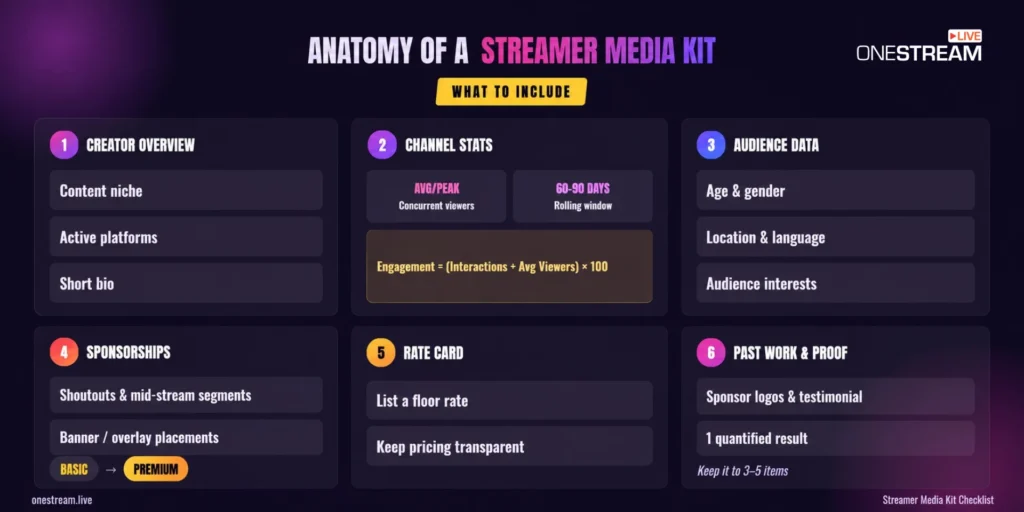
Every effective media kit begins with a concise creator overview. Present your content niche, active platforms, and a brief bio through a well-assembled document to provide brands with context before they review your statistics.
The next step is to focus on the information marketing teams care about most, like audience quality, sponsorship opportunities, and proof that you can achieve results.
Channel Stats and Audience Data
Many creators tend to center on follower counts, but sponsors are truly more interested in active session engagement. Live streaming metrics signal real audience investment in a brand:
- Average and peak concurrent viewers. These numbers reveal the share of people watching your streams at the same time. Average viewers are about consistency; peak viewers demonstrate your highest potential reach.
- Engagement rate. Calculating the engagement rate for streaming is done with the formula:
(Total Interactions ÷ Average Concurrent Viewers) × 100
Interactions may be based on chat messages, poll responses, reactions, etc. A strong rate indicates an active community that pays attention and participates. That often brings more value than a large audience with minimal to zero involvement.
The demographics factor is also important to consider. Brands typically want to see information on age groups, distribution by gender, geographic locations, languages, and audience interests. These insights help determine whether your viewers align with their target customers.
A rolling 60–90-day window usually gives brands a more realistic view of your current audience behavior than lifetime totals, which can be inflated by older spikes or outdated growth periods. For streamers using multistreaming tools such as OneStream Live, managing multiple destinations from one dashboard can also make it easier to organize performance data across platforms before pulling each platform’s native analytics into the kit.
Sponsorship Packages and Rate Card
Sponsors appreciate clarity. So outline the sponsorship formats you offer instead of forcing brands to guess what opportunities are available. The most common placements include:
- Pre-stream shoutouts that introduce a sponsor before the broadcast begins.
- Mid-stream dedicated segments where you discuss or demonstrate a product in greater detail.
- Banner or overlay placements that ensure consistent visibility throughout the stream.
Present pricing as a tiered structure rather than a single flat rate. For example, a basic package may cover a shoutout and overlay placement; a premium package may feature a dedicated segment and social media promotion.
This pricing approach is often called a rate card. Adding a rate card template to your kit reduces the need for back-and-forth and saves both parties time because pricing expectations are transparent from the start. A listed floor rate is always a winning strategy because it reads as more professional and helps filter out partnerships that aren’t a good fit for your budget.
Live Streams Sponsorship Deck
Powerfully pitch your brand and secure lucrative partnerships.
Past Brand Work and Social Proof
There is a big difference between creators with paid brand history and those who have none at all. That’s the reason the media kit shouldn’t be formulaic, based on the experience level.
If you’ve worked with brands before, include past sponsor logos and a short testimonial if available. A quantified result from at least one collaboration is preferred, with metrics such as clicks, conversions, engagement growth, or watch time improvements.
If you’re a beginner creator with no prior sponsorships, you may record yourself naturally mentioning a relevant product during a stream and note how you’d frame it as a shoutout or segment. Looking at influencer media kit examples from others in the same niche can help you get a vision of how to present results effectively. Keeping this section concise is the key to capturing the sponsor. Three to five items signal intentional curation without overwhelming the reader.
How to Make a Media Kit for Streamers
Building a professional media kit takes less effort than many creators assume. It comes down to two steps that are easy to complete if you know how the procedure goes: designing the document and preparing it for delivery.
Design a Layout That’s Easy to Review
Canva is the most practical starting point. It has pre-built media kit template designs, supports image embedding, and exports cleanly to PDF, which especially caters to streamers who aren’t skilled in design. Google Slides is a viable alternative for creators already in Google Workspace, with equivalent design solutions and PDF export options.
Remember that the main goal is to make information easy for a reviewing brand, so ensuring clarity takes over visual complexity here. Media kits perform best when they are three to six pages long. You have to provide visual consistency in fonts and colors, keep headings clear, and organize information in a logical order. A sponsor should be able to scan the document and understand your value within a few minutes to request the collaboration.
Starting with an existing template also eliminates much of the design guesswork. It allows you to pursue presenting strong data and sponsorship perks instead of worrying about the layout appeal.
Prepare the File for Email Delivery
Once you’ve handled the design, export the file as a PDF. An influencer media kit PDF keeps formatting intact across devices and email platforms, so that sponsors can see exactly what you intended.
File size is a critical consideration, too. Media kits with images and graphics can easily exceed standard email attachment limits, causing files to bounce or get caught by corporate security filters.
If the exported file is too large, you should compress the PDF before sending it to reach the brand’s inbox without triggering attachment size limits. Hosting the PDF on Google Drive and including a shareable link is a valid alternative when corporate email filters are a concern. Finally, choose a professional file name, for example:
YourName_StreamerMediaKit_2026.pdf
A clear naming convention makes it easier for marketing teams to locate your file later when reviewing potential creators.
How to Pitch Brands with Your Media Kit
Opening with a cold attachment is among the biggest mistakes creators make. Your first email should be a short, personalized pitch with a specific collaboration idea. The streamer media kit exists to support the conversation, not replace it, so landing it as the opening move might kill the deal at its root.
When a brand reaches out first, you should attach your kit to the reply the same day. This is where preparation pays off. A creator with a ready-to-send document keeps the interest moving forward, while one who still needs to pull assets risks losing the opportunity.
An effective PR email for influencers usually includes a neat introduction, a reason the brand aligns with your audience, and a simple collaboration proposal that describes how the partnership benefits both sides.
If you’re seeking target brands, prioritize companies already investing in streaming-related brand partnerships within your niche. Existing investment activity is a strong signal that a company understands creator marketing and may be open to additional integrations.
The follow-up strategy goes a long way, too. One follow-up about a week after the initial pitch, and a second follow-up a week after that, is typically enough. If you still don’t receive a response, it’s a sign to stop for improvements. That way, you could revisit the brand in the future with updated, more powerful results.
Conclusion
A streamer media kit isn’t just a thing to craft once and forget. It should evolve with your audience growth, content changes, and expanded sponsorship experience over time.
Many wait until they hit a major milestone to start a first draft, and these delays can cost them profitable deals. The truth is, opportunities often come unexpectedly, and creators who already have an excellent media kit are in the best position to earn high-value brand deals.
A polished media kit gets you in the door, but the numbers inside it need to keep growing. OneStream Live lets you multistream across every major platform from one dashboard, so every broadcast builds the kind of reach and engagement that makes brands say yes.

Streamer Media Kit FAQs
Keep it to three to six pages. That’s enough to cover your bio, stats, packages, and past work without overwhelming a brand. Marketing teams skim quickly, so anything longer risks burying your strongest information.
Yes. A media kit isn’t about size, it’s about looking prepared. Even with a modest audience, a clean kit that highlights strong engagement can make you more appealing to brands than a bigger creator with no kit at all.
A PDF is the safest choice because it keeps your formatting intact across devices and email platforms. If the file is too large or corporate filters are a concern, host it on Google Drive and share the link instead.
A pitch email proposes a specific collaboration, while a media kit backs it up with your audience data and sponsorship options. The email starts the conversation, and the kit gives brands the details they need to say yes.
It’s recommended to update a streamer media kit every three to six months. Other cases involve a significant increase in audience, launching a new platform, or completing a great brand campaign. Sending a kit with outdated stats can weaken credibility, making brands question the accuracy of the rest of the information in the document.
OneStream Live is a cloud-based live streaming solution to create, schedule, and multistream professional-looking live streams across 45+ social media platforms and the web simultaneously. For content-related queries and feedback, write to us at [email protected]. You’re also welcome to Write for Us!