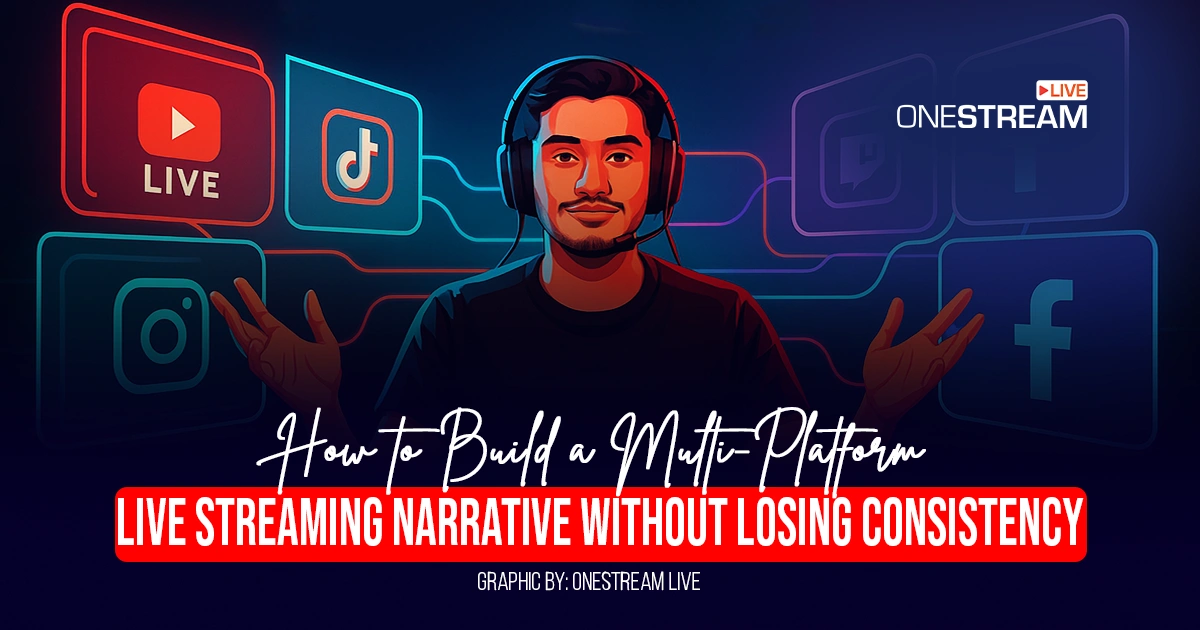

You did it. You’re doing multiplatform streaming to YouTube, Facebook, and Twitch all at once. Your viewer count is climbing, the notifications are rolling in, and you’re reaching more people than ever before. But as you glance at the different chat windows, a nagging feeling creeps in. The conversation on Twitch is all memes and inside jokes, your Facebook audience is asking about your business, and YouTube is a mix of both.
You’re everywhere, but your brand feels… scattered.
This is the hidden challenge of multistreaming. The technical part is easier than ever with OneStream Live.
However, the real work is ensuring that no matter where someone finds you, they get a consistent, recognizable, and compelling brand experience. It’s the difference between simply broadcasting and building a brand with a unified live streaming narrative.
This guide will show you how to do both. We’ll cover the essentials of how to go live on multiple platforms and then dive deep into the strategies that will turn your scattered broadcasts into a powerful, cohesive story that grows your audience and builds lasting loyalty.
- Building a unified streaming narrative is crucial for brand growth.
- A successful cross-platform content strategy involves assigning specific roles to each channel to tell a cohesive story.
- Effective multi-platform audience engagement relies on tools like a unified chat.
- To deliver a consistent brand messaging live stream, it's essential to use the same visual branding across all channels.
- Choosing the best multi streaming platform means prioritizing cloud-based services that offer stability, branding tools, and features that support your narrative goals.
What is Multiplatform Streaming?
Multistreaming is the process of broadcasting a single live video feed to multiple platforms at the same time. Instead of running separate streams for YouTube, LinkedIn, and your website, you send one feed to a cloud-based service like OneStream Live, which then distributes it everywhere for you.
The immediate benefits are obvious:
- Massive Reach: You find your audience where they already are, whether they prefer scrolling through Facebook, watching tutorials on YouTube, or hanging out on Twitch.
- Time Efficiency: You produce one piece of content and get triple (or more) the exposure.
- Platform Redundancy: If one platform goes down or experiences technical issues, your stream continues uninterrupted on all the others, protecting your audience and your message.
But simply showing up everywhere isn’t enough. Without a plan, you risk creating a fragmented experience that confuses your audience and dilutes your brand message. That’s why the most successful creators focus not just on the technical act of streaming to multiple platforms, but on the art of cross-platform storytelling.
The Foundational "How-To": Going Live Everywhere at Once
Before you can build a narrative, you need to get the technical foundation right. So, let’s dig into how to stream on multiple platforms with two primary methods.
1. Client-Side Streaming (The Hard Way)
This involves using software on your computer, like OBS Studio with a special plugin, to send out a separate stream to each platform. While it can be free, this approach puts an immense strain on your computer’s processor and your internet’s upload bandwidth. For every platform you add, you’re asking your setup to do more work, which can lead to dropped frames, poor quality, and a frustrating experience for your viewers.
2. Cloud-Based Streaming (The Smart Way)
This is where a dedicated multi streaming platform like OneStream Live changes the game. Instead of your computer doing all the hard & technical work, you send a single, high-quality stream to the cloud.
The platform then handles the complex work of distributing that stream to all your chosen destinations—over 45 of them, in OneStream Live’s case. This method saves your bandwidth, keeps your computer running smoothly, and ensures a stable, professional-quality broadcast on every channel.
Setting it up is simple. You connect your social accounts (YouTube, Facebook, etc.) and any custom destinations using a stream key (RTMP server free options are available for this), and you’re ready to broadcast to multiple platforms with a single click.
The Real Challenge: From Broadcasting to Storytelling
Now that the technical side is handled, let’s focus on what truly matters: your message. A consistent brand messaging live stream is what builds trust and makes your content instantly recognizable. When viewers know what to expect from you, they’re more likely to stick around, engage, and become loyal fans.
This doesn’t mean posting the exact same content everywhere. It means developing a cross-platform content strategy where a core narrative is adapted to fit the unique style and audience of each platform.
You can think of it like a movie campaign: the trailer goes on YouTube, behind-the-scenes clips go on Instagram, and cast interviews are shared on X (formerly Twitter). It’s all part of the same story, just told in different ways.
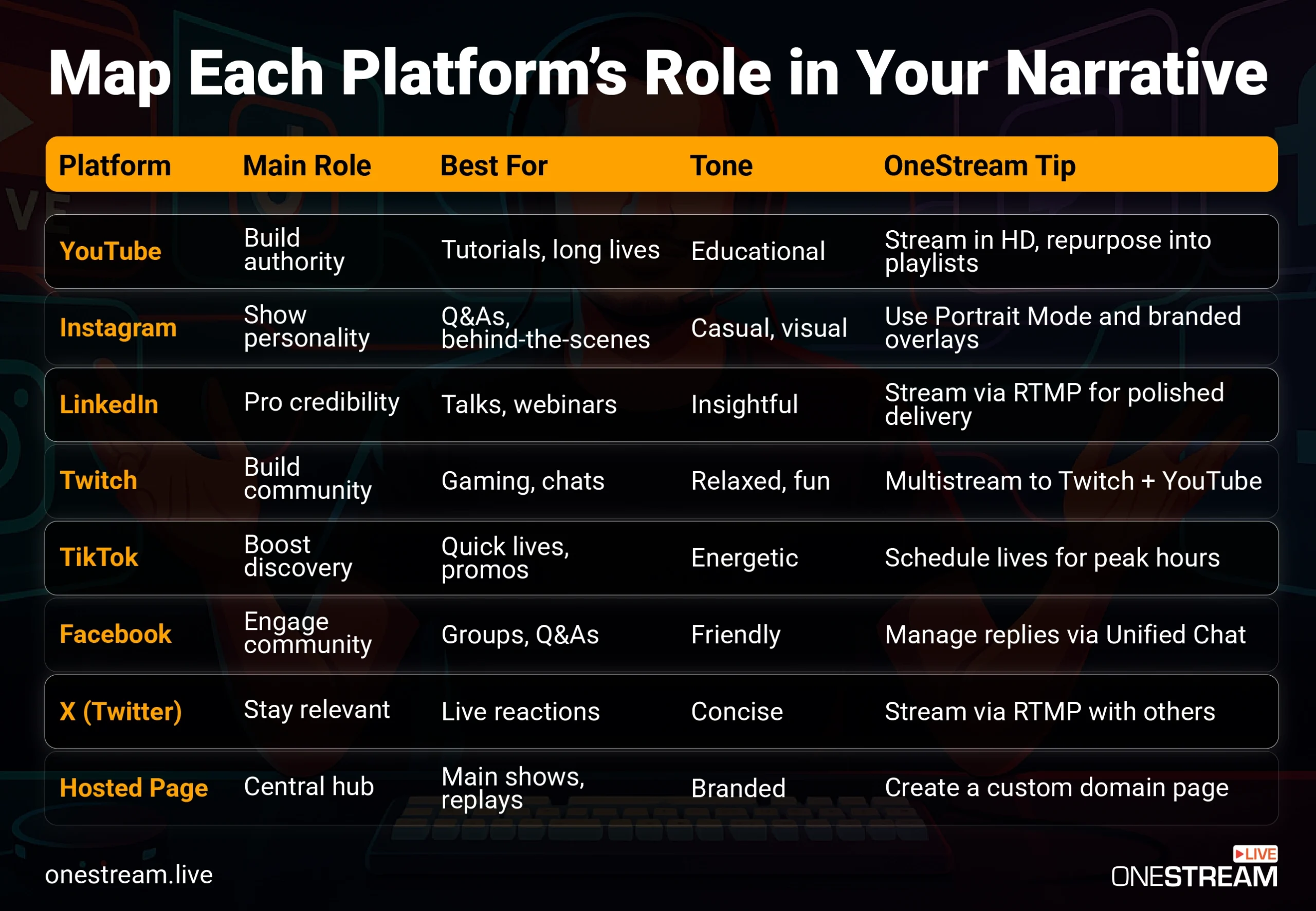
Map Each Platform’s Role for Multiplatform Streaming
The first step in building a cohesive strategy is to stop thinking of your platforms as a random collection of channels and start treating them like a team. Each platform has a unique strength and a specific audience expectation. By assigning a clear role to each one, you can create a narrative that feels intentional and deeply engaging.
5 Actionable Strategies for a Unified Live Streaming Narrative
With your platform roles defined, it’s time to execute. Here are five strategies to ensure your story stays consistent, no matter how many places you’re streaming.
1. Define Your Core Narrative
Before you even think about going live, ask yourself: What is the one story I want to tell? What is the core message or value I want my audience to walk away with?.
This could be anything from “making complex technology simple” to “building a supportive and creative community.” This core narrative is your anchor; every piece of content you create, on every platform, should reinforce it.
2. Master Your Visual Branding
Consistency isn’t just about what you say; it’s about what people see. Use consistent visual elements like logos, color schemes, and on-screen graphics (overlays) across all your streams.
This creates a polished, professional look that builds brand recognition instantly. Tools within the OneStream Live Studio make it easy to add branded overlays and backgrounds to your stream, ensuring a consistent look everywhere.

3. Unify Your Audience Engagement
One of the biggest hurdles in multi-platform audience engagement is managing chat from five different places at once. Jumping between windows is distracting for you and makes your audience feel disconnected. The solution is a unified chat tool.
The OneStream Live chat feature, for example, aggregates all comments from Facebook, YouTube, and Twitch into a single, manageable window. You can see and respond to everyone in one place, creating a seamless, interactive experience that makes a fragmented audience feel like one unified community.
4. Create a Content Pipeline
Consistency requires planning. A chaotic, last-minute approach will always lead to a disjointed message. You will need to establish a streamlined content pipeline in order to make your flow across various platforms manageable, you can click here to learn more too.
Use a content calendar to plan your streams in advance and use tools like OneStream Live’s scheduling feature to automate the process. You can even schedule pre-recorded videos to go live, ensuring you have a steady stream of content even when you’re not available to broadcast in real-time.
5. Analyze and Adapt
Your audience will tell you what’s working. Pay close attention to the analytics on each platform.
Is your educational content performing best on YouTube? Are your Q&As getting more engagement on Facebook? Use these insights to refine your cross-platform content strategy and double down on what resonates most with each unique audience segment.
Choosing the Best Multi Streaming Platform for Narrative Consistency
The right tools can make or break your ability to tell a consistent story. When evaluating the best multi streaming platform, don’t just look at the number of destinations. Look for features that actively support narrative cohesion:
- Cloud-Based Stability: A cloud-based platform ensures your stream quality is consistent and professional on every channel.
- Unified Chat: A non-negotiable feature for managing multi-platform audience engagement and building a single community.
- Branding and Customization: The ability to add consistent overlays, backgrounds, and logos is essential for visual identity.
- Scheduling and Automation: Tools that help you plan and execute your content pipeline are crucial for maintaining consistency over time.
OneStream Live was designed with these challenges in mind, offering a powerful, all-in-one solution that helps you not only stream to multiple platforms but also tell a compelling, consistent story while you do so.

Your Story, Everywhere
Multiplatform streaming is a distribution tactic but it’s also a brand-building strategy. By moving beyond the technical “how” and focusing on the strategic “why,” you can transform your live streams from scattered broadcasts into a powerful, unified live streaming narrative.
Define your story, assign roles to your platforms, and use the right tools to keep your message consistent. When you do, you won’t just be reaching more people. You’ll be building a stronger, more recognizable, and more trusted brand.

FAQs about Multiplatform Streaming
Yes, absolutely. You can stream on multiple platforms at once using two main methods.
The first is using a plugin for software like OBS on your computer, but this requires significant processing power and upload bandwidth.
The second, more reliable method is to use a cloud-based service like OneStream Live. You send a single stream to the cloud, and the service distributes it to all your destinations, ensuring a high-quality, stable broadcast without overloading your computer.
The most effective way to stream to YouTube and Twitch at the same time is by using a dedicated multistreaming platform like OneStream Live. It offers a unified chat feature that lets you see comments from both YouTube and Twitch in a single window, which is crucial for engaging with both communities simultaneously.
If you use a browser-based solution like OneStream Live, you don’t necessarily need special software.
The best solution is to use a platform that offers an aggregated or unified chat feature like OneStream Live. This tool combines the comments from all your streaming destinations—like Facebook, YouTube, and Twitch—into a single, manageable feed.
This allows you to interact with your entire audience without having to constantly switch between different windows, creating a more cohesive and engaging experience for everyone.
For live content, it’s most effective to broadcast the same core stream everywhere to maintain a consistent brand messaging live stream. However, your engagement strategy should be tailored to each platform.
The way you interact with your LinkedIn audience might be more professional than your approach on Twitch, for example. The key is to adapt your narrative and interaction style to fit each platform’s unique culture while the central content of your broadcast remains consistent.
OneStream Live is a cloud-based live streaming solution to create, schedule, and multistream professional-looking live streams across 45+ social media platforms and the web simultaneously. For content-related queries and feedback, write to us at [email protected]. You’re also welcome to Write for Us!