This is the OneStream Live we always meant to build.
If you have opened the app lately, you have already seen the new look. That is the smallest part of it. To explain the rest, it helps to go back to where the idea started.
We started OneStream Live in 2018 with one aim. A single video should reach every place your audience already is, without you doing the same work five times over.
Then the lockdowns started. Churches, teachers, event organizers and small businesses had to reach people they could no longer stand in front of, and streaming stopped being a nice extra. We spent those years building whatever our users asked for, as fast as we could.
Eight years of that leaves you with a product people love, and a house with rooms added on every side. OneStream Live 2.0 is the first time we have taken the whole thing apart and put it back together.
A new era of live streaming is here. Here is what is in it.
- OneStream Live has gone through a major upgrade, with new features across the platform and a redesigned app.
- Live Sales brings shoppable QR cards on screen, so viewers can buy mid-broadcast.
- Instant Studio gives you one permanent link that never expires.
- Pre-production is built in, with scenes, folders and a lobby that holds guests until you are ready.
- Co-Host lets a teammate help without touching your account or your stream keys.
- Backup stream keys keep a broadcast alive when the connection drops.
- Same plans, same price. All of it is included.

Why We Rebuilt Instead of Refreshed
We could have changed the colors and called it a new version. Plenty of products do, and nobody would have complained much.
Two things needed fixing. The app had grown a lot in eight years, and finding your way around it took more clicks than it should have. And there were features you kept asking for that we could not add properly without changing the foundation first.
So we did both at once. New layout, new features, same platform underneath.
The All-New Look
Open the app, and everything you need is one click away.
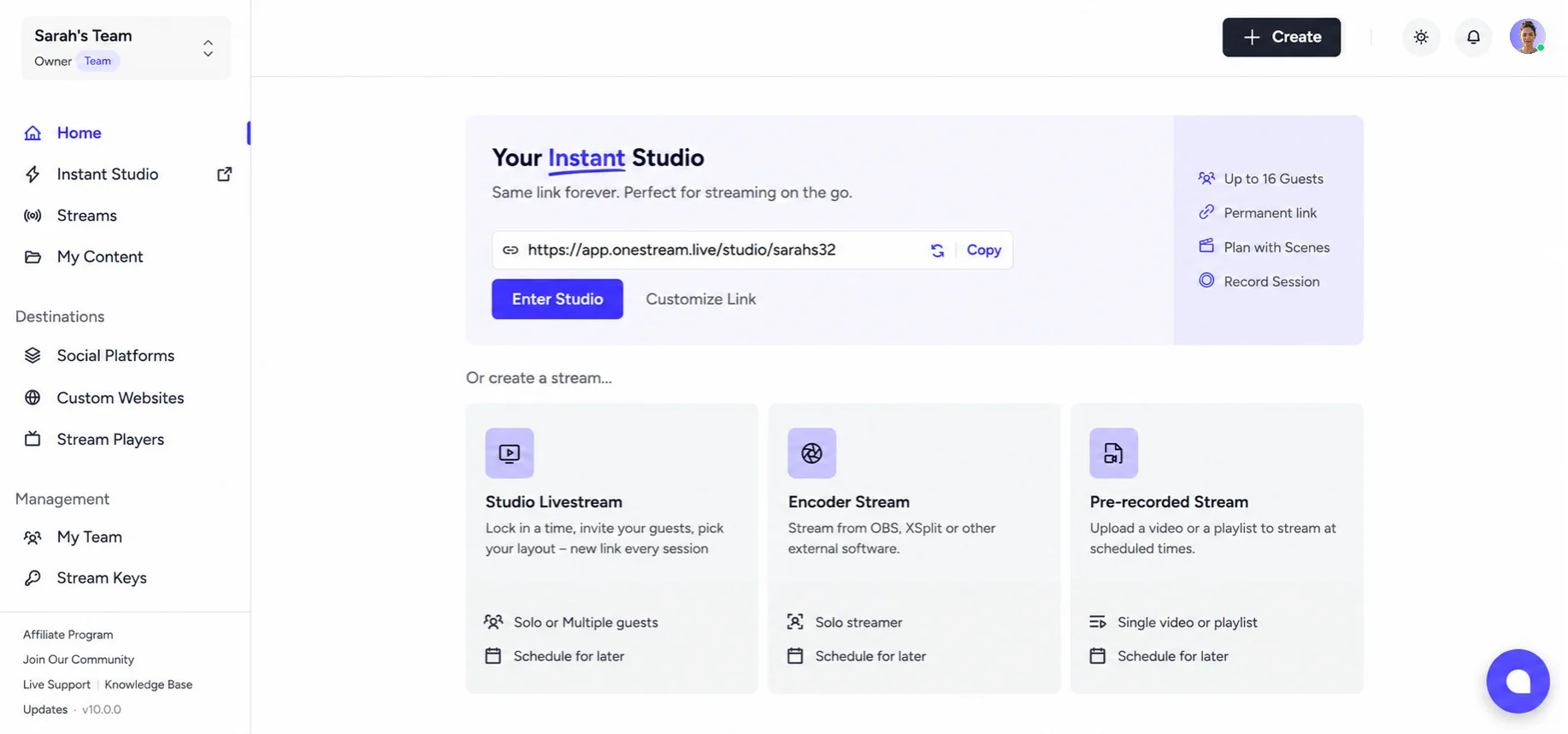
Instant Studio sits at the top of your dashboard with your permanent link ready to copy. Below it, three cards cover the three ways you go live: Studio Livestream, Encoder Stream and Pre-recorded Stream. Each one tells you what it does and lets you schedule it for later without opening anything.
Under that, your streams are listed with their status, so you can see what is inactive, what has destinations attached and what needs your attention before it goes out.
The side menu follows the same thinking. Streams and content at the top, destinations grouped in the middle, team and stream keys under management. Things sit where you would look for them.
The new identity reaches beyond the app. Our website wears the same look now, top to bottom.
Live Sales, the Most Requested Feature We Have Shipped
People have been asking for this one for years, and it is now built into Studio.
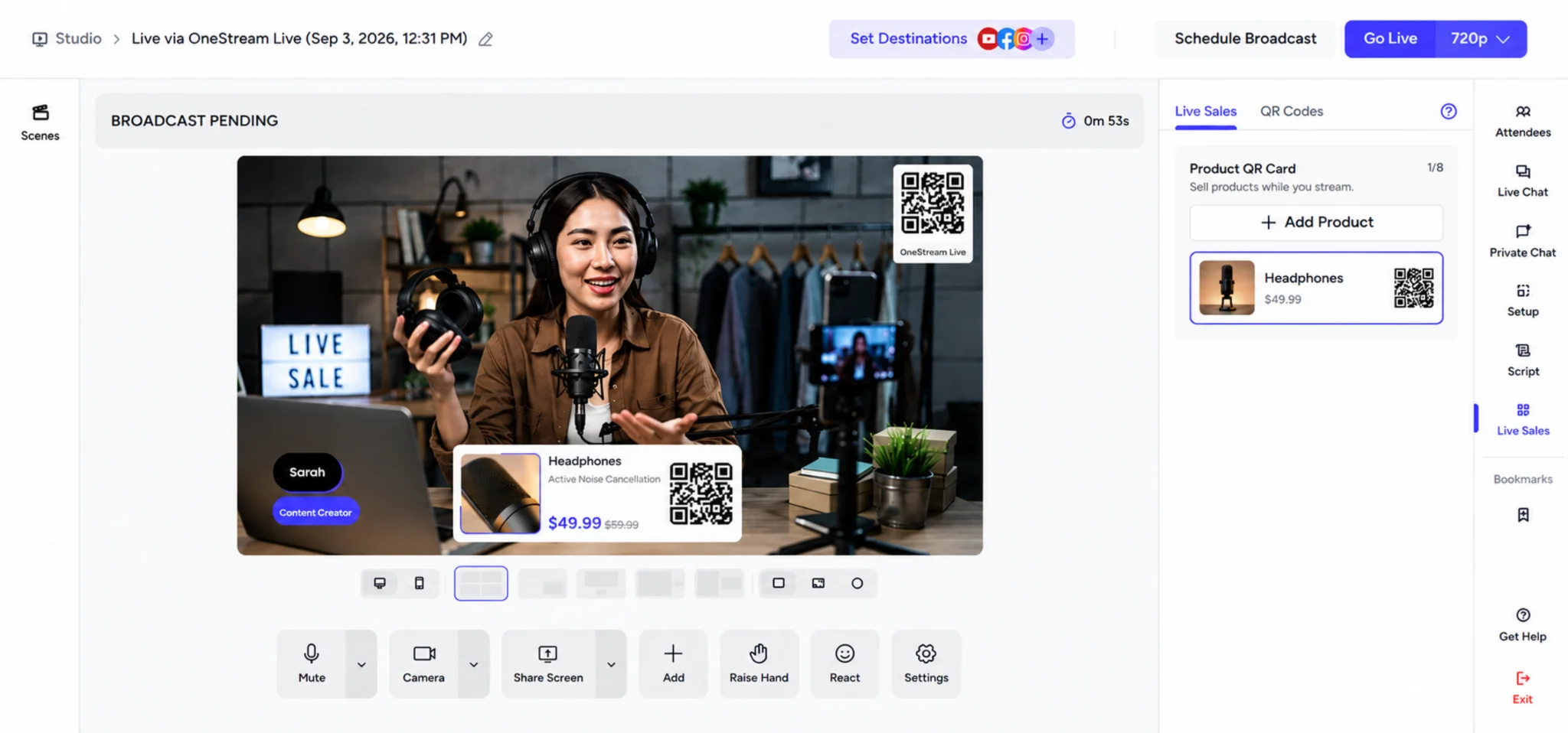
Live Sales puts shoppable product cards on screen during a broadcast. Each card carries a title, a description, product images, a price and a scannable QR code that links to your product page. Viewers scan with a phone and reach the checkout while the stream is still running.
Two other formats come with it. Instant QR turns any link into an on-screen code, which suits product pages, newsletter signups, ticket bookings, donation links and pretty much anything that can be purchased online. Promo QR pairs a code with an image for offers and campaigns.
No more asking people to leave your stream and go hunting for a link in your bio.
Two Ways Into Studio
Studio used to be one thing. It is now two, and the split matches how differently people use it.
Instant Studio
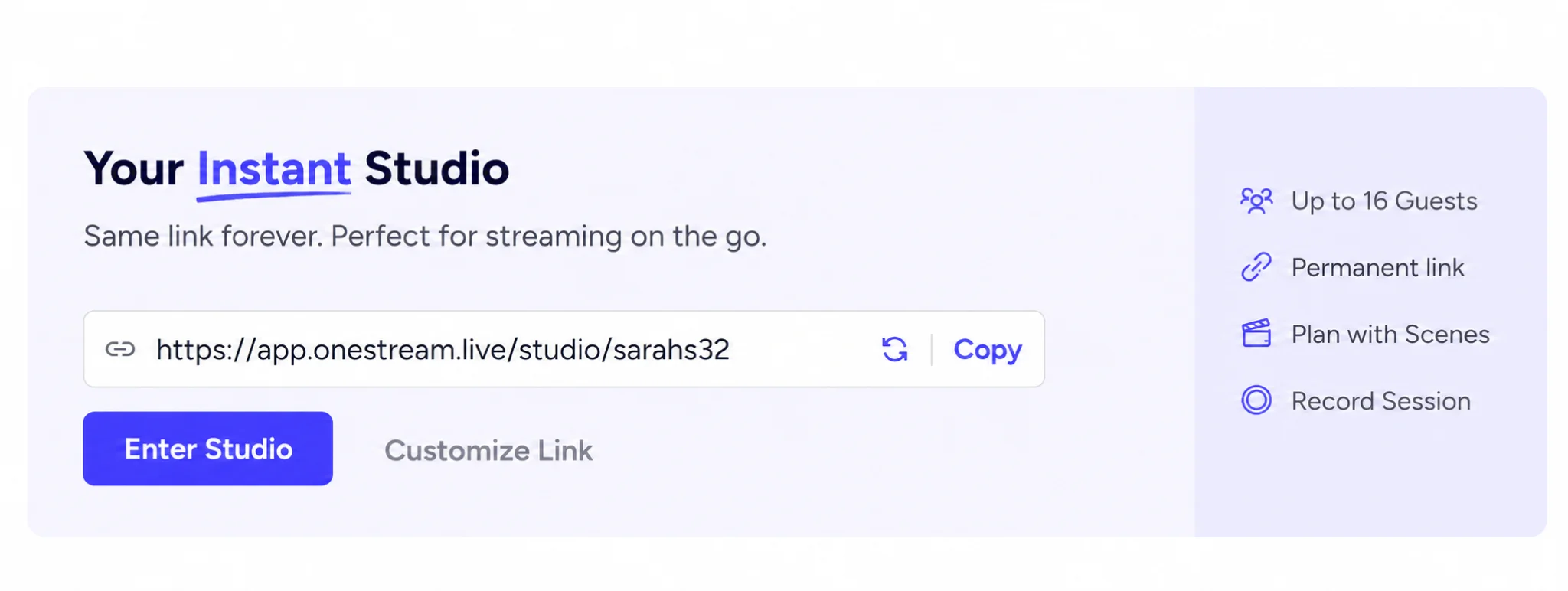
Instant Studio is a permanent room with a link that never expires. It sits on your dashboard as its own card, and the link stays valid after a broadcast ends, so it remains reusable for the next one.
That link is yours to manage. Copy it, customize the identifier at the end of the URL on supported plans, or regenerate it entirely when you want a fresh one. Put it in your email signature or a recurring calendar invite, and it keeps working.
Step back in and everything is where you left it. Your stage backgrounds, music, branding and overlays are all still loaded, along with any audio or images you shared during the session, so you can pick up and keep going.
Regular Studio
Regular Studio is still there and still the right choice for anything planned. It runs through the normal event setup, supports scheduling, and creates a session per event.
Instant Studio does not do scheduling, deliberately. It exists for the moments you want to be live in the next two minutes.
Everything else is shared. Scenes, intro and outro flows, recording, destinations and the full set of studio controls work identically in both.
Studio's New Production Layer
Three additions move Studio closer to a control desk.
Scenes
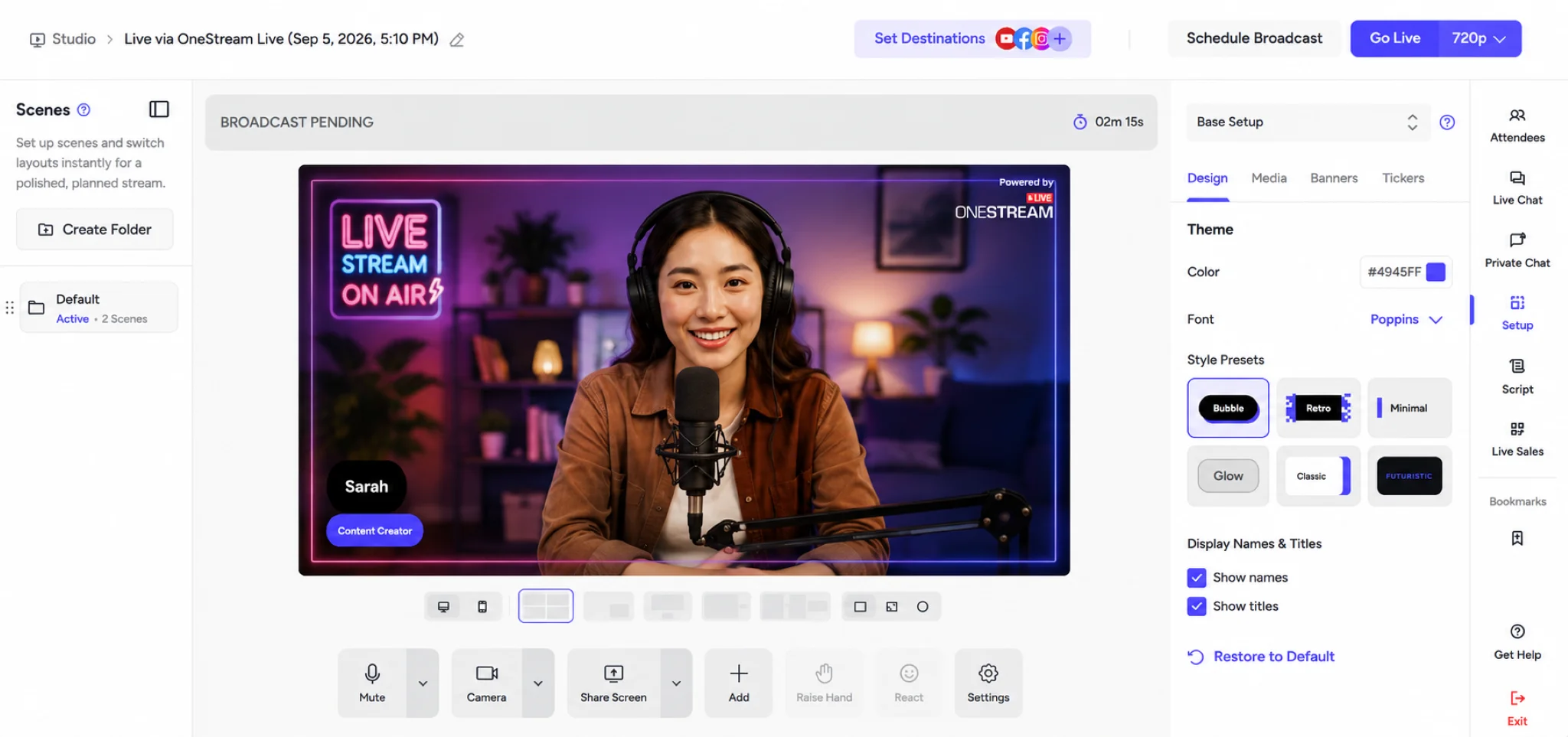
Build the show before you go live. A default scene, an intro, an outro, and as many others as the production needs, ready to switch between rather than assembled while people are watching.
Folders
Group your assets into folders instead of one long list. Banners, tickers and scenes each get their own, so the lower third you need is where you left it rather than somewhere in a scroll.
Lobby
Guests arrive in a waiting area and join the broadcast when you bring them in. Nobody walks into the middle of your opening anymore.
Co-Host: Give Access Without Giving Everything
Not everyone who works on your stream needs access to everything.
Co-Host is a role built for exactly that. A Co-Host can edit your scheduled events, and during a Studio session, they manage the on-screen elements: graphics, banners, guests and comments. Enough to run the production side of a broadcast properly.
What sits outside their reach is the point. Co-Hosts cannot get to your team settings, your stream keys or your connected social platforms. The person handling your banners cannot disconnect your social accounts.
Invite them by email, pick the role, and they work from their own login. Admin remains available for teammates who need the wider scope. Once the work is shared, see how team management takes the pressure off solo streamers.
Stream Keys, Now With a Backup
You can now create multiple named stream keys, with the number available depending on your plan.
For premium streaming, you can also add a backup key, available inline on the live encoder page. It runs a second ingest endpoint alongside your primary one. If the primary stream fails, you do not have to worry. The backup activates right away, and your broadcast carries on.
If you broadcast something that only happens once, such as a board meeting, a paid event or a weekend service, this is the one to set up first.
More Streaming Protocols
Encoder Stream now supports four protocols.
RTMP and RTMPS are still there and still the default for most setups. WHIP and SRT are the new options, and they matter for anyone streaming over an unreliable connection or chasing lower latency.
SRT in particular is built to hold a steady feed across networks that lose packets, so it works well on venue wifi or a mobile connection.
Features Renamed
Several features were improved and renamed along the way. Same job, better version, new label.
- Embed on Web is now Stream Players
- Hosted Live Pages are now Custom Websites
- Videos is now My Content
- Members is now My Team
- Schedules is now Streams
- RTMP Stream is now Encoder Stream, under Live in the Create menu
- Brand Profile in Studio is now Setup
Your Phone is Now a Studio
You asked for this one, repeatedly.
Now you can host full productions on your phone. Build your scenes, bring guests on stage, manage chat, and go live to all your destinations.
Everything you need to run a broadcast now fits in your pocket. There is far more in the mobile release than fits here, including Live Chat on mobile, custom websites you can build and edit from your phone, and a rebuilt encoder setup, so we wrote it up separately. See everything new in mobile app v5.0.0.
Download Mobile App Now


What Has Not Changed
Your pricing. Same plans, same rates; you’re paying the same after this upgrade as you were before.
That is worth saying plainly, because it is not how this usually goes. A redesign of this size is often the moment a company moves features up a tier or adds a new one above your plan. We have not done that. Everything in this post is included in what you already pay for.
Your account, your plan and your billing are exactly as they were.
The core is untouched too. This is still a cloud-based live streaming platform that sends one broadcast to more than 45 destinations and the web at the same time.
If you have not opened the app since the upgrade, all of this is already in your account.
Go See It for Yourself
Reading about a redesign is a poor substitute for using it.
So go deeper. Copy your Instant Studio link and send it to someone. Build a scene before your next broadcast instead of during it. Put a product card on screen and watch what happens in the comments. Add a backup key to the stream you cannot afford to lose.
Eight years of your feedback is sitting in this upgrade. The next version will be built from what you tell us about this one, so use it, break it, and let us know what you find.
A new era of live streaming is here, and the rest of it gets written by you.
Frequently Asked Questions
What is new in OneStream Live 2.0?
The main additions are Live Sales, which puts shoppable QR product cards on screen during a broadcast; Instant Studio with a permanent, reusable link; scenes and a guest lobby in Studio; the Co-Host role; multiple stream keys with a backup option; WHIP and SRT protocol support; and a mobile app that now runs full productions. The app was also redesigned throughout.
How does OneStream Live 2.0 improve live streaming?
It shortens the path from opening the app to going live, lets you build a broadcast with scenes before it starts rather than during it, and adds a backup stream key so a dropped connection does not end the broadcast.
Who can benefit from OneStream Live 2.0 features?
Creators, businesses, educators, marketers, faith organizations and enterprise teams. The Co-Host role and multi-team support suit organizations with more than one person on a broadcast, while Instant Studio and Live Sales are aimed at anyone who streams regularly.
Does OneStream Live 2.0 support multistreaming?
Yes. A single broadcast still reaches more than 45 social platforms and the web at the same time, alongside any custom destinations you add.
Is OneStream Live 2.0 more expensive than before?
No. Plans and pricing are unchanged, and everything in this release is included in what you already pay for.
OneStream Live is a cloud-based live streaming solution to create, schedule, and multistream professional-looking live streams across 45+ social media platforms and the web simultaneously. For content-related queries and feedback, write to us at [email protected]. If you have a story to share about your live streaming experience with OneStream Live, we would be glad to feature it. You’re also welcome to Write for Us!