![Islamic Podcast Setup Guide for Ramadan [Step-by-Step]](https://media-assets.onestream.live/wp-content/uploads/2026/02/how-to-launch-an-islamic-podcast-for-ramadan.webp)
Islamic Podcast creators rejoice: launching a professional show by Ramadan 2026 is easier than it looks. This step-by-step guide explains how to start a podcast from scratch – focusing on Muslim audiences and Ramadan content. We’ll cover what do you need to start a podcast, podcast set up tips, and the exact technical blueprint (with OneStream Live tools) to launch a podcast in time for the holy month.
Why Start an Islamic Podcast in Ramadan 2026?
Ramadan is peak season for spiritual content. Audiences actively seek faith-based talks, Quran reflections, and community stories so it’s a perfect time to make your own podcasts that resonate. In fact, podcast consumption surges ~22% during Ramadan among young Muslim listeners.
While older generations dial down media, Gen Z and Millennials tune in more, often listening after iftar. The global podcast boom amplifies this opportunity: over 584 million people worldwide listen to podcasts as of 2025. In other words, your Muslim podcast has a ready audience and you just need to launch it right.
Islamic podcast content is uniquely impactful. An Islamic podcast is an episodic audio or video show focused on Muslim life, faith, and culture. Unlike generic talk shows, it aligns with religious values and calendars (think Ramadan specials) to educate and inspire.
If you’ve ever admired the best Islamic podcast or felt the need for more Muslim voices in media, Ramadan 2026 is your moment. Let’s get practical on how to set up a podcast that stands out.
What Do You Need to Start an Islamic Podcast?
To launch a podcast that sounds professional, you’ll need a blend of gear, software, and strategy. Here’s your essential podcast checklist:
- A Clear Concept: Define your podcast’s theme and target audience. Will it be a Ramadan podcast with daily reflections, interviews with imams, or perhaps an “Islamic podcasts for beginners” series explaining how Ramadan works? Nail your niche early as it guides everything else.
- Quality Microphone & Headphones: Crisp audio is non-negotiable. A USB condenser mic (e.g., Blue Yeti) or XLR setup will elevate your sound. Use closed-back headphones to monitor audio and avoid echo.
- Quiet Space & Acoustic Treatment: Record in a quiet room. Use soft furnishings or foam panels to reduce echo. Many of the best Islamic podcast hosts record in home offices or even closets to get clean audio. Remember, listeners will tune out fast if audio is muffled or noisy.
- OneStream Live Studio (Browser-Based Recording): OneStream Live Studio is a game-changer for new podcasters. It is a cloud-based live streaming and recording tool. Unlike clunky desktop apps or single-platform tools, it runs in your browser and multistreams to 45+ destinations simultaneously. Invite guests with one link, record in HD, and add your branding without any technical fuss. OneStream Live Studio basically gives you a virtual control room for your show.
- Stable Internet (if streaming): If you plan to go live, ensure a solid internet connection (wired Ethernet if possible). Streaming video while hosting guests can strain Wi-Fi. Test your upload speed. A minimum of 5–10 Mbps upload speed is recommended for smooth live video.
- Podcast Hosting (for audio distribution): Although OneStream Live will handle the live/video side, you’ll likely want an RSS feed to publish audio episodes on Spotify, Apple Podcasts, etc. Platforms like Buzzsprout or Anchor can host your audio files. (You can repurpose your OneStream Live recording – more on that later.)
- Cover Art & Intro Music: Design a catchy podcast cover (1400px square) and pick a short intro jingle to establish your brand identity. These polish your podcast set up and make it look legit on platforms.
Launch a Podcast Step by Step (Ramadan 2026 Blueprint)
Now, let’s launch a podcast step by step with a Ramadan-focused timeline. Time is short, so follow this technical blueprint to hit “Publish” before the crescent moon appears:
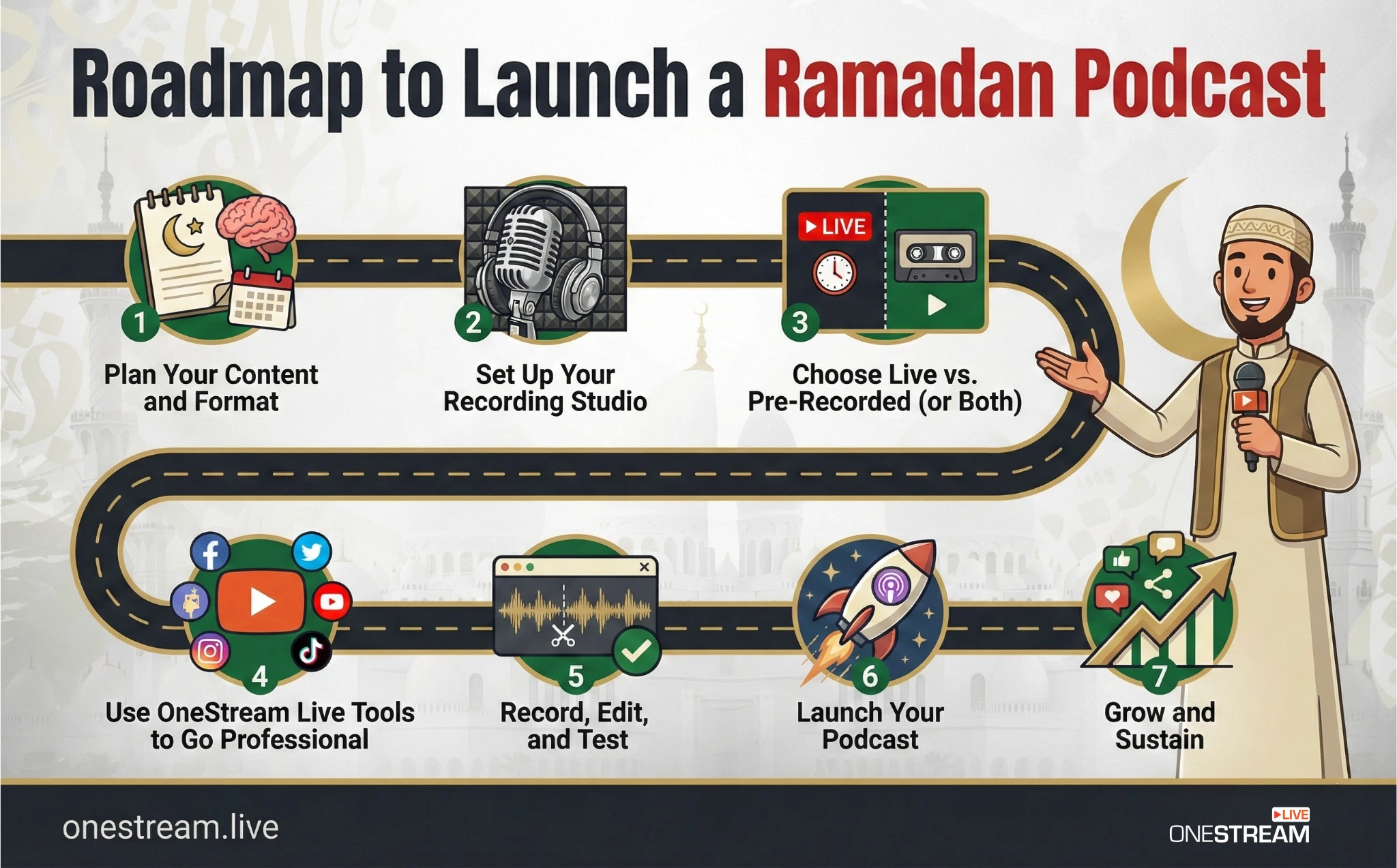
Step 1: Plan Your Content and Format
Sketch out your Ramadan content calendar. For example, 30 episodes for 30 days? Weekly deep-dives? Decide now. Outline topics or guests for each episode.
Keep episodes reasonably timed. Over 50% of podcasts run between 20 and 60 minutes, so a 30-minute Ramadan daily reflection is a sweet spot. Consistency is key as listeners will expect a steady flow once Ramadan begins.
Step 2: Set Up Your Recording Studio
It’s setup time. Plug in that mic and tweak settings. Record a few test clips to adjust gain and mic position (aim for clear, even volume).
If using OneStream Live Studio, log in through your browser and explore its interface. Add your logo, an overlay with your podcast name, and perhaps an intro/outro video.
The Studio’s teleprompter feature can even scroll your script or Quran quotes so you maintain eye contact. Don’t stress about video production values, as even a simple webcam or static image can dramatically boost engagement on YouTube if you decide to publish visuals. The point is to get comfortable with your tools now.
Step 3: Choose Live vs. Pre-Recorded (or Both)
Decide how you’ll deliver content during Ramadan. Live streaming can create a sense of community as viewers can comment “Ramadan Mubarak” in real time and you can respond.
If you go live, OneStream Live’s multistreaming capability lets you broadcast to YouTube, Facebook, and more at once, plus your website or a Hosted Live Page. (One in three U.S. podcast fans listens via YouTube, so streaming there can massively expand your reach.)
Alternatively, you can pre-record episodes in advance, which is useful if you have a tight schedule or want to fine-tune each episode. OneStream Live pioneered pre-recorded streaming, meaning you can upload an episode and schedule it to broadcast “live” at a set time.
This hybrid approach works great: you get the polish of editing plus the appointment viewing of live streams. Whichever route you choose, stick to it. (Tip: many creators do a mix – e.g. pre-record weekdays, go live on weekends for Q&A.)
Step 4: Use OneStream Live Tools to Go Professional
Make your workflow lean by using the right features:
OneStream Hosted Live Pages: If you don’t have a website, spin up a Hosted Live Page, which is a personalized landing page for your stream. In minutes, you can have a web page with your stream player, chat, and even a custom domain.
Add a Ramadan-themed headline, your social links, and a Donate button for zakat/charity if you’re a nonprofit. No coding needed, no external hosting. Hosted pages also let you embed a schedule of upcoming episodes, so your audience knows when to tune in. It’s your mini-website for the podcast.
RTMP Streaming: Already have an audience on a unique platform (like a mosque’s site or a private app)? OneStream Live’s RTMP streaming feature can beam your live video to any custom RTMP destination.
In plain terms, you can connect OneStream Live with any service that accepts a stream key/URL. This ensures that even if your community uses a niche platform, your Ramadan podcast can reach them. RTMP is the backstage magic that makes multi-platform streaming possible, and OneStream Live wraps it in a user-friendly package.
Unified Chat & Interaction: When you multistream, comments might pour in from YouTube, Facebook, etc. OneStream Live Studio provides a unified chat window, so you see all audience questions in one place.
Highlight some on-screen if you like. It’s a great way to make viewers feel seen and build that Ramadan camaraderie. Engagement can turn a good Ramadan podcast into an unforgettable community experience.

Step 5: Record, Edit, and Test
Before the big launch, do a trial run. Record a full episode (live or offline) and play it back. How’s the audio quality? Any awkward pauses to edit out? Use basic editing software (Audacity, Adobe Audition) to trim mistakes if you’re pre-recording.
If you’re streaming live, practice hitting the “Go Live” button in OneStream Live Studio. Maybe run an unlisted test stream to a private YouTube channel. Check lighting and framing if on video. This step flushes out tech hiccups before you’re in front of a live audience.
Step 6: Launch Your Podcast (Ramadan Day 1)
Bismillah, it’s showtime. Promote your first episode ahead of time: announce on your social media, email lists, and mosque bulletin. Then go live at the scheduled time (or let your pre-recorded session auto-stream).
Start strong with a warm Ramadan greeting and a teaser of today’s topic. If live, engage viewers: “Type your city in chat!” or pose a question. If something goes wrong (tech issues happen to the best Islamic podcast hosts, too), stay calm and improvise, as authenticity trumps perfection.
Once the session ends, OneStream Live Studio can record the whole stream for you. Download that recording and upload the audio to your podcast host so people who missed the live stream can catch up on Spotify or Apple later. Re-use the video for YouTube or clips for social media. You’ve now successfully launched!
Step 7: Grow and Sustain
Don’t stop at launch. Through Ramadan, iterate and improve. Pay attention to feedback in comments; they might suggest topics or ask questions that spark ideas. Keep an eye on analytics, which episodes got the most views or replays? Data will tell you what resonates.
Encourage word-of-mouth: ask viewers to share the podcast with friends or family (Ramadan is a communal time, and good content spreads). Also, use OneStream Live’s Playlist feature after Ramadan: you can queue up all your episodes into a 24/7 looping stream, which is a great way to reuse content and keep latecomers engaged.
Finally, consider continuing beyond Ramadan. Many Islamic podcasts for beginners begin as Ramadan specials and expand into year-round series on faith and life. If you’ve built momentum, ride it.
Ready to be the next voice in the Muslim podcast space? OneStream Live has your back with studio tools and streaming tech, so you can focus on your message. Ramadan 2026 awaits your Islamic podcast!
FAQs
You need a clear concept, a decent microphone & headphones, a quiet space, and a platform to record and stream. For beginners, OneStream Live Studio is ideal as it handles the technical heavy lifting of podcast set up, including recording, branding, and multistreaming. You’ll also want editing software for polishing audio, and a hosting service if you plan to distribute audio episodes on Spotify/Apple.
Start by planning a simple content series (e.g. “30 Days of Reflection”). Test your equipment and practice a short episode. Use a user-friendly tool like OneStream Live to record or go live.
Promote your launch on social media a few days before Ramadan. On Day 1 of Ramadan, publish your first episode (live or scheduled). Consistency is crucial: stick to your release schedule throughout the month.
You can set up a home studio with minimal cost. Choose a small, quiet room (carpets and curtains help with acoustics). Buy a good USB mic (there are great options under $100). Use free software or OneStream Live’s built-in Studio to record.
For video, a basic 720p webcam or your phone can work. Good lighting (even a desk lamp) and a tidy backdrop add a nice touch. Remember, content quality matters more than flashy studio gear, and some of the best Islamic podcast creators started with just a mic and passion.
Aim for 15 to 30 minutes per episode if doing daily Ramadan reflections, or up to 60 minutes for in-depth interviews or panel discussions. Data shows podcast episodes between 20 and 60 minutes hit the sweet spot for listeners.
The key is to maintain quality, and Islamic podcasts for beginners may favor shorter, more focused episodes, whereas established audiences may prefer longer discussions. Always prefer clarity and depth over length for length’s sake.
Use the community aspect. Encourage listeners to subscribe and share. Multistream to where your audience hangs out, like Facebook groups, YouTube channels, and even your mosque’s website via RTMP streaming.
Engage with your listeners through Q&As or shout-outs; people love being part of the show. Consistency builds trust, and external validation helps too: mention any guest imams or cite reputable sources (e.g., Pew Research or YouTube Creator Studio tips) to boost credibility.
Lastly, keep an eye on feedback and analytics, as they’ll guide you on what’s working. With dedication, your podcast could be among the best Muslim podcast platforms serving the ummah.
OneStream Live is a cloud-based live streaming solution to create, schedule, and multistream professional-looking live streams across 45+ social media platforms and the web simultaneously. For content-related queries and feedback, write to us at [email protected]. You’re also welcome to Write for Us!