You’re mid stream, someone just asked where to buy the shirt you’re wearing, and now you’re typing a link into chat while three other people ask the same question. A QR code fixes that in one second flat.
That’s the gap QR generators close for live streaming. Instead of viewers hunting for a link, typing a URL wrong, or scrolling past your bio, they scan and land exactly where you want them, whether that’s your stream, your shop, or your latest giveaway.
In this post, we’ll go through where QR codes fit into a live stream, how to actually use them well, and OneStream Live’s own QR tool built right into the Studio for selling mid broadcast.
- A QR code turns “search for my link” into “scan and land here,” cutting viewers out at the exact moment they’d normally give up.
- QR codes serve real jobs throughout a stream: getting people into your broadcast, keeping them interacting, driving sales, growing your social following, and collecting support or feedback.
- OneStream Live’s Studio panel includes its own QR tool under Live Sales, so you can build and display codes without ever leaving your broadcast software.
- Two code types cover two different moments: Instant QR for a fast link with just a title, logo, and color, and Promo QR for a fuller pitch with a description and up to 6 product images.
- You can save up to 8 QR codes per session, but only 1 ever shows on screen, and swapping between them doesn’t pause or cut your stream.

Ways QR Codes Enhance Live Streaming Experiences
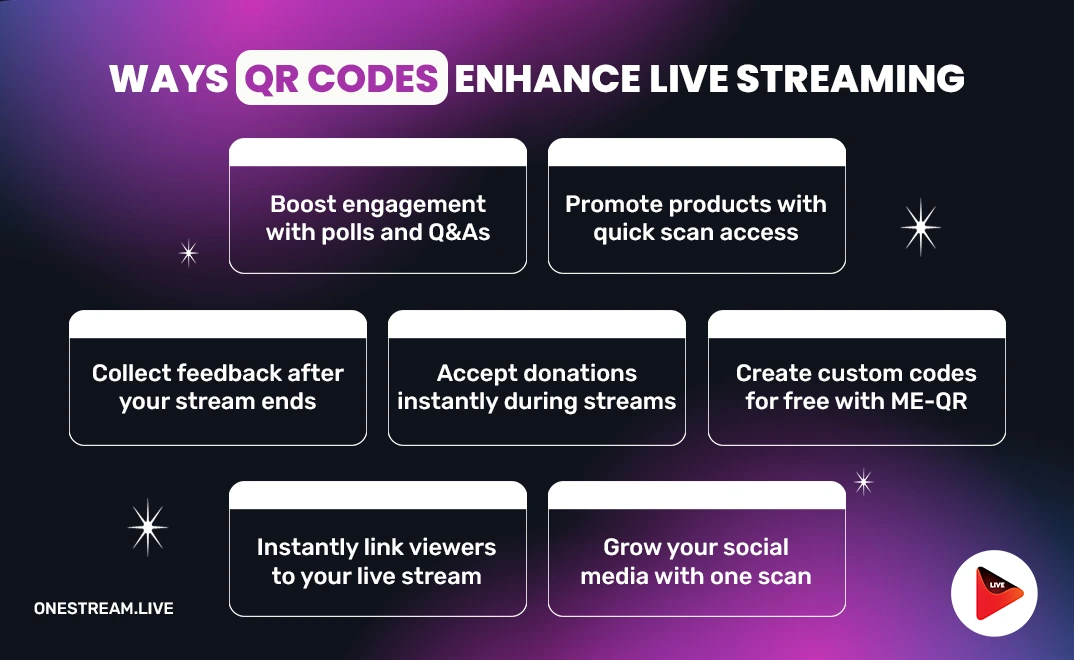
Incorporating a QR code into your live streaming workflow is a smart move. With a QR code generator, you can provide your viewers with quick access to live streaming links, promotional content, or interactive features, all with a simple scan. Platforms like ME-QR offer QR code generator free tools to create dynamic codes that can be easily customized, allowing you to link directly to your live stream or other relevant content.
Streamlining Access to Your Live Stream
One of the most common applications of QR codes in live streaming is simplifying access to your broadcast. Instead of requiring viewers to search for your stream manually, you can generate a QR code maker that links directly to your live video on platforms like YouTube, Facebook, or your own website.
By placing these codes on promotional materials, your social media pages, or even in email newsletters, you make it easier for potential viewers to jump directly into the action. The best part? You can generate the QR code in just a few clicks with a QR code generator free online, ensuring seamless access for your audience.
Read: A Live Streaming Guide for Beginners with OneStream Live
Interactive Engagement through QR Codes
Beyond providing easy access, a QR code can enhance viewer interaction during the stream. With a QR generator, you can create QR codes that link to interactive features such as polls, Q&A sessions, or exclusive behind-the-scenes content. For instance, viewers can scan a code that leads them to a form to submit questions for the host, or they can participate in live voting for certain aspects of the event.
Adding interactive elements encourages viewers to engage in real-time, which can increase audience retention and make your live stream more engaging. This functionality is especially useful for events like product launches, gaming streams, or social media broadcasts where audience participation is key.
Use OneStream Live to display your audience’s questions and comments on-screen and answer them in real time. It boosts engagement and encourages more viewers to join the conversation.
Promoting Products and Services
Live streaming is a fantastic tool for promoting products, services, or affiliate links, and QR codes make it even easier to direct your viewers to purchase pages, sign-up forms, or limited-time offers. During a product demonstration, for example, you can display a QR code that leads to your e-commerce site or special promotions related to the stream’s content.
With a free QR code generator, you can quickly generate unique codes for specific campaigns or products, making it easy to track performance and conversions. This is especially effective for live streaming sales or e-commerce events.
Connecting with Social Media
Social media live streaming has become increasingly popular, and QR codes offer an easy way to link viewers to your social media profiles or additional content on other platforms. By placing a QR code maker free on your live stream screen, viewers can scan and follow you on Instagram, Twitter, or Facebook in seconds, without having to search for your profile.
Additionally, QR codes can be used to direct viewers to hashtags or challenges associated with your stream, encouraging further interaction and helping your content go viral.
When you use OneStream Live, you can multistream to more than 45 social media accounts at the same time, which maximizes your visibility across platforms with just one broadcast.
Donations and Support for Content Creators
For content creators using live streaming platforms like Twitch, YouTube, or Facebook, QR codes provide an easy and secure way for viewers to make donations or support the stream. By generating a QR code free generator, you can link directly to your donation page or integrate it into platforms that support QR code payments.
This can be particularly helpful for independent creators or during charity events, allowing your viewers to show support instantly.
Read More: The Future of Live Donations: Harnessing the Power of Crypto Payments
Post-Stream Feedback and Analytics
QR codes can also be used after the live stream to gather feedback from your viewers. By creating a QR code creator that links to a post-stream survey or feedback form, you can gain valuable insights into your audience’s experience. These insights can help you improve future broadcasts, allowing you to refine your content and engagement strategies.
Sell Faster With OneStream Live's QR Code Tool
If you’re already streaming from OneStream Live, there’s no need to bring in a third party generator for this. The platform has its own QR code tool built directly into the Studio, so you can create, display, and switch codes without ever leaving your broadcast. It sits under Live Sales in the Studio panel and gives you two code types, each built for a different moment in a sale.
Instant QR is for speed. It’s a single link with an optional title, logo, and color to match your stream, ready to go up in seconds for a flash mention, a surprise discount, or a giveaway link.
Promo QR is for products that deserve a real pitch. It holds a title, a description, and up to six product images, so a scan lands somewhere built to sell the item, not just link to it.
Beyond the two code types, the tool includes:
- Room to plan ahead: Create and save up to 8 QR codes in a single session, so your whole lineup of offers is ready before you go live.
- One code on screen at a time: Only 1 QR code displays on your stream at once, keeping the screen clean and the offer clear.
- Live swapping, no interruptions: Add a code to your stream or swap it for another using Add to Stage, with no cuts, pauses, or restarts.
- On brand by default: Match a code’s color and logo to your stream so it looks like part of the broadcast, not a generic overlay.
Together, these turn the QR code from a static graphic into something you actively run during a sale, timing offers, swapping products, and matching your branding, all from inside the Studio you’re already streaming from.
Tips for Using QR Codes in Live Streaming
Here are some practical tips to help you get the most out of QR codes for live streaming:
1. Customize the QR code design: Use a QR maker to design custom QR codes that match your brand’s aesthetic. This can help make the QR codes more visually appealing and encourage viewers to engage with them.
2. Track your QR code performance: Utilize a QR code generator free online that offers analytics features to track how many times your QR code has been scanned. This data can help you measure the effectiveness of your live streaming campaign.
3. Test your QR codes before going live: Always test your QR codes before your live stream begins to ensure that they are working properly and directing viewers to the right content.
4. Make QR codes easily accessible: Place your QR codes in visible locations during your stream (e.g., on-screen graphics, chat, or in promotional materials) so that viewers can quickly scan them without interrupting their experience.
Integrating QR codes into your live streaming strategy can significantly enhance viewer engagement and streamline the overall streaming process. From promoting your content and products to improving social media interaction, QR codes serve as a bridge between the physical and digital worlds, creating a more interactive and immersive live streaming experience.
Conclusion
ME-QR provides a QR code generator free solution that allows you to create customizable and trackable QR codes for all your streaming needs. Whether you’re hosting a gaming session, a live Q&A, or a product launch, QR codes can help improve access, increase audience participation, and drive conversions.
Live streaming is all about connecting with your audience in real-time. With QR codes, you can take that connection a step further, offering seamless access, engagement, and interaction. Get started today with a free QR generator and elevate your live streaming experience!
Frequently Asked Questions
What is a QR code used for in live streaming?
A QR code gives viewers a direct scan to action link during a broadcast, most often to your stream itself, a product page, a social profile, or a donation form. Instead of typing a URL or searching for a link, viewers scan once and land exactly where you want them, which keeps them engaged instead of losing interest mid stream.
Do I need a separate app to create a QR code for streaming?
Not necessarily. General tools like ME-QR let you generate a code for any link in a few clicks. If you’re streaming from OneStream Live specifically, you don’t need a separate tool at all, the platform has its own QR code feature built into the Studio under Live Sales.
What's the difference between Instant QR and Promo QR in OneStream Live?
Instant QR is built for speed, just a link with an optional title, logo, and color, ready in seconds for a flash mention or giveaway. Promo QR takes a bit more setup but includes a title, description, and up to 6 product images, better suited to a featured product you want viewers to actually consider before scanning.
How many QR codes can I use during one OneStream Live broadcast?
You can create and save up to 8 QR codes in a single Studio session. Only 1 displays on your stream at a time, and you can switch between them by removing the current code and adding the next one to your stage, without pausing or cutting away from your broadcast.
Can viewers scan a QR code without a special app?
Yes. Nearly every modern smartphone camera can scan a QR code directly, no extra app download needed. That’s part of what makes QR codes work so well mid stream, viewers can act in seconds using a camera they already have open, right as they’re watching your offer.
OneStream Live is a cloud-based live streaming solution to create, schedule, and multistream professional-looking live streams across 45+ social media platforms and the web simultaneously. For content-related queries and feedback, write to us at [email protected]. If you have a story to share about your live streaming experience with OneStream Live, we would be glad to feature it. You’re also welcome to Write for Us!