Live streams are exhilarating in the moment, but once the “end broadcast” button is hit, too many brands let that hard‑won footage gather digital dust. In an era where 75 % of marketers already experiment with AI tools in their daily workflows and 94 % systematically reuse existing assets across channels, the real ROI hides in what you do after the stream ends. Meanwhile, consumer appetite shows no sign of slowing: 89 % of people want to see more online video from brands in 2024. In this guide, we’ll explore how to repurpose live video into viral content by turning raw streams into bite-sized, high-impact content that keeps your audience hooked long after you sign off.
Why Repurpose Livestreams?
Stretch every production dollar. Filming once, publishing many times drives cost‑per‑impression down.
Meet audiences where they scroll. Short clips, memes, and audio bites slot neatly into the infinite feeds of TikTok, X, LinkedIn, and podcast players.
Compound discoverability. Each fresh format creates an additional SEO‑friendly surface linking back to your original video.
Iterate faster. AI editors turn around new drafts in minutes, letting you test multiple hooks without re‑shooting.
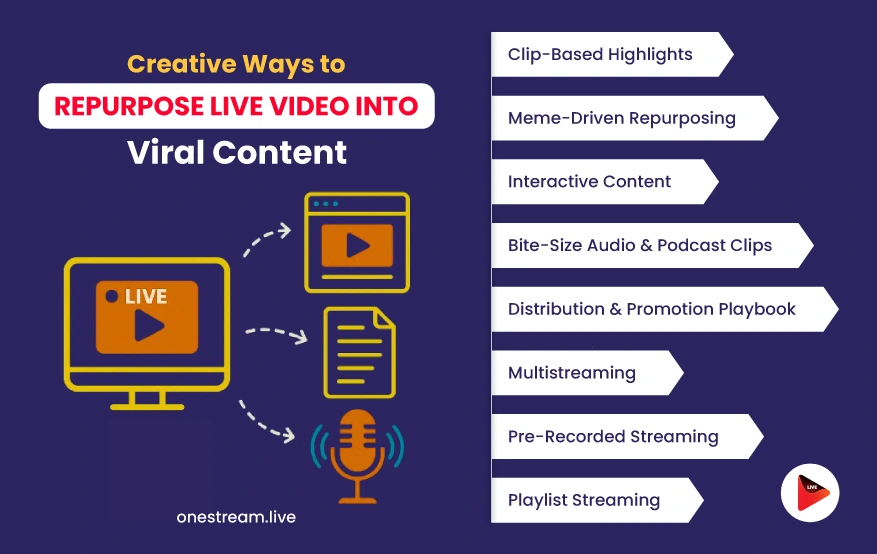
1. Clip‑Based Highlights: From Moments to Micro‑Content
Condense key reactions, jaw‑dropping “aha!” moments, or punchy one‑liners into 30‑ to 60‑second vertical clips. Timestamp stand‑out segments during the live show, then export them in batches for YouTube Shorts, Instagram Reels, and TikTok. Caption everything (85 % of social video plays mute by default) and lead with movement in the first two seconds.
Workflow
During the stream, drop chapter markers or jot real‑time notes.
Feed the video into an AI editor that auto‑detects speaker changes.
Batch‑export vertical clips with burned‑in captions.
Schedule each clip natively for maximum reach.
Q&A Corner
Q1:Should every highlight be vertical? A: Prioritize vertical for mobile‑first networks, but keep a horizontal master for LinkedIn or YouTube playlists.
Q2: What’s the ideal posting cadence? A: Start with three clips per stream spread over a week, then scale once engagement consistently stays above your account average.
2. Meme‑Driven Repurposing: Injecting Personality Into Clips
Humor triggers an instant emotional response, and nothing sparks shares faster than a timely meme. Face‑swap technology makes it effortless: over 200 million users engaged with face‑swap apps in 2023, averaging 10 minutes per session, and face‑swap activity surged 704 % in 2023 alone.
How to Do It
Isolate a reaction shot from your stream (surprise, laughter, disbelief).
Upload it to VidMage, which is a free online AI tool that swaps faces in photos and video with one click. Turn hosts into pop‑culture icons or even switch them with audience avatars.
Add on‑screen copy that riffs on a trending template: “When the chat asks one more tech question…”
Export several variants and A/B test on Stories vs. Feed posts.
Q&A Corner
Q1:Does meme content cheapen my brand? A: Not if it aligns with your voice, humor humanizes, but keep visuals on‑brand (color palette, font, tone).
Q2:How many memes is too many? A: Aim for a 1‑in‑5 ratio: for every four educational posts, drop one meme to avoid novelty fatigue.
3. Interactive Content: Polls, Quizzes & Fan Remixes
Turn passive viewers into co‑creators. Slice suspenseful moments—like an unresolved cliff‑hanger—into a short video and ask followers to vote on “What happens next?” via Instagram Polls or X Polls. Invite fans to remix the clip with their own commentary and duet replies.
Quick‑Start Ideas
Host a “Guess the Gear” quiz about your studio setup.
Run a post‑stream bracket tournament—best blooper wins.
Re‑stream top fan edits during your next broadcast.
Q1:Which platform drives the most poll responses? A: Instagram Stories consistently outperforms others for quick taps, but X excels at threaded discussions.
Q2:How do I track remixes? A: Create a unique hashtag and monitor mentions with a social listening tool like Brand24—then feature the best in a recap reel.
4. Bite‑Size Audio & Podcast Clips
Not everyone watches video on the go. Strip out crystal‑clear audio highlights and package them into 3‑ to 5‑minute minisodes. Drop them into your existing podcast feed or launch a new “Live Highlights” series. Pair with show‑notes that link back to the full video.
Best Practices
Use dynamic‑ad‑insert platforms so evergreen clips remain monetizable.
Stitch related clips into thematic bundles (e.g., “Lightning Round Advice”).
Q&A Corner
Q1:Do I need a separate RSS feed? A: No—most podcatchers support mixed‑length episodes; just flag minisodes in the title.
Q2:What about copyright for background music in the stream? A: Replace licensed tracks with royalty‑free beds during audio export to avoid takedowns.
5. Distribution & Promotion Playbook
Creating content is half the battle; the other half is strategic placement:
TikTok: Best on Tuesday–Thursday at 18:00 local time; use 30-second vertical clips and pin top comments with CTAs.
LinkedIn: Ideal on Wednesday at 09:00 local; upload 60-second horizontal clips and tag guest speakers.
YouTube: Perform best on Thursday at 15:00 local; leverage Shorts and long-form content, utilizing end screens to guide viewers to playlists.
But you don’t have to stop with just these platforms.
If you want to stay live on YouTube 24/7, you can do that easily with OneStream Live. And it doesn’t end there. You can stream to more than 45 social platforms at once, so your content reaches a wider audience without needing extra effort.
Promotion Stack
Buffer for cross‑platform scheduling.
Native YouTube Chapters to surface key moments.
Spark‑ad style paid boosts when organic CTR plateaus.
Q&A Corner
Q1:What is the optimal amount of ad spend? A: Allocate 10 % of your production budget to test boosts; scale only if cost‑per‑view stays below your target.
Q2:Which metric signals success? A: Watch “view‑through rate” first—if viewers finish at least 50 % of a clip, it indicates resonance beyond a click‑bait hook.
Multistreaming: Broadcast Everywhere at Once
Why go live on just one channel when your audience is scattered across platforms? With PneStream Live multistreaming, you can broadcast a single stream to 45+ destinations simultaneously. Think YouTube, Facebook, Twitch, LinkedIn, X, and beyond without extra hardware or bandwidth headaches.
Workflow Tips:
Use a cloud-based multistreaming tool like OneStream Live to manage all destinations in one dashboard.
Customize metadata, captions, and thumbnails per platform for better SEO and audience targeting.
Monitor chat and engagement metrics centrally to maintain a real-time feedback loop.
Q&A Corner:
Q1: How can I manage audience questions and comments across multiple platforms at once? A: OneStream Live consolidates all comments and live chat messages into a single unified chat window, so you can engage with your entire audience from one place, in real time.
Q2: What’s the biggest advantage of multistreaming for brands? A: Maximum visibility with minimum extra effort. Instead of repackaging the same content post-stream, you reach all your audiences live
Pre-Recorded Streaming: Go Live Without Going Live
Pre-recorded streams let you deliver flawless content while maintaining the illusion of being live. Whether it’s a holiday message, a tutorial, or a high-production brand launch, you can script, edit, and polish before broadcasting, then schedule it to run automatically.
Why It Works:
Zero live stress: No unexpected glitches, no stage fright.
Better audience engagement: Focus entirely on live chat and community interaction during the “broadcast.”
Perfect for time zones: Reach global audiences with precision-timed content.
Q&A Corner
Q1:Will viewers know it’s not live? A: Only if you tell them. Pre-recorded videos can be streamed as “live” for seamless audience experience.
Q2: Can I stream pre-recorded videos even if I’m unavailable at the time of broadcast? A: Yes. That’s one of the main advantages. You can schedule your content in advance and let it stream automatically. It is perfect for maintaining a presence when you’re busy or offline.
Playlist Streaming: Loop in Long-Term Engagement
Keep your channel active even when you’re offline by creating a playlist of recorded content that runs like a continuous live stream. Perfect for onboarding series, top-performing videos, or event replays.
Workflow
Upload multiple pre-recorded videos to your dashboard.
Arrange them into a playlist and set a scheduled stream time.
Activate the loop option for always-on content.
Q&A Corner:
Q1: Can I update a playlist after scheduling it? A: Yes. You can add new videos, remove old ones, or change the order. Just make sure to do it 30 minutes before the stream starts.
Q2: What happens when the playlist ends? Can it repeat? A: Yes. You can choose the loop option so the playlist starts over once it finishes. This is useful for always-on channels or content that needs to play continuously.
Caveats & Counterpoints
Repurposing isn’t risk‑free. Over‑editing can strip the authenticity audiences love about live video. Deepfake tools, while entertaining, come with ethical considerations and potential brand‑safety pitfalls. The deepfake market already tops USD 562.8 million (2023) and is growing at 41.5 % CAGR , so expect platforms to tighten AI‑generated content policies. Algorithm shifts can also tank newfound tactics overnight, so keep A/B testing and maintain backups of raw footage.
Conclusion & Next Steps
Your last livestream is a treasure chest filled with clips, memes, polls, podcasts, and more just waiting to be unlocked. Start small. Audit your previous broadcast, pull one highlight, and test two new formats this week. If you’re looking to repurpose live video into viral content, tools like VidMage make eye catching face swap memes easy, while native schedulers help with distribution. Track the boost in engagement, adjust your workflow, and most importantly, keep trying new things. Your audience will reward you with views, shares, and loyalty long after the live chat fades away.
Use OneStream Live to repurpose live video into viral content without starting from scratch.
OneStream Live is a cloud-based live streaming solution to create, schedule, and multistream professional-looking live streams across 45+ social media platforms and the web simultaneously. For content-related queries and feedback, write to us at [email protected]. You’re also welcome to Write for Us!
We use cookies to enhance your browsing experience, serve personalized content, and analyze our traffic. By clicking "Accept All", you consent to our use of cookies.
Cookie Preferences
Strictly NecessaryRequired
Essential for the website to function properly.
Functional
Enable enhanced functionality and personalization.
Analytics
Help us understand how visitors interact with our website.