Live streaming isn’t just about pressing the “Go Live” button—it’s about crafting an engaging experience for your audience. Video editing takes clips and constructs them into a clean and coherent presentation that makes streams visually interesting, engaging, and high-quality.
Is this something you are aiming for? We are with you on this journey! In this article, we’ll blow the dust off some of the best tools, planning techniques, and editing tricks to bring your streams to the next level. With that, go ahead and read on to boost your streaming skills!
Choosing the Right Video Editing Software
The foundation of any high-quality stream starts with arming yourself with the right tools. A good video editor allows you to refine your visuals, enhance audio, and add effects with zero stress or hassle.
You should be able to effortlessly make the necessary changes to your raw footage, edit MKV, combine two shots, etc.
Here are some popular options for you to consider:
Freepik’s AI Video Editor — A user friendly, web based editor perfect for fast edits, professional results. Ideal for social media, video ads, and educational content, it combines essential video editing features like trimming, overlays, and animations with AI-powered clip generation to streamline your entire video creation process.
Movavi — Perfect for detailed editing with tools for animations, transitions, and precise audio adjustments.
Magix — Ideal for both macOS and Windows users, offering powerful tools for quick edits and cinematic effects.
Pinnacle Studio — This software combines real-time mixing with video and audio enhancements, making it a good option for broadcasters.
These programs not only offer flexibility but also ensure your content looks professional and polished.
Preparation: The Key to Seamless Editing
Preparation is the backbone of any successful live stream. It ensures a smooth flow and helps avoid unnecessary hiccups during the broadcast.
1. Script and Plan Your Stream
A well-thought-out script ensures smooth transitions and prevents confusion:
Plan logical scene changes to maintain viewer engagement.
Identify areas for dynamic transitions, such as between gameplay highlights or Q&A sessions.
A clear plan not only saves time during editing but also makes your stream more cohesive.
2. Record Supporting Footage (B-roll)
B-roll adds depth and visual interest to your streams. Keep in mind the following:
If you’re explaining a product, footage of its features in action can enhance the narrative.
B-roll clips can also fill gaps, reducing awkward pauses.
Incorporating B-roll footage creates variety and keeps the audience visually stimulated.
3. Sound Design Matters
Quality audio is just as critical as visuals. Use editing tools to:
Synchronize voiceovers, background music, and sound effects.
Ensure the primary voice isn’t overshadowed by other audio elements.
Good sound design can significantly elevate the professionalism of your broadcast.
Video Editing Tricks for High-Quality Streams
Once the preparation is complete, it’s time to apply techniques that bring your content to life. These can make even a basic stream look polished and engaging.
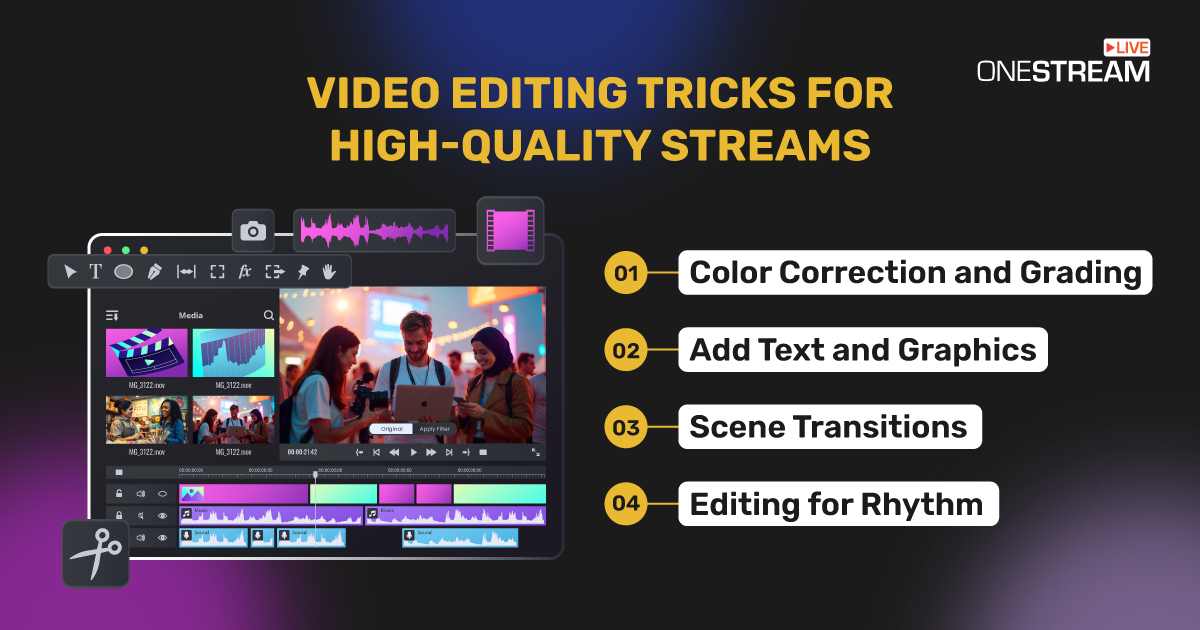
1. Color Correction and Grading
Consistency in color enhances the professional look of your stream:
Adjust brightness, contrast, and saturation to maintain a cohesive style.
Tools like Movavi excel in color grading, making your content visually striking.
A well-graded stream sets a mood and makes your visuals pop.
2. Add Text and Graphics
Text overlays – be it titles, subtitles, or lower thirds — to make streams more accessible and informative. For instance, you can do the following:
Use animated intros to set the tone for your stream.
Add callouts or labels during tutorials or gameplay highlights.
Clear text and professional graphics help convey information effectively.
3. Scene Transitions
Pacing your transitions ensures a smooth viewing experience:
Stick to simple fades or cuts for professional streams.
Match transitions to content.
Well-thought-out transitions keep your audience immersed without distracting them.
4. Editing for Rhythm
The rhythm of your edits should match the content’s energy:
Use quick cuts for action-packed moments or slow fades for relaxed segments.
Experimenting with tempo keeps viewers engaged.
Matching the pace of your stream with its content ensures it remains captivating.
If you’re looking for that extra edge, consider these practical tips. They’re easy to implement and highly effective in improving your overall presentation:
Dynamic overlays — Use OneStream Live Studio to integrate customized overlays that brand your live streams.
Green screen effects — Remove or replace your background to create a clean, distraction-free stream using OneStream Live Studio.
Multi-camera views — Switch between angles using the OneStream Live Studio for interviews, gameplay, or tutorials to add depth to your content.
Live reactions and highlights — Pre-prepare overlays for on-the-fly responses to in-game events or audience interactions.
These advanced tricks can help you maintain viewer interest and elevate your production quality.
Stream Like a Pro
Video editing transforms live streams into polished productions that captivate even the most demanding audiences. Every step from planning and scripting to mastering software contributes to a broadcast’s success.
Color grading, B-roll footage, and synchronized audio will make your streams stand out in an increasingly competitive space. Invest in the right tools and refine your approach to ensure your streams are not only professional but unforgettable.
OneStream Live is a cloud-based live streaming solution to create, schedule, and multistream professional-looking live streams across 45+ social media platforms and the web simultaneously. For content-related queries and feedback, write to us at [email protected]. You’re also welcome to Write for Us!
We use cookies to enhance your browsing experience, serve personalized content, and analyze our traffic. By clicking "Accept All", you consent to our use of cookies.
Cookie Preferences
Strictly NecessaryRequired
Essential for the website to function properly.
Functional
Enable enhanced functionality and personalization.
Analytics
Help us understand how visitors interact with our website.