
As a content creator or live streamer, you know the feeling. You post a piece of content, and the traffic is a flat line. Then, one day, you wake up to a massive, unexpected surge of visitors. You check your Google Search Console report and see that Google Discover picked up your article. It’s a huge rush, but it’s also unpredictable. That traffic can disappear as quickly as it came.
For years, this has been the creator’s challenge with the Discover feed: it’s been a powerful but fickle source of engagement. But in late 2025, Google introduced a new function that changes this relationship: the Google ‘Follow’ button.
This small button represents a major shift in how Discover publishers and creators can build a stable, long-term audience directly within Google’s ecosystem. It moves Google Discovery from a passive feed to an active subscription service. For those of us in the world of video streaming and content creation, this is a development you need to act on.
- The new Google 'follow' button gives creators a way to build a stable, long-term audience.
- This feature creates a new "Creator Dedicated Space" that unifies your content.
- It was released after major Google updates in 2024 and 2025 cleaned up spam, making it a reward for high-quality, "people-first" content.
- Your E-E-A-T is no longer just for algorithms; it's now a user-facing tool to convince people to follow you.
- To enable the follow feature, you must have a correctly configured RSS or Atom feed linked in your website <head>.
- A successful Google Discover SEO strategy now focuses less on specific keywords and more on covering entities and trending topics in your niche.
What is the Google Discover 'Follow' Feature, Exactly?
This is the most important question. The Google ‘Follow’ button is a feature that lets a user subscribe to your website or creator profile directly from a card in their Google Discover feed.
When a user (who must be signed in to Google) sees your content, they now see a “Follow” option, often at the top right of the card. When they tap your name, they are taken to a preview page. If they confirm, they are now “following” you.
This action populates a new, dedicated “Following” tab within their Discover, where they can see a feed composed only of content from the creators and Discover publishers they have explicitly followed.
How is the 'Follow' Button Different from the Old Discover Feed?
Let’s take the example of the difference between a radio station and a playlist you curate yourself.
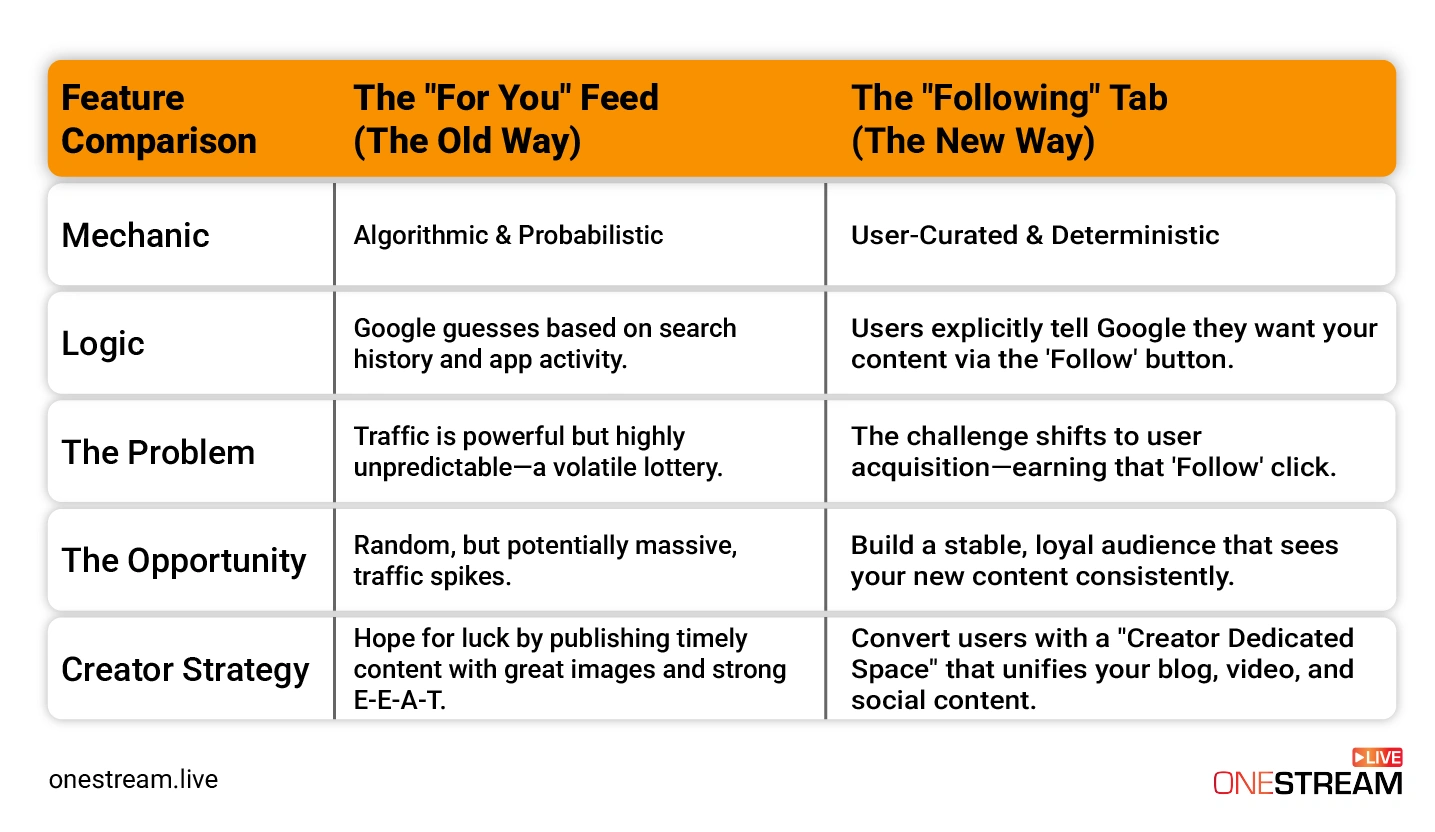
The main Google Discover page is like a radio station. Google is the DJ, playing songs (articles and videos) it thinks you’ll like based on your past activity, like your search history and app usage. This is a “probabilistic” system, as it’s based on probability and guesses.
The new “Following” tab is your personal playlist. You are the DJ. By hitting the Google follow button, you are explicitly telling Google, “I want to see content from this source.” This is a “deterministic” signal as it’s based on a direct, conscious choice.
For creators, this is the entire story. You are no longer just hoping to get lucky with the algorithm. You now have a direct tool to ask a user to subscribe, giving your updated content a much higher chance of being seen by them in the future.
What is This New "Creator Dedicated Space" Google is Showing?
This is the most exciting part for anyone in content creation. When a user taps your name to see if they want to follow you, Google doesn’t just show them a list of blog posts.
Instead, it presents a “new, dedicated space.” This page acts as a mini-portfolio for you as a creator, and Google builds it automatically.
Our analysis shows this space pulls in all of your Discover content from multiple platforms, including:
- Your website articles
- Your YouTube videos
- Your YouTube Shorts
- Your posts from X (formerly Twitter) and Instagram
This is a massive development. Google is officially breaking down the walls between your website, your video channels, and your social media. It now understands that you, the creator, are the “entity” people want to follow, not just one of your platforms.
For a OneStream Live user who might be multistreaming a pre-recorded video to YouTube and Facebook while also writing a blog post about it, this is perfect. Google is now connecting those dots for the audience, presenting your entire brand in one place.

Why Did Google Release This After the August 2025 Spam Google Updates?
To understand the ‘Follow’ feature, you have to understand the context of the Google updates that came before it. The period from March 2024 to September 2025 was a “great clean-up” for Google.
- The March 2024 Core Update was a major algorithmic change that, combined with other efforts, aimed to reduce low-quality, unoriginal content in search results by 45%.
- The August 2025 Spam Update (which completed rolling out in late September 2025) was not a “core” update, but a spam update. It was a global update using Google’s SpamBrain AI to specifically target manipulative tactics, “parasite SEO,” and other low-quality content.
Think about it: Google spent 18 months aggressively purging its index of unhelpful, scaled, and spammy content. It had to do this before it could confidently ask users to “Follow” publishers. The ‘Follow’ feature is the reward for high-quality creators and publishers who create “people-first” content and proved their value during these clean-ups.
How Does This Change E-E-A-T (Experience, Expertise, Authoritativeness, Trust)?
For years, we’ve talked about E-E-A-T as a set of signals to prove our quality to Google’s algorithms. We add author bios and “About” pages, and we cite our sources to show Google we’re legitimate.
The ‘Follow’ feature changes E-E-A-T from an algorithmic concept into a direct user conversion metric.
Here is the new user journey:
- A user sees your content in their Discover feed on Google.
- They’re interested and tap your name to see that “dedicated creator space”.
- On that page, they will personally judge your E-E-A-T.
They will ask, “Is this a real person or a faceless brand?” “Are they an expert on this topic?” “Do they have a YouTube channel and social presence, or just this one blog?”
A thin, anonymous profile will get a low “Follow” rate. A rich profile, which shows your face, your expertise, your YouTube videos, and your social posts, will get a high “Follow” rate. Your E-E-A-T is no longer just for Google; it’s now your primary sales pitch for winning a new follower.
Why is the Google Follow Feature Perfect for Video Creators?
The new Google Discover model is built for the modern, multi-platform creator = the exact person who uses tools like OneStream Live. The system is no longer just about articles; it’s about creators.
This creates a “virtuous cycle” that was impossible before:
- Acquire: You write a helpful blog post on your website (e.g., “My 5 Favorite OBS Settings for Flawless Streams”).
- Subscribe: That article gets traction on Discover on Google search and earns you a new “Follower” who is interested in you and your expertise on streaming.
- Engage: The next week, you use OneStream Live Studio to host a live Q&A on YouTube about OBS. Because that user explicitly follows you, Google now has a very strong signal to show that new YouTube video to them in their “Following” tab.

Your blog post acquired the follower, and your video content (your primary medium) engages them. This is the Discover Search ecosystem working in complete harmony.
How Can Live Streamers Get a "LIVE" Badge in Discover Google Feeds?
This is the most advanced, high-value strategy for streamers. Beyond just getting your videos on Discover, you can get a “LIVE” badge next to your video, creating a powerful sense of urgency.
This is a technical setup, but it’s worth it. It requires two things:
VideoObjectSchema: This is the basic structured data that tells Google about your video (title, thumbnail, upload date).BroadcastEventSchema: This is a nested piece of code inside yourVideoObjectthat tells Google the stream’s start time and end time, and includes a simple “true/false” tag forisLiveBroadcast.
When your stream is live, you (or your website’s system) set isLiveBroadcast to true. When you’re done, you set it to false.
For this to work instantly, Google requires you to use its Indexing API. You must “ping” the API the second you go live. This is where a professional streaming setup becomes important. If you use live streaming tool like OneStream Live’s External RTMP Streaming, you are already using a setup that can be integrated with these “go-live” signals.
Combining this “LIVE” badge with a “Follower” base is the next frontier. You are effectively creating a Google-native “go-live” notification system that pushes your stream directly into your followers’ feeds.
How to Get on Google Discover and Get the 'Follow' Button: A 4-Step Guide
Ready to get your site ready? Here are the practical steps on how to appear in Google Discover and activate the Google follow button.
Step 1: Set Up Your RSS/Atom Feed Correctly
The technical backbone of the ‘Follow’ feature is your website’s RSS or Atom feed. If you don’t provide one, Google will try to guess, but it’s much better to have control.
- Create a Feed: If you use WordPress, you already have one (e.g.,
yoursite.com/feed). - Link in Your
<head>: You must add a<link>tag to the<head>section of your website’s HTML. This must be on all pages, including your homepage and individual posts.- For RSS:
<link rel="alternate" type="application/rss+xml" href="https."//www.example.com/feed/">
- For RSS:
- Use a Good Title: Make sure your feed’s
<title>in the XML file is descriptive (e.g., “OneStream Live Blog”) and not just “RSS Feed”. - Don’t Block It: Ensure your
robots.txtfile is not blocking Googlebot from crawling your feed URL.
Pro Tip: Google’s rules allow you to have multiple feeds. You could have a feed for “Tech Reviews” and another for “Marketing Tips.” By linking the correct feed to the corresponding article, you can let users follow only the specific topic they care about.
Step 2: Implement Video and Live Stream Schema
As discussed above, this is non-negotiable for video creators. At a minimum, every page with a video (including pre-recorded streams) should have VideoObject schema markup. This tells Google the video’s title, description, and, most importantly, the thumbnailUrl.
For live streamers, adding the nested BroadcastEvent schema is the next step to appearing in Google Discover news feeds with that coveted “LIVE” badge.
Step 3: Use Large, High-Quality Images
Google Discover is a visual-first feed. Your content will be skipped if your image is small, blurry, or low-quality.
- Image Size: Google’s own guidelines say to use “compelling, high-quality images, especially large images.” The unofficial standard is to use a featured image that is at least 1200px wide.
- Meta Tag: You must enable the
max-image-preview:largemeta tag in your site’s<head>. This gives Google permission to show your large images. - Thumbnails: For video, your
thumbnailUrlin the schema markup is your one shot. Make it compelling.
Step 4: Find Your Profile Link and Ask People to Follow
You don’t have to wait for people to find you. You can actively promote your Google Discover profile.
First, you need to find your unique ‘Follow’ link. This is a bit tricky, but it seems to be a profile.google.com URL. There are some tools (like one from 1492.vision) and SEOs who can help you find this link.
Once you have that link, treat it like any other call-to-action:
- Add a “Follow us on Google Discover” button to your website.
- Put the link in your email newsletter.
- Create a YouTube Short or social post showing your audience how to find and click the Google News follow button for your content.
What is the Right Keyword Strategy for Google Discover SEO?
This is a trick question. Traditional Google search engine optimization is keyword-driven. A user types a query, and you provide the answer.
Discover SEO is “query-less”. No one is typing “articles about live streaming gear” into their Google Discover feed. The feed shows them content based on their interests and entities (people, topics, and brands) that Google knows they like.
So, if you’re doing keyword mapping, your Google Discover strategy is different:
- Traditional SEO: Targets “how-to” and “problem” keywords (e.g., “what is Discover in Google Search Console”).
- Discover SEO: Targets topics and entities that are trending in your niche (e.g., a new camera, a new social platform, a new streaming trend).
Your content should still have good semantic keywords , but the timing and relevance to your niche’s interests are far more important than keyword density.
How Do I Write Content That Ranks on Discover Search Engine and in AI Answers?
Today, you have to write for three audiences: human readers, traditional search, and the new Generative Engines (LLMs) that create AI Overviews.
Luckily, the strategy for all three is merging.
- For Humans: Write in a clear, natural language.
- For Discover: Use high-E-E-A-T signals and compelling visuals.
- For AI (GEO): Structure your content with simple, clean headings and short paragraphs. LLMs love to quote content that is structured like an encyclopedia or a high-quality “how-to” guide.
If you’re writing in natural language, using question-based headings (like the ones in this article), and providing direct, factual answers, you are already doing the work of Generative Engine Optimization (GEO).
Just as Google Analytics helps SEO teams understand which content drives engagement and traffic, a new generation of AI visibility tools, like SE Visible, shows which questions, themes, and angles are most frequently surfaced in AI-generated answers.
So, How Does Google Discover Work for Creators Now?
Google Discover has grown up. It’s no longer just a volatile bonus source of traffic. The ‘Follow’ feature makes it a core pillar of a modern creator’s audience-building strategy.
It’s Google’s way of rewarding creators who have a multi-platform presence. It’s built for people who write articles, make videos, and post on social media.
For creators using a platform like OneStream Live, this is a massive confirmation of your strategy. You’re already using a live streaming solution to create content across multiple channels. You’re using pre-recorded streaming to schedule high-quality video and multistreaming to distribute it.
Now, Google has given you the final piece: a central ‘Follow’ button that unifies all that hard work and helps you turn passive viewers into a loyal, subscribed audience.

FAQs about Google Discover
It’s a personalized content feed in the Google app and Chrome that shows you articles and videos based on your interests and web activity, without you needing to search.
Following a topic (like “live streaming”) shows you content from many sources. Following a publisher or creator tells Google you want to see more of their specific content—including articles, YouTube videos, and social posts—in your “Following” tab.
You must have a valid RSS or Atom feed. The best way to enable it is to add a <link> tag in your website’s <head> section that points directly to this feed.
Traffic from Discover can change often. This can be due to a shift in user interests, your content no longer being timely, a recent algorithm update, or a potential violation of Discover’s content policies.
OneStream Live is a cloud-based live streaming solution to create, schedule, and multistream professional-looking live streams across 45+ social media platforms and the web simultaneously. For content-related queries and feedback, write to us at [email protected]. You’re also welcome to Write for Us!