
Facebook copyright infringement is central to how content is moderated, shared, and monetized in 2025. With Meta enhancing its Rights Manager tools and intellectual property violation policies, creators need sharper clarity than ever on copyright issues, Facebook claim risks, and how to use music on Facebook Live without triggering complaints.
Recent updates make it clear: Meta is enforcing its policies more strictly. The Copyright Help Center now outlines clearer pathways for protecting your own work and responding when others claim infringement. (Meta Help Center)
If you want to avoid strikes, bans, or that dreaded Facebook copyright message, you need to understand how things work now: how to report violations, use licensed music, issue takedowns, and even file a DMCA. We’ll unpack all that clearly, with up-to-date steps and practical advice.
- Facebook copyright policy in 2025 enforces stricter monitoring through Rights Manager and DMCA processes.
- Using unlicensed music often results in a Facebook message about copyright infringement or muted streams.
- Submitting a Facebook copyright report form or a Facebook DMCA notice is the proper way to protect your work.
- To avoid Facebook claim strikes, always rely on original or licensed content.
Facebook’s Updated Copyright Tools & How to Use Music Safely
Facebook (Meta) has tightened up its systems around Facebook copyright, Facebook claims, and intellectual property violations since 2024. If you stream or post content with music, here’s what to know now and how to avoid trouble.
1. Rights Manager is more active & accessible:
Rights Manager helps content owners protect their work via audio, video, and image matching on Facebook & Instagram. Rights holders can monitor unauthorized use, request takedowns, and see where their content appears.
To use it, you must verify ownership (copyright, publishing, or licensing info) so Meta can authenticate your claim.
2. Copyright / DMCA clarity is improved:
The Copyright Help Center and policy pages (Meta Help Center) now offer clearer instructions on how to contact Facebook when you see violations, fill out a Facebook copyright report form, or file a Facebook DMCA notice.
3. New music rules in live content:
- You can use music in Facebook Live only if you have the rights or a valid license. If not, your stream may be muted (audio removed), blocked, or face a claim.
- Meta provides the Sound Collection/Sounds Library, royalty-free or licensed tracks, for creators to use safely.
4. How to avoid copyright issues on Facebook Live:
- Always use music you own, or properly licensed tracks.
- Use Meta’s royalty-free collections.
- Avoid using full tracks by famous artists unless you have sync or master use permissions.
- When you stream, ensure there’s a visual component, as music alone or “music listening experience” type content is often flagged.
5. What happens if you get flagged:
- If someone files a Facebook claim against your content, you’ll usually get a notification and some options to mute, remove, or dispute.
- Repeat infringements can lead to strikes, account limits, or losing access to certain tools.
Pro Tip: Stream with copyright-free music in just a few clicks using OneStream Live Studio. Read More Now!
How to Report Copyright Infringement & Contact Facebook
If someone is using your content without permission, Facebook gives you a clear path to file a complaint. Here’s how reporting works in 2025:
1. Use the Facebook Copyright Report Form
- Head to Meta’s copyright report form.
- Fill in details about your work, proof of ownership, and where the infringing content appears.
- This triggers a formal Facebook copyright infringement review.
2. File a DMCA Takedown
- If you’re in the U.S. (or a country recognizing DMCA law), you can submit a Facebook DMCA notice.
- The platform will remove the content or mute the audio until the dispute is resolved.
- Remember, DMCA means Digital Millennium Copyright Act. It’s the legal framework governing takedown requests.
3. What is Copyright Infringement on Facebook?
- It includes uploading videos, music, or images you don’t own or don’t have rights to.
- Even short clips can trigger a Facebook copyright infringement message or muted streams.
4. Contacting Facebook Directly
- You can contact Facebook through the Help Center, where live chat support is sometimes available for business accounts.
- Contacting Facebook through Rights Manager is recommended if you regularly monitor IP violations.
5. Disputes & Counter-Claims
- If you believe your content was wrongly flagged, you can submit a counter-notification.
- This is how you inform Meta that you have rights, for example if you licensed a track or created the content yourself.
Pro Tip: Always keep documentation like licenses, contracts, or permission notes ready. If your content is flagged, this proof helps you avoid repeated strikes under Facebook’s copyright policy.
How to Avoid Copyright Problems on Facebook Live
Copyright strikes on Facebook Live can end a stream abruptly or, worse, restrict your account. Here’s how to steer clear of violations:
- Use licensed or royalty-free music
- The safest way to stream is with music you own or have licensed.
- Meta offers the Sound Collection, a library of free tracks and effects cleared for use. This helps avoid Facebook copyright infringements.
- If you’re unsure, run a Facebook music copyright checker before going live.
- Understand the rules for music
- Wondering how to play music on Facebook Live without copyright problems? Stick to short clips, background music you’ve licensed, or the Sound Collection. Playing full albums or DJ sets without permission often triggers a Facebook claim.
- If music is the central focus (a “listening experience”), it’s more likely to be flagged.
- Be proactive with your content
- Always ensure your stream has a visual component as Facebook discourages audio-only content.
- Include a Facebook copyright disclaimer text in your description if you’re using licensed work. This, although not legally binding on its own, demonstrates good faith.
- Pre-recorded content must be marked clearly as pre-recorded; looping videos or static polls are not allowed.
- Check before you stream
- Tools like Facebook copyright checkers available online can help identify copyrighted tracks before your video goes public.
- For regular creators, using a Facebook tool to check music copyright is worth the extra step.
- Know the policy updates
- Meta’s Facebook copyright policy explicitly states that repeated violations may result in muted audio, video removal, or restrictions on live access.
- To avoid an intellectual property violation on Facebook, keep your uploads 100% original or fully licensed.
Pro Tip: If you want to use popular songs, explore services that handle rights management on your behalf. Otherwise, even a few seconds could result in takedowns, regardless of intent.
Strike System & Consequences on Facebook
Meta enforces a strike-based system to deal with Facebook copyright issues and other violations. Understanding how it works can help you protect your account.
- First strike: Usually results in muted audio or partial video removal. You’ll also receive a Facebook copyright infringement message explaining the action.
- Multiple strikes: Repeated violations may trigger restrictions on going live, limits on monetization, or temporary suspensions.
- Severe violations: Uploading large amounts of copyrighted material or intentionally distributing pirated media may result in an immediate ban under Facebook’s copyright policy.
- Strike duration: Strikes are not always permanent. However, Facebook doesn’t disclose exact timeframes for how long they remain on record.
What happens if you ignore warnings?
- Content removal: A flagged video will be deleted, sometimes without notice, if it is clearly in violation of rights.
- Account limits: Loss of access to features such as live streaming or ads.
- Permanent bans: In cases of repeated intellectual property violations on Facebook, entire pages or accounts may be shut down.
Can you dispute a strike?
Yes. If you own the rights or have proof of licensing, you can file a dispute through the Facebook copyright report form or by submitting a Facebook DMCA counter-notification. Having evidence, like a license agreement or original creation files, is essential.
Pro Tip: Don’t assume small infractions will go unnoticed. Even short clips of copyrighted songs can trigger Facebook’s detection system, leading to a strike.
Best Practices to Stream Safely & Avoid Facebook Copyright Infringement
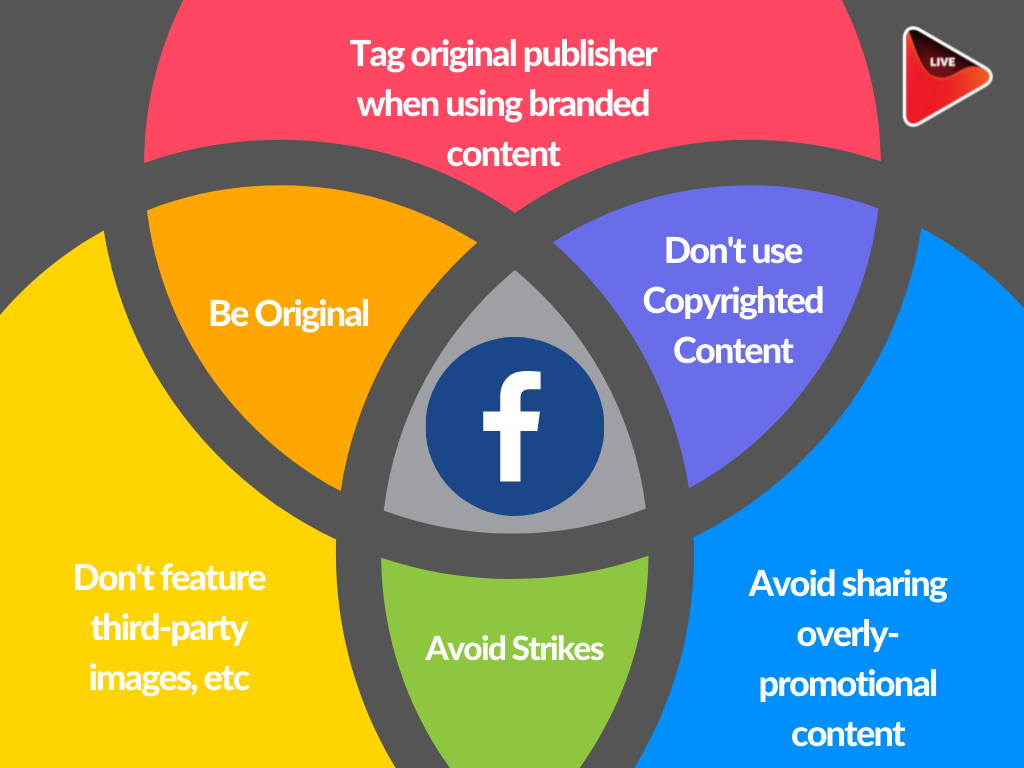
Avoiding copyright issues on Facebook doesn’t have to be complicated. With a few smart habits, you can keep your content original, compliant, and worry-free.
Create original content whenever possible:
The safest way to avoid a Facebook copyright infringement strike is to broadcast content that you’ve produced yourself. If you’re sharing music, video clips, or images, make sure you own the rights. Videos originally created by someone else, or reposted without rights, are also automatically flagged.Use licensed or royalty-free music:
If you’re unsure how to avoid copyrighted music in Facebook streams, stick to licensed tracks or Meta’s free Sound Collection. Third-party licensing platforms also offer clearance options. Even short clips of background music from a sound system can trigger takedowns.Check content in advance:
Run your videos through a Facebook copyright checker online to see if any audio may trigger claims.Understand disclaimer limits:
Adding a Facebook copyright disclaimer text (“I don’t own the rights to this music…”) does not legally protect you. It’s useful for transparency, but it won’t stop a Facebook claim if you’re using copyrighted material.Be cautious with live performances:
Playing instruments or singing live is generally safe. But if you include backing tracks or samples, you’ll need permission from the rights holders. Knowing how to copyright a song you’ve created can also help protect your own work.Stay updated with policy changes:
Meta updates its Facebook copyright policy regularly. Check the Help Center for updates on new rules, particularly regarding Facebook copyright message alerts and Facebook’s procedures for intellectual property violations.Plan ahead for disputes:
Keep licenses, agreements, or proof of ownership handy. If content gets flagged, you can respond quickly via the Facebook copyright report form or a Facebook DMCA counter-notice.
Final Takeaway
By 2025, Facebook copyright infringement will be one of the most common reasons streams get flagged or accounts get restricted. Meta has expanded its detection systems, clarified takedown procedures, and made tools like the Sound Collection and Rights Manager easier to access.
For creators, the message is clear: understand what is copyright infringement, learn how to avoid copyright infringement on Facebook, and keep documentation handy in case disputes arise. By staying proactive, you’ll avoid the pitfalls of copyright claims and focus on what matters: growing your community.
Frequently Asked Questions
It’s using music, video, or images you don’t own or have permission to use.
Use original or licensed music, or Meta’s free Sound Collection library.
No. Disclaimers don’t override copyright law or Facebook’s detection systems.
You can use the Facebook copyright report form or the Help Center to submit complaints or disputes.
You may receive strikes, muted videos, or account restrictions under Facebook’s copyright policy.
Use royalty-free or licensed tracks, or select songs from Meta’s Sound Collection.
OneStream Live is a cloud-based live streaming solution to create, schedule, and multistream professional-looking live streams across 45+ social media platforms and the web simultaneously. For content-related queries and feedback, write to us at [email protected]. You’re also welcome to Write for Us!