
Most creators kill their sites by hosting video files directly. Don’t be one of them. In this guide, we break down the best WordPress hosting for video streaming, comparing NVMe speeds and unmetered bandwidth.
There is a pervasive myth in the creator economy that “hosting is hosting.” That as long as you have a domain name and a place to install WordPress, you are ready to broadcast to the world. This is a dangerous lie.
When you are pushing live video, you aren’t just a blogger; you are a broadcaster. And the infrastructure required to keep a site alive when 500 people suddenly click “Watch Now” is entirely different from the infrastructure needed to host a recipe blog.
The "Unlimited" Bandwidth Trap
Here is the ugly truth about the hosting industry: “Unlimited” almost never means unlimited.
Walk into the Terms of Service (TOS) of nearly any budget host, and you will find a clause called the “Fair Usage Policy” (FUP). It usually states that if your site consumes more resources than a “normal” personal blog, they have the right to throttle your speed or take you offline, effectively immediately.
For a streamer, this is catastrophic. Live video is data-heavy. Even if you are smart and using OneStream Live to handle the actual video distribution (which we will get to in a minute), your WordPress site still has to handle the concurrent traffic of users hitting your landing page, loading the chat widget, and querying the database.
If you are just starting out, you might get away with standard infrastructure. A recognized, accessible entry point for WordPress hosting can handle your initial traffic spikes while you build your audience, as long as you understand the limitations of shared resources.
But as you grow, you need to look for high speed hosting providers that offer unmetered bandwidth—meaning they don’t cap your data transfer—and have a track record of not throttling creators the moment they find success.
What is Time to First Byte (TTFB)
Stop looking at “storage space.” You aren’t Dropbox. You are a streamer. The only metric you should be concerned about is Time to First Byte (TTFB).
TTFB is the time it takes for a user’s browser to receive the very first byte of data from your server after they click your link. Google loves this metric. Users feel it.
If your TTFB is slow (anything over 600ms is sluggish; over 200ms is ideal), your audience is staring at a white screen. In the streaming world, attention spans are nonexistent. If the player doesn’t load instantly, they are gone. They are back on TikTok or Twitch, and you have lost them.
Why NVMe Storage is Non-Negotiable
To get that low TTFB, you need the fastest WordPress hosting hardware. This brings us to the disk type.
- HDD (Spinning Disk): Ancient technology. A physical needle reads data from a spinning platter. It is slow, prone to failure, and has no business running a modern media site.
- SSD (SATA): Better, but still limited by the connection interface.
- NVMe (Non-Volatile Memory Express): The gold standard. NVMe drives connect directly to the server’s motherboard via the PCIe interface.
Here is the math: NVMe drives can be up to 6x faster than standard SSDs. When hundreds of users hit your site simultaneously to catch your live stream, the server has to make hundreds of database queries per second to load the page content, the user profiles, and the comments.
Spinning disks choke under this pressure. NVMe eats it for breakfast.
Managed vs. Shared Hosting
To understand why your stream buffers or your site crashes, you have to understand the neighborhood your website lives in.
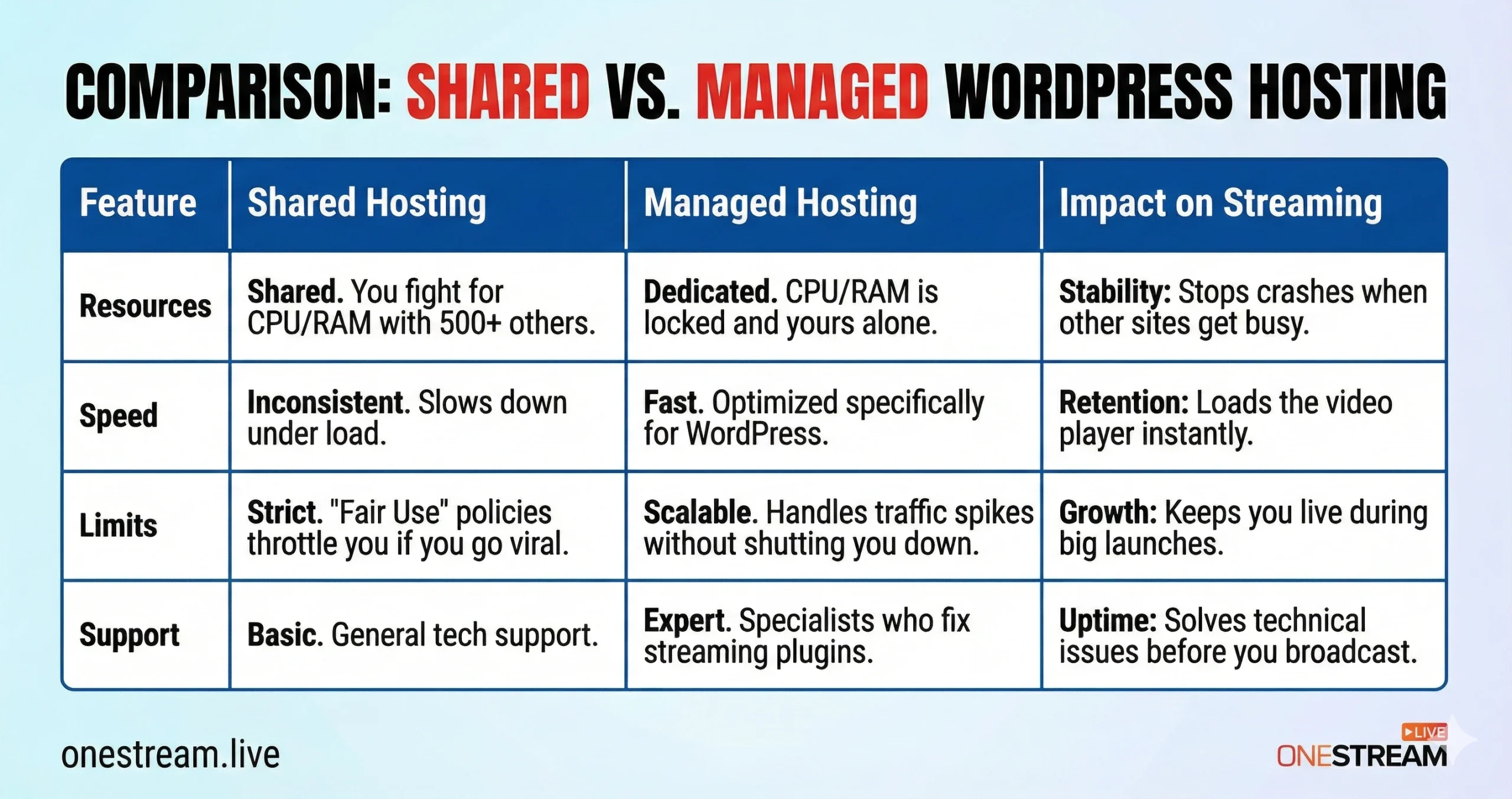
Shared hosting is like living in a college dorm. You have your own room, but you share the hot water, the electricity, and the hallway bandwidth with 500 other students.
If the guy in Room 304 decides to mine crypto or host a viral meme, your shower goes cold. In hosting terms, if another site on your server gets a traffic spike, your site slows down. This is the “Bad Neighbor Effect.”
Managed WordPress hosting is like renting a private penthouse. You have dedicated resources. You have a concierge (support team) who specializes in WordPress issues.
Most importantly, you have “containerized” resources. Even if the rest of the server farm is on fire, your allocated RAM and CPU cores are yours and yours alone.
For creators, managed WordPress hosting is often the only viable path. These providers configure the server specifically for WordPress, implementing server-level caching that generic hosts simply don’t offer.
This means your page loads faster, your OneStream Live player embeds instantly, and you don’t have to worry about the “noisy neighbors” crashing your party.
The Role of CDN Integration in a Global Stream
Your server is physically located somewhere—let’s say, Dallas, Texas.
When a viewer in London connects to your site, that data has to travel under the Atlantic Ocean. That distance creates latency. Latency creates lag. Lag creates angry comments.
A Content Delivery Network (CDN) solves this by caching the static parts of your website (images, CSS, JavaScript) on servers all around the world. When the London viewer connects, they aren’t pulling data from Dallas; they are pulling it from a server in London.
Many streaming hosting services claim to have a CDN, but check if it’s integrated properly. The best hosts offer enterprise-level integration (often with Cloudflare) that works right out of the box.
This offloads 60-70% of the traffic from your main server, leaving the CPU free to handle the dynamic stuff—like your live chat or membership logins.
The "Don't Do It" Section: Hosting Video Files
We need to have a serious conversation about a mistake that kills more creator websites than hackers do: hosting video files in your WordPress Media Library.
Do. Not. Do. This.
I don’t care if you have “unlimited” storage. I don’t care if you have a dedicated server. WordPress is a Content Management System (CMS), not a video streaming server. It is designed to serve text and images, not to push heavy MP4 packets to thousands of concurrent connections.
If you upload a 2GB recording of your last stream to your Media Library and five people try to watch it at once, your server’s RAM will max out, the CPU will hit 100%, and the site will crash (Error 502 Bad Gateway).
The Solution: The OneStream Live Strategy
Smart creators separate their concerns. You use your WordPress host for the website and a specialized tool for the video.
This is where OneStream Live stops being a “tool” and starts being infrastructure. By utilizing OneStream Live, you bypass the limitations of your WordPress host entirely for the video delivery.
- Multistreaming Power: You aren’t just sending data to your website. You are sending a single stream to OneStream Live, and they are replicating it to YouTube, Facebook, Twitch, and 45+ other destinations simultaneously. Your poor WordPress server doesn’t have to lift a finger for this.
- Embeddable Player: You simply take the embed code from OneStream Live and drop it onto your WordPress page. The video bandwidth comes from OneStream Live’s servers (or the destination platforms), not your Bluehost or SiteGround account.
- Live Unified Chat: Instead of taxing your WordPress database with a heavy chat plugin that writes to your SQL database every millisecond, you use the OneStream Live Unified Chat. It aggregates comments from all platforms into one interface.

This is the secret to the best WordPress hosting for video streaming: It’s about not using your host for the streaming.
Final Thoughts
The search for the best WordPress hosting for video streaming ends with a realization: the host is there to serve the page, not the stream.
By shifting the video processing load to OneStream Live and ensuring your WordPress host is optimized for speed (high TTFB, NVMe, unmetered bandwidth), you create a bulletproof ecosystem. You stop worrying about server error logs and start worrying about your lighting, your audio, and your content.
That is how you win.

Frequently Asked Questions (FAQs)
Yes. While they may not explicitly say “we throttle streams,” they throttle “CPU usage” and “I/O processes.” Since live streaming (or even high-traffic landing pages for streams) is resource-intensive, you will hit these hidden caps quickly.
Once you hit the cap, the host will either slow your site down to a crawl or temporarily suspend your account to “protect other users.”
No. As mentioned above, this is a technical suicide mission. WordPress uses PHP to generate pages. It is not optimized for video streaming protocols like HLS or RTMP. Hosting video files locally destroys your bandwidth and kills your Time to First Byte.
Shared hosting may be a suitable option for a small website, but when it comes to live streaming, there can be sudden spikes in traffic and resource demands. Managed WordPress packages with autoscaling CPU and RAM/RAM and high PHP worker limits are the best fit for achieving steady results in live events.
You can make a test live page with an embedded player and simulate the traffic by load-testing plug-ins or services. Test page load times, caching status, and embed performance under load to ensure your host won’t fail when your streams are on live.
Not necessarily. If your hosting has an optimized CDN that is serving images, thumbnails, CSS, and JS efficiently, adding another CDN might be overkill. But definitely verify that it works well with the live video embeds and multistreaming you use.
OneStream Live is a cloud-based live streaming solution to create, schedule, and multistream professional-looking live streams across 45+ social media platforms and the web simultaneously. For content-related queries and feedback, write to us at [email protected]. You’re also welcome to Write for Us!