
Most guides on AI tools for content creation read like they were written by a chatbot with a toxic positivity problem. It’s stiff, oddly enthusiastic about mundane things, and often wrong. But dismissing AI entirely because of bad prompters is a mistake in 2025.
The 2025 Creator Mental Health Study found that 62% of digital creators report feeling burnt out. You aren’t tired because you lack creativity; you are tired because you are doing the job of a ten-person television studio by yourself.
The goal is to let the machine handle the boring stuff like the metadata, rough cuts, and distribution logistics, so you can focus on the art. If you treat AI as an intern rather than a replacement, you regain your sanity.
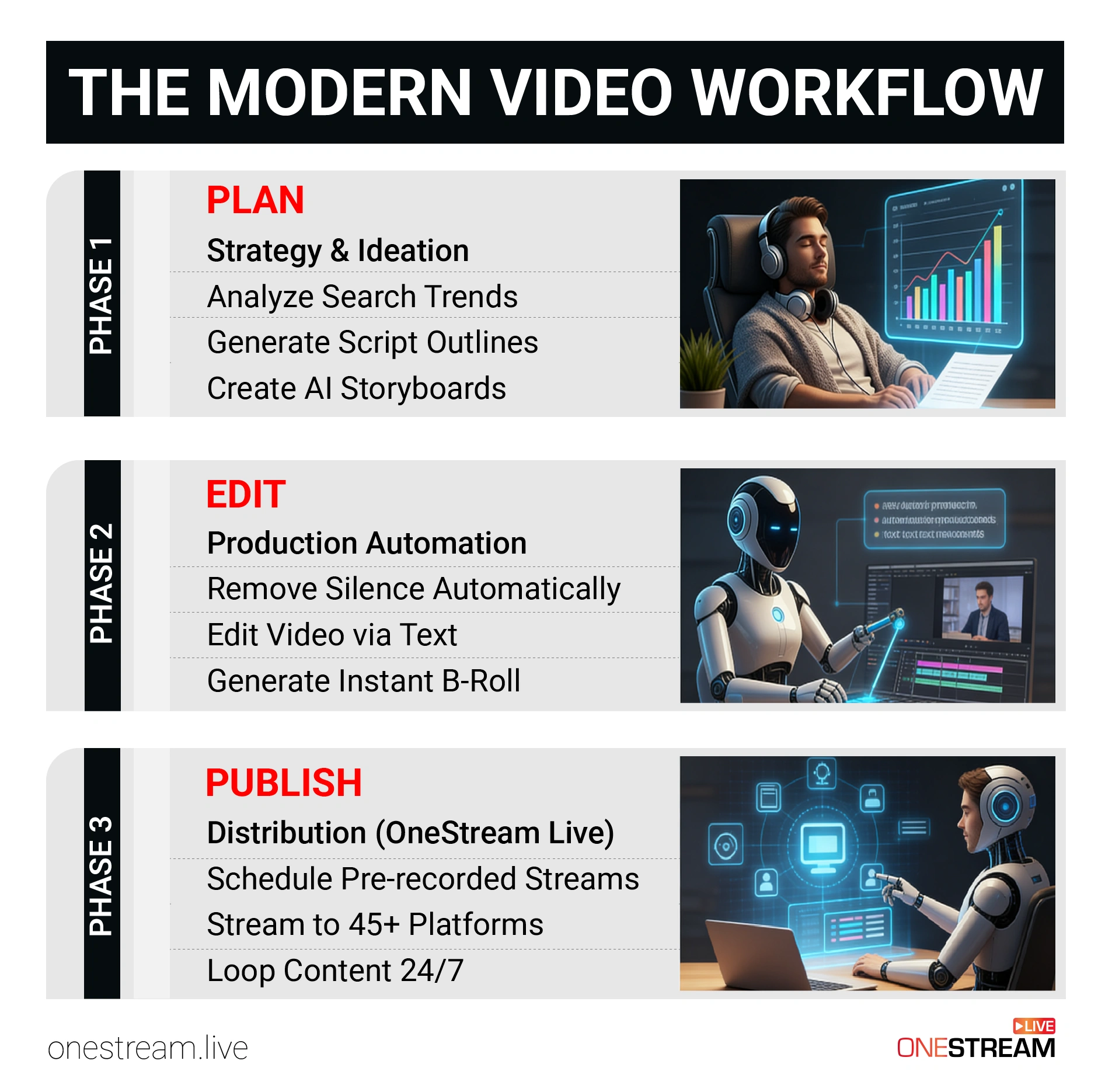
Here is the AI content creation workflow that actually works: broken down into Planning, Editing, and the crucial final step most people botch: Publishing.
- Use AI-driven trend analysis to predict viral topics.
- Overcome writer's block by generating skeleton outlines that structure your narrative.
- Slash production hours by utilizing text-based video editing and automated silence removal.
- Maximize audience reach by using pre-recorded streaming software to broadcast polished edits.
- Implement multistreaming platforms to distribute content simultaneously to multiple platforms.
- Build a 24/7 brand presence with video looping strategies and custom hosted live pages.
- Professional content creation services succeed by using human intuition to curate an authentic AI output.
What is the Modern AI Infrastructure?
Before we list the tools, it is necessary to understand why this shift is happening now. A few years ago, high-end automation was restricted to enterprise studios with massive server racks. Today, the barrier to entry has collapsed.
This democratization is largely due to the rise of AI as a service models, which allow developers to build powerful applications on top of existing large language and vision models. Because of this infrastructure, you can now access supercomputer-level processing power to analyze trends or render video from your laptop browser. The tech has scaled; now your workflow must scale with it.
Phase 1: How to Use AI for Content Creation in the Planning Stage
Blank page syndrome is the enemy of consistency. The hardest part of being a video creator is often just deciding what to film. This is where we learn how to use AI for content creation effectively. And we do it not by asking it to write a script, but by asking it to find a gap in the market.
1. How to Conduct AI-Driven Trend Analysis
Don’t guess what people want to watch. Use AI to analyze large datasets of viewer behavior. Tools like TubeBuddy or VidIQ have integrated AI features that scan YouTube search volume to predict which topics are about to spike.
- The Action: Instead of asking ChatGPT “Give me video ideas,” feed it your last 10 video titles and their view counts. Ask it: “Based on this performance, identify three patterns in my successful content and suggest five new titles that follow this logic.”
- The Benefit: You move from “guessing” to “strategic iteration.” You stop throwing spaghetti at the wall and start cooking a meal people actually ordered.
2. How to Use AI for Scripting (Without Sounding Robotic)
Never ask an AI to write your final script. It will sound like a press release. Instead, use it to generate the skeleton.
- The Workflow: Dictate your loose thoughts into a voice memo. It doesn’t need to be coherent; just ramble about your topic for 5 minutes.
- The Prompt: Upload the transcript and ask an LLM: “Turn this rambling transcript into a structured bullet-point outline for a 10-minute video. Keep the tone casual and flag any sections that need more research.”
- The Result: You get structure without losing your unique voice. You are still the AI content creator, but you skipped the hour of staring at a blinking cursor.
3. Visualizing the Narrative with Storyboarding
Before you turn on the camera, you need to know what the shot looks like. AI image generators can create storyboards for you.
Describe your scene, “Close up of a nervous man holding a coffee cup, noir lighting,” and get a visual reference. This is crucial for video content creator tools because it helps you communicate your vision to editors or just keeps you on track during a solo shoot.
Phase 2: What Are the Best AI Tools for Content Creation in Editing?
Editing is where dreams go to die. It is tedious, repetitive, and kills momentum. This is the sector where the best AI tools for content creation offer the highest ROI. Recent data shows that AI video tools can reduce production time by approximately 80%.
1. Text-Based Video Editing: The New Standard
If you are still scrubbing through timelines looking for bad takes, you are wasting time. Tools like Descript or Premiere Pro’s text-based editing allow you to edit video by editing the transcript.
- The Fix: You delete the sentence in the text document, and the AI cuts that section of the video.
- Silence Removal: One of the most powerful tools for video content creators is automated silence removal. With one click, you can strip out every “um,” “ah,” and awkward pause. This tightens your pacing instantly.
2. Generative Fill and Asset Creation
Need B-roll? In the past, you had to film it or buy expensive stock footage. Now, generative video tools can create specific 5-second clips to cover your cuts.
- Visual Continuity: If your camera frame was slightly off, AI tools can now expand the background (generative expand) to fix the aspect ratio. This is particularly useful when repurposing horizontal video for vertical platforms like TikTok.
3. How to Automate Accessibility with Captions
Accessibility is no longer optional. Search engines index text, not audio. If you want your video to rank, it needs words on the screen.
- Pro Tip: When you prepare your video for broadcast, OneStream Live supports adding captions or subtitles through SRT files. You can use AI to generate these captions with near-perfect accuracy, then upload them directly to your stream settings. This makes your content accessible to the hearing impaired and the 75% of people who watch mobile video with the sound off.
Phase 3: Automated Content Generation for Publishing and Distribution
This is the pivot point. You have a perfectly edited, AI-assisted video. If you just upload it to YouTube and walk away, you have failed. You need an automated content generation workflow for distribution.
You don’t need to be at your desk to go live. You need infrastructure that works while you sleep. OneStream Live acts as the bridge between your static video file and a live, interactive audience.
Here is how to turn one video into a recurring event.
1. Why Pre-recorded Streaming is the Secret Weapon
Going live is stressful. The internet cuts out. The lighting fails. You forget your lines. But “Live” content gets prioritized by algorithms on Facebook, YouTube, and LinkedIn.
- The Solution: Use Pre-recorded Streaming. You take your polished, AI-edited video and broadcast it as if it were live.
- The Benefit: You get the engagement boost of a live stream (real-time chat, notifications to followers) with the quality control of a pre-edited video. You can schedule these up to 60 days in advance using Advanced Scheduling.
- The Workflow: Upload your AI-edited masterpiece to OneStream Live. Select your date and time. Choose your destinations. The system handles the rest. You can even create Playlists to queue up multiple videos in a specific order, creating a TV-style block of content.
2. How to Use Cloud Storage Integration for Heavy AI Files
High-quality video files are massive. 4K video rendered by AI upscaling tools can eat up gigabytes of space. Downloading them from your editor just to re-upload them to a streaming platform is a waste of bandwidth and time.
- The Shortcut: OneStream Live integrates directly with Cloud Storage solutions like Google Drive, Dropbox, and Amazon S3.
- The Efficiency: You can save your AI-edited video from your editor directly to the cloud and then import it seamlessly into your streaming dashboard. No hard drive clutter required. This streamlines your live streaming setup and keeps your local machine running fast.
2. Multistreaming: The Art of Hyper-Distribution
Why settle for one audience? Multistreaming allows you to broadcast to over 45 social media platforms simultaneously.
- The Strategy: Configure your stream to hit YouTube (for long-term search), Facebook (for community sharing), and Twitch (for live interaction) all at once.
- Portrait Streaming: If you are targeting mobile users, use OneStream Live Studio to switch to Portrait Mode. This is ideal for Instagram Live and TikTok, platforms that favor vertical content. You can repurpose your horizontal AI content into a vertical format specifically for these current locations of high traffic.
3. The “Loop” Strategy: Creating a 24/7 Channel
You have seen those “Lofi Hip Hop” channels that run forever? You can do that for your business or personal brand using video looping.
- The Workflow: Create a playlist of your best AI tools for content creation tutorials or webinars. Set them to loop.
- The Result: You create an “Always On” TV channel for your brand. This is vital for a sophisticated streamer setup, ideal for reinforcing messages or showcasing product features while you are offline.
Phase 4: How to Create a Brand Home with Hosted Live Pages
Dependency on social media algorithms is dangerous. If YouTube changes its rules, you lose your reach. You need a home base. OneStream Live offers Hosted Live Pages, which are essential content creation tools for building your own online real estate.
1. No External Hosting Required
You don’t need to know how to code. You can create a professional, personalized web page for your live stream without external hosting or a domain. OneStream Live handles the servers.
2. Complete Customization for Brand Identity
Your page shouldn’t look generic. You can customize everything from the chat widget to the video player.
- Custom Domain: Establish your brand with a Custom Domain that reflects your organization’s identity. Instead of a random URL, it’s https://www.google.com/search?q=live.yourbrand.com.
- Clickable Call-to-Action: This is where you convert viewers into customers. Use a Clickable Call-to-Action Button to direct viewers to e-commerce sites, donation pages, or your newsletter.
3. Integrating the Embed Player
If you already have a website, streamline your content delivery with the Embed Player.
- Universal Embed Player: Ideal for frequent events, this player uses a consistent embed code. You paste it once, and every time you go live via OneStream, it appears on your site automatically.
- Adaptive Bitrate Streaming: The player uses Adaptive Bitrate Streaming (ABR) to ensure smooth playback regardless of the viewer’s internet speed. This technical reliability is crucial for retaining viewers who might click away if the video buffers.
Phase 5: The Human Element in Professional Content Creation Services
There is a reason we are reclaiming the term “content creation tools.” A tool needs a master.
AI is fantastic at predicting the next word in a sentence, but it is terrible at understanding “taste.” It doesn’t know why a joke lands or why a specific camera angle feels emotional.
- The Trap: If you rely 100% on AI, your content will feel “smooth.” Smooth is boring. Smooth is forgettable.
- The Fix: Inject “texture.” Add personal anecdotes. Make controversial statements. Disagree with the AI’s suggestions. The algorithm rewards consistency, but the audience rewards authenticity.
Professional content creation services are already moving this way by using AI for the grunt work and humans for the strategy. You should too. The real skill of the future AI content creator isn’t prompting; it’s curating. It’s knowing which 90% of the AI’s output to delete.
Final Word
The narrative that AI will replace creators is false. AI replaces lazy creators.
The creators who win in 2025 will be the ones who build a system by using AI tools for content creation. They will use AI to handle the planning and editing, and infrastructure like OneStream Live to handle the publishing and distribution.
Don’t let your hard work rot on a hard drive. Take that video, schedule it, loop it, and stream it everywhere.
Ready to automate your distribution? Create your free account with OneStream Live today and schedule your first broadcast in minutes.

FAQ: AI Content Creation & OneStream Live
Yes, but with a caveat. Platforms like YouTube are requiring creators to label realistic AI content.
However, if you use AI for planning, editing, and scheduling (like using OneStream Live to Multistream), you are monetizing your workflow, which is perfectly fine. The goal is efficiency, not deception.
Consistency is key. Use Advanced Scheduling to map out your content calendar for the next two months. This helps you avoid the “feast or famine” cycle of posting. You can queue up weeks of content in one afternoon session.
Absolutely. Through External RTMP Streaming, you can connect effortless with top RTMP encoders like OBS, Zoom, XSplit, and Wirecast. This means you can use AI features inside OBS (like noise suppression) and pipe that signal directly into OneStream Live.
Use Pre-recorded Streaming to schedule your video to go live in different time zones. You can be “live” in Tokyo while you are sleeping in New York. Additionally, the Unified Chat feature lets you engage with audiences across different platforms from a single interface, ensuring you don’t miss a comment regardless of where the viewer is watching.
With External RTMP Streaming, you can enjoy No Time Limits for RTMP Streaming. This allows for uninterrupted broadcasting, which is perfect for 24/7 loops or marathon charity events.
OneStream Live is a cloud-based live streaming solution to create, schedule, and multistream professional-looking live streams across 45+ social media platforms and the web simultaneously. For content-related queries and feedback, write to us at [email protected]. You’re also welcome to Write for Us!