
New Year’s Eve streaming is about to hit its peak for 2025, going into 2026. Every year, millions scramble to find the 2026 countdown live online, hoping to watch the ball drop without cable or tune into some celebratory livestream. We get it: most people looking up New Year’s Eve streaming are viewers.
But here’s the twist: instead of just watching someone else’s stream, why not be the stream? If you’re a content creator (or an aspiring one), New Year’s Eve is a golden opportunity to hijack the ball drop hype and turn it into a moment for your own channel.
This guide will show you how to pivot from passive viewer to star broadcaster with creative streaming ideas and technical tips for a smooth 2026 countdown live event. Get ready to ring in 2026 by growing your audience and giving the world a show of your own!
New Year’s Eve streaming attracts massive global attention in a short time window.
Unique stream formats help creators stand out from basic countdown streams.
Viewers prefer interactive and community-driven NYE live streams.
Clear titles and early scheduling improve discoverability on December 31.
A stable setup is critical to avoid issues at the midnight countdown.
Multistreaming helps reach viewers across platforms at the same time.
Why You Should Hijack the Ball Drop (The Opportunity)
Everyone watches the clock on New Year’s Eve. In fact, Times Square organizers estimate over one billion people worldwide watch the famous ball drop ceremony each year, whether on TV or online. The official Times Square webcast alone drew 1.8 million+ viewers from 200+ countries last year. That’s a colossal audience with eyes glued to New Year’s Eve live content. Now imagine tapping into even a fraction of that interest for your own stream.
Search traffic spikes on December 31: YouTube fills with livestreams titled “NYE 2026 Live Countdown,” and Twitch sees streamers in party hats chatting with their communities as midnight approaches.
Even Twitch itself has encouraged creators to host NYE streams. In 2020, they invited streamers to throw virtual house parties and even provided a co-streamable feed of the Times Square ball drop. The message is clear: viewers are actively looking for streams to celebrate with, so why shouldn’t they celebrate with you?
“Talk about what happened to you and your stream during the past year. All the bad and all the good moments. Watch some stream highlights with [your community]…” – This advice from a fellow streamer on Reddit captures exactly what makes a New Year’s broadcast special.
It’s personal, interactive, and memorable. Rather than passively watching a network special, viewers who join an independent creator’s stream get a more intimate, community-driven celebration. They become part of the story.
Moreover, the community factor is huge. Many folks can’t (or choose not to) be out at big parties as they’d rather chill at home and hop on a stream. As one experienced streamer noted, there’s a “substantial audience of people who prefer staying home… treating the stream as their social gathering for the night”.
These viewers are often more engaged than usual. They’re chatting, sharing stories, even generously gifting subs or donating in the festive spirit. In other words, New Year’s Eve brings out strong emotions and generosity, which can translate into real growth for creators who cater to that crowd.
5 New Year’s Eve Streaming Ideas
It’s not enough to throw up a countdown timer and say “Happy New Year,” as hundreds of streams will do only that. To stand out, you need a creative angle.
Here are five inspired streaming ideas to elevate your New Year’s Eve broadcast (and none of them are just watching a clock tick down):
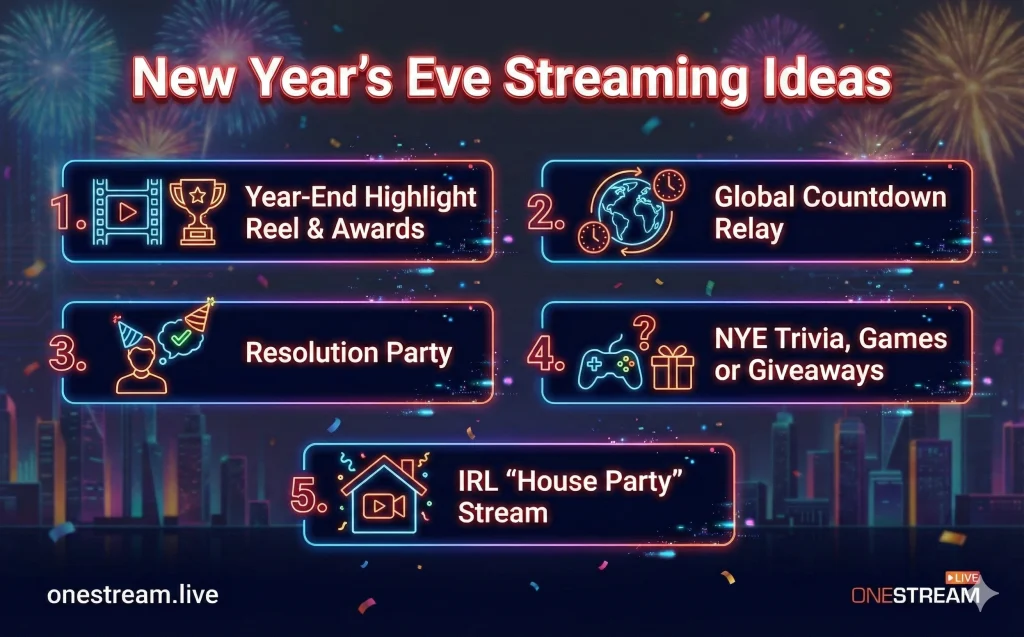
1. Year-End Highlight Reel & Awards
New Year’s is perfect for retrospectives. Host a “Best of 2025” segment on your stream. Roll footage of your top 2025 moments: hilarious fails, epic wins, or heartfelt interactions from your past broadcasts.
You can even turn it into an awards show (think “Streamies of My Channel 2025”). Hand out fun superlatives: “Best Clip of the Year,” “MVP Community Member,” “Top Donor Shoutout,” etc. This lets viewers relive memories and feel part of your journey.
Bonus: If you saved clips throughout the year, this is their time to shine. Nostalgia + celebration is a powerful combo. By reflecting on the past year, you set a positive, inclusive tone to kick off your 2026 countdown live.
2. Global Countdown Relay (24-Time-Zone Stream)
Why celebrate midnight only once? One ambitious idea is to do a rolling celebration across world time zones.
Start your stream earlier in the day to ring in New Year 2026 with friends in Europe, Asia, Africa… all the way to the Americas. This can be a 24-hour stream (or close to it) – the kind of marathon event viewers love to pop in and out of.
You could compile fun facts or short video clips of each country’s New Year traditions to play as their midnight approaches. Of course, staying live for so long is tough so this is where OneStream Live’s pre-recorded streaming feature can save the day (more on that in the Technical Setup section).
For instance, you can schedule a pre-recorded “Happy New Year [Country]!” message or fireworks video to play while you take a quick break. A global countdown tour not only taps into multiple peaks of viewer interest (as midnight rolls around repeatedly), it also literally says “everyone’s invited.” It’s the best 24 hour stream idea for NYE, and with planning, you can pull it off without collapsing at 12:01.
3. Resolution Party & 2026 Goals
Turn your stream into an interactive goal-setting workshop (with a festive vibe). Share your personal or channel goals for 2026 – maybe you plan to hit a subscriber milestone, start a new content series, or upgrade your gear.
Encourage viewers to chime in with their resolutions too (fitness? learning a skill? finally starting their YouTube channel?). You can use polls or a live Google Doc for viewers to contribute goals anonymously. The idea is to get a positive discussion going. It’s inspiring and lets your community bond over hopes for the new year.
Many big streamers do just chatting streams on this topic as it feels like a group of friends setting intentions together.
Pro Tip: Put a fun spin on it by revisiting last year’s resolutions and laughing (or face-palming) at how they panned out. Authenticity and humor go a long way here. By the end of the night, everyone’s motivated and feeling closer-knit.
4. NYE Trivia, Games or Giveaways
Spice up your countdown with some structured fun. For example, run a New Year’s Eve trivia quiz for your viewers: questions about 2025’s pop culture moments, notable news, or even facts about New Year’s traditions around the world. This keeps the chat energized and competitive (you can even give a small prize to the winner – perhaps a gift card or a shout-out on your next video).
If trivia isn’t your style, consider party games that work over stream. Jackbox games, for instance, are fantastic for audience participation. Or do a “2025 in Review” bingo: viewers get bingo cards of events or memes that might be mentioned, and see who gets bingo first as you naturally chat about the year.
Additionally, New Year’s is a great time for giveaways. A countdown plus a prize draw at midnight (e.g., “When the clock hits 2026, I’ll randomly pick one viewer to win X”) can keep people hooked until the very end. The key is to give your audience something to do besides watching the clock. An engaged viewer is a happy viewer (who’s too busy to click away).
5. IRL “House Party” Stream
If you’re comfortable mixing real life with your online persona, consider streaming an actual New Year’s gathering. This could be as simple as you in your living room, snacks and sparkling cider on hand, chatting with viewers as if they’re guests at your party. Or invite a couple of friends on stream (in person or via Zoom) for a small on-camera celebration.
The vibe should be laid-back and authentically festive. You can show off your decorations, share your family’s unique New Year traditions, even do a live countdown for each time zone (back to idea #2) with different props or mini-celebrations for each.
One streamer-centric twist: make it a multi-streamer meetup. Coordinate with a few creator friends to each host a segment, then raid each other’s streams as each of you reaches midnight in your respective time zone (a virtual party hop). This is exactly what Twitch encouraged with its NYE house party initiative, and they even provided graphics and a special directory for “Special Event” streams that night.
After choosing one (or a mix) of these ideas, remember that presentation is everything. Lean into the holiday theme: festive overlays, New Year’s graphics, on-screen chat confetti and go wild. This is a once-a-year spectacle, so embrace a little extravagance. And keep your energy up: you set the party mood, whether it’s nostalgic, hyped, or heartfelt.
Click-Worthy Stream Title Ideas for NYE
Great content needs an equally great title – especially if you want strangers to click into your stream. You’ll be competing with many other NYE broadcasts, so a catchy title can make the difference.
Here are some stream title ideas to grab attention (feel free to steal or adapt them):
- “2026 Countdown Live – Global New Year’s Party 🎉” – (hits the 2026 countdown live trend and promises a worldwide celebration.)
- “NYE Marathon: 24 Hours, 24 Time Zones, 1 Party” – (speaks to the 24 hour stream concept and sounds epic.)
- “How to Watch the Ball Drop (Join My Live Reaction!)” – (plays off the viewer intent of how to watch the ball drop without cable, enticing them with your commentary.)
- “Top 25 Moments of 2025 + Live New Year Countdown” – (combines a year-end list with the live countdown, very click-worthy and YouTube-friendly.)
- “No Cable, No Problem: NYE 2026 Live Stream Bash” – (directly addresses cord-cutters and promises a solution – your stream.)
- “New Year’s Eve Streaming Spectacular – Road to 2026”
When crafting your title, bold your keywords (if the platform allows styling) or at least make sure the phrases like “New Year’s Eve”, “2026”, “live”, “countdown”, etc., are front and center.
Think about what you would click on as a viewer on December 31. Be clear, be exciting, and hint at the unique angle you’re offering. A good title not only draws in curious newcomers but also sets expectations for the kind of stream experience you’re about to deliver.
How to Do New Year's Eve Streaming
A brilliant idea and a snappy title won’t matter if your stream crashes at 11:59 PM. New Year’s Eve is not the time for technical meltdowns as the stakes (and viewership potential) are high.
Here’s how to ensure your 2026 countdown live stream goes off without a hitch, plus a look at tools (including OneStream Live) that can give you an edge:
1. Double-Check Your Gear and Connection
This might sound obvious, but do a full tech rehearsal on December 30 or early on the 31st. Test your internet upload speed (and consider plugging in via Ethernet for stability). Make sure your streaming software (OBS, OneStream Studio, etc.) is configured correctly and resolution, bitrate, and keyframe interval are optimized for your platform(s).
Run a private test stream to check audio levels and camera framing. If you’ve scheduled any pre-recorded segments, verify they play correctly and transition smoothly.
Having a backup connection (like a hotspot) and even a backup device to go live from can be a lifesaver if something fails. It’s rare, but platforms like YouTube have had outages on big days so be ready to quickly switch to an alternate platform or stream method if needed.
2. Use OneStream Live’s Cloud Powers
OneStream Live is a cloud-based multistreaming and scheduling platform, and it can be your secret weapon for New Year’s. Why? Because it offloads a lot of the heavy lifting to the cloud servers.
For example, you can upload a pre-recorded video (say, a fancy 10-minute countdown animation or a “Happy New Year 2026” greeting you produced) and schedule it to stream at a specific time to all your channels. OneStream Live will broadcast that clip automatically, in sync, without you having to push any buttons and without stressing your local internet or PC.
This is perfect for executing that 24-hour stream idea: you could line up a queue of pre-recorded videos to cover certain time slots or time zones, effectively letting you stream 24/7. Want to loop a fireworks video every hour on the hour? OneStream Live can do that. It’s like having a producer running things in the control room while you focus on hosting and engaging with viewers.
3. Multistream to Broaden Your Reach
New Year’s Eve isn’t the moment to worry about exclusivity as you want to be discoverable wherever potential viewers are lurking. With OneStream Live, you can multistream your broadcast to YouTube, Facebook, Twitch, Twitter, Instagram, your personal website, and more simultaneously.
People on Facebook who’d never go on Twitch can still stumble upon your stream, and vice versa. Multistreaming also serves as a backup: if one platform goes down or lags, viewers can hop to another. OneStream Live supports 45+ platforms, so take advantage of that breadth.

4. Use Advanced Scheduling and Notifications
Schedule your stream event in advance on each platform so followers get a heads-up (“Streamer_ X is going live at 11 PM on New Year’s Eve!”). OneStream Live can schedule events ahead of time and even send notifications if integrated correctly.
Also, use OneStream Live’s hosted live pages if you want a quick, custom landing page. You’ll get a unique URL where your multistream is embedded, great for sharing with people outside social platforms. You can brand that page with a New Year theme and chat embed, essentially creating your own mini-NYE site.
Similarly, an embed player allows you to put your stream on your blog or anywhere else – maybe you write a quick post for those Googling “watch New Year’s Eve live” and embed your player there.
5. Incorporate multi-camera or media sources
If your stream concept calls for it, plan your production elements. For a more polished feel, you might have: a main face-cam, a secondary cam (wide shot of your room or a view out your window if you can see fireworks), and a screen capture (for showing highlights or playing a video). OneStream Live’s Studio can handle scenes with multiple inputs. You can practice switching between them or use picture-in-picture.
For example, during the final minute, you might show a fullscreen countdown video (preloaded and triggered at 11:59) while your face-cam is inset reacting. Or if you’re commentating an official feed, perhaps you show brief clips or a timer synced to it. Just be sure your PC can handle the load and have those media files ready to go in your streaming software or uploaded to OneStream Live for cloud playback.
Lastly, don’t forget backup measures. Record your stream locally if possible (many tools allow recording while streaming) as it’d be a shame to lose that magical midnight moment due to a glitch. And have a Plan B for everything: if your fancy overlay lags, be ready to switch to just your face-cam; if your music gets muted, have a royalty-free playlist on standby. Redundancy is the name of the game for big events.
With solid prep and OneStream Live handling the heavy lifting, you can broadcast a New Year’s Eve streaming extravaganza that looks professional and stays rock-steady… while you focus on engaging your audience and having a blast.
Conclusion: Your NYE Stream – New Year, New Superstar?
Pulling off a successful New Year’s Eve streaming event is part art, part science. You need the creative spark (a fun concept that stands out), the technical reliability (so the stream doesn’t drop at the critical moment), and the audience engagement (to turn casual viewers into an excited community counting down together).
A few parting tips to seal the deal: Keep your energy authentic, if you’re hyped, your viewers will be too. Don’t stress the small stuff (if something goes wrong, laugh it off; it’s live, that’s the thrill).
Make sure to encourage viewers to follow/subscribe during the excitement, as a gentle CTA like “If you’re enjoying the party, hit that follow so we can do this again next year!” fits perfectly in the celebratory mood. And importantly, enjoy the moment yourself. Your genuine enjoyment is contagious. Remember, you’re a creator with a community, and that personal touch is your superpower.
Here’s to a stellar New Year’s Eve stream and an even brighter 2026 for your channe.
🥂 See you on the other side of the countdown – live and loud!

FAQs About New Year’s Eve Streaming
Avoid restreaming major network broadcasts (ABC, CNN) directly, as this triggers immediate takedowns. Instead, use a tool like OneStream Live to host your own “watch party.” You can lawfully display a countdown clock timer on-screen while you provide commentary, or use copyright-free feed sources like the official Times Square clean feed (if available for re-broadcast) combined with your unique reaction.
Move beyond the standard countdown clock. Try hosting a “Global Midnight Tour” where you hop through time zones with guests from different countries. Other high-engagement streaming ideas include a “2026 Resolutions Workshop,” a “Roaring 20s” virtual costume contest, or a “Year-in-Review” tier list ranking the best viral moments of 2025.
You don’t need to be at your desk at midnight. Record your special countdown or “Thank You” message days in advance. Use OneStream Live’s Pre-Recorded Streaming feature to schedule the video to go live automatically at 11:59 PM across YouTube, Facebook, and Twitch simultaneously, letting you enjoy the champagne while your channel does the work.
Yes, and it is the best way to maximize your audience. Using a cloud-based multistreaming tool ensures you reach them all without needing a supercomputer. A key technical tip: Ensure your upload speed is stable, or use a cloud service to handle the bandwidth load so your stream doesn’t buffer at a critical moment.
Viewers are actively searching for “how to watch the ball drop without cable.” They usually rely on antenna feeds or free trials. As a creator, you can capture this traffic by titling your stream “Official 2026 New Year’s Watch Party (No Cable Needed).” Provide a community space for them to chat and celebrate, effectively becoming their “second screen” alternative to paid TV.
OneStream Live is a cloud-based live streaming solution to create, schedule, and multistream professional-looking live streams across 45+ social media platforms and the web simultaneously. For content-related queries and feedback, write to us at [email protected]. You’re also welcome to Write for Us!