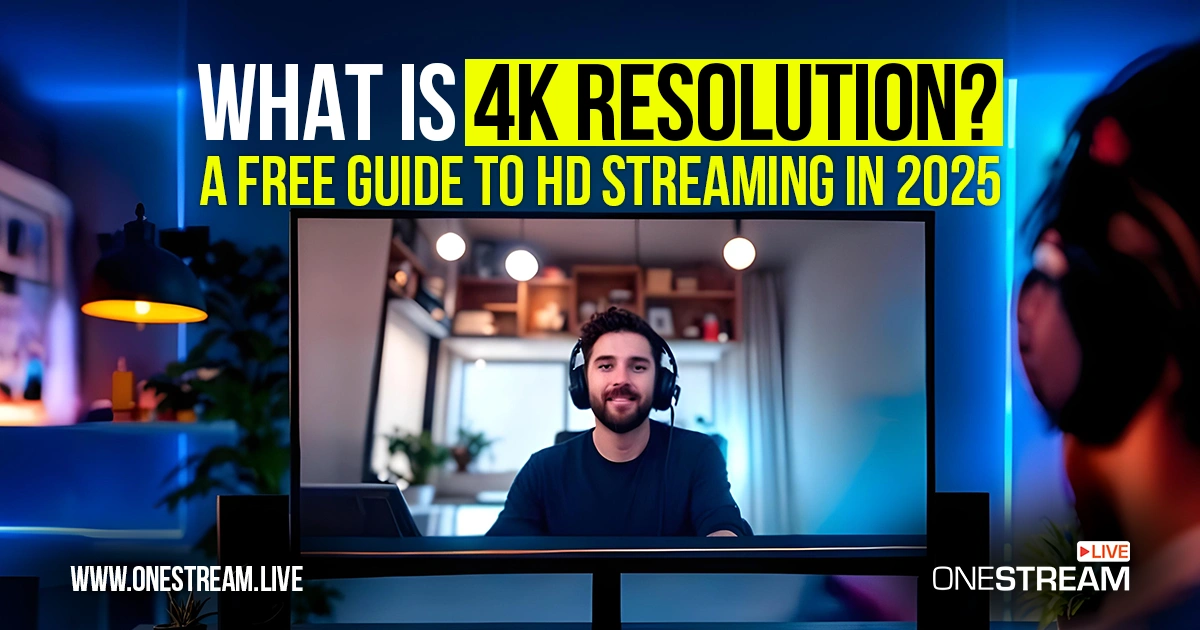

What is 4K resolution, and why does it matter for live streaming in 2025? In simple terms, 4K is an Ultra High Definition (UHD) video resolution with roughly four times the detail of standard HD.
It’s called “4K” because the image is about 4,000 pixels wide. That translates to a display resolution of approximately 3840 × 2160 pixels for consumer 4K/UHD, packing in over 8 million pixels per frame. By comparison, 1080p Full HD has about 2 million pixels (1920 × 1080).
More pixels mean more visual information, resulting in sharper, more detailed images even on large screens. As we head into 2025, understanding 4K has become crucial for content creators and streamers aiming to deliver top-tier video quality.
- Ultra HD video quality is sharper, but HD live streaming stays more reliable for most creators.
- Platforms differ: YouTube Live supports 4K, while many limit streams to 1080p streaming.
- Recording in 4K video resolution lets creators downscale for crisper HD broadcasts.
- OneStream Live Studio tools make professional HD live streams easy with scheduling and cloud encoding.
What is 4K Resolution?
4K resolution refers to any format of image or video with around four thousand pixels across its horizontal axis. In home entertainment and streaming, “4K” usually means UHD (Ultra High Definition) at 3840 × 2160 pixels.
Either way, a 4K image contains about 8.3 million individual pixels. To put that in perspective, what does 4K mean for clarity?
It means far more detail: you can zoom in or view on a big 4K TV without the picture breaking up or looking grainy. A 4K video resolution provides such a high level of detail that even fine textures and text on screen remain crisp.
With 4K video quality, viewers can sit closer to a screen or enlarge the picture more than they could with 1080p, all without sacrificing clarity. The image remains clear because those extra pixels provide granular detail.
This is why many filmmakers and YouTubers record in 4K. It gives flexibility in editing (for example, cropping or stabilizing footage) while still outputting a sharp final product.
It’s worth noting that most consumer “4K” devices like TVs, monitors, and cameras are actually UHD (3840×2160). True DCI 4K (4096×2160) is used in cinema and professional applications. For everyday purposes, though, UHD and 4K are nearly identical in experience. So when you hear 4K meaning Ultra HD, that’s the standard for TVs, streaming, and cameras in 2025.
Why Does 4K Resolution Matter for Streaming in 2025?
The new standard for quality: By 2025, 4K resolution has become the benchmark for premium content. Over 80% of streaming devices shipped by 2024 already support UHD output. This makes 4K less of a luxury and more of a mainstream expectation for viewers.
Future-proof for creators: Recording in 4K video quality allows creators to downscale to HD streaming with superior sharpness or crop footage in editing without losing detail. YouTubers and filmmakers often shoot in 4K and export in 1080p to produce cleaner, crisper results.
Rising viewer expectations: Audiences with 4K TVs, monitors, or devices can clearly see the difference. Sports, gaming, and cinematic travel content especially benefit, as 4K captures motion, fine detail, and realism far better than 1080p HD.
Industry-wide adoption: Major platforms like YouTube, Netflix, and Amazon Prime now offer vast 4K libraries, while gaming consoles natively output in 4K. Live streaming platforms are gradually adding 4K support, showing the market’s steady embrace of Ultra HD.
Professional credibility: For webinars, product launches, and corporate events, 4K provides sharper visuals, making text easier to read and boosting overall professionalism. A broadcast platform in 4K can elevate brand image compared to standard HD.
Limitations still exist: Not all platforms (e.g., Instagram Live, TikTok) support 4K, and many viewers lack devices or internet speeds to stream Ultra HD smoothly. In such cases, 4K is downscaled to 1080p HD, offering no added benefit.
Balanced approach wins: In 2025, creators are smart to mix strategies: use 4K video resolution where it matters most, but prioritize reliable HD live streaming for accessibility and reach.
Is 4K Better than 1080p for Live Streaming?
Technically speaking, 4K vs 1080p is a dramatic leap in fidelity. 4K has about four times the number of pixels as 1080p, which gives it a much sharper image quality.
If pure visual detail is your goal, 4K is undeniably better than 1080p in that respect. A landscape shot in 4K will show individual blades of grass where a 1080p image might blur them.
Viewers on large screens or projectors will appreciate the extra resolution. 4K footage retains crispness on a 65-inch TV that would make a 1080p video look a bit soft.
However, “better” for live streaming isn’t only about resolution. It’s also about consistency, accessibility, and practicality.
4K quality comes at the cost of much higher bandwidth usage and processing demands. Streaming a 4K video requires significantly more data to be transmitted than streaming the same content in 1080p.
This has two major implications:
Bandwidth and Data:
To broadcast 4K live without issues, a high-speed internet connection is essential on the streamer’s side, and viewers also need fast connections to watch in 4K. Providers recommend at least 25 Mbps download speed for 4K streaming, and live 4K broadcasts often demand even more (50+ Mbps for reliable headroom).
By contrast, 1080p streaming can usually work well with around 5–10 Mbps. If either the streamer or the viewer doesn’t meet these speed requirements, the 4K stream will buffer, drop frames, or be forced to downgrade quality.Processing and Equipment:
Streaming in 4K puts strain on your gear. The content creator’s computer (or hardware encoder) needs to encode a much larger video frame in real-time, which can tax CPUs or GPUs. Cameras need to be 4K-capable, and so does any capture hardware.
On the viewer’s side, not only must their device handle decoding a 4K stream, but if they’re watching on a smaller or older screen (say a budget phone or a 1080p laptop), they won’t see the full benefit of that 4K stream anyway. Essentially, 4K video quality is only fully appreciable if the end-to-end chain (from creator to viewer) supports it.
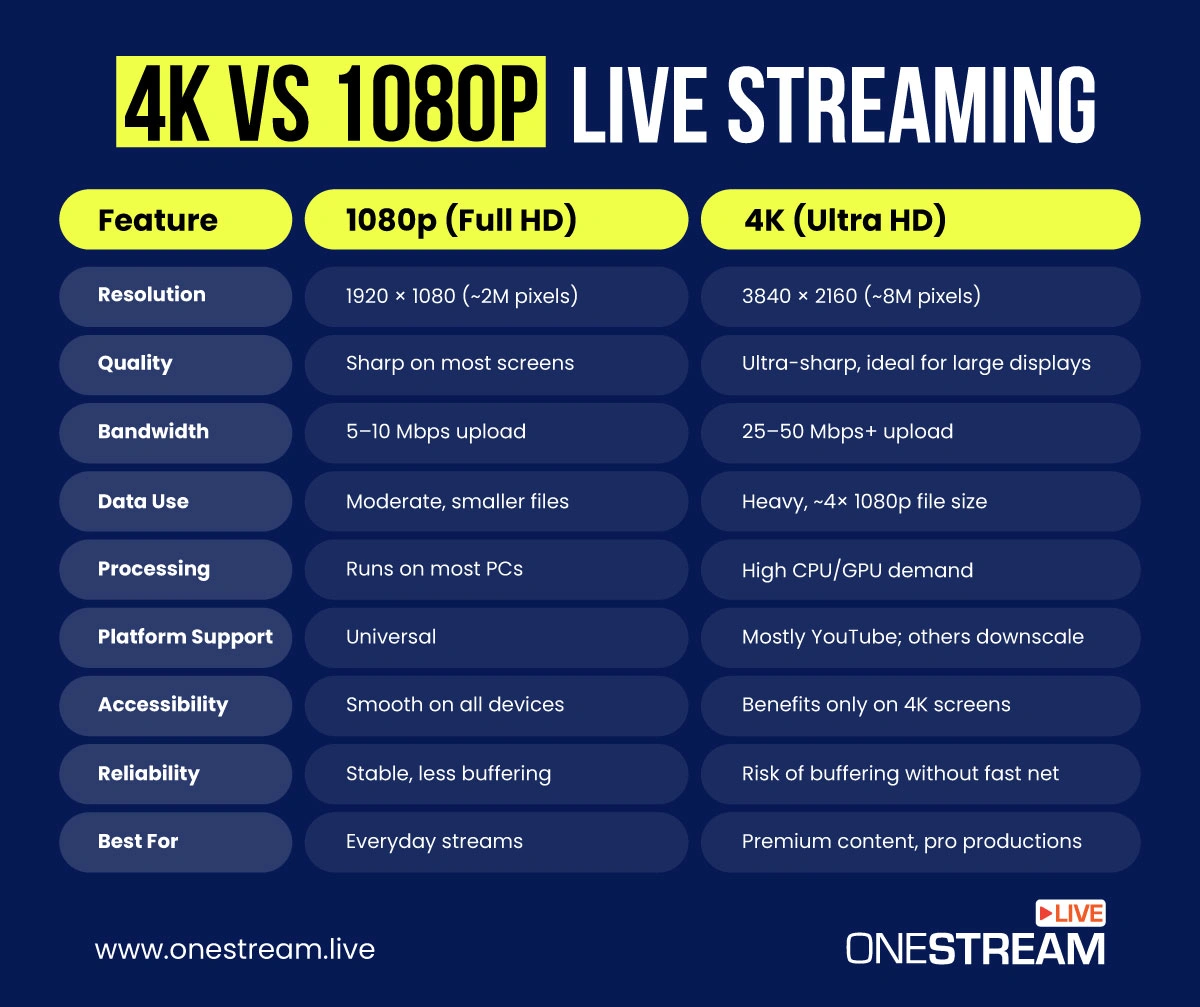
Because of these factors, 1080p HD streaming remains the sweet spot for most live broadcasts in 2025. Full HD is much easier to stream reliably: it looks very good on most devices, and it’s far less likely to cause buffering for viewers.
For many live streamers, what is 4K resolution worth if a chunk of your audience gets a choppy feed or can’t tell the difference on their screen? In many cases, a high-bitrate, well-produced 1080p stream can provide an excellent viewer experience with fewer risks of technical issues.
So, is 4K better? Yes, in raw visual terms 4K is better than 1080p, offering superior clarity.
But for live streaming, “better” depends on your context. If you have the infrastructure to support it and a platform (and audience) that can view it, 4K can elevate your stream’s perceived quality.
If not, 1080p will be more efficient and eliminate a lot of potential headaches.
What Do You Need to Stream in 4K?
Streaming in 4K Ultra HD is an exciting prospect, but it raises an important question: what is needed to broadcast 4K content live? Because 4K streaming is resource-intensive, you must ensure every link in the chain can handle the Ultra HD load.
Here’s a checklist of requirements for 4K live streaming success:
| Requirement | What You Need | Why It Matters |
|---|---|---|
| Capture Device | 4K webcam, DSLR/mirrorless, camcorder, or GPU with 4K output | Provides a genuine 4K signal; weak gear = poor visuals |
| Encoding Power | High-end PC, GPU encoder (e.g., NVENC), or dedicated hardware | Handles heavy real-time 4K encoding without lag |
| Internet Speed | Minimum 25 Mbps upload (50 Mbps safer) | Ensures smooth Ultra HD streaming without buffering |
| Platform Support | YouTube Live, Facebook (limited), Custom RTMP | Not all platforms allow 4K; many cap streams at 1080p |
| Storage & Data | Ample disk space + unmetered/big data plan | 1 hour of 4K can be tens of GB; data caps drain fast |
| 4K Display (optional) | UHD monitor for preview | Lets you see streams as 4K viewers do; accurate colors/details |
A 4K Capture Device:
First and foremost, you’ll need a camera (or screen capture) capable of producing a 4K signal. This could be a 4K webcam, a DSLR or mirrorless camera with a 4K output, or a professional camcorder.If you’re capturing gameplay, your GPU needs to support 4K output. Ensure your camera’s sensor and lens are good quality too; resolution means little if the image itself is subpar.
Powerful Encoding Hardware:
Encoding 4K in real time is no small task. You should have a capable computer or hardware encoder.Modern streaming software (OBS, etc.) can encode 4K, but expect high CPU usage or utilize GPU-based encoders (like NVENC on NVIDIA cards) for efficiency. In some cases, a dedicated hardware encoder or capture card can help offload the work.
High Bandwidth Internet Connection:
Perhaps the biggest factor in broadcasting 4K is a fast, reliable internet connection, which is non-negotiable. You’ll likely need an upload speed of 25 Mbps or higher per stream for decent quality, and ideally 50+ Mbps to have headroom.Streaming Platform Support:
Not all live streaming platforms accept 4K streams. As of 2025, YouTube Live and certain custom RTMP destinations will accommodate 4K, and Facebook Live supports up to 4K for some users/pages.Twitch, however, generally caps streams at 1080p 60fps for non-partners, and most webinar or meeting platforms still use HD. Always check the platform’s specs.
For example, YouTube allows 4K @ 60fps, but others might limit resolution or frame rate. There’s no benefit in pushing 4K to a platform that will downgrade it to 1080p; you’d just be wasting bandwidth.
What resolution is 4K on each platform and do they allow it? Do a quick documentation check for your target destinations.
Adequate Storage and Data Plans:
Remember that streaming 4K will consume a lot more data. If you archive your streams, the files will be huge (a one-hour 4K stream recording can be tens of gigabytes depending on bitrate).Make sure your local storage can accommodate this if you plan to save copies. Also, if you’re on a metered internet plan or a hotspot, mind the data usage as 4K will chew through data caps quickly. Similarly, your viewers using mobile data might appreciate an HD option, since 4K eats up their bandwidth too.
A 4K Display (Optional but Helpful):
While not strictly required, having a 4K monitor to preview your stream can be beneficial. It lets you see the output as your 4K viewers would.If you only have a 1080p screen, you can still stream in 4K, but you won’t see the full fidelity of your broadcast. In other words, your encoding is 4K but your personal view is downsampled. A high-quality display ensures your colors and details are accurate as you produce the stream, which is part of delivering a professional result.
How to Live Stream in High Quality with OneStream Live?
Maybe you’ve decided that jumping to 4K streaming isn’t practical for you right now, but you still want to deliver the highest quality live streams possible in HD. This is where OneStream Live comes in.
OneStream Live is an all-in-one, cloud-based live streaming solution with a suite of tools tailored for professional-grade streaming. It’s designed to help creators get the most out of HD streaming, offering a smooth experience for both streamer and audience without requiring 4K.
Let’s highlight some key OneStream Live features that enable high-quality streaming (even if you’re not in 4K):
1. OneStream Live Studio
OneStream Live’s browser-based Live Studio lets you create and broadcast live sessions in HD with ease. You can invite up to 16 remote guests and have up them on screen, which is fantastic for talk shows, interviews, or panel discussions.

2. Pre-Recorded Streaming & Scheduling
OneStream Live is a pioneer in prerecorded streaming, which is a feature that lets you broadcast pre-made videos as “live” streams. Why is this valuable for quality? Because you can perfect a video (record in 4K locally if you want the highest quality source), edit it, and then stream it in HD at a scheduled time with OneStream Live.
The platform’s advanced scheduling allows you to queue up streams up to 60 days in advance, so you can plan a whole content calendar and have your high-quality streams go live when your audience is online, even if you’re not at the computer.
This also mitigates risk: if your internet is not robust enough for live 4K, you can upload a high-res file from a location with excellent internet, and OneStream Live’s cloud will handle the streaming.
3. Optimized Streaming Infrastructure
Because OneStream Live is cloud-based, a lot of heavy lifting is done on their servers. This means you don’t need an extreme PC rig to stream high-quality video.
You can upload or capture in high quality, and OneStream Live’s cloud encoders take care of transcoding and sending the stream to each destination. It’s an adaptive streaming setup that results in a stable output, sparing you from overloading your local CPU/GPU.
OneStream Live also supports RTMP streaming input, so if you do have a fancy setup (say OBS outputting a 1080p60 high-bitrate stream), OneStream Live can receive that via RTMP and redistribute it to all your channels reliably.
All these capabilities mean that while the industry marches toward 4K, you don’t have to wait to deliver an exceptional streaming experience. OneStream Live empowers you to stream full HD now, taking advantage of its live stream tools and features to captivate your audience.
By using OneStream Live, you essentially sidestep the current limitations of 4K live streaming. You can produce awesome content in HD that looks clear and professional, using the platform’s reliability and reach.
Plus, you’ll be positioned to upgrade to 4K in the future if/when it makes sense. But in the meantime, you’re delivering a smooth experience to the widest possible audience.

FAQs: 4K Resolution & HD Streaming
Yes, 2160p is often used interchangeably with 4K, specifically referring to the 3840 × 2160 UHD resolution used in TVs and monitors. The term “2160p” denotes the number of vertical pixels. So if you see 2160p (or UHD) as a quality option, that is 4K resolution.
Technically, 4K (Cinema) is 4096 × 2160, slightly wider than 3840 × 2160. But in consumer tech, 3840 × 2160 is considered 4K UHD
It’s called 4K because the image has around 4,000 pixels across the horizontal dimension. In UHD TV specs, ~3840 pixels round up to 4K.
The film industry’s 4096-pixel standard is exactly 4K width. In short, the name comes from the ~4K horizontal pixel count. By contrast, 1080p was named after its ~1080 vertical pixels. So “4K” is a simpler way to indicate roughly four thousand pixels across.
Yes, 4K video quality is sharper than 1080p, but for live streaming, “better” depends on your setup. 4K demands high-speed internet (25–50 Mbps upload) and powerful hardware, while 1080p provides smoother performance on most devices.
To broadcast in 4K Ultra HD, you’ll need at least 25 Mbps upload speed, though 50 Mbps or higher is recommended for stability. By contrast, HD live streaming usually works well with 5–10 Mbps upload.
YouTube Live fully supports 4K at 60fps. Facebook Live offers 4K for some pages, but many users are capped at 1080p streaming. Twitch generally limits streams to 1080p 60fps. Always check platform specs before broadcasting.
You’ll need a 4K capture device (camera, DSLR, or GPU), powerful encoding hardware, and a reliable broadband connection. Large storage and possibly a UHD monitor are recommended for previewing your broadcast.
Yes. A one-hour 4K live stream can be several times larger than a 1080p stream, often tens of gigabytes. This makes HD streaming more practical for creators and viewers with limited data or slower internet.
If your audience has 4K devices and strong internet, streaming in 4K can boost quality. But for most creators, 1080p HD live streaming remains the sweet spot, offering a professional look without the risk of buffering or dropouts.
OneStream Live Studio lets you broadcast in crisp HD with multiple guests, branded overlays, and multicamera setups. Even without 4K, you can achieve professional-grade quality and reach wider audiences through live video distribution across platforms.
Conclusion
By now, we’ve explored what 4K resolution is, how it compares to HD, and what it takes to stream in 4K versus 1080p. The key takeaway is that while 4K offers stunning detail, HD streaming remains extremely relevant and effective in 2025.
Therefore, focus on creating value for your viewers: sharp 1080p video, clear audio, interactive elements, and consistent scheduling can grow your audience today, while the world catches up to 4K tomorrow.
So, are you ready to elevate your live streaming game? Start streaming and make 2025 the year you shine online! Happy streaming! 😊
OneStream Live is a cloud-based live streaming solution to create, schedule, and multistream professional-looking live streams across 45+ social media platforms and the web simultaneously. For content-related queries and feedback, write to us at [email protected]. You’re also welcome to Write for Us!