If you’ve spent any time on Twitch, you’ve likely seen those colorful, animated emotes floating across the screen during live streams. You might have wondered, what exactly are Twitch Bits? These virtual goods are more than just a fun way to interact with streamers and they play a big role in the Twitch economy by helping viewers support their favorite content creators. Bits also serve as a great monetization tool for streamers.
Let’s break down everything you need to know about Twitch Bits in 2026, including how they work and why they’re so important.
- Bits are Twitch’s virtual currency. Viewers buy them and Cheer them in chat with animated Cheermotes.
- Every Bit is worth a flat one cent to the streamer, no matter which bundle the viewer bought.
- Twitch sells Bits in six bundles from 100 to 25,000, and the per Bit price drops as the bundle gets bigger.
- You no longer need Affiliate or Partner status to switch Bits on, though you do need it to get paid.
- You can earn Bits for free in some regions by watching short ads or completing Twitch Research surveys.
- Grow beyond Twitch by streaming to 45+ social platforms at once with OneStream Live.

What are Twitch Bits
Twitch Bits or Twitch Cheer Bits are a virtual currency on the Twitch platform that allows viewers to show support for streamers. When you send Bits in Twitch chat, you can use animated emotes called Cheermotes to get attention, earn badges, and appear on leaderboards. The more Bits you send, the more vibrant the animations and the higher the recognition you get in the chat.
In simple terms, Bits are a way to cheer for your favorite streamers and get noticed in their live chat. You can use them one by one or all at once. The more Bits you send, the more exciting the animations. With larger Cheers, you can even pin your message so it stays visible longer in chat. In essence, Twitch Bits are virtual goods that allow you to interact directly with a content creator in a fun and supportive way. They let you show appreciation, you can also ask questions, or simply cheer for the streamer.
Related Article:
How to Start Live Streaming on Twitch
How Much Do Bits Cost on Twitch?
Social proof is the psychological phenomenon where people look to others’ actions to determine their own. On Instagram, this translates to followers, likes, comments, and shares – but more importantly, it’s about authentic engagement that shows real people value your content.
How Much Do Bits Cost on Twitch?
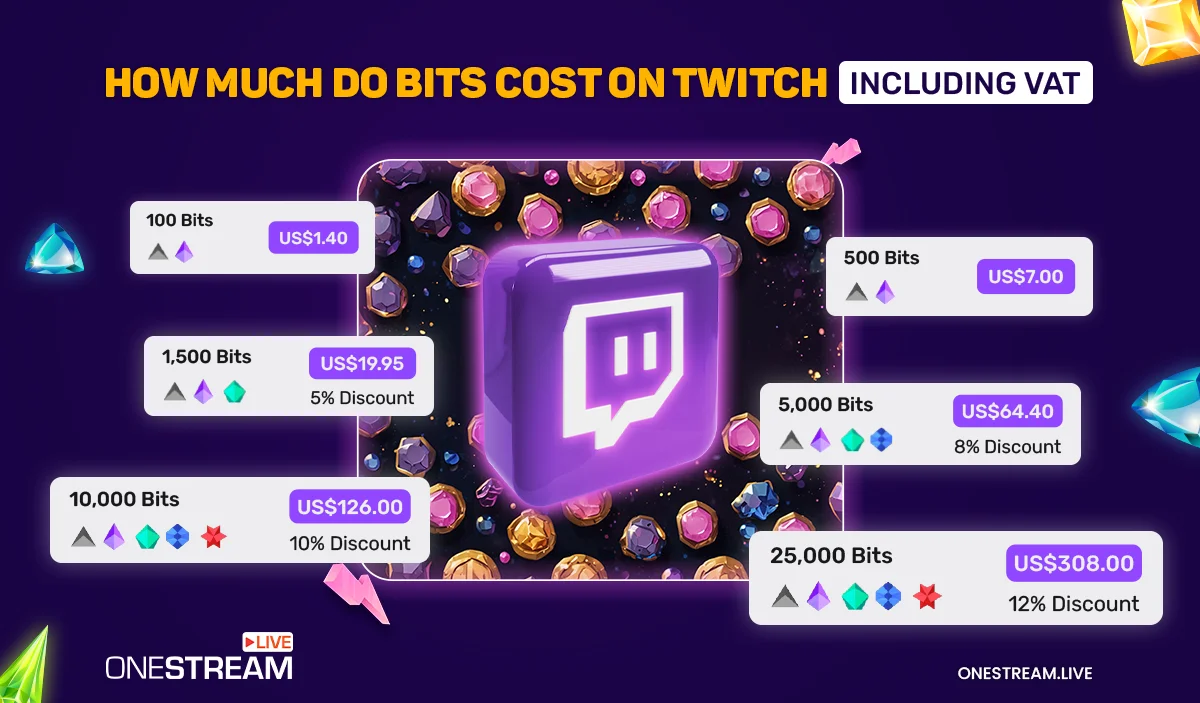
Bits work similarly to in-game currency. Each Bit is worth around 1 cent (USD), there’s an additional VAT, so the final price is a bit higher. Here’s a breakdown of how much bits cost twitch in USD:
- 100 Bits = US $1.40
- 500 Bits = US $7.00
- 2000 Bits Twitch = US
- $28.00 (not a bundle, so the price depends on which packs you combine)
- 5000 Bits on Twitch = US $64.40 (8% Discount)
- 10000 Bits on Twitch = US $126.00(10% Discount)
- 25000 Bits Twitch =US $308 (12% Discount)
So when you convert Twitch Bits to USD, it follows this pricing structure. The more Bits you send, the higher your level of support for streamers, and you can earn badges that rank up to show off your contribution.
These Bits act as a great monetization tool for streamers, turning casual viewers into loyal supporters and helping content creators fund their channels.
Since viewer support is essential for earning more Bits, many streamers focus on audience growth and look for ways to grow their Twitch following, which boosts visibility and attracts more engaged viewers.
Read More: How to Become a Twitch Affiliate
How to Purchase Bits?
To use Bits, you first need to purchase them. Here’s how you can do it:
On Web Browser:
- Click the Bits Icon: In the Twitch chat window of any channel that has Bits enabled, click on the Bits icon.
- Select a Bundle: Choose the number of Bits you wish to purchase. Larger bundles offer more value.
- Payment: After selecting, review your order and complete the payment. You can use a credit card, PayPal, Amazon Pay, or other available methods.
On Mobile Apps:
Purchasing Bits through the Twitch mobile app follows similar steps but can include platform processing fees (Google Play Store or Apple App Store). Alternatively, you can visit bits.twitch.tv in your mobile browser to purchase at web browser prices.
To buy Bits through mobile, simply follow the same steps as the web browser method.
You May Also Like: How to Live Stream on Twitch and YouTube Simultaneously
How to Get Free Twitch Bits
In some countries, you can get Twitch free bits by watching ads or completing surveys. Look for the “Watch Ad” button next to “Get Bits” in the Bits menu. Ads usually run 15 to 30 seconds, and depending on the ad and your region, you can earn around 5 to 100 Bits for watching. Once you’ve watched the day’s allowance, the button greys out until it resets.
Additionally, by participating in Twitch Research Surveys, you can earn up to 500 Bits. These surveys typically take 5-10 minutes, and slots fill quickly, so you need to be fast when one opens.
How to Cheer on Twitch
Cheering is simple and fun! Here’s how to do it:
1. Select a Cheermote: In the chat, type or select the Cheermote and number of Bits you want to send.
2. Send with a Message: You can send a message with your Cheer to make it more personal.
3. Multiple Cheers: You can chain multiple Cheers or even send a larger message.
To cheer without the Cheermote menu, just type cheer followed by the number of Bits (e.g., cheer1000 to send 1,000 Bits).
If you send 1,000 Bits or more, you get a 5-second countdown to cancel the cheer, so you can fix any mistakes if you add an extra zero.
Eligibility to Earn Bits
Any eligible streamer can earn Bits. Since Twitch’s Monetization for All rollout, Bits, subs, emotes, badges, and Channel Points are open to all streamers, not just Partners and Affiliates. You can switch them on through your Creator Dashboard.
Getting paid for them is a separate step. To receive a payout you still need Affiliate or Partner status and a $50 minimum balance. Until then, your earnings sit in your Spendable Balance, which you can use to buy Bits or gift subs on Twitch.
To qualify for Affiliate, a channel must meet the following criteria:
- Stream for 4 hours
- Stream on 4 different days
- Minimum 3 average concurrent viewers on those 4 days
- 25+ followers
While meeting these requirements helps you earn Bits, there’s no limit to your growth potential. If you’re looking to expand your reach and grow not only on Twitch but across other social platforms, OneStream Live can help. You can stream to over 45 social platforms simultaneously, expanding your reach far beyond Twitch. It’s an easy way to increase your audience and give your channel the exposure it deserves!
Conclusion: Why Twitch Bits Matter
Twitch Bits are a fun and simple way for viewers to support their favorite streamers while also adding some excitement to the chat. For streamers, Bits are a great monetization tool that can turn casual viewers into loyal supporters. For viewers, Bits offers a way to interact with content creators, show appreciation, and get recognized in the stream.
Frequently Asked Questions
How much is 1,000 Bits on Twitch?
The streamer receives $10.00, since every Bit is a flat one cent. The viewer pays more, usually around $14.00, because there is no 1,000 Bit bundle and they end up combining smaller packs.
Can Bits be refunded?
No. Bits are non-refundable once purchased and can only be spent on Twitch. They don’t expire, though, so there’s no pressure to use them straight away.
Do Partners earn more per Bit than Affiliates?
No. The rate is one cent per Bit for both, and it does not change with channel size. Subscriptions work differently, with splits that improve as you progress, but Bits are flat.
Is it cheaper to buy Bits on mobile or desktop?
Desktop. In-app purchases on iOS and Android carry the app store commission, so the same bundle costs noticeably more. Buying through bits.twitch.tv in a mobile browser gets you web pricing.
Are Bits worth more to a streamer than subscriptions?
It depends on the amount. A 1,000 Bit Cheer pays $10, while a Tier 1 sub at the standard split pays around $2.50. But subs recur every month and a Cheer happens once, so a subscriber is usually worth more over time.
OneStream Live is a cloud-based live streaming solution to create, schedule, and multistream professional-looking live streams across 45+ social media platforms and the web simultaneously. For content-related queries and feedback, write to us at [email protected]. If you have a story to share about your live streaming experience with OneStream Live, we would be glad to feature it. You’re also welcome to Write for Us!