
I know securing multicamera streaming setups entails clear visuals and seamless production. But creating a reliable system that protects your content, gear, and team is equally important.
Issues like unauthorized access, overnight equipment security, and managing multiple live outputs can turn a smooth stream into a stressful scramble. In this guide, we’ll walk through practical strategies to safeguard your multicamera live streaming workflow.
You’ll learn how to map the entire capture-to-audience pipeline, centralize control with the right multi camera streaming software, integrate tools for pre-recorded scheduling, and even extend your cameras’ role into after-hours protection with a monitored security camera system. Let’s get started.
- Map and secure your multi camera setup for live streaming to avoid disruptions.
- Use an all in one live streaming app to manage layouts, guests, and destinations.
- Protect your workflow with a monitored security camera system for overnight safety.
- Rotate stream keys and limit roles to reduce accidental broadcasts.
- Enhance reliability with multi camera live streaming software and structured planning.
Section 1: Map the Capture-to-Audience Pipeline
A secure multicamera streaming setup starts with clarity. If you don’t know exactly how your cameras connect to your audience, you won’t know where things can fail.
That’s why the first step is to create a simple diagram of your workflow—from lens to viewer: cameras → switcher/encoder → contribution uplink → browser-based studio → multistream distribution → destinations.
For every step, note down:
- Who has access to the equipment or software
- How performance will be monitored
- What the fallback plan is if something breaks
This exercise eliminates any experiments and ensures every risk point has a backup. For instance, pair your primary encoder with a backup on the same cart, or use a bonded uplink to keep the stream alive even if the office network fails.
Having a failover scene prepped in your multi camera streaming software also helps you maintain professionalism if problems arise mid-broadcast. Centralizing production makes this easier.
With OneStream Live’s Studio, you can control layouts, guests, and overlays in one place while pushing your feed to multiple platforms. Instead of juggling apps or devices, a single multi camera streaming setup like OneStream Live keeps the show running smoothly and also gives your team one dashboard for both production and monitoring.

Section 2: Centralize Distribution with Multistreaming
Running a polished streaming setup shouldn’t be limited to just switching angles. It should also get your show in front of audiences everywhere without doubling your workload. If you try to push separate encoder feeds to each platform, you risk overloading your system and creating more points of failure.
A smarter solution is to use a multi camera live streaming software like OneStream Live that supports multistreaming. This lets you send one clean broadcast to a central hub, which then distributes it to all your destinations like Facebook, YouTube, LinkedIn, Twitch, or even your own website.
The payoff? If one platform crashes or rate-limits your stream, your broadcast continues on all others without interruption. That isolation prevents the dreaded “all or nothing” failure.
With OneStream Live, you can stream to 45+ platforms simultaneously, disable any single destination on the go, and still keep your multicamera production flowing smoothly. This type of live multi camera video solution saves bandwidth and stress and also ensures your audience has multiple ways to tune in.

Section 3: Pre-Recorded vs. Live Segments
Even with the best multicamera streaming setup, not every part of your show needs to be live. Smart streamers mix pre-recorded content with live interaction to reduce errors, save resources, and deliver a polished experience.
For example, product demos, highlight reels, or recurring intros can be uploaded in advance using OneStream Live. That way, only the interactive portions, like Q&A or guest panels, go live. This hybrid style keeps your team fresh and your audience engaged, especially if you’re streaming across time zones.
OneStream Live makes this process simple. With its scheduling feature, you can line up pre-recorded videos to stream as if they’re live. By controlling which segments are live and which are pre-recorded, you cut mistakes and still keep your audience glued to the screen.
Section 4: Make Cameras Work Double Duty
In offices and studios, your multicamera streaming setup can also play a vital role in securing your space. During production, those same cameras deliver clean angles and seamless transitions for a professional multicam live stream. After hours, they safeguard gear, doors, and storage without needing a separate system.
Strong access control is the backbone of this approach. Limit entry to key zones like the green room, control room, and storage.
For structured planning, use CISA’s physical-security resources, which emphasize layered defenses and risk-based zoning. This ensures your multi camera streaming software and production devices remain protected from accidents or tampering.
When the lights go out, connect your camera grid to a monitored security camera system. Unlike motion-only alerts, monitored solutions use human verification and live talk-down features, reducing false alarms and stopping real threats in real time. This lets your live multi camera video solution double as overnight protection.
Finally, treat every camera, encoder, and capture card as the IoT device it is. Following the NIST IoT baseline (NISTIR 8259A) ensures secure credentials, patching, and logging are in place. Combined with a clear multi cam setup, these practices give you peace of mind that your broadcast space stays both creative and secure.
Section 5: Control Stream Keys, Roles, and Recovery
The fastest way to derail a professional multi camera live stream is through a leaked key or an accidental broadcast. To prevent this, streamline how your team manages permissions and prepares for recovery.
Use permanent keys for stable encoder-to-studio workflows, but treat them like passwords. Rotate them when contractors leave and never share them in unsecured chats. Pair this with a multicamera streaming software that scopes keys per destination, allowing you to revoke access without disrupting an entire production.
Equally important is role separation. Assign graphics prep or layout edits to junior staff, while only senior operators handle publishing.
And when things do go wrong, the plan matters most. Build a quick rollback: cut to a holding card, pause only the affected destination, and reset the scene. With an all-in-one live streaming app, you can centralize controls, monitor multiple channels at once, and avoid cascading failures across your multicam streaming setup.
Section 6: Design the Space for Cameras
A strong multi camera setup for live streaming starts with the room itself. Clean cable runs, lockable racks, and clear sightlines keep production simple while aligning with security best practices.
During business hours, organize spaces into zones: lobby, green room, set, control, and storage. Post signage for active recording areas to prevent awkward interruptions, and keep server closets badge-restricted. Structured planning ensures your multi camera app or production software runs without unnecessary disruptions.
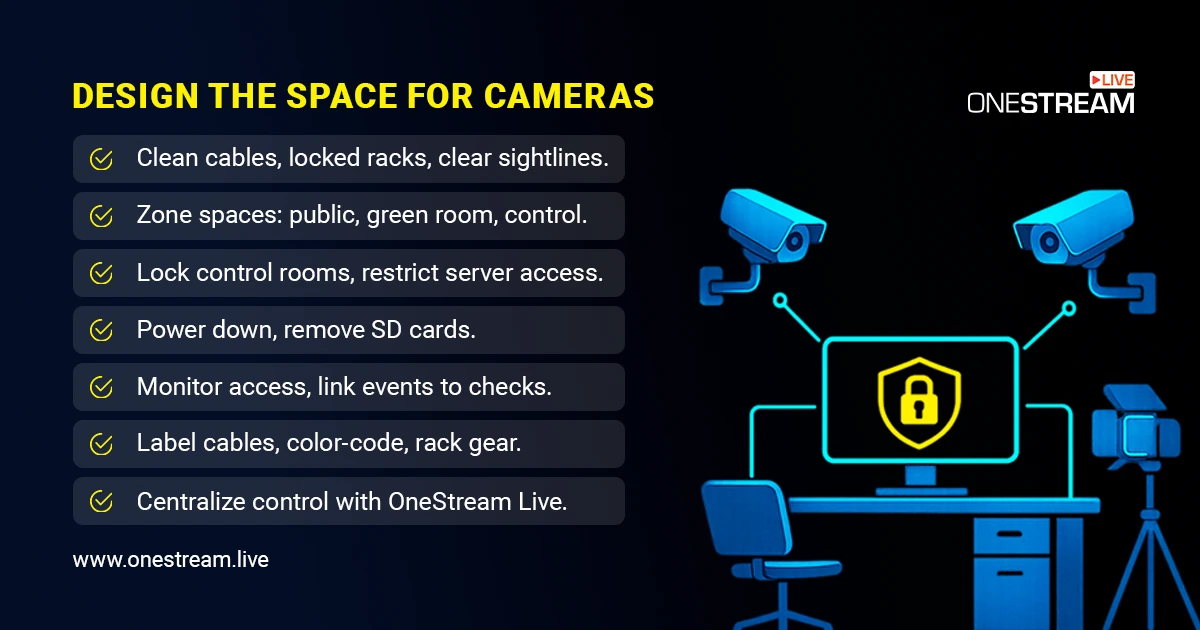
After hours, the room changes character. Power down fixtures, remove SD cards, and stow batteries safely. If certain devices must remain online, lock the room and tie access events to alerts, ensuring the multi camera streaming setup stays protected overnight.
Don’t overlook the basics like labeling cables, rack-mounting sensitive gear, and color-coding connections. These simple practices save hours of troubleshooting during a multi cam live stream. On the production side, use an all in one live streaming app to centralize layouts, guests, and output management, so your operators focus on content instead of juggling windows.
Frequently Asked Questions
Start with a multi camera streaming software that supports scene switching, overlays, and easy integration. Many multi camera live streaming apps for Android and iOS make setup simple.
Limit access to equipment rooms, use a monitored security camera system, and rotate your stream keys regularly. This reduces risks while running a multicam live stream.
Yes, but free tools often have limitations in output quality and destinations. For a professional workflow, consider advanced multi camera streaming setups with centralized control.
Use a Facebook Live multiple cameras integration through an all in one live streaming app or browser-based platform like OneStream Live. This ensures smooth switching between angles while broadcasting.
Wireless setups give flexibility in moving cameras without cable clutter. A good multi cam setup allows mobility while keeping your multi camera live stream stable.
Conclusion
Securing multicamera streaming requires building repeatable habits that protect your setup and keep the broadcast professional. Map your signal path, centralize your multi camera live streaming software, safeguard stream keys, and lock down your space after every session.
With the right balance of planning, security, and tools like OneStream Live’s multi camera app, your team can deliver seamless shows without worrying about disruptions. In the end, a consistent, secure workflow ensures your audience only sees polished, high-quality content.

OneStream Live is a cloud-based live streaming solution to create, schedule, and multistream professional-looking live streams across 45+ social media platforms and the web simultaneously. For content-related queries and feedback, write to us at [email protected]. You’re also welcome to Write for Us!