Setting up a Twitch TV account is an exciting step into the world of live game streaming. However, verifying your Twitch identity typically involves linking a phone number, which enhances security but may feel intrusive for those who value their privacy. If you’re wondering how to verify your Twitch account without a phone number, you’re not alone.
With over 35 million daily active users and more than 2.5 million people streaming each month (according to Twitch’s Transparency Report), Twitch has become a massive ecosystem of content creators. Fortunately, there are secure and smart alternatives that allow you to complete verification without exposing your personal information.
In this guide, we’ll explore how to verify your Twitch account without using your personal phone number — and give you smart, secure alternatives that actually work.
In this Article:
Why Does Twitch Require a Phone Number for Verification?
Twitch requires phone number verification to enhance platform security, reduce spam bots, and prevent abuse in chats and streams. It also helps protect your account with two-factor authentication (2FA).
However, many users are understandably hesitant to share their personal numbers due to privacy concerns.
Key Takeaway: Phone verification adds security but isn’t mandatory with your personal number — safer alternatives exist.
Is It Safe to Verify Twitch Without Using My Personal Number?
Yes, it’s absolutely safe — and often smarter — to use an alternative number. Whether you’re a privacy-first streamer or just want to separate your streaming identity from your personal one, you have secure options like temporary phone numbers, virtual numbers, burner phones, and authenticator apps.
Key Takeaway: Avoiding your personal number is a smart privacy move, not a risk.
How to Verify Twitch Account Without a Phone Number: 3 Secure Methods
If you’re eager to start live streaming but don’t want to use your private number, there are effective methods to receive the SMS verification code securely and anonymously. From temporary phone numbers to burner phones, these options let you keep control over your personal data.
1. Use a Temporary Phone Number for Quick, One-Time Access
Temporary phone number services provide short-term, disposable numbers that are perfect for one-time verifications, such as signing up for Twitch. These numbers are available online and can receive text messages, including verification codes, without the need to expose your real phone number.
2. Get a Virtual Phone Number for Long-Term Twitch Verification
Virtual numbers function like regular ones but are hosted online. If you plan to stream regularly and want a stable number for Twitch and other platforms, this is a solid option.
Services like Google Voice, TextNow, or Twilio offer them.
Steps to Get a Virtual Phone Number:
Select a trusted virtual phone number service that provides international or region-specific numbers.
Sign up and choose a plan that suits your verification and communication needs.
Purchase a number and activate SMS reception.
Use this number during Twitch’s phone verification process.
Pros:
Long-term solution
Private inbox
Cons:
Some providers may not work with Twitch
May require payment or identity proof
Key Takeaway: Virtual numbers are a great option if you choose a Twitch-compatible provider.
3. Try a Burner Phone for Maximum Anonymity
For those who prioritize complete privacy while streaming, a burner phone can be a reliable option. These prepaid phones come with their own number and require no personal data to activate, making them ideal for anonymous usage.
How to Use a Burner Phone:
Buy a prepaid burner phone from an electronics store or supermarket.
Activate the phone according to the provider’s instructions.
Use the included number to complete the Twitch verification process.
Discard or store the phone afterward, depending on your future needs.
Pros:
Maximum privacy
Not tied to your identity
Cons:
Costs money
Physical hardware required
Key Takeaway: Burner phones are the best choice for complete anonymity.
How to Add a Non-Personal Number to Twitch — Step-by-Step
Once you’ve secured a temporary, virtual, or burner phone number, follow these steps to verify your Twitch account:
Log in to your Twitch account.
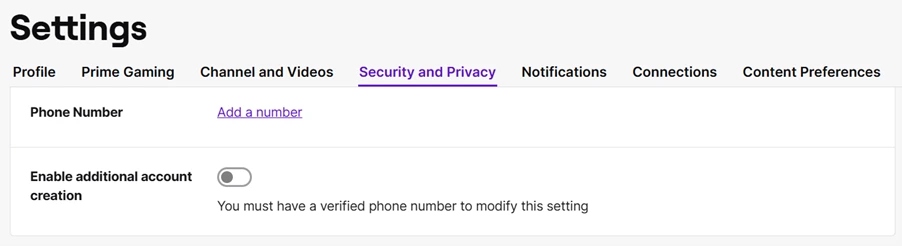
Click your profile icon and navigate to Settings.
Open the Security and Privacy tab.
Click Add a Phone Number.
5. Enter your alternative number of choice.
6. Retrieve the SMS code from your selected method and enter it on Twitch.
That’s it! You’ve successfully verified your account without using your personal phone number.
Secure Twitch Verification Without Using Your Phone Number
Once your account is verified — even via an alternate number — you can switch to an authenticator app for ongoing 2FA. Apps like Authy, Google Authenticator, or Microsoft Authenticator generate time-sensitive login codes.
1. Verify via Authenticator App
After verifying with a phone number (even a temporary one), you can switch to an authenticator app for secure, SMS-free logins. Apps like Authy or Microsoft Authenticator generate one-time codes that help you log in safely.
Steps to Set It Up:
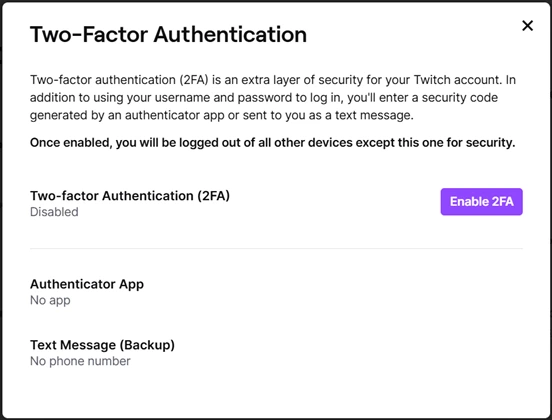
Log into your Twitch account and go to Settings → Security and Privacy.
Click Set Up Two-Factor Authentication.
3. Click Enable 2FA.
4. Enter your alternative phone number to receive the initial setup code.
5. Scan the QR code using an authenticator app such as Authy or Microsoft Authenticator.
6. Use the app-generated code to complete verification.
Once connected, the app generates a one-time password for each login session, allowing future logins without needing SMS verification.
2. Confirm Your Email for Twitch Account Access
Email verification is another step required for setting up your Twitch account and unlocking core features like chat and streaming. It also works as a basic level of identity confirmation, often needed before setting up other verification methods.
How to Verify Your Email Address:
Log in to your Twitch account.
Click your profile icon and go to Settings → Security and Privacy.
If your email isn’t already added, click Add Email.
Enter your preferred email address and check your inbox for a message from Twitch.
Enter the 6-digit code or click the link in the email to complete verification.
Note: Twitch may have issues with custom domains. It’s usually best to use a mainstream email provider, such as Gmail or Yahoo, to ensure smooth delivery.
What Are the Pros and Cons of Each Verification Method?
Method
Pros
Cons
Temporary Number
Fast, free
May not always work
Virtual Number
Long-term, private
May cost money or get rejected
Burner Phone
High privacy, reusable
Requires purchase, physical setup
Authenticator App
Secure, SMS-free logins
Requires initial phone verification
Key Takeaway: Choose the method that fits your privacy level, budget, and streaming goals.
What If Twitch Rejects My Verification Number?
This happens. Some temporary or VoIP numbers get flagged. If your number is rejected:
Try a different provider (preferably paid or private)
Use a burner phone
Wait 24 hours and retry
Can I Stream Without Verification on Twitch?
You can create an account and watch content, but:
You can’t participate in some chats
You may be blocked from streaming
You won’t have access to 2FA security
Verification is a must if you want to build a Twitch channel seriously.
Summary: Protecting Privacy While Growing Your Streaming Channel
You can verify your Twitch account without using your personal phone number using smart, secure alternatives:
Temporary phone numbers for quick setup
Virtual numbers for long-term use
Burner phones for maximum anonymity
Authenticator apps for SMS-free logins
And once you’re verified and ready to stream — use OneStream Live to multistream across Twitch, YouTube, and more, without installing any software. OneStream Live supports privacy-first streaming, letting you focus on content creation, not phone verification.
Stay safe, stay private, and let your streaming shine. Don’t let verification roadblocks keep you from going live.
OneStream Live is a cloud-based live streaming solution to create, schedule, and multistream professional-looking live streams across 45+ social media platforms and the web simultaneously. For content-related queries and feedback, write to us at [email protected]. You’re also welcome to Write for Us!
OneStream Live is a cloud-based live streaming platform that allows users to create professional live streams & multistream to more than 45+ social media and the web simultaneously.