Every minute that you stream to just one platform means leaving the second audience behind. Let’s take the example of two massive platforms that are growing faster than any others. One is Twitch, which currently has over 6 million active streamers in February 2026.
On the flip side, we have TikTok that houses over 1 billion active users as of 2026. Streaming to one of these platforms means leaving a huge audience base on another platform that will never discover you until you show up there. That’s exactly why creators are now looking for ways to learn how to stream on Twitch and TikTok simultaneously.
Streaming on Twitch and TikTok simultaneously lets you reach two completely different audiences from a single broadcast.
Twitch and TikTok each have their own monetization — multistreaming means you earn from both at the same time.
OneStream Live lets you go live on Twitch and TikTok in a few clicks with no extra software needed.
Keep your visual elements in the center-safe zone so both landscape Twitch and portrait TikTok viewers get a clean experience.
Repurposing your stream into clips and Shorts after going live turns one broadcast into a full week of content.
Why Stream to Twitch and TikTok at the Same Time?
In 2026, creators aren’t just pushing content to one platform; they know their audiences are everywhere. Thus, if you’re actually eager to compete with today’s streamers, then streaming on multiple platforms is the way to go.
The Two Platforms: Two Different Audiences
Twitch and TikTok aren’t competing for the same type of viewer, and that’s exactly why being live on both is powerful. Let’s take the example of the gaming audience, Twitch with older Gen Z who like longer and immersive streams, and TikTok having young Gen Z that prefers fast-paced discoverable content. Both groups share a strong interest in gaming. By streaming on both platforms, you place your content in front of a much wider audience that already enjoys the kind of content you create.
You Double Your Revenue
Why earn from one platform when you can earn from two? That’s what smart streamers already know. Every platform rewards content differently, and to succeed in the saturated streamers market today, you need to be everywhere. On TikTok, you can earn through Live Gifts, Live Subscriptions, and Brand Partnerships. On Twitch, you earn through subscriptions, bits and ad revenue.
You Take Advantage of the Algorithms
TikTok algorithm works by pushing the live content to new users, so even a small streamer has a genuine shot at viral reach. Twitch reward consistency, the more you’re live on the platform, the more Twitch promotes you to the viewers who are already engaging in the category you’re streaming in.
You Protect Yourself from The Dependency
Imagine waking up one day and finding out your channel is banned. Maybe you used copyrighted music or something unexpected happened during the stream, and now you’re temporarily or permanently banned. Streaming to two platforms isn’t just about increasing your income potential; you’re actually building an audience on both platforms. So even if one goes down, you still have another one supporting your content.
How to Go Live on Twitch and TikTok Using OneStream Live
Streaming on two platforms is easy with OneStream Live; you don’t have to juggle through tools or download anything for multistreaming. Here’s how to do it:
Step 1: Sign Up for OneStream Live
Go to OneStream Live and create a free account. Once you’re done, you’ll land inside the central hub for managing destinations, stream settings, and more.
Step 2: Connect Your Twitch Account
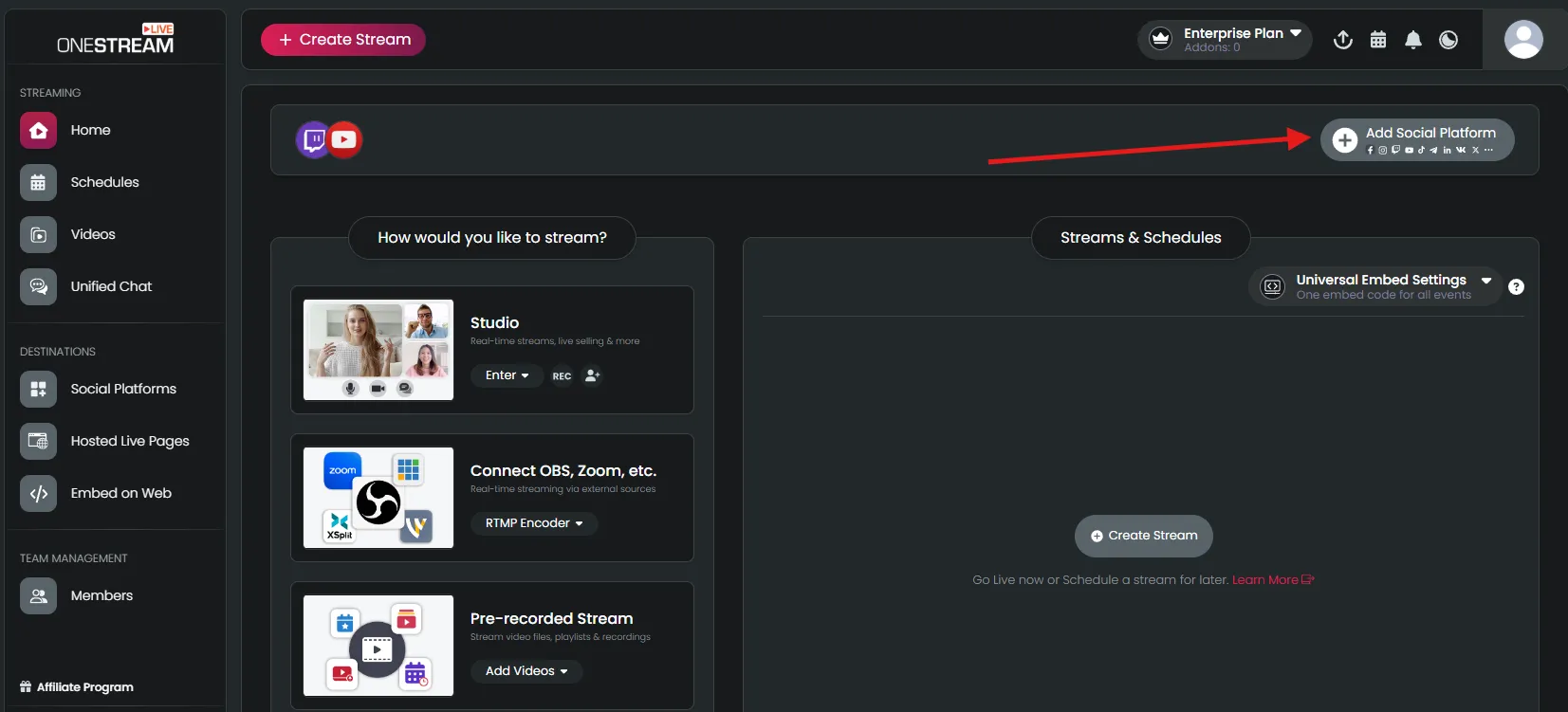
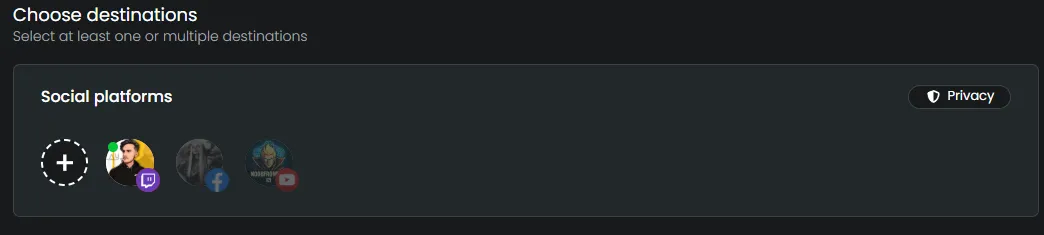
Inside the studio, you’ll get an option to “add social platform” like this:
Select “Twitch” from the platforms list, log in using your credentials, and that’s it, Twitch is now connected to OneStream Live.
Step 3: Connect Your TikTok Account
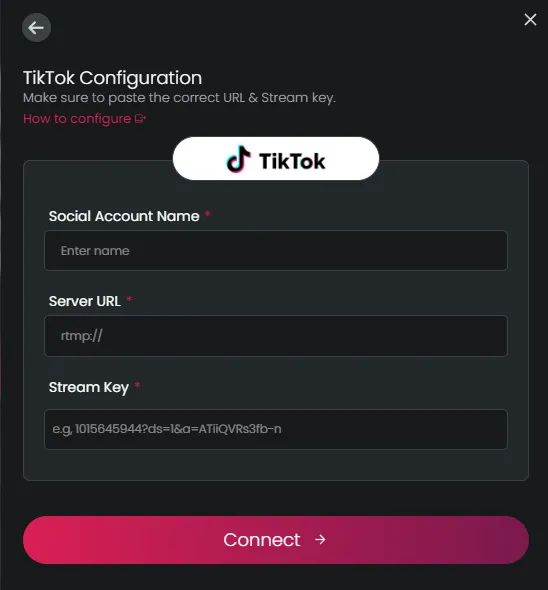
Follow the same method we used to add Twitch, but once you select “TikTok” from the list, you’ll get these options:
You can get the “Server URL” and ” TikTok Stream Key” from TikTok Live Studio. However, before this step, make sure your TikTok account meets the 1,000-follower minimumrequired to access TikTok LIVE and that the LIVE feature is enabled on your account. Once your live is enabled, you can follow this guide or watch this tutorial to connect your TikTok:
Step 4: Choose Your Live Method
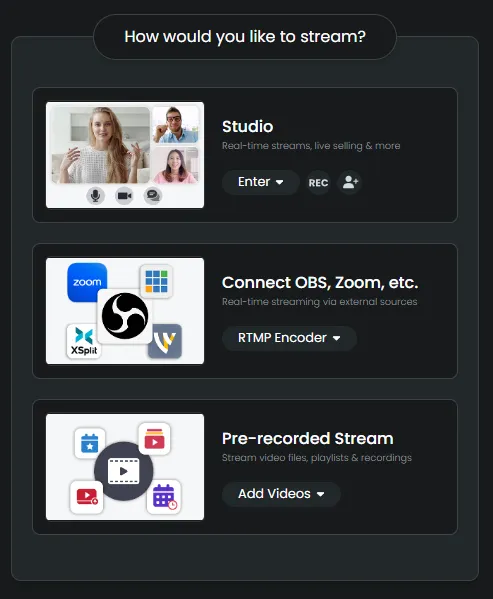
Once your social destinations are connected, you can stream via three different methods:
Studio
RTMP for external encoders like OBS, Streamlabs, Zoom, etc.
Pre-recorded streams to use your recorded videos and broadcast them as live events.
Step 5: Configure Your Stream Settings
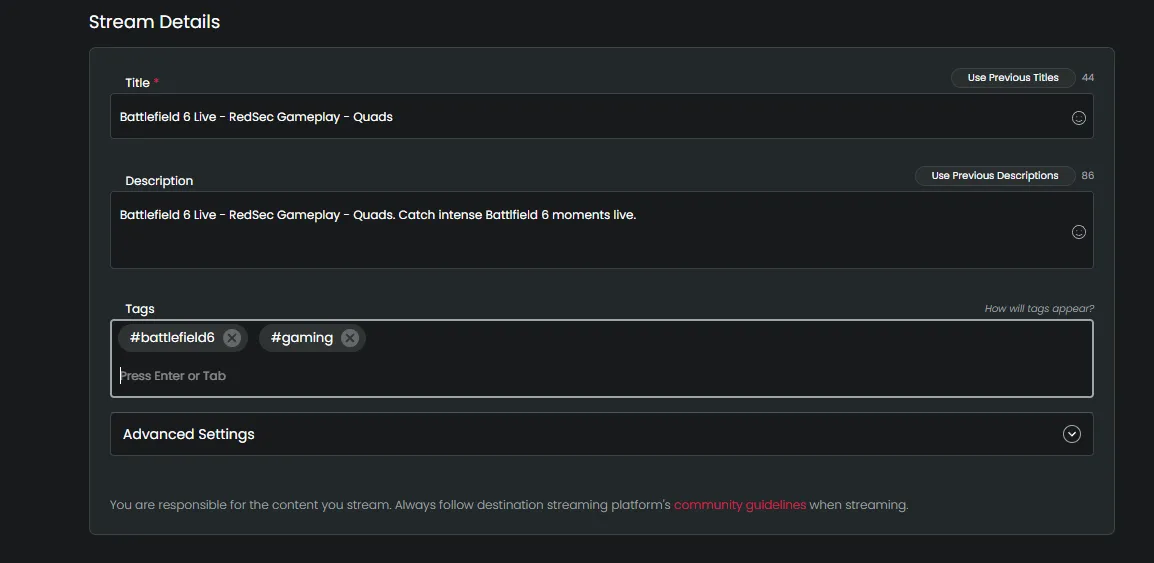
Now it’s time to add your stream details like its title, thumbnail, and tags like this:
You can add your Twitch link to TikTok or vice versa to grow followers on both platforms.
Step 6: Add Destinations for Dual Stream on Twitch and TikTok
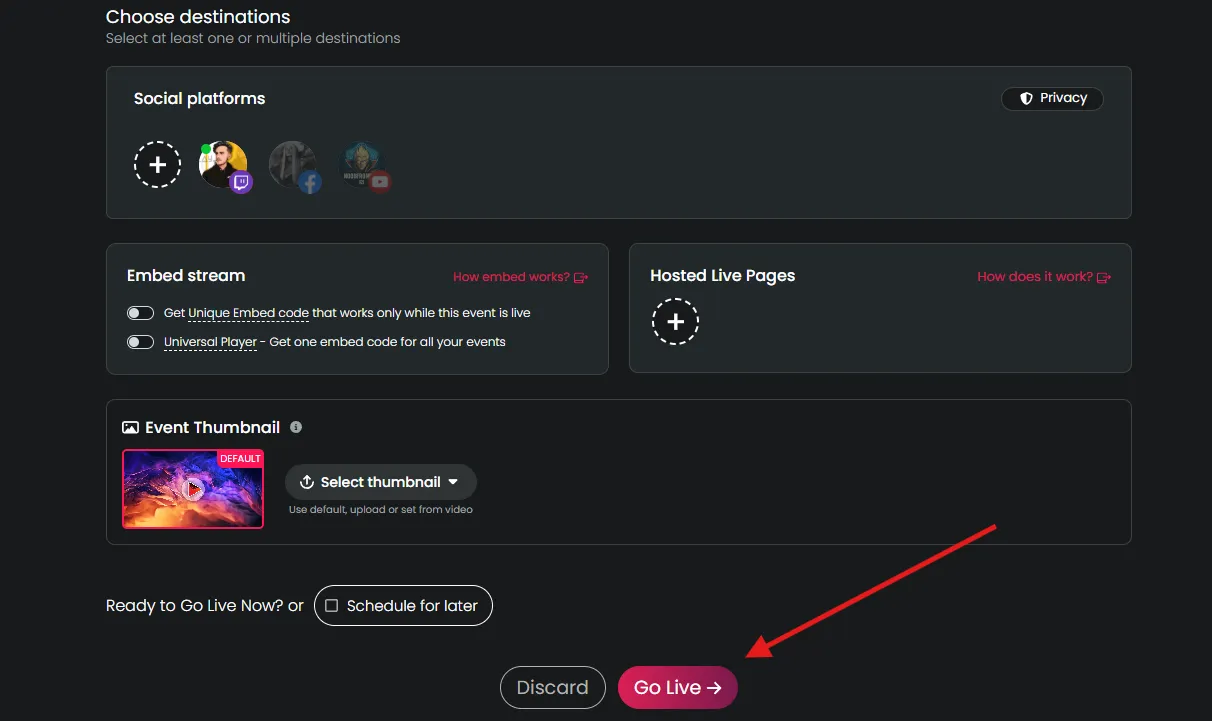
Click and enable destinations you want to add to your stream, like this:
After this, just click “Go Live” to stream to Twitch and TikTok at the same time.
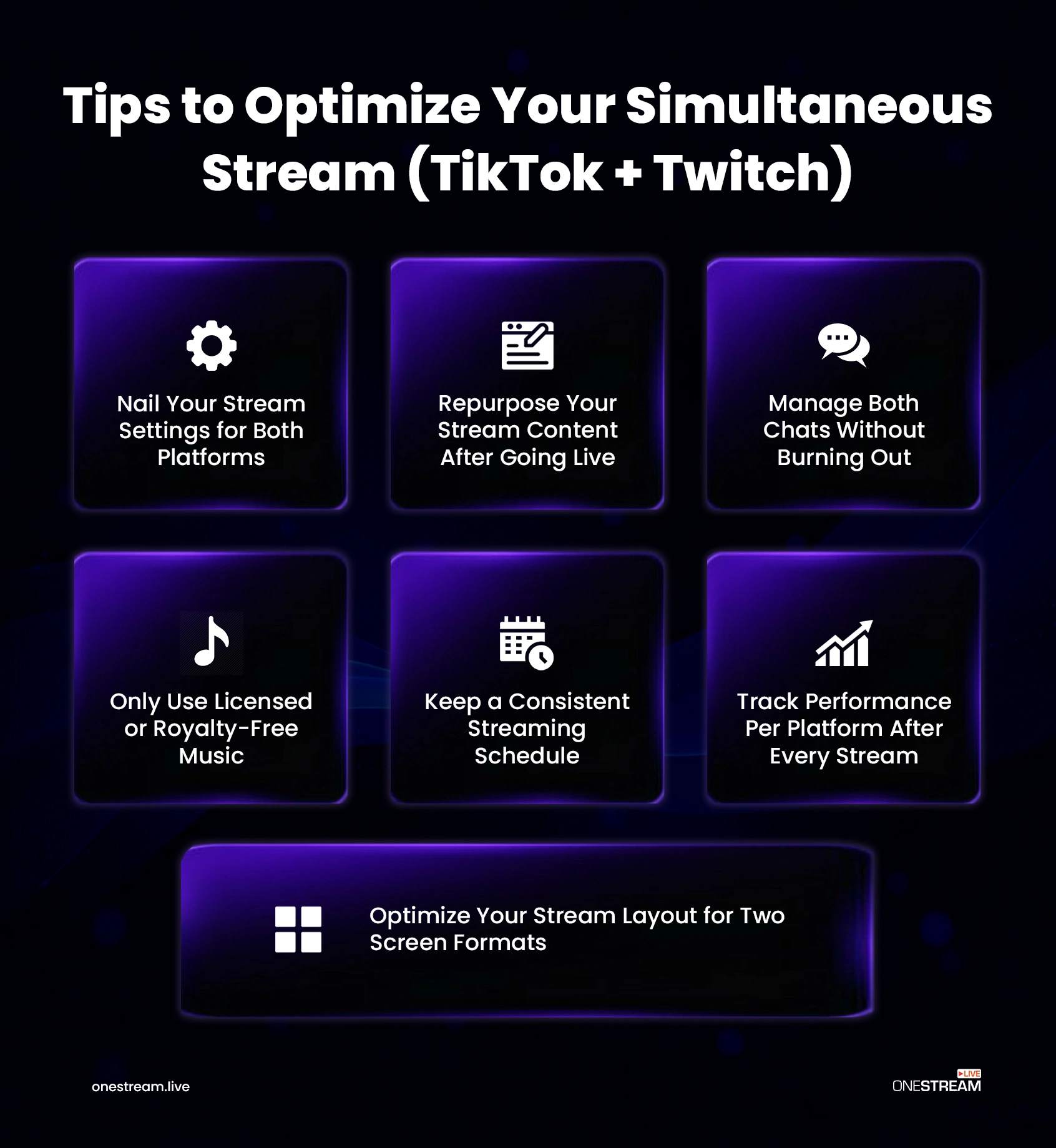
Tips to Optimize Your Simultaneous Stream
Since you’ll be streaming to two different platforms with varying streaming requirements, here are some tips to keep the experience smooth while simulcasting:
1. Nail Your Stream Settings for Both Platforms
Twitch and TikTok both have different recommended settings for streaming. Wrong settings can lead to a negative viewer experience on the specific platform. Twitch supports higher bitrates and resolutions comfortably. TikTok is more sensitive to connection instability and applies heavier compression on its end. Pushing too high a bitrate to TikTok doesn’t improve quality; it creates buffering.
2. Optimize Your Stream Layout for Two-Screen Formats
This is the step most people ignore while multistreaming, and it’s the one that most visibly separates a professional dual-platform stream from an amateur one. Twitch displays in landscape (16:9). TikTok Live displays in portrait (9:16) on mobile.
A simple, effortless fix is to just keep your critical visual elements within the frame. This can be your face cam, alert notifications, and subscriber counters. Pushing any of these too far to the right or left will affect the portrait experience on TikTok.
3. Manage Both Chats Without Burning Out
If you manage both chats on each platform, it can become quickly exhausting. OneStream Live gives you a unified chat feature that lets you communicate with both your audiences through a single chat interface.
4. Only Use Licensed or Royalty-Free Music
Both Twitch and TikTok run automated copyright detection systems during live broadcasts, and neither platform gives much warning before acting. TikTok will mute your stream audio or your VOD the moment it detects a copyrighted track. Twitch issues DMCA strikes that can result in VOD deletions, clip removals, and repeated violations, putting your channel at risk.
5. Keep a Consistent Streaming Schedule
Consistency compounds. On Twitch, the algorithm rewards streamers who go live regularly and predictably; consistent scheduling helps you surface in category pages. On TikTok, the platform sends push notifications to your followers when you go live. Thus, by being consistent, you build a recognizable identity on both platforms.
6. Track Performance Per Platform After Every Stream
Your combined viewer count isn’t the only thing you need to keep an eye on. Twitch and TikTok measure audience behavior differently, reward different content patterns, and tell completely different stories about what’s working.
After every stream, review each platform separately:
Twitch: Average concurrent viewers, peak viewers, new followers, subscriber conversions, and chat activity rate
TikTok: Unique viewers, new followers, Gifts received, shares, and how long viewers stayed before leaving
7. Repurpose Your Stream Content After Going Live
The game doesn’t end after your stream ends. Smart streamers repurpose their streamed content for Instagram, YouTube Shorts, and TikTok. Twitch lets you download and clip your stream moments in both vertical (portrait) and landscape format. Create a few clips after every stream and upload them to different platforms to attract more followers.
Conclusion
Streaming to a single platform in 2026 is like opening a store and telling half of your customers it exists. Twitch and TikTok aren’t competing for the same viewers; they’re serving two different audiences with two different relationships to live content. Reaching both destinations isn’t just possible, it’s one of the smartest moves a streamer can make right now.
Specifically, now that the multistreaming headache doesn’t exist with OneStream Live, with a few taps, you have two audiences growing at the same time. Start multistreaming to over 45 platforms with OneStream Live and make yourself known all over the internet!
Yes, creators can stream on Twitch and TikTok simultaneously using multistreaming tools or streaming software that supports broadcasting to multiple platforms.
Creators stream on both platforms to reach different audiences, increase visibility, and grow their communities faster.
OneStream Live is a cloud-based live streaming solution to create, schedule, and multistream professional-looking live streams across 45+ social media platforms and the web simultaneously. For content-related queries and feedback, write to us at [email protected]. You’re also welcome to Write for Us!
Meer is a tech enthusiast and writer who’s been exploring the digital world for over four years. He loves diving into how technology shapes our online presence. He’s worked with a range of clients and platforms around the globe, helping brands communicate complex ideas in a clear, relatable way. Outside of writing, you'll find him hiking or streaming his favorite video games.