Zoom meetings have become widespread enough that people now want to use them for many different purposes. If you’ve ever wondered how to record a Zoom meeting and make the most out of it, you’re not alone. Since people discovered the ease of communicating online and how it can facilitate business, everyone wants to have meetings on Zoom these days.
Zoom is so popular, in fact, that it accounts for almost 56% of the videoconferencing software market. This is huge!
And not only do people want to conduct meetings that way, they want to take parts of them and share with different groups, rearrange clips, and repurpose them in various other ways. This is perfectly possible; you just need to have the tools to do so.
In this Article:
Be Sure That You Are Recording
This might sound silly, but you’d be surprised at how often people manage to miss it. You need to be sure that someone actually presses the record button. Designate someone in advance for this task in particular.
Interestingly, because of Zoom’s huge global popularity you now have the option of streaming live to Facebook or YouTube. Depending on the audience you want to reach, this could be a good option for you.
Pro Tip:Zoom alone streams to only one platform at a time — OneStream Live enables multistreaming to 45+ platforms simultaneously (YouTube, Facebook, LinkedIn, etc.).
Why Should You Record a Zoom Meeting?
Recording your Zoom meetings isn’t just about saving a copy — it’s about maximizing value. Here’s why you should always hit that record button:
Create an archive for future reference
Share key moments with those who couldn’t attend
Repurpose Zoom meetings into social media content, newsletters, or blog posts
Edit Zoom recordings to create polished, shareable videos
Boost your engagement by live streaming your recorded sessions across platforms
Key Takeaway: Recording Zoom meetings helps you extend the life and reach of your content beyond the live session.
How to Record a Zoom Meeting Step-by-Step
1. Enable Recording Permissions in Zoom
Make sure your Zoom account allows recording. If you’re the host, go to Settings > Recording and enable either local or cloud recording.
Note: Cloud recording is only available on paid Zoom plans but makes it easier to share and repurpose content.
2. Assign a Recording Manager (Optional but Smart)
Designate someone to be responsible for starting and stopping the recording — so no one forgets!
3. Choose Between Local or Cloud Recording
Local Recording: Saves directly to your computer.
Cloud Recording: Stores your video online for easy sharing and downloading.
4. Hit "Record" at the Start of Your Meeting
It sounds simple, but it’s often forgotten! Don’t miss out on valuable content.
5. Save and Review Your Recording
After the meeting, Zoom will process your recording. Review it immediately to check for audio clarity and video quality.
Key Takeaway: Planning your recording process ensures you capture high-quality content for repurposing and live streaming.
Can You Record a Zoom Meeting Without Host Permission?
Technically, yes — but it requires using a screen recorder for Zoom. To accomplish a Zoom meeting recording without host permission, all you need is a quality screen recorder. With the right screen recorder, you can record anything on your screen, regardless of its source.
However, always ensure you have consent from participants to avoid legal issues.
If you’re the participant and need to record:
Use a third-party screen recorder for Zoom.
Choose a recorder that allows capturing both video and audio.
Confirm recording policies in your country or company guidelines.
Key Takeaway: Use screen recorders responsibly and ethically when recording Zoom meetings.
How to Repurpose Zoom Meetings into Engaging Content
Once you’ve recorded your meeting, don’t let it sit unused! Here’s how you can repurpose Zoom meetings:
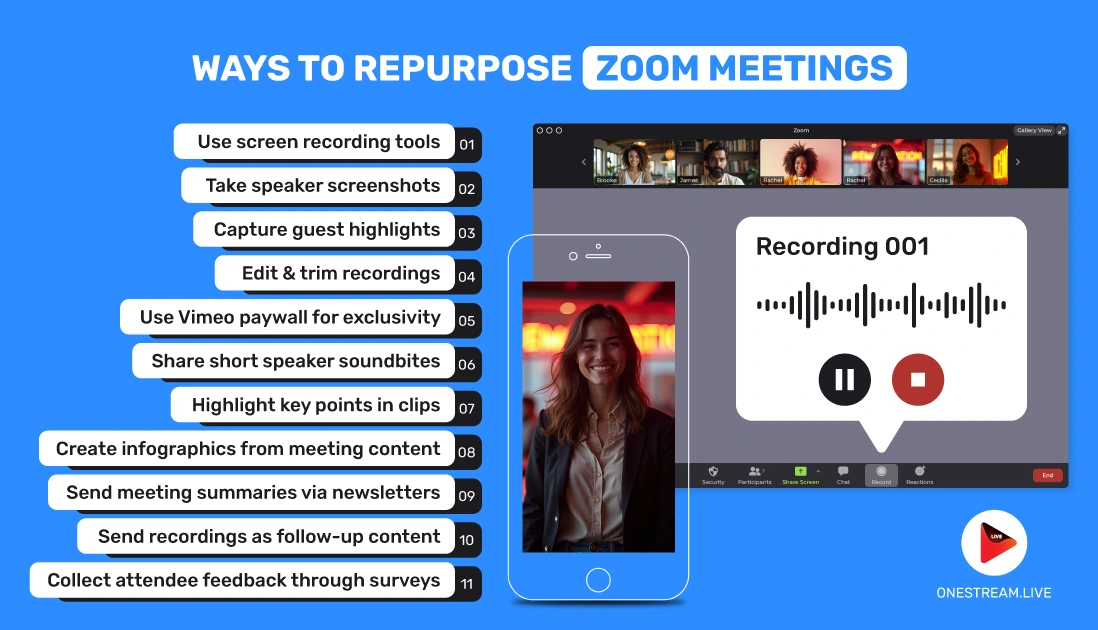
1. Take Speaker Screenshots
If you want to have images of speakers available for future use, you can take screenshots of them throughout the meeting. You can use these images on promotional material, on your website, or wherever you see fit.
This could be especially useful if you have special guests in your meeting or people that you want to highlight for your company. You might ask people in advance if they can pause and smile at some point so that you can capture their images.
2. Edit Your Recording
There are ways that you can edit recordings after you save them. If you have a video editing program – even a basic one – you can make your video much more professional-looking. For example, you can:
Add graphics or a logo to your screen
Include a title slide
Add captions
Include a closing slide
Another nice advantage of being able to edit is that you can cut out parts you don’t want.
3. Posting After Recording
You can always wait until your recording is over and then post it to a video site such as YouTube or Vimeo. This option may be preferable to live streaming for some people because waiting until the end of the meeting gives you the option of editing out undesirable parts if you need to.
If you want to share your video with some people only or make it a paid option, then you can opt for sharing on Vimeo rather than YouTube and put it behind a paywall.
4. Sharing Soundbites from Speakers
It is often the case that outsiders aren’t interested in every detail of meetings, and for this reason you might choose to just share select soundbites from your speakers. You can also repurpose sound bites to use as content in different places, for example, in newsletters or social media.
Advanced versions of Zoom even allow you to get a live transcript of meetings.
5. Sharing Important Points From Meetings
What many people are looking for from meetings are just the main points. It is said that 76% of consumers prefer short-form videos to longer ones, and this is certainly true of most audiences, regardless of meeting topics.
Repurposing allows you to meet this demand without creating new material from scratch. You can also extract these and take other select aspects, such as infographics, and send them out in different forms.
6. Sending Summaries to a Newsletter List
If your meetings contain valuable information that you want to share with potential customers, you can create short summaries and share them in the form of a newsletter. This can be a great way to spread the word about things that you are accomplishing and keep people up-to-date on your activities.
7. Keeping Track Of Attendees
Another advantage of recording Zoom meetings is that you can keep a record of your attendees. You can also conduct surveys of your attendees to receive feedback on your meetings and see if there are any ways for improvement.
In addition, you can send them the recordings as a thank you for taking part.
Key Takeaway: Repurposing your Zoom recordings multiplies your content output and improves audience reach.
How to Live Stream Zoom Recordings Across Multiple Platforms
Not everyone could attend your live session — but they might watch it later on YouTube, Facebook, or LinkedIn. Multistreaming your recorded meetings helps you:
Reach wider audiences across multiple channels.
Engage viewers through scheduled replays.
Build authority by consistently sharing valuable content.
OneStream Live: The Ultimate Repurposing Partner
Zoom allows streaming to one platform at a time — but with OneStream Live, you can:
Multistream Zoom recordings to 45+ platforms simultaneously.
Upload and schedule pre-recorded Zoom videos for live streaming.
Customize your streams with overlays, captions, and branded visuals.
Multistreaming helps you maximize the ROI of your recorded content without the need to go live repeatedly. OneStream Live makes it easy to turn your Zoom recordings into powerful live-streamed content, expanding your reach with minimal effort.
Final Thoughts: Make Your Zoom Meetings Work Harder for You
These are just examples of the things that you can do with recorded Zoom meetings. If you have particular interests in parts, images, or refashioning your meetings that are appropriate to your purposes, give these tips a try.
Recording Zoom meetings is just the beginning. With a smart repurposing strategy and tools like OneStream Live, you can:
Record once and share everywhere.
Reach audiences across 45+ platforms.
Engage viewers with polished, branded content.
Don’t let your Zoom recordings collect dust. Repurpose, edit, and multistream your content with OneStream Live!
OneStream Live is a cloud-based live streaming solution to create, schedule, and multistream professional-looking live streams across 45+ social media platforms and the web simultaneously. For content-related queries and feedback, write to us at [email protected]. You’re also welcome to Write for Us!
OneStream Live is a cloud-based live streaming platform that allows users to create professional live streams & multistream to more than 45+ social media and the web simultaneously.