
What if I told you a 5 to 10-second clip can decide if people watch your video or click away? Would you give it more focus? That short clip is your YouTube intro. Viewers decide within seconds if they keep watching. You only get one chance at a first impression. A strong YouTube intro hooks your audience and makes your channel memorable. In this guide, you will learn how to make a YouTube intro that engages viewers from the very first second.
How to make a YouTube intro starts with keeping it short, around 5–10 seconds, to hold attention.
Use elements like clips, text, music, and your logo when creating a video intro.
Match the intro style to your content, such as funny YouTube intros for comedy or vlog intros for lifestyle creators.
Beginner tools like Canva, Clipchamp, Panzoid, and Animaker make it simple to create a YouTube intro quickly.
For custom effects, advanced software like After Effects or Blender lets you design a YouTube intro animation.
What Is a YouTube Intro?
A YouTube intro is a short opening video clip at the very start of your YouTube content. Think of it as your channel’s theme song or signature greeting. It tells viewers who you are and what your channel is about in just a few seconds.
Most creators use a custom YouTube intro for all their videos to establish branding. For example, many YouTube channel intros show the channel name or logo with some music and visuals. This intro video essentially becomes the identity of your channel.
Your intro can be placed at the very beginning of each video (or right after a quick teaser clip). It serves as an intro for YouTube channel that gives a consistent feel across all your content. Even a simple YouTube intro like a five-second logo animation with a catchy jingle and you can make your channel look professional and on-brand.
Why You Need an Intro for Your YouTube Channel
A YouTube intro brands your channel and tells viewers who you are. It sets the tone so people know what to expect from your content. A good intro video also makes your channel look professional and memorable.
Over time, your audience will recognize your intro music and visuals, which strengthens your channel’s recall value. This is why YouTube intros are important for branding, as they make your videos instantly recognizable.
An intro also sets the tone for your content. For example, vlog intros we usually see as casual and friendly, so you can use candid clips of your day. In contrast, a tech review channel might use a sleek animated logo intro. If your content is humorous, you could use funny YouTube intros to set a lighthearted mood. The style should match your brand so you attract the right viewers.
More importantly, a great intro grabs attention in seconds. If you lose viewers early, YouTube won’t recommend your video. In fact, slow or boring intros cause many viewers to click away. A strong intro for your YouTube channel keeps people watching and improves your audience retention.
What Should Your YouTube Intro Include?
When you design YouTube intro, include elements that quickly communicate your channel’s personality. Here are key elements of an engaging intro video:
Short Video Clips
Use one or two very short video clips (1–3 seconds each) that represent your channel. For example, a travel vlogger might flash a couple of breathtaking location shots. A gaming channel might show a quick highlight of gameplay or best scenes. Choose clips that show what your channel is about in an instant.
Photos
You can incorporate still images if they fit your style. A montage of photos can work for storytelling or vlog intros. Make sure the photos are high-quality and relevant. For instance, a cooking YouTube channel intro could show a photo of a delicious finished dish. Quick photo slides between video clips can add variety.
Music
Music is one of the most important elements for setting the tone. Pick a short music clip or jingle that matches your channel’s vibe. An energetic beat suits a fitness or prank channel, while a calm acoustic tune might suit a travel relax vlog.
Intro music also builds brand recognition, and your viewers will start to associate that tune with your content. Make sure you have the rights to the music! Use royalty-free tracks or original music. (YouTube explicitly warns creators to only use content they own or are authorized to use.)
Text
Include your channel name or title prominently. Many intros flash the channel’s name or logo in text. You could also add a tagline or a very short slogan if it helps explain your content. Some creators include the episode title, or the video’s location/date if it’s a travel vlog. Use clear, easy-to-read fonts that match your branding. You can even animate the text, for example, make it slide in or pop on screen to make the intro more dynamic.
Graphics & Logo
Finally, add any graphic elements that enhance the intro. This usually includes your logo (if you have one) or YouTube channel icon. You might add simple graphics or icons related to your niche (for example, a camera icon for a photography channel).
Keep graphics consistent with your color scheme and style. You can also use special effects to animate your logo or graphics, which gives a professional touch. For instance, a logo can spin or a graphic can flash with a sound effect to create a memorable image.
Keep it Simple and Short
Don’t try to cram all of the above if it feels too busy. An effective intro might just be your logo animation with music and nothing else, and that is perfectly fine. The goal is to be on-brand, concise, and engaging. Keep your intro under ~10 seconds for best results. Viewers have short attention spans, so a short intro and around five to ten seconds is ideal.
Long intros can cause boredom and drop-offs. In fact, many simple YouTube intros that are only 3–5 seconds can be very effective. Use those few seconds wisely to showcase your brand and hook the viewer.
How to Make a YouTube Intro (Step-by-Step)
Many creators call YouTube intros “YT intros.” Here is how to make a YT intro for your channel. Don’t worry if you’re new, creating a video intro is easier than it looks when you break it down into steps. Follow these steps to make a YouTube intro for your channel:
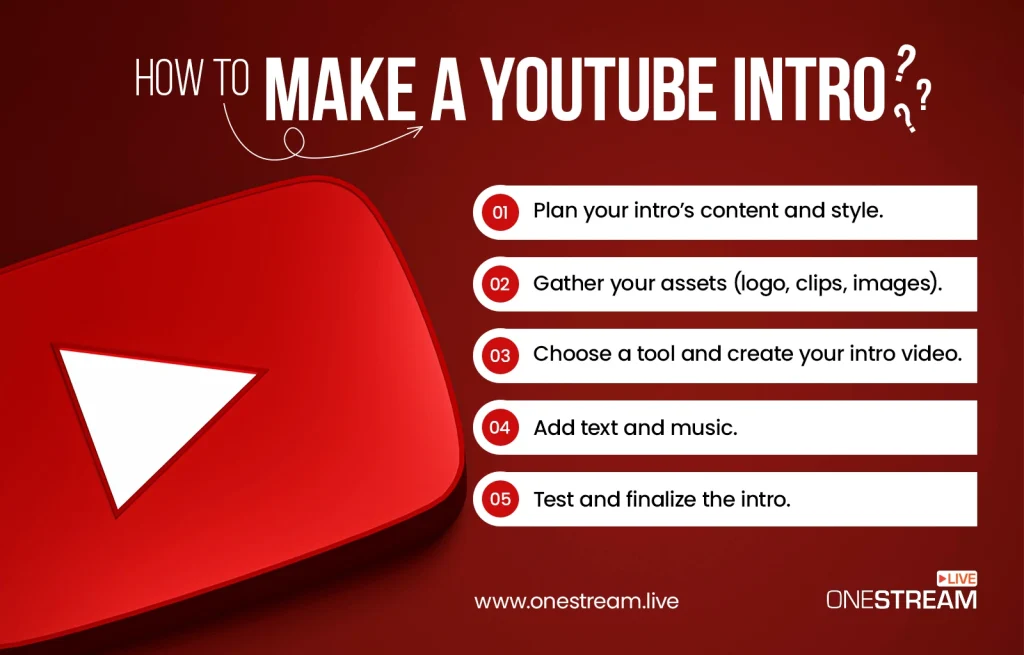
Plan Your Intro’s Content and Style
Start by gathering inspiration. Watch some of the intro videos from other creators in your niche. Notice what works in their intros: Are they using cool animations, a catchy tagline, or epic music? Think about the style and mood: funny, dramatic, informative, etc.
Make sure it fits your channel’s theme and target audience (vlog, gaming, business, etc.). Keep this plan simple and on-brand. Also, decide the length (remember, aim for ~5–10 seconds).
Gather Your Assets (Logo, Clips, Images)
Next, collect the media you want to use. This includes your logo file and any images or short video clips for the intro. Pick a few short video clips from your own content that best represent your channel. Make sure that each clip is just a few seconds long (you can trim longer videos to get the highlights). If you want, select a couple of high-impact photos as well.
For example, if you are creating a video intro for a travel channel, you might choose a 2-second beach clip, a 2-second mountain clip, and a smiling photo of you traveling. It’s wise to gather more material than you think you need, so you can choose the very best moments when editing. Keep all these files in a folder for easy access.
Choose a Tool and Create your Intro Video
Pick an intro maker or video editing software to create a YouTube intro. For beginners, an online tool with templates is easiest. Open the tool and start a new project. Import your logo, clips, and images. Arrange them on a timeline in a logical order. Use one of the tool’s intro templates if available, or start from scratch using your assets.
Add Text and Music
Insert any text you need, such as your channel name (if not in the logo) or a tagline. Choose a font that matches your style (bold, playful, elegant, etc.).
Now find the perfect background music or sound for your intro. The music sets the energy level: upbeat music for fun or fast-paced channels, dramatic music for serious or cinematic vibes, etc.
Make sure the music is not copyrighted. Only use music you have permission to use. For instance, royalty-free tracks, music from YouTube’s Audio Library, or music you composed yourself. Using copyrighted music without permission can result in YouTube muting or taking down your video. In fact, YouTube’s rules state you should not use any content you don’t own or have authorization for, including music.
So pick a licensed track or something original. Once you have the music, decide which 5–10 second segment of the track fits best, since your intro will be short. You might choose a part of the song with a strong beat drop or a catchy riff to maximize impact.
Test and Finalize the Intro
Preview the intro to see how everything looks and sounds together. Make sure the entire intro video is about 5–10 seconds long (definitely no more than ~10 seconds).
Check that the intro feels engaging and not boring. Show it to a friend or fellow creator for feedback. Once you’re satisfied, export the intro video in a YouTube-friendly format (such as MP4).
Finally, add this intro to the beginning of your YouTube videos when editing. Now you have a custom intro for your channel!
Best Tools to Make an Intro Video for YouTube
You don’t need Hollywood-level software to create a cool intro. There are many tools that can help you create intro video content easily:
- Canva: Canva offers free intro video templates specifically for YouTube. You can pick a template, customize the text, colors, and even upload your own logo and images. It’s drag-and-drop simple.
- Clipchamp: Clipchamp is an online video editor (now part of Microsoft) that has a library of intro templates and stock videos. It’s beginner-friendly – you can create an intro video by editing a template in your browser.
- Panzoid: Panzoid is a popular free tool for more advanced animated intros. It provides 3D intro templates (often used for gaming channels). You can customize the text in these templates to get a flashy animated YouTube intro animation without needing to know After Effects.
- Animaker: Animaker is another online platform where you can create custom YouTube intro videos using pre-made scenes and animations. It’s great for cartoon-style or animated intros. There are many styles to choose from, and you can add your own twist.
Using these tools, even beginners can create a simple YouTube intro in minutes by modifying templates. If you’ve wondered how to make a YT intro quickly, templates are the best choice because they handle the design and animation for you. Simply insert your own channel name, images, and music into the template you like.
For more advanced editing, you can also use standard video software like Wondershare Filmora, Adobe Premiere Pro, or Final Cut Pro.
How to Make a YouTube Intro Animation
If you want an animated intro with custom graphics or 3D effects, you need to put in more effort. To make a fully animated YouTube intro, you need specialized software. Tools like Adobe After Effects or Blender allow you to design complex motion graphics and 3D logo animations. With these, you can create a truly unique intro animation from scratch.
The tools we mentioned earlier are easy to use but keep in mind that advanced animation tools have a steep learning curve. If you’re new to animation, start with simpler editors or use templates that have built-in animations. Some intro maker websites (like Renderforest or Placeit) also offer animated intro templates where you just upload your logo and choose an animation style.
Another option is to hire a freelancer or use a service to get a custom intro animation. Many businesses and streamers do this to achieve a high-quality look. However, for most beginners, using the tools and templates listed above is enough to get a good result. The goal is to have a smooth, eye-catching animation that enhances your intro without distracting from your content.
Your Intro Is Ready, Now Let’s Focus on Growth
Once your intro is done, the next step is to make it work for your channel growth. Do not just use it in regular uploads. Keep your branding consistent in live streams as well.
OneStream Live makes this super easy. You can add your intro and outro videos to live streams with one click. You can also set up 24/7 streaming on YouTube or multistream to more than 45 platforms at the same time. This way your intro becomes part of every video and every stream. It helps you look professional and reach more viewers.
The goal is not just to have an intro. The real value comes when you use it everywhere your audience sees you. That consistency builds recognition and supports long term channel growth.

Final Thoughts
When creating your YouTube intro, remember it will appear in every video you post. Put effort into making it the best you can. A YouTube intro helps your videos grab attention right away. By using the steps on how to make a YouTube intro, you can design one that connects with your viewers. Keep it short, clear, and aligned with your brand.
A simple intro or a creative animation both work if they grab interest. Now it is your turn to make an intro video that reflects your style. A well-made intro will leave a lasting impression and keep people coming back to your channel.
Your YouTube intro gets your audience engaged, and by using OneStream Live, you can extend that impact and grow on other social media platforms without much effort.

FAQs - How to Make a YouTube Intro
You can make an intro on YouTube by using editing software or intro makers, as explained in the blog on how to make a YouTube intro to engage the audience.
Free YouTube intros can be created with online tools and templates such as Canva, Clipchamp, Panzoid, or Animaker.
Many YouTubers use popular tools like Canva, Adobe Express, or Filmora, all detailed in our blog on how to make a YouTube intro to engage the audience.
Yes, AI-powered intro makers can design professional and engaging intros, and our blog on how to make a YouTube intro explains how to use them effectively.
The ideal YouTube intro is 5–10 seconds long, short enough to grab attention without losing viewers.
A good intro includes your channel name, logo, tagline, and a quick visual hook that reflects your brand style.
OneStream Live is a cloud-based live streaming solution to create, schedule, and multistream professional-looking live streams across 45+ social media platforms and the web simultaneously. For content-related queries and feedback, write to us at [email protected]. You’re also welcome to Write for Us!