Scroll through your feed today, and you’ll notice something peculiar: people are watching everything on mute. If your video has no captions, your message is as good as lost. And that’s where the debate of open caption vs closed caption comes in.
The difference may sound trivial: a toggle here, a burned-in subtitle there. But for streamers, it’s the line between a broadcast that’s accessible and one that gets swiped away. Viewers don’t hang around long to puzzle out muffled audio or heavy accents. They move on.
The good news is that tools have caught up. OneStream Live lets you add captions easily by uploading an SRT file or writing subtitles straight into your pre-recorded stream.
Over the next few minutes, we’ll cut through the jargon, weigh the benefits of both open captions and closed captions, and show you which approach will keep your live streams watchable, inclusive, and on point in 2025.
What are Captions?
Captions are the on-screen text descriptions that you see in running videos. They run parallel to the video image to grab the visual element of the video while reading through the video’s dialogues. That said, the users no longer only need to rely on the sound of the video.
What is the Open Caption vs Closed Caption Debate?
Let’s clear the fog. People toss around “captions” like it’s one universal thing, but there’s a world of difference between an open caption and a closed caption.
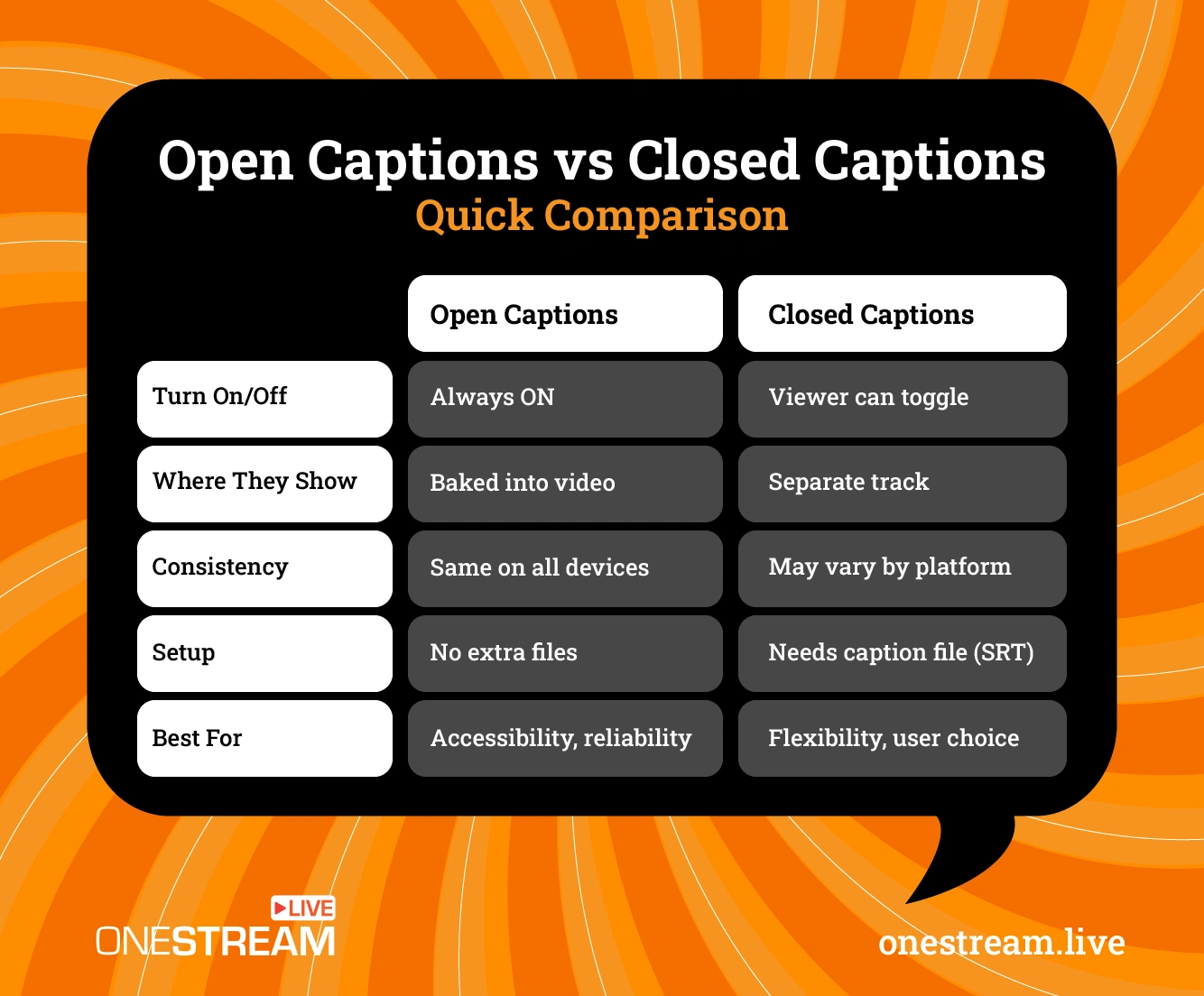
What Does Open Caption Mean?
Open captions are like ink on paper: permanent, baked into the video, visible whether you like it or not. They’re the subtitles you can’t “switch off,” designed to follow the dialogue and sound cues so viewers don’t miss a beat.
At the simplest level, open captions are always visible. They’re burned into the video and cannot be turned off. The text is permanently part of the stream.
What Does Closed Caption Mean
Closed captioning, on the other hand, is more like a light switch. You, the viewer, get to decide whether you want the text on screen.
That flexibility is handy if you’re in a library and need the words, but unnecessary when you’re sitting in a quiet room with headphones on. To put it plainly, the meaning of closed captions boils down to a choice.
But here’s the thing streamers often miss: this isn’t just about text on a screen. It’s about how audiences live.
In India, where most e-learning happens on noisy smartphones, live captions can be the difference between finishing a course or dropping off. In the UK, accessibility advocates argue that open captioning removes barriers faster than any settings menu ever could. And in the US, toggling between closed vs open captions has become a matter of personal preference, almost like adjusting playback speed.
OneStream Live doesn’t force you into one camp. It lets you upload an SRT file, type in your own subtitles, and decide whether they’re welded into the stream or switchable on demand.
For creators, that’s power. For viewers, that’s clarity. For everyone, it’s the end of pretending captions are optional.
Read the Helpdesk article on How to Add an SRT File to your Video for Captions?
Benefits of Captions for Live Streaming
Adding captions for live streaming helps make your content usable in real situations where people actually watch. Take the example of commuters scrolling with sound off, students tuning into webinars in noisy dorms, or viewers with hearing loss who rely entirely on text.
Here are some of the biggest advantages:
- Accessibility for all audiences:
In public places or when people are commuting, 69% of consumers prefer watching videos with no audio. So, the reality is that captions make your streams inclusive.
With live captions, viewers can follow along even in crowded trains, libraries, or offices where sound isn’t practical. Viewers with hearing difficulties or language barriers can also follow along without missing context. - Sound-off culture
On Facebook, around 85% of video views occur without sound. If your stream doesn’t have open captions or live captions, much of your audience simply scrolls past. Captions keep them engaged, even when the audio isn’t an option. - Better comprehension
In a survey of over 2,000 students across 15 universities, 75% said they used captions as a learning aid. More than half reported captions helped them understand content better.
Accents, background noise, or fast technical jargon often leave people lost. By adding closed captioning or using tools to add subtitles automatically to video, you make your message crystal clear. - Improved retention and engagement
Research shows that videos with captions are watched longer and remembered better. In education-heavy markets like India, live captioning in webinars directly translates to higher completion rates. - Global reach
Captions make it easier to repurpose your streams for multilingual audiences. Once text is available, it can be translated quickly, helping your content scale across borders. - SEO and discoverability
Text isn’t just useful for viewers. It’s also useful for search engines. Captioned videos provide indexable content that helps your streams rank higher in search results. It’s a subtle but real traffic booster. - Professional polish
A captioned stream signals that you take your content seriously. Adding closed captions or open captions supports accessibility and reflects professionalism, which in turn attracts brand deals and partnerships.
With OneStream Live, these advantages aren’t hard to unlock. Upload an SRT file for your pre-recorded video, write subtitles manually, or even add captions to live stream sessions before scheduling.
Instead of treating captions as an afterthought, you can make them part of your workflow, giving every broadcast a bigger reach and stronger impact.
Why Streamers Often Prefer Open Captions Over Closed Captions
For streamers, the open caption vs closed caption choice usually comes down to simplicity and consistency. Here’s why open captions have become the safer bet for many creators in 2025.
1. No need for extra toggles
With open captions, the subtitles are part of the video itself. There’s no menu to wander off to and no confusion about how to enable them.
That’s important because many viewers don’t know what is closed captioning or where to find the option to switch it on. Instead of leaving people to hunt for a setting to turn off live caption or toggle it on, the text is already there. By removing that step, streamers guarantee accessibility for everyone.
2. Reliability across platforms
When using closed captioning, results can vary depending on the device or platform. Subtitles may not display properly on certain apps, or they might lag behind the audio.
With open captioning, the text is fixed in place, which means fewer support issues and a consistent experience. By baking subtitles into the video, streamers avoid any gaps. It doesn’t matter whether the audience is on mobile in India, relying on live captions, or watching from a desktop in Canada, because the experience remains consistent.
3. Easier workflow for creators
Managing separate files can be a hassle. Streamers who want to add captions to their pre-recorded live streaming sessions often find it simpler to embed text directly.
By uploading an SRT file in OneStream Live, you can add subtitles to video automatically and avoid syncing problems.
4. Stronger branding and professionalism
Because open captions are permanent, they can be styled to align with your brand. That’s something auto-generated live captioning rarely offers.
Streamers can choose fonts, colors, and placement that fit their overall look. For creators in the UK, where accessibility and design are often considered together, open captions provide a cleaner, more polished feel.
5. Audience trust
For new viewers, clarity builds confidence. A person trying to understand the meaning of open captions doesn’t want to experiment with buttons until they can follow along.
Subtitles that appear by default make content feel more thoughtful and inclusive. And while some may prefer to turn off live captions, research shows most audiences accept captions as the default when they’re presented well.
How to Add Subtitles to a Video for Live Streaming
Captions don’t have to be complicated. With OneStream Live, you can add them in just a few steps. Here’s how it works in practice:
Step 1: Upload your video
Start by selecting your stream in the pre-recorded section. You can upload from your device or import directly from Dropbox, Google Drive, or OneStream Live Storage. Supported formats include mp4, mov, and m4v.
Step 2: Add your captions
To create them yourself, click on Captions/Subtitles and add text manually. This is useful if you want to control pacing or emphasize certain terms.
To save time, you can also add subtitles to video automatically by preparing an SRT file in advance. Import the file, and it syncs instantly with your content.
Step 3: Edit and style
Once uploaded, captions can be adjusted. Shortening sentences helps avoid overcrowding the screen, keeping them under 20 characters per second for readability. This matters if you’re experimenting with open captioning, where the text will be permanently visible.
Step 4: Save and schedule
Click Save to finalize your subtitles. You can then schedule your stream or go live immediately. With this setup, you don’t have to worry about syncing errors or whether your audience knows how to turn off live captions. The text is ready wherever your stream is published.
For educators and businesses, being able to add closed captioning to a video or apply live captions ensures clarity. For global audiences, captions double as translation tools, as viewers can quickly convert the text into their own language.
Ready to Master OneStream Live? Dive into our detailed Udemy course and transform your live streams today.
Final Takeaway
Captions have become essential for modern streaming. They’re how audiences watch content today, often with the sound off or in environments where audio isn’t practical. The choice between open caption vs closed caption comes down to whether you want text always visible or user-controlled, but both options play a critical role in how viewers experience your content.
Creators who use open captions guarantee that their message is never missed, while closed captioning allows flexibility for those who prefer to toggle. Adding live captions also helps audiences in noisy spaces or during e-learning sessions, while branded subtitles elevate professionalism and build trust.
With OneStream Live, the process is easy and straightforward. By making captions part of your workflow, you future-proof your streams and ensure that your story is always heard, even when it isn’t.
Frequently Asked Questions
An open caption is permanently displayed on a video and cannot be turned off by the viewer.
Closed captioning allows viewers to enable or disable subtitles, usually through a player or device setting.
You can manually type them in, or upload an SRT file to sync automatically with your stream using OneStream Live.
A live caption is generated automatically as speech is detected, typically used in live presentations or webinars.
Closed captions can be added during editing or through streaming tools that support caption files, giving viewers the option to switch them on or off.
System-generated captions can often be toggled off in device or browser settings, though open captions cannot be removed.
OneStream Live is a cloud-based live streaming solution to create, schedule, and multistream professional-looking live streams across 45+ social media platforms and the web simultaneously. For content-related queries and feedback, write to us at [email protected]. You’re also welcome to Write for Us!
![How to Record Google Meet [2026 Complete Guide]](https://media-assets.onestream.live/wp-content/uploads/2026/02/how-to-record-google-meet-sessions-for-live-streaming.webp)