
Being a social media manager involves managing a chaotic mix of expectations. Your boss wants leads, the algorithm wants consistency, and your audience wants to be entertained. While there are plenty of tactics to try, nothing replaces the sheer brute force of a well-executed social media holiday calendar.
Just like every year, the 2025 holiday calendar for social media posts is packed with opportunities. But if you treat Q4 like just another quarter, you will miss the boat.
The holiday season, specifically the sprint from November to January, is the best time to connect with followers and push festive offers. But it can also bury you. That is why planning social media content in advance is the only way to survive the madness without losing your mind. When you know exactly what to post and when to stream, you move from reactive panic to proactive growth.
Holiday season activity rises sharply and creators get higher engagement, traffic, and sales.
A planned content calendar helps avoid burnout and keeps your posting consistent during the busiest months.
Live streams perform better than regular posts, especially on Black Friday, Cyber Monday, and New Year's Eve.
Emotional, community-focused content works best during November and December.
Batch creating content and scheduling posts early is the easiest way to stay ahead.
Pre-recorded streams let you stay active even on days you want to be offline.
Using tools like OneStream Live helps you multistream, schedule, and manage chat across platforms without extra work.
Why Holiday Content Is Critical for Creators
The holiday season isn’t just a festive version of the rest of the year. It is the “Golden Quarter” for a reason. In this period, you have a shot at securing the highest engagement, sales, and community interaction of your career. Here is why you need a concrete social media calendar:
1. The Attention Economy Shifts
When people clock out of work, they clock into social media. Users are significantly more active during this period, which means more eyes on your holiday posts, your products, and your streams. This applies to major marketing holidays and niche seasonal campaigns alike.
2. Wallets Are Open
We all have items sitting in our carts waiting for a price drop. The year-end brings Black Friday, Cyber Monday, and gift-giving panic. People are actively hunting for deals. Creators who publish content calendar ideas focused on solutions during these windows see a direct revenue spike.
3. Brand Budgets Explode
Every brand wants to dominate Q4. Consequently, November and December are when ad spend and sponsorship rates hit their ceiling. If you are visible and consistent with your social holiday calendar, you position yourself for better affiliate commissions and collaboration offers.
4. High Emotional Connection
If there is one time of year when audiences are nostalgic and generous, this is it. It is the perfect moment to deepen connections through gratitude posts and real-time interaction. Live video is the best medium for this, as it cuts through the noise of static images.
5. Momentum for 2026
As a creator, you never want to start January from zero. Finishing the year strong sets the pace for the next.
- You gather better analytics on what works.
- You enter the new year with an active, warm audience.
- You hit the ground running in January (the renewal season).
You aren’t just posting content to fill a slot. You are building a baseline for your 2026 growth.
November Social Media Holidays: The Pre-Game
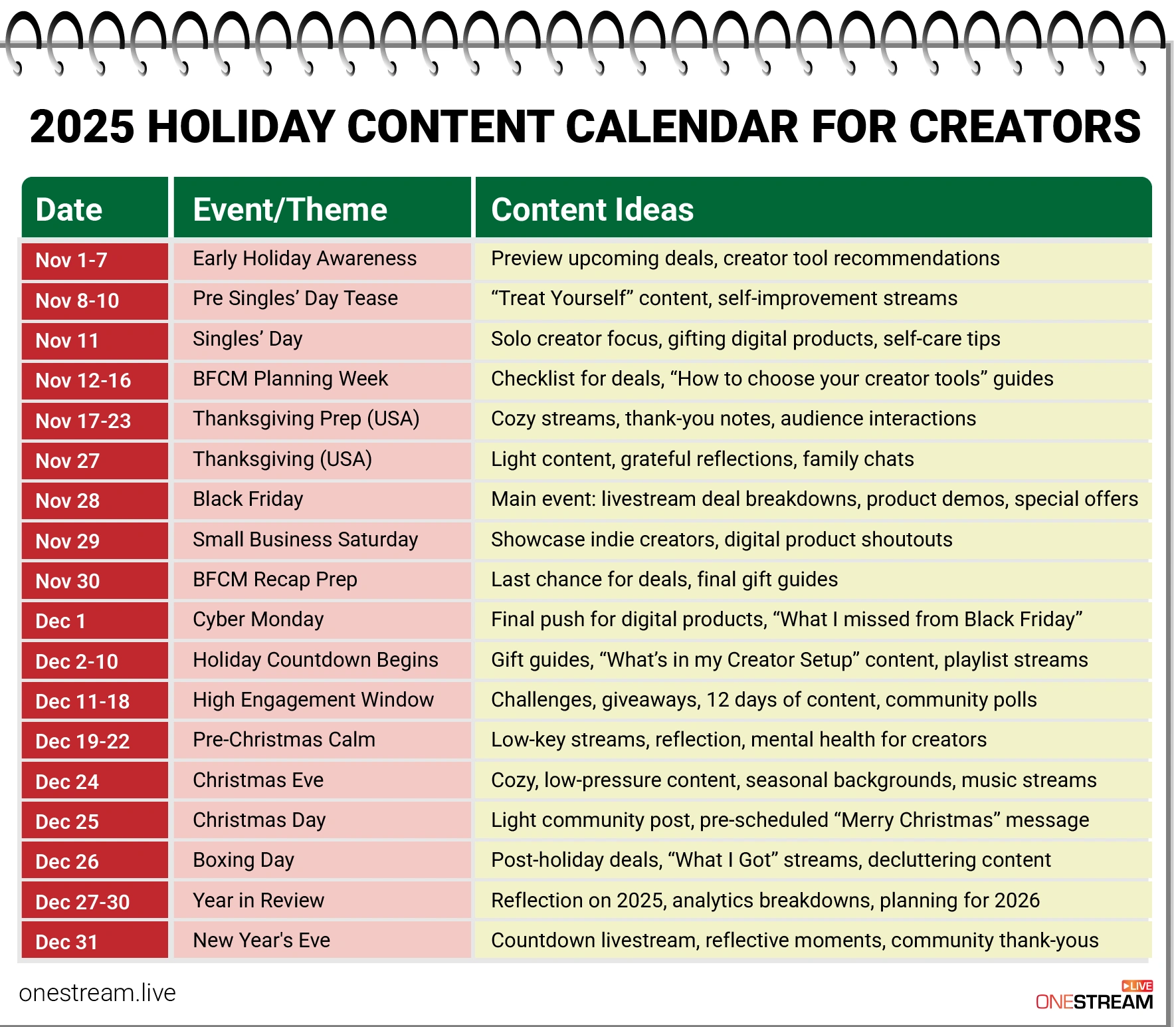
Starting November 1st, the clock starts ticking. This is your warmup window. Below is your social marketing calendar breakdown for the month.
1. November 1–7 — Early Holiday Awareness
Creators start planting seeds here. You aren’t hard-selling yet; you are setting expectations. Use this week to tease marketing calendar events and major content drops.
- Stream Idea: A “What to expect this holiday” casual chat.
- Content: Sneak peeks of upcoming deals and “Holiday season is loading” posts.
2. November 8–10 — Pre–Singles’ Day Tease
Prepare your audience for Singles’ Day (Nov 11). This has become a massive global shopping event. Build excitement with “treat yourself” narratives and promote lower-ticket digital products.
- Stream Idea: Self-improvement livestreams or digital product reviews.
- Content: Teasers for solo-friendly products.
3. November 11 — Singles’ Day
Your first major sales day. Encourage your audience to spend on themselves, and along with this, you can also promote your low-friction offers. Make sure the content is solo-friendly to make it effective.
- Stream Idea: A “Me-Time” stream featuring products that improve personal workflow or lifestyle.
- Content: “Best gifts to yourself” guides.
4. November 12–16 — BFCM Planning Week
Your audience is now making their lists for Black Friday/Cyber Monday (BFCM). Catch them in planning mode.
- Stream Idea: “My BFCM Wishlist” (Live unboxing of things you plan to buy).
- Content: BFCM shopping checklists and deal teasers.
5. November 17–23 — Thanksgiving Prep
This is the community week. Before the ads take over, build loyalty.
- Stream Idea: Host a “Friendsgiving Live” using OneStream Live’s Unified Chat to bring in guest speakers or community members on screen.
- Content: Shoutouts to followers.
6. November 27 — Thanksgiving Day
A slow content day, but meaningful. You need to share authentic content and post something that shows you appreciate your audience. Keep it low-pressure.
- Stream Idea: A pre-recorded “Thank You” message scheduled via OneStream Live so you can enjoy your dinner while the stream runs.
- Content: Family-friendly photos.
7. November 28 — Black Friday
Black Friday is the biggest shopping day of the year and the most strategic one for content marketers. This is your day to achieve results, so please ensure you meet your goals with the right content by pre-planning your Black Friday marketing ideas.
Live shopping converts at a much higher rate than static posts. You can announce the biggest deals and launch your digital products. Here are some Black Friday live stream ideas:
- Stream Idea: A marathon “Deal Breakdown” stream. Demo products live and answer questions in real-time.
- Content: Real-time deal alerts and “Worth it vs. Skip it” guides.
8. November 29 — Small Business Saturday
Keep a day when small businesses can shine with their creative and problem-solving products. You can do a lot during this:
- Stream Idea: Interview other small creators or showcase your own digital products.
- Content: “Support small creators” campaigns.
9. November 30 — BFCM Recap Prep
The calm before Cyber Monday. Target the late buyers, share helpful recaps, and pre-load content for December.
- Content: Last-chance gift guides.
10. December 1 — Cyber Monday
Cyber Monday, just like the name suggests, is when digital-heavy deals dominate. You can focus on online courses, digital downloads, presets, kits, and share productivity and creator workflow products.
- Stream Idea: Screen-share tutorial of your favorite software tools on sale.
- Content: “What I didn’t buy on Black Friday” (Digital Edition).
11. December 2–10 — Holiday Countdown Begins
Run a thematic content series. This is the prime time to execute the Vlogmas 2025 content plan.
- Stream Idea: “Vibe streams”—put on some lo-fi music, customize your OneStream player background with a snowy theme, and just hang out with chat.
- Content: Creative gift guides.
December Social Media Holidays: Peak Traffic
The focus shifts from “deals” to “gifts” and “vibes.” This section of the holiday social media calendar is about retention and high engagement.
12. December 11–18 — High Engagement Window & Hanukkah
This is the most interactive week of the year. It also marks the start of Hanukkah 2025 (Dec 14-22).
- Stream Idea: Multistream a menorah lighting ceremony to Facebook and YouTube simultaneously.
- Content: 12 Days of Content series, giveaways, and community polls.
13. December 19–22 — The “Weird” Days
Don’t ignore weird or fun holidays in December. They are great engagement hooks when people are bored of standard Christmas posts.
- Stream Idea: Bake cookies live for “National Hard Candy Day” (Dec 19) or similar niche food days.
- Content: December holidays around the world trivia.
14. December 24 — Christmas Eve
Keep it cozy. Humanize your brand.
- Stream Idea: Ambient streams (a fireplace loop).
- Content: Warm, personal photos.
15. December 25 — Christmas Day
You should be offline, but your channel shouldn’t be.
- Stream Idea: Use OneStream Live’s Pre-recorded Streaming to broadcast a special holiday message you filmed weeks ago. You get the engagement; you stay with your family.
- Content: A simple “Merry Christmas.”
16. December 26 — Boxing Day
Surprisingly strong for traffic. People are spending gift cards.
- Stream Idea: “What I got for Christmas” haul.
- Content: Digital product discounts.
17. December 27–30 — Year in Review
Look at your analytics and show customers what you achieved together.
- Content: Year-end recaps and teasers for 2026.
18. December 31 — New Year’s Eve
The viral moment. Plan a New Year’s Eve Countdown Stream.
- Stream Idea: Use OneStream Live to broadcast your countdown to Twitch, YouTube, and TikTok (via RTMP or Studio) all at once.
- Content: “Thank You” messages.
Calendar for January 2026: The Resolution Rush
Most creators crash in January. You won’t. This phase is where the content calendar ideas pivot to “New Year, New Me.”
19. January 1–7 — The Fresh Start
Capture the resolution crowd immediately.
- Stream Idea: “Goal Setting for 2025” workshop.
- Content: Ideas for live streaming your fitness or business goals.
20. The “National Days” Strategy
Use National Days in January to keep content flowing when news is slow.
- Jan 4 (Trivia Day): Host a live trivia game with your chat.
- Jan 21 (Get to Know Your Customers Day): A Q&A session using OneStream’s Unified Chat to highlight user questions.
- Content: Social media dates focusing on motivation and planning.
Best Content Strategies for 2025’s Social Media Holiday Calendar
You have the social media calendar dates, but you need a strategy. Consistency matters, but a plan creates impact. Here is how to yield results:
1. Plan Series-Based Content
Repeating themes helps you stay consistent. Create a social media hashtag calendar for yourself.
- Idea: “Weekly Gift Guide” every Tuesday.
- Idea: “Countdown to New Year” daily tips.
2. Focus on Holiday Emotions
Focus on nostalgia, warmth, and community. People connect with brands that feel human, not corporate.
3. Keep it Interactive
Interactive content generates 2x more conversions. Don’t just post; ask.
- Holiday-themed giveaways.
- Community challenges.
- Poll-based decision posts (e.g., “Which wrapping paper should I use?”).
4. Collaborate More
Use other audiences. Host joint live streams. OneStream Live makes this easy by allowing you to invite guests directly into your stream via a browser link without any requirement of an external software.
5. Prioritize Livestreams
Live video converts better than static images. Period. You must prioritize live content during high-stakes days like Black Friday and New Year’s Eve. You cannot afford to be limited to one platform. Brands use OneStream Live to broadcast to 45+ destinations simultaneously with a single click, maximizing reach without extra effort.

Best Practices to Simplify Your Content Scheduling
Thinking about planning holiday posts for social media in real-time? Bad idea. The season moves too fast. The best creators batch their work.
1. Batch Create the Content
Filming in real-time is a recipe for disaster. Save your energy.
- Film multiple Reels in one afternoon.
- Shoot all your holiday visuals in a single photoshoot.
2. Have a Scheduling System in Place
Will you manually log in to five platforms on Christmas Morning? No. Use the OneStream Live Scheduling tool. It ensures your content goes live—whether it’s a pre-recorded video or a real-time stream—even when you are sleeping or traveling. This is vital for marketing holidays that happen on weekends.
3. Keep a Backup Folder
Unexpected things happen during holidays coming up. Keep a “break glass in case of emergency” folder with:
- Quote graphics.
- Behind-the-scenes clips.
- Repurposed footage.
- OneStream Live Cloud Storage: Upload your video assets here so you can access and stream them from anywhere, even if your laptop dies.
4. Repurpose Your Existing Content
Turn a long-form post into multiple short clips. Turn a livestream into a carousel breakdown. Work smarter, not harder.
Wrap Up
The holiday season can make a brand a success if you have the right strategy. Magic isn’t in doing more; it’s in doing it intentionally. If you are just posting holiday posts because everyone else is, you won’t see results.
You now have a complete roadmap for 2025’s social media holiday calendar, from November 1st to the January resolution rush. Use this schedule to plan early, focus on the right platforms, and use OneStream Live to automate your broadcasting. Whether you need to live stream to 45 platforms at once or schedule pre-recorded content while you eat pumpkin pie, the tools are there.

Quick Answers for Holidays Coming Up (FAQ)
The most critical date for sales is Black Friday (November 28, 2025). However, the most critical date for community retention is New Year’s Eve (December 31).
A calendar prevents burnout. It helps creators capitalize on high-CPM windows like Hanukkah 2025 and Black Friday without scrambling for last-minute ideas.
You should use pre-recorded streaming for essential, non-interactive posts like Christmas Day greetings, Boxing Day sales announcements, or daily Vlogmas 2025 Content Plan updates. By using a tool like OneStream Live, you can schedule these videos to go live across all your platforms.
Live shopping streams on Black Friday and Cyber Monday offer the highest conversion rates, according to industry reports (often 2x-3x higher than static posts). This is because the real-time interaction and urgency of the stream build immediate trust and drive instant transactions.
For high-traffic, multi-platform events, you must use a Unified Chat interface. OneStream Live’s Unified Chat feature combines comments from platforms like Facebook, YouTube, and Twitch into one screen, ensuring you never miss an audience question during the peak traffic moment.
OneStream Live is a cloud-based live streaming solution to create, schedule, and multistream professional-looking live streams across 45+ social media platforms and the web simultaneously. For content-related queries and feedback, write to us at [email protected]. You’re also welcome to Write for Us!