
Low-cost content creation is a survival skill for modern creators because creating content in 2025 doesn’t come cheap. Between cameras, editing tools, subscriptions, and promotion, content creation costs can spiral out of control before you even hit publish.
But here’s the thing: you don’t need a massive budget to produce professional work. With the right strategies, you can master affordable content creation without sacrificing creativity. In fact, some of the most engaging creators online demonstrate that quick, inexpensive, and even viral work can be achieved on a tight budget.
After extensive research in this domain, I have come up with 10 practical cost-cutting tips to help you reduce your content creation cost while still delivering quality. These strategies will help you streamline your workflow, save money, and stay competitive.
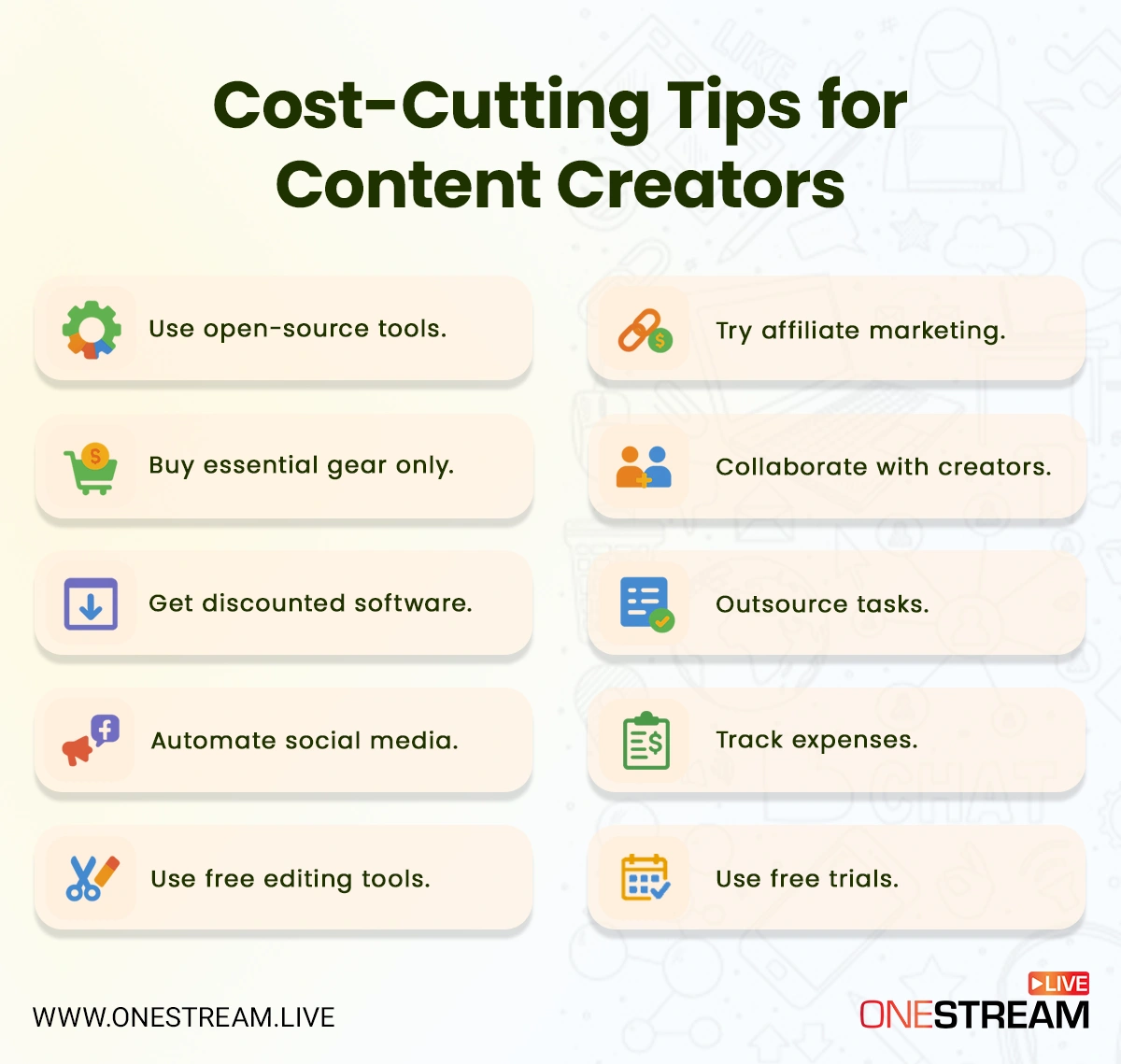
Tip #1: Use Open-Source Tools
When you’re grinding daily on content creation, every dollar counts. Open‑source tools can be your secret weapon for low‑cost content creation, as they come with no subscription fees, flexible licenses, and are often more powerful than you’d expect.
Why This Matters:
- Zero cost, rich features.
Tools like Shotcut, Kdenlive, Blender, and Audacity offer professional-grade capabilities like video editing, effects, 3D, and audio, all without costing a cent. TechRadar’s 2025 roundup highlights Shotcut as a standout open-source editor that supports up to 8K, with markers, keyframing, and flexible UI features. - Pro-level power.
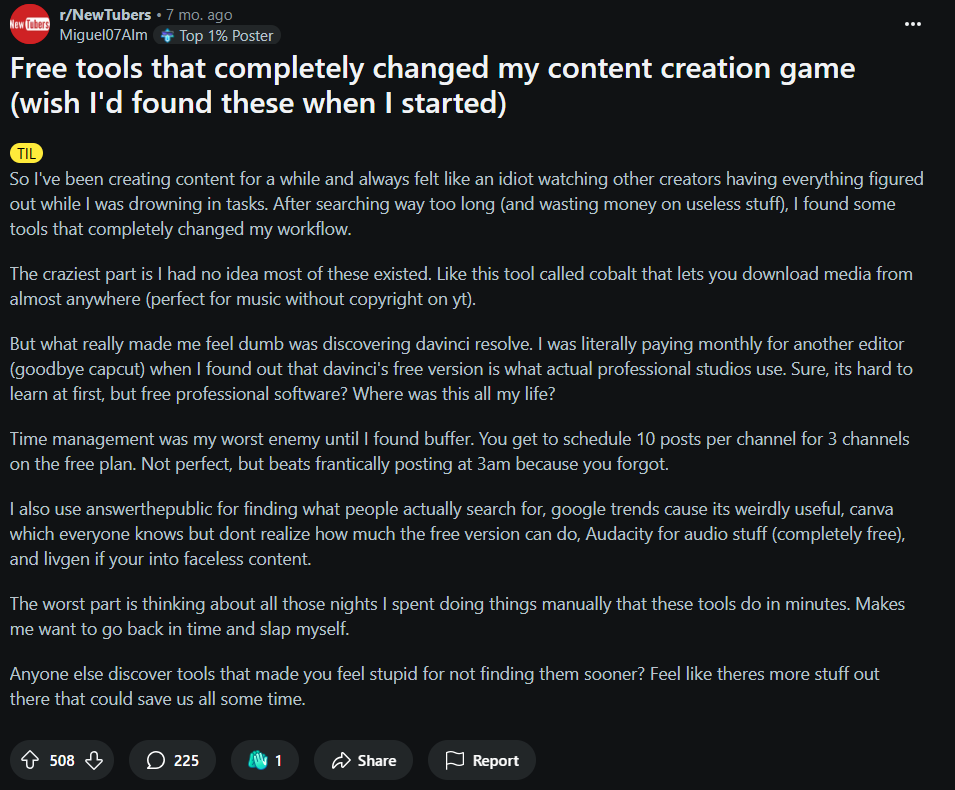
DaVinci Resolve, while not open-source, offers a powerful free version used professionally across industries. Those steep features often live behind expensive paywalls—free versions give creators a huge leg up. - 3D & animation edge.
Blender flexes serious muscle. It’s open-source and used for modeling, VFX, and even entire animated features like Flow (2024), which won an Academy Award. That’s serious production value without production costs.
On Reddit, one savvy new creator put it bluntly:
“I was literally paying monthly for another editor… when I found out that Davinci’s free version is what actual professional studios use.”
While these tools reduce your software costs, OneStream Live can help eliminate several other expenses. Our Live Studio lets you operate with integrated streaming, overlays, scheduling, and recording. Meaning fewer moving parts, fewer subscriptions, and a more cost-effective content engine overall.

Tip #2: Buy Essential Gear Only
When you’re knee-deep in creating, gear overload is all too tempting: every accessory, fancy mount, lens filter… until your budget cries uncle.
Here’s the smart play: start with the absolute essentials and nothing more.
Why It Matters:
- Avoid overspending before you know your style. You don’t need a $2,000 camera rig to start. Many creators find success with humble setups.
- Focus on amplification, not duplication. The right mic or lighting can boost production quality exponentially.
From a Reddit thread buzzing with gear-savvy creators, one user offered a reality check that still rings true:
“Mic. Mic. Mic. Nothing else. Phone does a good enough job for video. Editing software—free options are available to start with. Lighting: Use a sheet on windows.”
— CantKBDwontKBD Read More
Another chimed in:
“An actual microphone for capturing good quality audio is the easiest way to give your content the biggest boost. Lighting is important too, but audio wins every time.”
— anthemofadam Read More
This is exactly how to keep gear spending lean, but results high.
Moreover, a case study from 2023 spotlights @blackfoodfridays, run by KJ Kearney:
KJ’s mission? Shine a light on Black-owned food businesses.
One smart move and a budget saver was relying on reposts and community-generated content when possible. This helped KJ maintain a content creation cost of just about $200 per month.
It’s smart. It’s strategic. And it’s exactly how you stretch every hard-earned dollar of your content budget.
WHAT GEAR IS ESSENTIAL
| Gear | Why It Matters | Low-Cost Suggestions |
|---|---|---|
| Microphone | Clear, professional audio makes your content feel polished. | Entry-level USB mics (e.g., Fifine or Snowball) or Lavalier mics. |
| Lighting | Even simple lighting makes a massive difference in production value. | Use natural window light or budget ring lights under €30. |
| Stabilization | Keeps your footage from feeling shaky or amateurish. | Cheap tripods, GorillaPods, or makeshift clamps. |
| Editing Setup | No need for ultra-speed laptops—just enough processing power to edit. | Refurbished or budget laptops with SSD and 8 GB+ RAM. |
Tip #3: Get Discounted Software
Software costs are one of the biggest line items in any content budget. Subscriptions can quickly pile up and eat into your profits. Luckily, there are smart, cost effective content marketing strategies that help you keep expenses in check.
Where to Find Discounts:
- Student & educator discounts. Adobe, Microsoft, and other providers offer significant cuts (sometimes over 60% off) for students and teachers. (adobe.com)
- Annual billing. Paying once a year can shave off up to 20% compared to month-to-month plans. If you manage several subscriptions across your stack, subscription billing software helps you keep everything organized in one place.
- Nonprofit & creator grants. Some companies provide special pricing for nonprofits or creator communities.
While cutting down on software costs, don’t forget your streaming setup. OneStream Live offers up to 20% off with its annual subscriptions, making it one of the most affordable ways to manage your live streaming and content distribution without piling up extra expenses.

And for Adobe specifically, if you need access to the full Creative Cloud suite but want to avoid the steep monthly fee, consider buying an Adobe Creative Cloud Key from a trusted source. It’s a reliable way to access the full suite of tools at a fraction of the usual price.
Tip #4: Automate Social Media
Keeping up with multiple platforms can feel like a full-time job. Between scheduling posts, engaging with followers, and tracking analytics, social media management often becomes one of the biggest hidden content creation costs.
That’s why automation is so important.
Why It Matters:
- Time is money. Automating posts frees up hours each week that you can reinvest in creating content.
- Consistency builds trust. Regular posting boosts visibility and keeps your audience engaged without you having to manually press “publish” every time.
- Cross-platform presence. Tools like OneStream Live that let you manage multiple accounts at once reduce the cost of hiring separate managers or agencies.
Research from Hootsuite’s 2024 Social Trends Report shows that brands using automation tools increased engagement by 23% compared to those relying on manual posting.
Creators echo this. In a Buffer case study, content creator Latasha James explained how batching and scheduling her content allowed her to scale her freelance business without burning out.
This is where OneStream Live shines. Instead of paying for a separate automation tool, you can:
- Schedule pre-recorded videos up to 60 days in advance.
- Multistream to 45+ platforms simultaneously, from YouTube and Facebook to LinkedIn and Twitch.
- Use event announcements to auto-notify your audience when you’re going live.

Tip #5: Use Free Editing Tools
Editing can be one of the most expensive parts of the creative process. Premium software subscriptions add up quickly, but the good news is there are free (and surprisingly powerful) alternatives that make low-cost content creation entirely possible.
Why It Matters:
- Reduces recurring costs. Free tools eliminate monthly fees that can eat into your content budget.
- Accessible to beginners. Many free editors are intuitive and community-supported, making them ideal for small content creators.
- Keeps quality high. Today’s free editors rival premium suites, offering professional-grade features.
YouTuber Casey Faris, with over 400K subscribers, teaches editing using DaVinci Resolve Free, proving you don’t need expensive software to create professional tutorials and cinematic projects. His channel has helped thousands of creators transition away from costly subscriptions.
Even better, if you’re streaming, OneStream Live’s Studio eliminates much of the need for heavy post-editing. With built-in overlays, transitions, captions, and branding options, you can polish your streams in real time.
That means less time editing afterward and fewer tools cluttering up your content creation services stack.
Tip #6: Try Affiliate Marketing
One of the smartest ways to offset your content creation costs is by turning your platform into a revenue stream. Affiliate marketing allows you to earn commissions by recommending tools, products, or services your audience already needs.
A 2023 survey by Influencer Marketing Hub found that over 80% of creators monetize through affiliate marketing, with some reporting earnings of $1,000+ per month just from niche tools.
Why It Matters:
- Low barrier to entry. Most affiliate programs are free to join.
- Passive income. Once your links are live, you can earn money long after the content is published.
- Scales with audience. Even small content creators can generate income if their recommendations feel authentic.
Pat Flynn’s Smart Passive Income has long been a case study in affiliate success. In his public income reports, affiliate links were consistently among his top revenue sources, earning tens of thousands of dollars monthly.
Moreover, YouTuber Justin Brown of Primal Video frequently reviews video creation tools. By pairing tutorials with affiliate links, he’s generated substantial income streams which have been more than enough to fund his channel’s growth without massive sponsorship deals.
Pro Tip: OneStream Live’s Affiliate Program offers a solid 25% recurring commission on every subscription you refer!
Tip #7: Collaborate with Creators
One of the best ways to lower content creation costs without lowering quality is by working with other creators. Collaboration lets you share resources, split expenses, and expand your audience reach.
Why It Matters:
- Shared workload. Split editing, filming, or promotion tasks to save time and money.
- Audience growth. Cross-promotion introduces you to new viewers without additional ad spend.
- Creative variety. Collabs spark new ideas and prevent content fatigue.
As an example, MrBeast’s collaborations with other YouTubers like Mark Rober and Logan Paul have repeatedly shown how shared audiences can fuel massive growth without any additional marketing costs.
Moreover, podcaster Jordan Harbinger often brings on guests from adjacent niches, growing his reach while providing high-value conversations. Essentially, gaining marketing exposure at no extra cost.
Low-Cost Strategies for Collaboration:
- Guest appearances. Invite a fellow creator into your stream or podcast.
- Content swaps. Exchange blog posts, YouTube shoutouts, or Instagram takeovers with peers in your niche.
- Joint campaigns. Pool budgets for one polished video or live event that benefits both parties.
Collaboration becomes easy with OneStream Live Studio:
- Invite up to 16 guests and showcase them on-screen.
- Multistream to each collaborator’s channels simultaneously.
- Share branded overlays, tickers, and logos for joint identity.
Tip #8: Outsource Tasks
As your channel or brand grows, so do the demands on your time. Editing, designing thumbnails, writing captions, managing emails, I know it’s easy to get buried in tasks.
In a study by HubSpot, small businesses outsourcing content tasks reported 63% lower content marketing costs compared to building full in-house teams.
Outsourcing doesn’t just free up time, it can also lower your content creation costs in the long run by letting you focus on the high-value work only you can do.
Why It Matters:
- Time efficiency. Your time is often worth more than the cost of outsourcing.
- Professional polish. Specialists can deliver higher-quality results faster.
- Scalable growth. Outsourcing keeps you from hitting burnout as your content demands increase.
Track the hours you spend on repetitive tasks. If outsourcing costs less than your hourly creator rate, it’s worth delegating.
How to Outsource on a Budget:
- Use platforms like Fiverr, Upwork, or Freelancer for one-off tasks like thumbnails, captions, or transcription.
- Hire virtual assistants for repetitive admin work.
- Test micro-gigs before committing to long-term contracts to find out who delivers real value.
Tip #9: Track Expenses
You can’t manage what you don’t measure. Many creators underestimate their actual content creation costs until they sit down and track every dollar.
According to FreshBooks, 70% of freelancers who consistently track expenses report better financial stability and fewer surprise bills at tax time.
From subscriptions to gear upgrades, even “small” expenses add up. Tracking isn’t glamorous, but it’s the backbone of cost effective content marketing.
Why It Matters:
- Prevents budget leaks. Spot unused subscriptions or tools you’ve outgrown.
- Keeps ROI visible. Know what’s paying off (ads, gear, collaborations) and what’s wasting money.
- Supports smarter pricing. Understanding your true costs helps answer questions like how much to charge for content creation.
Influencer Erin Morrissey (known as @ErinLivesWhole) shared that carefully monitoring expenses allowed her to move from part-time blogging to full-time business. She tracked every tool, subscription, and freelance expense, ensuring her rates reflected real costs.
Pro Tip: Set a monthly “budget review day.” It only takes 30 minutes but can save you hundreds over time by cutting unused tools or adjusting your content creation pricing.
Practical Tools for Creators:
- Google Sheets/Excel: Free, flexible, and customizable.
- Wave or FreshBooks: Track income + expenses with invoicing tools.
- Notion templates: Many creators now share budget trackers tailored for influencers and freelancers.
Tip #10: Use Free Trials
Before locking yourself into another subscription, squeeze every drop of value out of free trials. Nearly every major platform offers 7–30 days of access, and for creators on a tight content budget, these windows can be super important.
Why It Matters:
- Risk-free testing. Find out if a tool genuinely improves your workflow before paying.
- Content batching. Knock out multiple projects during a trial period, essentially getting premium features for free.
- Avoid buyer’s remorse. If a tool isn’t right, cancel before renewal and move on.
Pro Tip: Keep a spreadsheet of all your active free trials with renewal dates. A simple reminder can save you from unexpected charges that eat into your content creation costs.
Top Tools with Free Trials:
- Canva, a go-to design tool for social media creators, offers a 30-day Pro trial. Many creators use this to design a full month of assets upfront.
- Skillshare’s free month trial has helped small content creators access entire courses on video editing, branding, and affordable marketing, without spending a dime.
- On Reddit’s r/ContentCreators, users often recommend trial-hopping (rotating free trials across services) to reduce content creation costs during early growth.
FAQs on Low-Cost Content Creation
The cost of content creation depends on your setup. Beginners can start free with open-source tools, while professionals may spend $200–$1,000 monthly on software, gear, and services.
To set your content creation pricing, calculate your time, software, and production costs. Most content creator rates range from $50 per social post to $500+ per video, depending on niche and quality.
Because a defined content budget keeps expenses under control, improves ROI, and helps answer questions like how much to charge for social media content creation. It also ensures you don’t overspend on non-essentials.
The first step is clarifying your content creation costs. Prioritize essentials like a good microphone, lighting, and a live streaming broadcasting tool such as OneStream Live before splurging on extras.
Instagram content creation pricing varies widely. Micro-influencers may charge $50–$150 per post, while larger creators can charge $500–$5,000 depending on reach, engagement, and niche.
The cost of content marketing for small businesses averages $2,000–$10,000 per month if outsourced to agencies. DIY creators can lower costs significantly by using affordable marketing tools and platforms like OneStream Live.
Influencer cost per post ranges from $100 for nano-influencers to $10,000+ for celebrities. According to Influencer Marketing Hub’s 2024 benchmark, Instagram posts average $1,000, while TikTok collaborations trend slightly higher.
Final Word
Mastering low-cost content creation isn’t about cutting corners; rather, it’s about being strategic. By using open-source tools, free editing software to collaborate with peers, and taking advantage of free trials, you can dramatically reduce your content creation costs without sacrificing quality.
Creators like Ali Abdaal and Casey Faris prove that smart investments and outsourcing, combined with affordable tools, can build entire careers. The truth is, when creating video marketing content on a budget, what matters most isn’t how much you spend. It’s how resourceful you are.
And that’s where OneStream Live becomes a game-changer. With its all-in-one live streaming broadcasting platform, built-in Studio, multicam streaming, overlays, captions, and automation features, you can simplify your toolkit, avoid unnecessary expenses, and scale your reach across 45+ platforms.
Affordable doesn’t have to mean average. With the right mindset and tools, you can create content that’s fast, professional, and impactful. Even on a budget.
OneStream Live is a cloud-based live streaming solution to create, schedule, and multistream professional-looking live streams across 45+ social media platforms and the web simultaneously. For content-related queries and feedback, write to us at [email protected]. You’re also welcome to Write for Us!