
You will likely find many options when choosing the platform for live streaming your videos. Many streamers ask: Vimeo Live vs YouTube Live, which is best? Both are among the most popular video platforms for streaming, but they serve different needs. This guide will help you understand the difference between Vimeo and YouTube for live streaming so you can select the best option for your business.
YouTube commands billions of users, while Vimeo offers niche advantages. There are many video streaming services like YouTube, but these two are among the top for live broadcasts. Is Vimeo better than YouTube for your goals? Read on to find out.

Vimeo Live vs YouTube Live serve different goals for creators and businesses
YouTube Live is free while Vimeo Live requires a paid plan for streaming
Vimeo offers an ad-free and fully customizable player for a professional look
YouTube gives better SEO and a wider reach for brand awareness
Vimeo provides strong privacy options and focused audience engagement
Use OneStream Live to stream on both platforms and grow your reach
What Is Vimeo Live?
Vimeo introduced Vimeo Live in 2017 as a live streaming feature for businesses and creators. It enables high-quality live video streaming with real-time audience engagement. Vimeo is often compared to platforms like YouTube since both allow video hosting and live streaming. However, Vimeo focuses on professional content and offers advanced control for streamers.
Vimeo Live is a paid service (Vimeo’s free plan does not support live streaming), available through tiered plans (Starter, Standard, Advanced). Streamers get a variety of tools to create and manage events. Vimeo Live offers several ways to go live:
- Browser streaming (recurring events): Use Vimeo’s built-in web tool to stream repeat events from your browser.
- RTMP streaming: Stream via RTMP using external encoders (like OBS) for one-time or recurring events.
- Webcam streaming: Go live directly with your webcam for quick, one-off events.
- Livestream Studio: Use Vimeo’s Livestream Studio software for a professional multi-camera production.
Vimeo Live streams are high quality (up to 1080p Full HD). You also get robust features like embedding on your site, password-protected streams, and live chat support on higher plans. In short, Vimeo Live is designed for those who need a polished, controlled live streaming experience for their brand or business.
What Is YouTube Live?
YouTube Live is YouTube’s live streaming feature that launched in 2011. It allows creators to broadcast video and interact with viewers via live chat in real time. Almost anyone can live stream on YouTube. It’s available on desktop for all users (you just need to verify your channel and enable the live feature), and on mobile if you have 1,000+ subscribers. YouTube Live is completely free to use. Creators can go live in multiple ways:
- Webcam: Stream directly from your computer’s webcam through YouTube’s website (simple and no extra software needed).
- Mobile: Stream on the go from the YouTube mobile app (for channels with 1k subs or more).
- Encoder (Stream Now): Use an encoder or streaming software (via RTMP) for more advanced streams, like sharing your screen or using external cameras.
YouTube continues to expand its live streaming features. In recent years, it added options like Go Live Together (co-host a live stream with a guest on mobile), Live Rings on channel avatars to indicate when someone is live, Live Redirect (send viewers to another live stream or Premiere when your stream ends), and interactive tools like Live Q&A and polls in the chat.
These features enhance engagement and discovery for live broadcasts. Overall, YouTube Live is accessible and powerful: you tap into YouTube’s massive user base and search visibility while live streaming, with plenty of built-in tools and customization options.
Vimeo vs. YouTube: A Comparison
When comparing Vimeo vs YouTube for live streaming, several key factors determine which platform might suit you better.
Let’s break down the Vimeo vs. YouTube comparison across important aspects:
Pricing: Vimeo vs YouTube
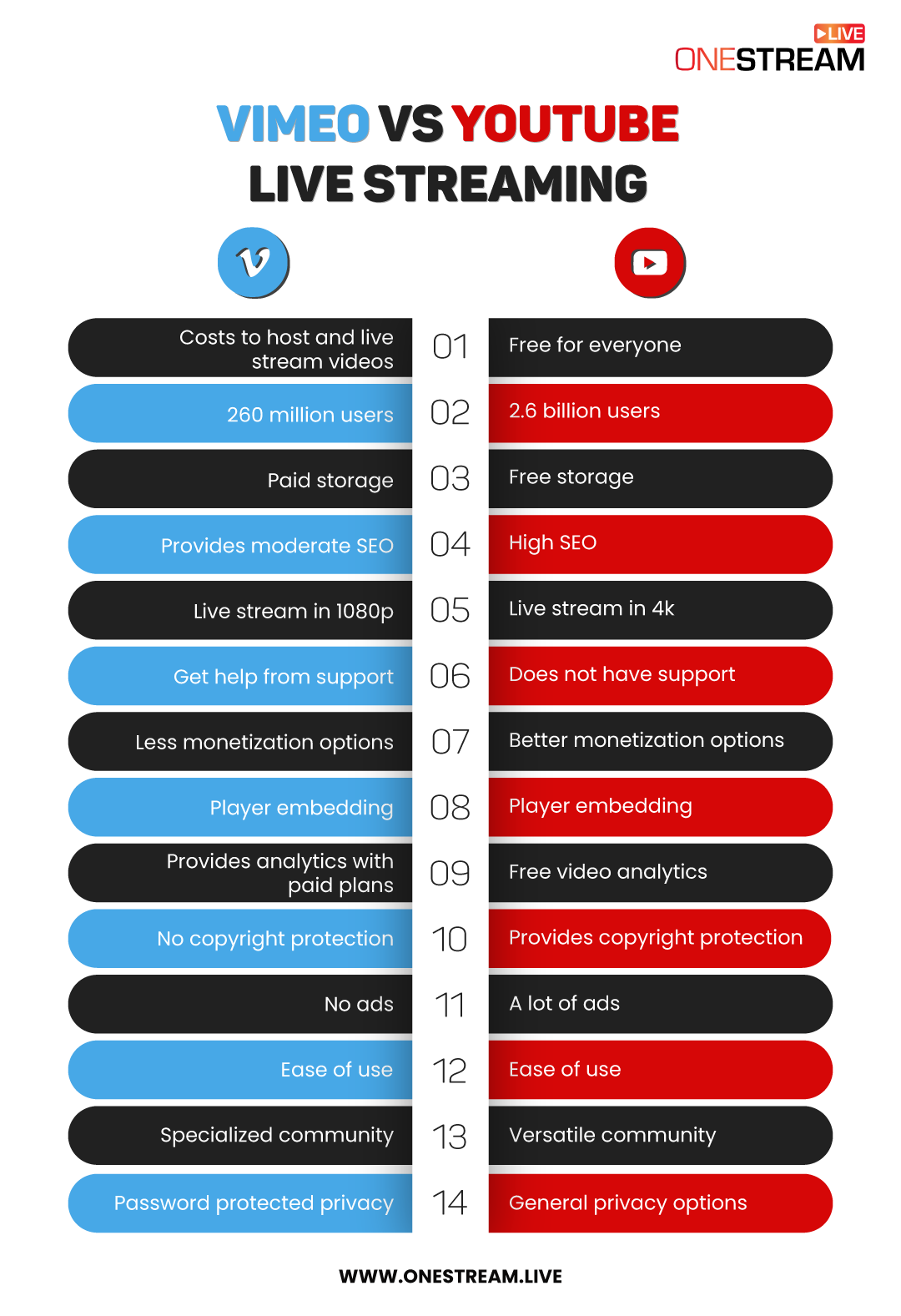
YouTube Live is free for anyone to use. You can stream unlimited live videos on YouTube without any cost or special account. This makes YouTube very appealing for individuals and businesses on a budget.
Vimeo Live requires a paid plan. Vimeo does have a basic free plan, but it does not support live streaming. To go live on Vimeo, you must subscribe to one of its paid tiers (Starter, Standard, or Advanced).
These plans come with monthly/annual fees and unlock live streaming along with other features. Vimeo often offers a free trial for new users to test these plans.
User Base and Reach
YouTube has an enormous audience. It’s one of the most popular video platforms in the world, with about 2.6 billion monthly active users as of 2025. This huge user base means your live streams on YouTube have the potential to reach a massive, global audience.
However, the scale also means fierce competition for viewers’ attention and over 500 hours of video are uploaded to YouTube every minute, so it can be hard to get noticed.
Vimeo’s audience is much smaller. Vimeo has around 287 million monthly users in recent years which is a fraction of YouTube’s reach. But Vimeo’s community is more specialized and niche. About 90% of Vimeo users are on paid plans, often creative professionals.
Fewer people use Vimeo, but those who do are typically looking for high-quality content. Your videos on Vimeo won’t get billions of random views, but they might get more targeted attention from a niche audience.
Storage and Upload Limits
YouTube provides unlimited storage for your videos. You can upload as many videos (and live stream recordings) as you want, and YouTube won’t charge for storage or bandwidth.
Vimeo has storage limits based on your plan. The free Vimeo plan offers up to 1 GB total upload storage, which is very limited. Paid plans increase the storage: for example, Starter gives 100 GB, Standard 2 TB, and Advanced 7 TB of video storage.
In terms of bandwidth, Vimeo caps streaming bandwidth (e.g. 2 TB per month on most plans) which effectively limits how much your videos can be streamed by viewers.
If you plan to host a lot of video content or very long streams, YouTube’s unlimited storage and bandwidth is are clear advantages. Vimeo is sufficient for most business use-cases, but heavy content producers need to mind the limits.
SEO & Discoverability
YouTube is owned by Google and is the world’s second largest search engine after Google itself. This gives YouTube a major edge in discoverability. Videos on YouTube show up in YouTube search results and often rank high in Google search results. In fact, Google tends to favor YouTube videos in search carousels over videos from other sites.
This means your live streams and video content on YouTube have a better chance of being found organically by people searching for topics. YouTube’s algorithm and recommendations can also push your live stream to interested viewers.
Vimeo videos can be optimized with titles, descriptions, and tags for Vimeo’s internal search. Vimeo content is less likely to appear at the top of Google results compared to YouTube content.
If SEO and maximum visibility are a priority, YouTube wins hands down. Vimeo is more about deliberate sharing (embedding on your site, sharing the link with a specific audience) rather than being discovered by random searches.
Video Quality
When it comes to broadcast quality, YouTube Live vs Vimeo Live have different offerings. YouTube Live supports up to 4K (2160p) streaming at 60 FPS and you can do this for free. If you have the equipment and bandwidth, YouTube lets you stream in Ultra HD, which is great for events like gaming, sports, or any content where you want the highest resolution.
Vimeo Live currently maxes out at Full HD 1080p for live streams. 4K live streaming is not supported on Vimeo. This 1080p limit might be fine for most typical streams (1080p is very clear), but if you were hoping to broadcast in 4K, Vimeo won’t do it.
On the flipside, Vimeo is known for preserving video quality with less compression on uploaded videos. Professional creators often praise Vimeo’s playback quality for recorded content, so your videos may look crisper on Vimeo because the platform doesn’t compress files as heavily as YouTube.
Customer Support
Using YouTube is mostly a self-service experience. YouTube does not offer live customer support for streamers unless you’re a top creator or part of the Partner Program. If you run into issues, you’re expected to consult YouTube’s Help Center articles or user community forums. There is no instant chat or phone support for general users.
Vimeo, being a paid service, provides customer support to its subscribers. All paid plans come with at least email support, and higher tiers include live chat support. Notably, Vimeo’s Advanced plan even offers live event support and live chat assistance during your streams, especially useful if you encounter technical difficulties in a mission-critical webcast. This can be quite helpful for businesses that need quick technical help.
Monetization: Vimeo vs YouTube
Monetization is a big differentiator between the two platforms. YouTube is an ad-supported platform and offers many ways for creators to earn money from their content. Through the YouTube Partner Program, creators can enable ads on their videos (pre-roll, mid-roll, etc.) and earn a share of the revenue. Typically, YouTube shares 55% of ad revenue with the creator.
In addition to ads, YouTube provides features like Channel Memberships (fans pay monthly fees), Super Chat & Super Stickers (viewers pay to highlight messages during live chats), YouTube Premium revenue, merchandise shelves, and more. Successful YouTubers can make a substantial income, but it usually requires a very large audience.
Vimeo takes a different approach, and it is ad-free. Viewers will not see any ads on Vimeo videos, and thus, creators do not earn money through ad impressions. Vimeo itself makes money from subscriptions, not ads.
So how can a creator or business monetize content on Vimeo? Vimeo offers alternative monetization options, such as Vimeo On Demand, which lets you sell your videos or films (either as purchases or rentals).
Vimeo also has an OTT service where you can launch your own subscription-based video platform. Additionally, creators can set up paid video channels or series where viewers subscribe for access. These methods are more common for filmmakers, educators, or businesses selling premium content.
Player and Embedding
Many businesses care about how a video player is embedded on their website. YouTube’s player is universal and recognizable, but customization is limited. YouTube provides an embed code to put videos on other sites.
However, the YouTube player will always show YouTube branding and typically suggests other videos (including random recommendations or competitors’ content) at the end of playback, unless you use certain code parameters. Customizing the look or controls of the YouTube embed requires technical tweaks and even then, options are few.
Vimeo’s player is highly customizable, which is a big draw for professionals. With Vimeo, you can embed videos on your website and make them look native. You can change the player’s color to match your brand, add a custom logo or remove Vimeo’s logo, and even customize the buttons and end screens.
Vimeo allows you to disable all those “related videos” or external links on your embeds. Essentially, you get a clean, distraction-free video player that you can tailor to your branding. When you adjust your default player settings on Vimeo (for example, setting your brand color), those changes can automatically apply to all your embedded videos, even ones you added in the past. This saves a ton of time if you have many videos.
Pro Tip: You can embed your live streams on custom webpages with OneStream Live and personalize the design, colors, and layout to match your brand.

Analytics Tools
Both platforms offer analytics, but the depth and access differ. YouTube provides an extensive Analytics dashboard for free to every creator. You can see real-time viewership on your live streams, track metrics like total views, watch time, average view duration, audience demographics, traffic sources, click-through rates for thumbnails, and much more.
These analytics are very detailed and help you understand how your content is performing. Importantly, you don’t have to pay anything extra for these stats on YouTube, and they are available to all users by default.
Vimeo also offers video analytics, including live stream stats, engagement data, and the geography of viewers. However, advanced analytics on Vimeo require a paid plan. With a basic (free) Vimeo account, your insights are minimal. As you upgrade (Starter, Standard, Advanced), more analytics features unlock, e.g., engagement graphs, social stats, and in Advanced, you get event analytics.
Vimeo’s analytics are quite useful for businesses, and you can even track which parts of your video people re-watched or skipped. The only catch is you have to pay for the privilege.
Copyright Protection
If you are concerned about protecting intellectual property or avoiding strikes, note the differences here. YouTube has a very strict and sophisticated copyright system. YouTube’s Content ID technology automatically scans uploaded videos and live streams against a database of copyrighted material.
If it detects that your content includes someone else’s music or video, it can flag or even disable your video in some cases. Rights holders on YouTube can choose to block content, mute audio, or even monetize your video for themselves if you use their material without permission.
YouTube also operates on a “three strikes” rule for copyright violations; repeated offenses can lead to channel termination. The upside of this system is that if you own content, YouTube helps protect it and you will be notified if someone uploads your video, for example. The downside is that as a creator, you must be very careful not to include unlicensed music or clips, or your stream could be cut off mid-flow.
Vimeo has a more relaxed approach to copyright enforcement. Vimeo does not have an automated Content ID system on the scale of YouTube. They do have a Copyright Match tool for music in some cases, but generally, Vimeo relies on manual DMCA notices for copyright issues.
Vimeo’s community is smaller and more professional, so rampant piracy is less of an issue on the platform. If someone does infringe, a copyright owner can report it and Vimeo may remove the video, but you’re less likely to get an immediate automated strike during a live stream for playing a song, for example. That said, Vimeo’s terms still prohibit copyright infringement and they can terminate accounts that repeatedly violate.
Privacy Options: Vimeo vs YouTube
Privacy control is an area where Vimeo often gets praise. YouTube gives you three basic privacy settings for uploads:
Public: Anyone can see your video.
Unlisted: The video won’t show up on your channel or search, but anyone with the direct link can view it.
Private: only specific people you invite can watch, and they need a Google account.
These options work for simple needs. For example, you can live stream unlisted on YouTube and share the link only with your team. YouTube also lets you disable comments or embed for a video if needed. But the controls stop there.
Vimeo offers much more granular privacy settings, which is great for businesses and private sharing. On Vimeo, in addition to Public and Private, you can set a video to:
Password-Protected: viewers must enter a password you create to watch the video.
Only Me: completely private, only you can see it when logged in.
Hide from Vimeo: The “hide from Vimeo” option is very useful. It means your video won’t appear on Vimeo’s public pages at all, but you can still embed it on your own website or share the link. Essentially, it’s like unlisted, but even Vimeo’s own site won’t show it.
Moreover, Vimeo allows domain-level privacy control so you can specify that a video may only be played on certain websites. This level of control is ideal for internal company streams, private events, or gated content.
Ads and Viewing Experience
The viewing experience on each platform differs largely due to advertisements. YouTube is an ad-supported platform, so viewers are very likely to encounter ads when watching your content (unless they have YouTube Premium).
Viewers may see ads before your live stream starts, mid-roll ads during longer streams, or banner ads around the video. From a business perspective, this can be a double-edged sword: ads can generate revenue for you, but they might also annoy your audience or distract from your message.
Advertisers love YouTube because of its reach, and many brands use YouTube Live streams for promotion. But if you’re streaming an important conference or message, an ad popping up might not be ideal.
Vimeo has zero ads. Vimeo prides itself on being an ad-free space. Neither you nor your viewers will see third-party advertisements on Vimeo videos. This creates a more professional and uninterrupted viewing experience.
For example, if you embed a Vimeo Live player on your website for a product launch, your viewers will not be hit with unrelated ads, and they’ll only see your content. The trade-off is, of course, that you, as the creator, aren’t earning money from ads either (as discussed in Monetization). For many businesses, not having ads is preferable, as it keeps the focus on your content and maintains a clean image.
Ease of Use
Both YouTube and Vimeo are user-friendly, but let’s compare. YouTube makes it extremely easy for anyone to get started. If you have a Google account, you already have a YouTube account. Creating a channel and going live is straightforward. You don’t need to be tech-savvy: with a few clicks you can start a webcam stream or schedule one.
Vimeo is also quite easy to use, especially for those in professional fields. The process to start a live stream on Vimeo is similar: you create an event, set up your stream (browser or via a streaming software), and go live.
The interface is clean and not cluttered with trending videos or ads like YouTube. Because Vimeo’s audience is smaller, there’s less “noise” on the platform. Uploading videos, organizing them into showcases (albums), and adjusting settings are all intuitive on Vimeo’s website.
If you know how to use any modern web app, you can handle Vimeo. In terms of live streaming, neither platform requires advanced technical skill for basic streams.
Community and Content Style
The community you’ll find (and build) on YouTube vs Vimeo can be quite different. YouTube is a massive melting pot of content. On YouTube Live, you’ll encounter every type of stream imaginable: gaming, music concerts, vlogs, cooking classes, church services, and webinars.
The audience on YouTube is extremely diverse. This is great because no matter what your content is, you can potentially find a viewer community. However, it also means the general tone on YouTube can be more casual and, at times, chaotic.
With open comments, you might get trolls or off-topic remarks since it’s free and open to all. If you have a unique idea, YouTube likely has a niche or community for it, but you’ll also be in a crowded arena with lots of noise.
Vimeo’s community is smaller, more specialized, and tends to be professional/creative. Vimeo often attracts filmmakers, artists, designers, educators, and businesses. The overall environment is more supportive and constructive.
You won’t typically see toxic comment sections on Vimeo; the culture leans toward respectful feedback and appreciation for quality. Also, since most users are paying customers, the user base skews toward people who are serious about video. You won’t find viral prank videos or teenage vlog superstars on Vimeo that crowd sticks to YouTube.
Instead, you might find a community of, say, indie filmmakers who share short films and critique each other’s work. For a brand or business, posting on Vimeo can lend a perception of exclusivity or sophistication. The flip side is you won’t get the sheer volume of casual viewers that YouTube has.
Vimeo vs YouTube for Business: Which Platform to Choose?
If you are a business owner or marketer, the choice between Vimeo and YouTube should align with your goals and audience. Both platforms offer powerful tools for businesses, but in different ways:
Wider Reach vs Targeted Engagement
YouTube’s unparalleled reach makes it ideal for businesses aiming to build brand awareness and attract a general audience. YouTube can expose your product demos, webinars, or commercials to the masses.
On the other hand, Vimeo is better for targeted engagement. If your business caters to a specific niche or B2B audience, e.g. creative professionals, educators, etc., Vimeo can help you connect with that community in a focused environment without outside distractions.
Professional Presentation
Businesses often embed videos on their websites or present content to clients. Vimeo’s ad-free, customizable player is ideal for this. For example, a business showcasing product videos on their site may prefer Vimeo to maintain branding and not show YouTube’s recommended videos or ads.
Vimeo also allows private sharing with password or domain restrictions for internal corporate communications, training videos, or client-only live events. If you need to stream a town hall meeting or a paid workshop, Vimeo gives you privacy and control.
Cost Consideration
YouTube is free, which is great for small businesses or startups with a limited budget. You get a huge platform for no cost. Vimeo’s plans cost money, but consider it as an investment for additional features (video management, higher quality support, etc..
For some businesses, the cost is justified by the professional features (e.g., no competitor ads on your content, better analytics for lead generation tracking, the ability to replace a video without changing the URL, etc., which Vimeo allows on certain plans).
Larger companies might opt for Vimeo Enterprise for even more control, whereas they might use YouTube mainly as a public-facing channel.
Marketing vs Showcasing
Use YouTube for marketing outreach, teasers, thought-leadership live chats, influencer partnerships, or anything where you want as many eyeballs as possible.
Use Vimeo for showcasing and specialized content, high-fidelity streams like virtual events, portfolio pieces, or content behind a paywall. For instance, a production company might put trailers on YouTube (to go viral) but host the full film on Vimeo On Demand for paying viewers.
In many cases, businesses actually use both: YouTube as the broad funnel and Vimeo as the refined platform. The good news is it’s not necessarily an either/or. But if resources are limited and you must choose one, choose YouTube for maximum exposure and growth, choose Vimeo for a premium experience and control.
Suppose you wish to tap on a large audience across multiple platforms and build a community on both. In that case, you can use any live streaming product, such as OneStream Live to multistream on YouTube and Vimeo.
OneStream Live is a cloud-based live streaming solution that allows businesses and brands to schedule pre-recorded videos for live streaming, go live in real-time using any External RTMP source, or go live from a browser through OneStream Studio.

Wrap Up
Choosing between Vimeo Live vs YouTube Live comes down to your objectives and your audience. Businesses and brands are taking every opportunity to boost their marketing efforts, build a community, and deliver value to their customers. This makes it important for them to select a suitable social platform for sharing their content online.
If you’re looking for a high-impact, free-of-cost social platform that allows you to reach a massive audience, then YouTube is your best option. Its search engine optimization makes it the perfect choice for businesses that want to grow their online presence through videos such as product how-to’s, podcasts, webinars, tutorials, etc. Vimeo was built for creators looking to tap into niche audiences, making it a better choice for artists and brands interested in creating a highly engaged community. So if you are looking to connect with professionals in a specific niche, with better control over the privacy of your videos and enhanced tools for customizing and creating your video, Vimeo is a better place to start live streaming your content.
However, you can reach both communities and build a wider audience by multistreaming on Vimeo and YouTube simultaneously using OneStream Live.

FAQs: Vimeo Live vs YouTube Live
Vimeo Live focuses on professional, ad-free streaming with customization, while YouTube Live emphasizes reach and discoverability.
YouTube offers built-in monetization options, such as ads and Super Chat, while Vimeo relies on paywalls and subscriptions.
Yes, both support HD and 4K streaming, but Vimeo gives creators more control over bitrate and branding.
Businesses often prefer Vimeo Live for privacy, branding, and analytics, while YouTube is ideal for public marketing and reach.
Yes, Vimeo Live requires a paid plan, while YouTube Live is free but supported by ads and platform limitations.
OneStream Live is a cloud-based live streaming solution to create, schedule, and multistream professional-looking live streams across 45+ social media platforms and the web simultaneously. For content-related queries and feedback, write to us at [email protected]. You’re also welcome to Write for Us!